소개
This manual provides detailed instructions for the setup, operation, and maintenance of your PDP Afterglow Wave Wireless Headset. Designed for an immersive audio experience, this headset is compatible with Xbox Series X|S, Windows 10/11 PC, PlayStation PS5/PS4, and various Bluetooth-enabled devices.

Image: The PDP Afterglow Wave Wireless Headset, showcasing its black design and customizable RGB lighting on the earcups.
제품 특징
- 맞춤형 RGB 조명: Personalize your headset with millions of color combinations and lighting effects via the free PDP Control Hub app.
- 편안한 디자인: Features soft, memory foam ear cushions and swivel earcups for extended gaming sessions and comfortable storage.
- 몰입형 오디오: Equipped with 50mm drivers for clear highs and deep lows.
- 편리한 컨트롤 : On-ear volume controls and a game/chat balance dial for quick audio adjustments.
- 소음 제거 마이크: Provides clear communication, with a flip-to-mute function for privacy.
- 다양한 연결성: Connects wirelessly via a low-latency USB dongle to consoles or via Bluetooth to mobile devices.
- 광범위한 호환성: Officially licensed for Xbox, and compatible with Windows 10/11 PC, PlayStation consoles (PS5/PS4), and most Bluetooth devices.
- 긴 배터리 수명: 한 번 충전으로 최대 16시간 동안 재생할 수 있습니다.
설치 지침
1. 헤드셋 충전
Before initial use, fully charge the headset. Connect the included USB charging cable to the headset's charging port and to a powered USB port (e.g., console, PC, USB wall adapter). The headset's RGB lights will pulse during charging and should turn solid when fully charged. A full charge typically takes approximately 8 hours and provides up to 16 hours of battery life.
Image: The headset highlighting its 16-hour battery life for extended gaming sessions.
2. Connecting to Xbox/PC (Wireless Dongle)
- Insert the USB wireless dongle into an available USB port on your Xbox console or PC.
- Power on the headset by pressing and holding the Power button until the lights illuminate.
- The headset and dongle should automatically pair. A solid light on the dongle and headset indicates a successful connection.
- Adjust volume using the on-ear controls.
Image: The headset emphasizing its cross-compatibility with various gaming platforms and Bluetooth devices.
3. Connecting via Bluetooth (Mobile Devices, PS5/PS4)
- 헤드셋의 전원이 꺼져 있는지 확인하십시오.
- Press and hold the Bluetooth button on the headset until the indicator light begins to flash, indicating pairing mode.
- On your device (e.g., smartphone, tablet, PlayStation console), navigate to Bluetooth settings and select "Afterglow Wave" from the list of available devices.
- Once connected, the headset's Bluetooth indicator light will become solid.
작동 지침
헤드셋 컨트롤
- 전원 버튼: 길게 눌러 전원을 켜거나 끕니다. 짧게 눌러 배터리 상태를 확인하세요.
- 볼륨 다이얼: 돌려서 전체 음량을 조절하세요.
- 게임/채팅 밸런스 다이얼: Adjusts the balance between game audio and chat audio.
- 모드 버튼: Cycles through different RGB lighting effects. Press and hold to turn RGB lights on/off.
- 마이크로폰: Flip the microphone boom up to mute. Flip down to unmute.
Image: Close-up of the headset's noise-canceling microphone, illustrating the flip-to-mute feature.
PDP 컨트롤 허브 앱
Download the free PDP Control Hub app from the Microsoft Store (for Xbox/PC) or your device's app store (for mobile) to customize your headset:
- Modify RGB lighting zones and effects.
- Adjust audio settings and equalizer presets.
- 헤드셋 펌웨어를 업데이트하세요.
Image: Diagram showing the customizable RGB lighting zones on the headset, managed via the PDP Control Hub app.
유지
- 청소: 헤드셋을 닦을 때는 부드럽고 마른 천을 사용하십시오. 연마성 세척제나 용제는 사용하지 마십시오.
- 저장: Store the headset in a cool, dry place away from direct sunlight and extreme temperatures. The swivel earcups allow for a flat storage position.
- 배터리 관리 : To prolong battery life, avoid fully discharging the headset frequently. Charge regularly, even if not in use for extended periods.
- 방수 기능: This headset is not water resistant. Avoid exposure to liquids.
문제 해결
| 문제 | 가능한 해결책 |
|---|---|
| 오디오가 없거나 볼륨이 낮습니다 |
|
| 마이크가 작동하지 않습니다 |
|
| Headset disconnects randomly or poor signal |
|
| RGB 조명이 작동하지 않습니다 |
|
명세서
| 특징 | 세부 사항 |
|---|---|
| 모델명 | 애프터글로우 웨이브 무선 헤드셋 |
| 모델 번호 | 049-032-BK |
| 연결성 | Wireless (USB Dongle), Bluetooth |
| 블루투스 버전 | 4.0 |
| 블루투스 범위 | 20 피트 |
| 오디오 드라이버 크기 | 50mm 다이나믹 드라이버 |
| 임피던스 | 32옴 |
| 배터리 수명 | 최대 16시간 |
| 충전 시간 | 약 8시간 |
| 마이크로폰 | 소음 제거, 뒤집어서 음소거 |
| 통제 수단 | On-ear Volume, Game/Chat Balance, Mode Button (RGB) |
| 호환성 | Xbox Series X|S, Windows 10/11 PC, PlayStation PS5/PS4, Bluetooth devices |
| 무게 | 1.19파운드(약 0.54kg) |
| 재료 | 폴리카보네이트(PC) |
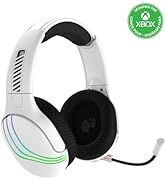
Image: The headset highlighting its 50mm drivers for immersive audio quality.
보증 정보
PDP products are covered by a manufacturer's warranty. For specific details regarding your PDP Afterglow Wave Wireless Headset warranty period and terms, please refer to the official PDP web사이트를 방문하거나 고객 지원팀에 문의하세요. 보증 청구를 위해 구매 증빙 자료를 보관하세요.
지원하다
For further assistance, technical support, or to download the PDP Control Hub app, please visit the official PDP web대지:
FAQ 및 추가 자료는 지원 페이지에서도 찾아보실 수 있습니다.


