소개
The MEE audio Connect Air AF-CA1 is a compact Bluetooth wireless audio transmitter designed to enable wireless audio streaming from devices equipped with a 3.5mm audio jack to Bluetooth headphones or speakers. This adapter is ideal for use with in-flight entertainment systems, gym equipment, televisions, and gaming consoles, allowing you to enjoy audio wirelessly.
안전 정보
Please read and follow these safety guidelines to ensure proper use and prevent damage to the device or personal injury:
- 기기를 물이나 과도한 습기에 노출시키지 마십시오.
- 기기를 극한의 온도(더위나 추위)에 노출시키지 마세요.
- 기기를 분해하거나 개조하지 마십시오. 보증이 무효화됩니다.
- 기기를 어린이와 애완동물의 손이 닿지 않는 곳에 보관하세요.
- 현지 규정에 따라 배터리를 폐기하십시오.
패키지 내용
- MEE audio Connect Air AF-CA1 Bluetooth Wireless Audio Transmitter
- USB-C 충전 케이블
- 사용자 설명서
제품 끝view
The MEE audio Connect Air features a compact design with intuitive controls and indicators.

Image: MEE audio Connect Air AF-CA1 Bluetooth Transmitter, showing the 3.5mm jack, multifunction button, headphone indicator lights, and battery indicator lights.

Image: Diagram illustrating the components of the Connect Air, including the 3.5mm audio jack, multifunction button, two headphone indicator lights (blue/red alternating for pairing, blinking blue for standby, solid blue for connected), and four battery indicator lights (100%, 75%, 50%, 25%).
제어 및 표시기:
- 3.5mm 오디오 잭: 오디오 소스에 연결합니다.
- 다기능 버튼: Power on/off (hold 2 seconds), Bluetooth pairing mode (press 2 times), check battery status (press 1 time).
- Headphone Indicator Lights (1 & 2): Indicate pairing status for each connected headphone (blue & red alternating for pairing, blinking blue for standby, solid blue for connected).
- 배터리 표시 등: Four white LEDs show remaining battery charge (4 lights for 100%, 3 for 75%, 2 for 50%, 1 for 25%).
- USB-C 포트: 장치를 충전합니다.
설정
1. Charging the Connect Air
Before initial use, fully charge the Connect Air using the provided USB-C cable. Connect the USB-C end to the Connect Air and the other end to a USB power source (e.g., computer, wall adapter).

Image: Diagram showing the Connect Air connected to a power source via its USB-C port for charging.
2. 블루투스 헤드폰과 페어링
The Connect Air can pair with up to two Bluetooth headphones simultaneously.
- 전원 켜기: Press and hold the multifunction button for 2 seconds until the indicator lights turn on.
- Enter Pairing Mode (Connect Air): Double-press the multifunction button. The headphone indicator light (1) will flash blue and red alternately, indicating it is in pairing mode.
- Enter Pairing Mode (Headphones): Put your Bluetooth headphones into pairing mode. Refer to your headphone's user manual for specific instructions.
- 연결하다: Place your headphones close to the Connect Air. Once paired, the headphone indicator light (1) on the Connect Air will turn solid blue.

Image: Diagram illustrating how to turn on the Connect Air by holding the button for 2 seconds, and how to enter pairing mode by double-pressing the button.

Image: Diagram showing how to put AirPods into pairing mode by opening the case lid and pressing the button on the back, or double-tapping the front for some models.
3. 오디오 소스에 연결하기
- Plug the 3.5mm audio jack of the Connect Air into the audio output port of your desired device (e.g., airplane entertainment system, TV, gym equipment).
- Ensure your paired headphones are powered on and connected to the Connect Air.
- Start playing audio on your source device. The audio will now stream wirelessly to your headphones.

Image: Diagram showing the Connect Air plugged into an audio source, wirelessly transmitting audio to a pair of over-ear headphones.
운영
Using with In-Flight Entertainment
Plug the Connect Air into the 3.5mm headphone jack of the airplane's entertainment system. Pair your Bluetooth headphones to enjoy movies, music, or TV shows wirelessly.

Image: The MEE audio Connect Air plugged into an airplane seat-back entertainment system, wirelessly streaming audio.
Using with Gym Equipment, TVs, and Gaming Consoles
The Connect Air is compatible with any device featuring a standard 3.5mm audio output. This includes treadmills, elliptical machines, televisions, and gaming console controllers (e.g., Nintendo Switch, Xbox, PlayStation).

Image: Icons representing gym equipment, airplanes, gaming consoles, and TVs, indicating the Connect Air's broad compatibility with 3.5mm audio jacks.
Dual Headphone Support
The Connect Air can stream audio to two Bluetooth headphones simultaneously, allowing two users to share the audio experience from a single source.
- First, pair your primary headphones as described in the Setup section.
- To pair a second pair of headphones, double-press the multifunction button again. The second headphone indicator light (2) will flash blue and red alternately.
- Put your second pair of Bluetooth headphones into pairing mode.
- Once paired, the second headphone indicator light (2) will turn solid blue.

Image: Two individuals sharing audio from a tablet via the Connect Air, each wearing Bluetooth headphones, demonstrating dual-headphone support.
충전 중
The Connect Air features a built-in rechargeable battery. To check the current battery level, press the multifunction button once. The battery indicator lights will illuminate to show the remaining charge:
- 조명 4개: 100% 충전
- 조명 3개: 75% 충전
- 조명 2개: 50% 충전
- 조명 1개: 25% 충전
The device can be used while charging. A full charge provides approximately 20 hours of playtime with one pair of headphones or 15 hours with two pairs.

Image: The Connect Air displaying its battery indicator lights, with text highlighting its extended battery life of 20 hours with one headphone and 15 hours with two headphones.
유지
To ensure the longevity and optimal performance of your MEE audio Connect Air:
- 부드럽고 마른 천으로 기기를 닦으세요. 강한 화학 물질이나 연마재를 사용하지 마세요.
- 사용하지 않을 때는 장치를 서늘하고 건조한 곳에 보관하십시오.
- 장치를 떨어뜨리거나 강한 충격을 가하지 마십시오.
문제 해결
하드웨어 재설정
If the device becomes unresponsive, a hardware reset may resolve the issue.
- Locate the reset pinhole on the side of the Connect Air.
- Insert a small pin or paperclip into the pinhole and gently press until you feel a click.
- The device will power off and reset.
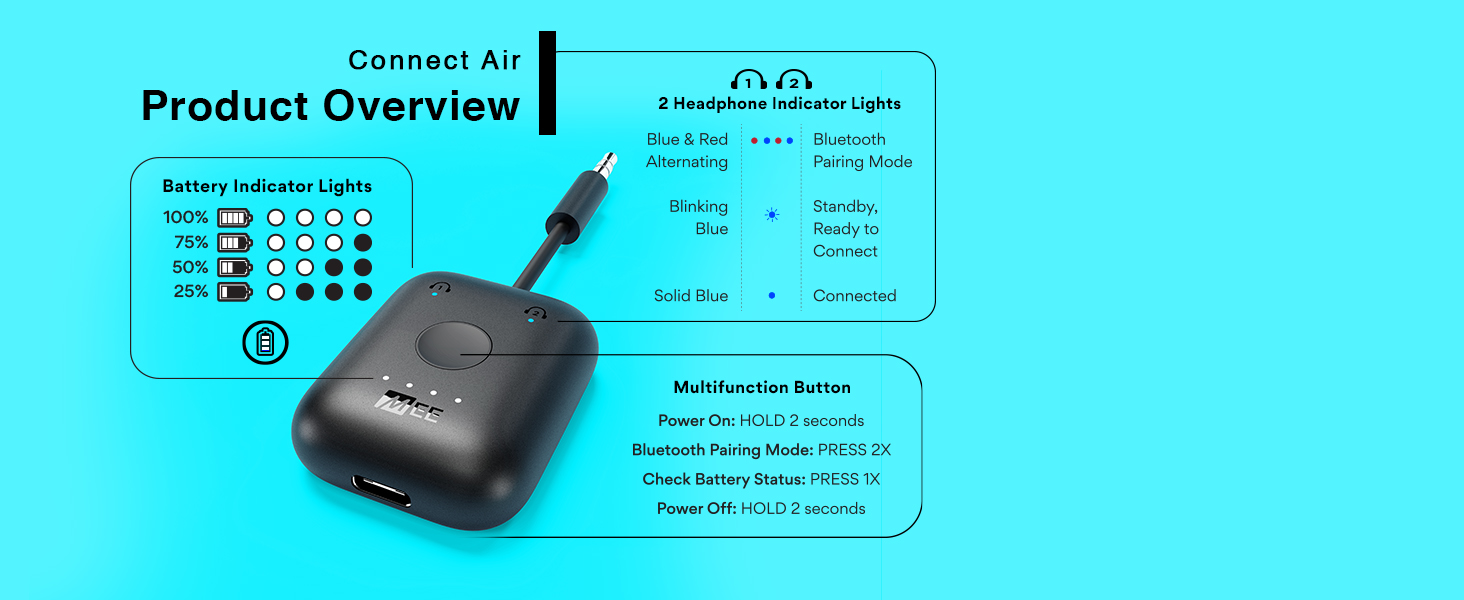
Image: Diagram showing the location of the reset pinhole on the side of the Connect Air and how to insert a pin or paperclip to perform a hardware reset.
Software Reset (Clear Pairing Memory)
To clear all previous Bluetooth pairings from the Connect Air's memory:
- Power on the Connect Air.
- Press the multifunction button 6 times rapidly.
- Both headphone indicator lights will flash, indicating that the memory has been cleared.
- A new pairing process must be initiated for any headphones.

Image: Diagram showing the Connect Air and indicating to press the multifunction button 6 times to perform a software reset and clear pairing memory.
명세서
| 제품 치수 | 1.5 x 0.6 x 1.8 인치 |
| 품목 무게 | 0.6 온스 |
| 품목 모델 번호 | AF-CA1 |
| 배터리 | 1개의 리튬 금속 배터리(포함) |
| 연결 기술 | 블루투스 |
| 전원 | 배터리 구동 |
| 특징 | Low Latency (aptX Low Latency compatible) |
| 재료 | 플라스틱 |
보증 및 지원
The MEE audio Connect Air AF-CA1 comes with a 1-year manufacturer's warranty. For technical support, warranty claims, or additional product information, please visit the official MEE audio web사이트 또는 고객 서비스 부서에 문의하십시오.
MEE 오디오 Web대지: www.meeaudio.com


