1. 제품 오버view
The InvisiClean Bella Air Purifier is designed to provide clean, fresh air for large rooms, covering up to 1500 sq ft. It features a multi-stage filtration system, smart Wi-Fi connectivity, and quiet operation, making it ideal for homes with allergies, pets, or concerns about smoke and dust.
주요 특징은 다음과 같습니다.
- H13 트루 헤파 필터: Captures 99.99% of pollen, dust, pet dander, and particles as small as 0.1 microns.
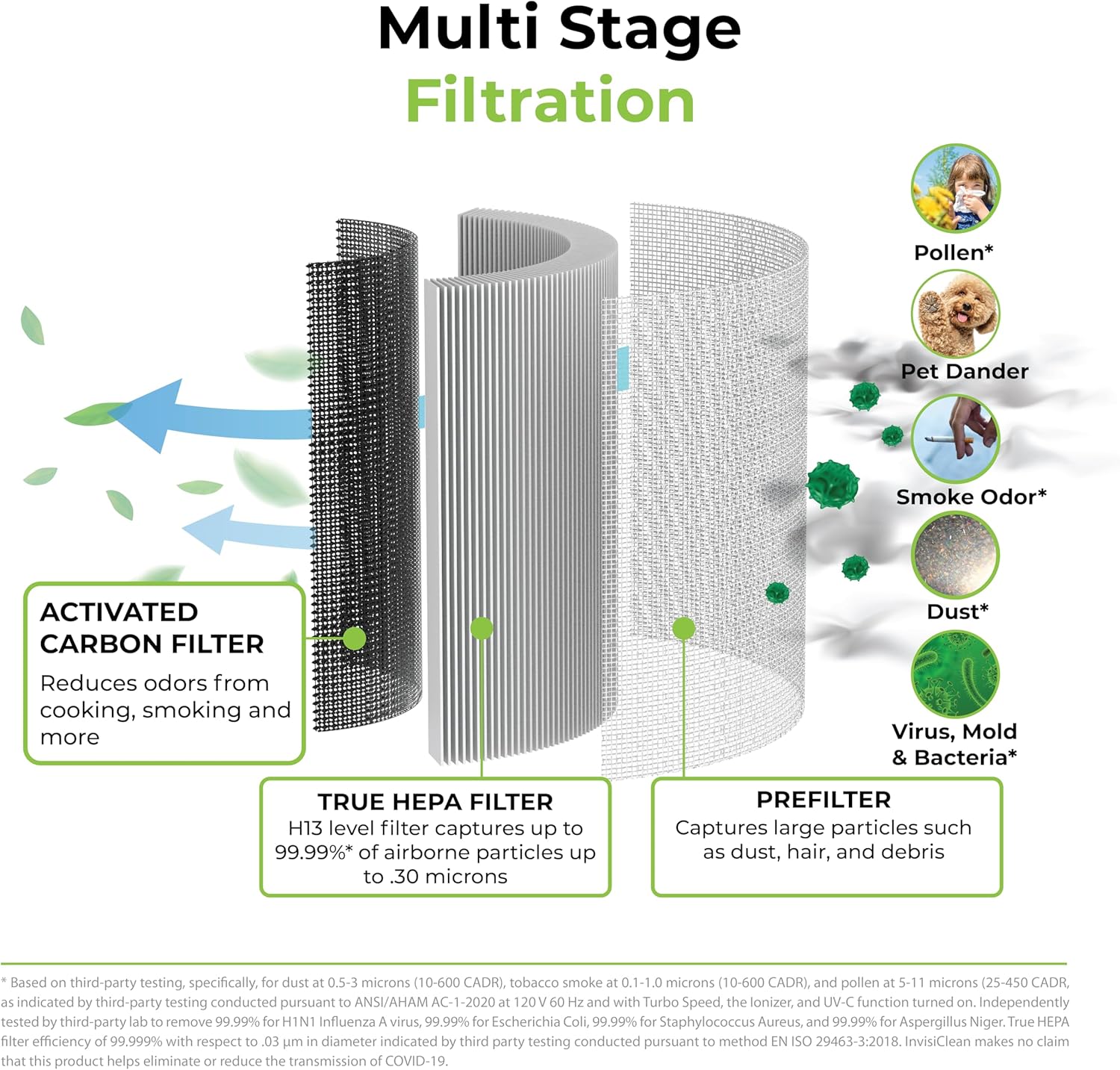
- 멀티에스tage 여과: Includes a Mesh Prefilter, H13 True HEPA filter, and Activated Carbon filter for comprehensive air purification.
- 스마트 와이파이 제어: Manage settings, schedules, and monitor air quality remotely via the InvisiClean app.
- 조용한 작동: Designed for ultra-quiet performance, especially in sleep mode.
- 360도 공기 흡입구: Ensures efficient air cleaning from all directions.
- PM2.5 센서 및 자동 모드: 실시간 공기 질에 따라 자동으로 팬 속도를 조절합니다.
- 사용자 친화적인 컨트롤: Touchscreen panel with timer, sleep mode, auto mode, adjustable fan speed, and child lock.

이미지: 앞면 view of the InvisiClean Bella Air Purifier, showcasin세련된 디자인과 상단 제어판이 특징입니다.
2. 설정 가이드
2.1 포장 풀기 및 배치
1. Carefully remove the air purifier from its packaging.
2. Place the unit on a flat, stable surface. Ensure there is at least 6 inches of space around all sides for optimal airflow.

Image: Dimensions of the InvisiClean Bella Air Purifier (9"D x 9"W x 22.24"H), illustrating its compact footprint.
2.2 필터 설치
The InvisiClean Bella comes with its filter pre-installed, but it may be wrapped in plastic for shipping. Please follow these steps to ensure proper filter setup:
- Locate the magnetic side panel on the air purifier. Gently pull it open to reveal the filter compartment.
- If the filter is wrapped, carefully remove it from the unit and unwrap any plastic packaging.
- Insert the filter back into the compartment. The filter is cylindrical and designed for 360-degree air intake. Ensure it sits securely at the bottom.
- Close the magnetic side panel until it clicks firmly into place.
영상: View of the InvisiClean Bella Air Purifier with its side panel open, showing the cylindrical filter inside. The image highlights the easy access for filter changes.
2.3 전원 연결
Plug the power cord into a standard electrical outlet (110V-220V compatible).
3. 사용 설명서
3.1 제어판 이상view
The InvisiClean Bella features an intuitive touchscreen control panel on its top surface. The digital display shows the PM2.5 reading and air quality indicator.

이미지: 클로즈업 view of the InvisiClean Bella Air Purifier's top control panel, detailing the various touch buttons and digital display.
- 전원 버튼: 기기를 켜거나 끕니다.
- 팬 속도 버튼: Cycles through low, medium, high, and turbo fan speeds.
- 자동 모드 버튼: Activates intelligent mode where the unit adjusts fan speed based on detected air quality.
- 절전 모드 버튼: Dims display lights and operates at the lowest fan speed for quiet night-time use.
- 타이머 버튼: 자동 꺼짐 타이머(1~12시간)를 설정합니다.
- 어린이 잠금 버튼: Press and hold to lock/unlock the control panel, preventing accidental changes.
- 필터 재설정 표시기: Illuminates when filter replacement is needed.
3.2 Smart Wi-Fi App Control
For enhanced control and scheduling, download the InvisiClean app on your smartphone.
- Download the "InvisiClean" app from your device's app store.
- Follow the in-app instructions to connect your Bella Air Purifier to your home Wi-Fi network.
- Once connected, you can remotely control all functions, set daily schedules, monitor real-time air quality, and receive filter replacement reminders.

Image: The InvisiClean Bella Air Purifier next to a smartphone displaying the InvisiClean app interface, demonstrating remote control capabilities.
Video: Official InvisiClean Bella Smart Air Purifier overview, demonstrating its features and quiet operation. This video is provided by the seller.
4. 유지관리
4.1 필터 교체
The filter should be replaced approximately every 6-8 months, depending on usage and air quality. The filter reset indicator light will illuminate when it's time for a change.
- 공기 청정기의 전원을 끄고 플러그를 뽑으세요.
- Open the magnetic side panel.
- Pull the old filter out using the tabs provided.
- Insert a new InvisiClean Bella replacement filter (search for B0CCXNSGZX or B0CD17DRTN).
- 측면 패널을 닫습니다.
- Plug in the unit. Press and hold the Filter Reset button on the control panel for 3-5 seconds until the indicator light turns off.

이미지: 다중성을 설명하는 다이어그램tage filtration system of the InvisiClean Bella, including the prefilter, True HEPA filter, and activated carbon filter.
4.2. 외부 청소
Wipe the exterior of the unit with a soft, dry cloth as needed to remove dust. Do not use abrasive cleaners or solvents.
5. 문제 해결
- 장치가 켜지지 않음: Ensure the power cord is securely plugged into both the unit and the wall outlet. Check if the outlet is functional.
- Poor airflow or unusual noise: Check if the filter is correctly installed and unwrapped. The filter might be clogged and require replacement. Ensure no obstructions are blocking the air intake or outlet.
- Wi-Fi 연결 문제: Ensure your Wi-Fi network is 2.4GHz. Restart the air purifier and your router. Follow the app's troubleshooting steps for pairing.
- 필터 교체 후에도 필터 표시등이 계속 켜져 있습니다. Press and hold the Filter Reset button on the control panel for 3-5 seconds until the light turns off.
6. 사양
| 특징 | 세부 사항 |
|---|---|
| 제품 치수 | 9 x 9 x 22.24 인치 |
| 무게 | 9 파운드 |
| 적용 범위 | Up to 1500 sq ft (1 air change per hour) / 312 sq ft (4.8 air changes per hour) |
| CADR | 200CFM / 340m³/h |
| 힘 | 110V-220V |
| 필터 유형 | H13 True HEPA, Mesh Prefilter, Activated Carbon |
| 인증 | Energy Star Certified, CE Certified, ETL Certified, CARB Certified, EPA Certified |
7. 보증 및 지원
InvisiClean is a US-based company committed to quality and customer satisfaction. For any questions or support, please refer to the contact information provided with your product or visit the official InvisiClean web대지.
InvisiClean products are tested and certified by Intertek, Energy Star Listed, California Air Resources Board (CARB) approved, FCC certified, and ETL listed, ensuring high standards of safety and performance.


