1. 서론
This manual provides essential information for the proper installation, operation, and maintenance of your Mopar 68193711AC Fuel Pump Control Module. Please read this manual thoroughly before attempting any installation or service to ensure safe and correct usage.
2. 안전 정보
WARNING: Improper installation or handling of fuel system components can lead to serious injury, fire, or property damage. Professional installation is highly recommended.
- Always disconnect the vehicle's battery before working on any electrical or fuel system components.
- 작업 공간은 환기가 잘 되고 화기나 불꽃이 없는지 확인하십시오.
- 안전 안경과 장갑 등 적절한 개인 보호 장비를 착용하세요.
- Fuel is highly flammable. Handle with extreme care and be prepared for potential fuel spills.
- 구체적인 절차와 토크 사양은 차량 서비스 매뉴얼을 참조하세요.
3. 제품 오버view
The Mopar 68193711AC Fuel Pump Control Module is an original equipment (OE) component designed to regulate the voltage supplied to the fuel pump. This regulation allows for precise control of fuel pressure, optimizing engine performance and fuel efficiency. The module is typically located near the fuel tank or within the vehicle's chassis.

그림 3.1: 상단 view of the Mopar 68193711AC Fuel Pump Control Module, showing the part number and Mopar branding.

그림 3.2: 하단 view of the module, illustrating the mounting points.
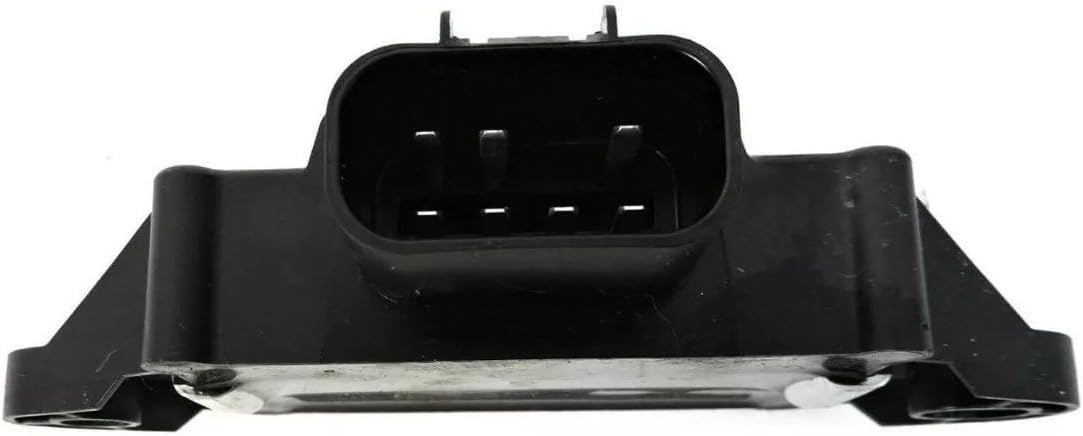
Figure 3.3: Close-up of the electrical connector, showing the pin configuration.
4. 설정 및 설치
The installation of a Fuel Pump Control Module requires mechanical aptitude and specific tools. If you are not confident in your ability to perform this installation, it is recommended to seek assistance from a certified automotive technician.
4.1 설치 전 확인 사항
- Verify that the Mopar 68193711AC module is the correct part for your vehicle's make, model, and year.
- Gather necessary tools: wrenches, sockets, screwdrivers, battery terminal wrench, and a diagnostic scan tool (if available).
- 차량을 평평한 곳에 주차하고 주차 브레이크를 걸어 두세요.
4.2 설치 단계
- 배터리 분리: Locate the vehicle's battery and disconnect the negative (-) terminal first, followed by the positive (+) terminal. This prevents electrical shorts during installation.
- Locate Existing Module: Refer to your vehicle's service manual to find the exact location of the fuel pump control module. It is often found near the fuel tank, under the vehicle, or in the trunk area.
- 전기 커넥터 분리: Carefully disconnect the electrical harness from the existing module. Be gentle to avoid damaging the connector or wiring.
- 장착 하드웨어 제거: Unscrew any bolts or fasteners securing the old module to the vehicle chassis.
- 이전 모듈 제거: Carefully detach and remove the old fuel pump control module.
- 새로운 모듈 설치: Position the new Mopar 68193711AC module in the correct orientation. Secure it with the original mounting hardware. Ensure it is firmly attached.
- 전기 커넥터를 다시 연결하세요: Plug the electrical harness firmly into the new module until it clicks into place. Double-check for a secure connection.
- 배터리를 다시 연결하십시오: 먼저 배터리의 양극(+) 단자를 연결한 다음 음극(-) 단자를 연결하십시오.
- 테스트 시스템 : Start the vehicle and check for proper operation. Listen for the fuel pump priming sound. If a diagnostic scan tool is available, check for any stored or pending diagnostic trouble codes (DTCs).
5. 작동 원리
Once correctly installed, the Mopar 68193711AC Fuel Pump Control Module operates automatically as part of the vehicle's engine management system. It receives signals from the Powertrain Control Module (PCM) to adjust the voltage supplied to the fuel pump, thereby controlling fuel pressure and volume delivered to the engine. This dynamic control ensures optimal fuel delivery under various driving conditions, contributing to efficient combustion and reduced emissions. No direct user interaction is required for its operation after installation.
6. 유지관리
The Mopar 68193711AC Fuel Pump Control Module is a sealed electronic component and does not require routine maintenance or user-serviceable parts. However, periodic visual inspection during other vehicle maintenance can help identify potential issues:
- Check the module's housing for any signs of physical damage, cracks, or corrosion.
- Inspect the electrical connector and wiring for fraying, corrosion, or loose connections.
- 장착 하드웨어가 안전하게 고정되어 있는지 확인하세요.
If any damage or unusual conditions are observed, consult a qualified technician for further inspection and diagnosis.
7. 문제 해결
If you experience issues that you suspect are related to the fuel pump control module, consider the following common symptoms and steps:
7.1 Common Symptoms of a Faulty Module
- 엔진은 크랭킹되지만 시동이 걸리지 않습니다.
- Engine stalls intermittently.
- Poor engine performance, such as hesitation or lack of power.
- 엔진 경고등(CEL)이 계기판에 켜졌습니다.
- Diagnostic Trouble Codes (DTCs) related to fuel pressure or fuel pump control.
7.2 진단 단계
- DTC를 확인하세요: Use an OBD-II scanner to retrieve any stored diagnostic trouble codes. Codes related to fuel pump control circuits (e.g., P0230, P0231, P0232) may indicate a module issue.
- 배선 검사: Visually inspect the wiring harness and connector leading to the module for any damage, corrosion, or loose pins.
- Fuel Pressure Test: A qualified technician can perform a fuel pressure test to determine if the fuel pump is receiving proper voltage and if the system is maintaining correct pressure.
If troubleshooting does not resolve the issue, or if you are unsure about performing these steps, it is strongly recommended to consult a certified automotive technician for professional diagnosis and repair.
8. 사양
| 상표 | 모파 |
| 모델 번호 | 68193711AC |
| 차량 서비스 유형 | 트럭 |
| 품목 치수(L x W x H) | 3.94 x 7.87 x 7.87 인치 |
| 품목 무게 | 1.1파운드(0.5킬로그램) |
| 사양 충족 | OE(Original Equipment) |
| 자동차 부품 위치 | 뒤쪽 |
| 작동 모드 | Mechanical (Note: This refers to the fuel pump it controls, the module itself is electronic) |
9. 보증 및 지원
For warranty information regarding your Mopar 68193711AC Fuel Pump Control Module, please refer to the documentation provided at the time of purchase or contact your authorized Mopar dealer or the seller directly. Warranty terms and conditions may vary.
For additional support or inquiries, you may visit the official Mopar store or contact their customer service:
- Mopar Store: 아마존의 모파 스토어를 방문하세요.


