소개
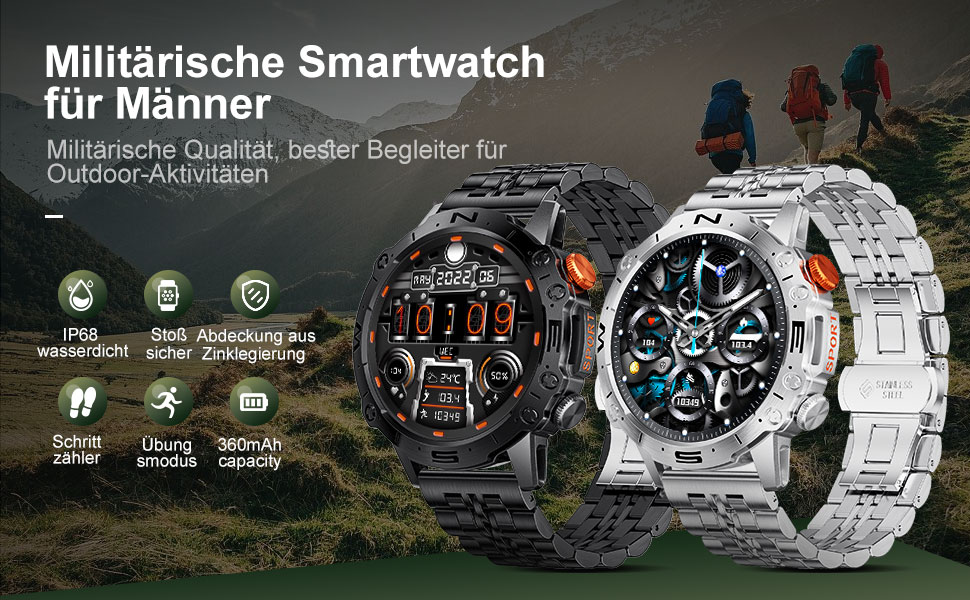
This manual provides detailed instructions for the setup, operation, and maintenance of your LIGE ST19-A Smartwatch. Designed for durability and functionality, this smartwatch features a 1.43-inch AMOLED touchscreen, Bluetooth calling, comprehensive health monitoring, and multiple sports modes. Please read this manual carefully to ensure proper use and to maximize your device's potential.
1. 설정
1.1 스마트워치 충전
Before first use, fully charge your LIGE ST19-A Smartwatch. Use the provided magnetic charging cable.
- Connect the magnetic end of the charging cable to the charging contacts on the back of the smartwatch.
- 케이블의 USB 끝을 표준 USB 전원 어댑터(권장 5V/1A)나 컴퓨터의 USB 포트에 연결합니다.
- 시계 화면에 충전 상태가 표시됩니다. 완전 충전에는 일반적으로 2~3시간이 소요됩니다.
- Once fully charged, the watch offers approximately 3-7 days of working time and up to 30 days of standby time.
1.2 앱 설치 및 기기 페어링
To unlock the full functionality of your smartwatch, you need to install the companion application on your smartphone and pair the devices.
- 블루투스 활성화: 스마트폰 설정에서 블루투스가 켜져 있는지 확인하세요.
- 앱 다운로드: Scan the QR code provided in the watch's packaging or search for "FitCloudPro" in your smartphone's app store (Google Play Store for Android, Apple App Store for iOS). Alternatively, you can visit 이 링크 for download options.
- 설치 및 열기: "FitCloudPro" 앱을 설치하고 실행하세요.
- 장치 추가: In the app, navigate to the "Device" or "Add Device" section. The app will search for available devices. Select "ST19-A" from the list to initiate pairing.
- 페어링 확인: Follow the on-screen prompts on both your phone and smartwatch to confirm the pairing request.
- 알림 활성화: Grant the necessary permissions for the app to display notifications from your phone on the smartwatch.
- 블루투스 통화 기능: After successful connection, you can enable or disable the call function on the watch. If the connection is successful, you can add/answer calls and play music.

2. 사용 설명서
2.1 기본 탐색
- 터치스크린: 메뉴와 기능을 탐색하려면 왼쪽, 오른쪽, 위, 아래로 스와이프하세요. 탭하여 선택하세요.
- 측면 버튼: The smartwatch features physical buttons for quick access to functions or to return to the home screen. Refer to the watch's interface for specific button assignments.
2.2 블루투스 통화
스마트폰과 페어링이 완료되면 스마트워치에서 직접 전화를 걸고 받을 수 있습니다.
- 전화 걸기: Access the dialer on your watch or select a contact from your synced phonebook.
- 전화 받기: When a call comes in, the watch will display the caller ID. You can answer or decline the call directly from your wrist.
- The watch includes a microphone and speaker for hands-free communication.

2.3 스마트 알림
Receive instant notifications for incoming calls, text messages, and alerts from various social media applications directly on your wrist.
- Ensure notification permissions are granted in the "FitCloudPro" app for desired applications.
- Supported apps include Line, Messenger, Facebook, Twitter, Kakao Talk, Skype, and WhatsApp.

2.4 건강 추적
The smartwatch provides 24-hour real-time monitoring of various health metrics.
- 심박수 모니터링 : 하루 종일 지속적으로 심박수를 추적합니다.
- 혈압 측정 : 혈압 측정값을 제공합니다.
- 혈중 산소(SpO2) 모니터링: 혈중 산소 포화도를 측정합니다.
- 수면 모니터링: 깊은 수면, 얕은 수면, 깨어 있는 시간 등 수면 패턴을 분석합니다.
- 보수계: Counts your daily steps, distance, and estimated calorie burn.
- 호흡 훈련: 스트레스 관리에 도움이 되는 호흡 운동 가이드.
참고: 이 기기에서 제공하는 건강 데이터는 참고용일 뿐이며 의학적 진단이나 치료에 사용해서는 안 됩니다. 건강 관련 문제는 의료 전문가와 상담하십시오.

2.5가지 스포츠 모드
The smartwatch supports over 100 sports modes to track your workout data accurately.
- Select your desired sport mode from the watch's menu to begin tracking.
- The watch records data such as duration, distance, calories burned, and heart rate during your activity.
- Examples of supported activities include walking, running, cycling, swimming, and various gym exercises.

2.6 추가 기능
- 날씨 표시: Get real-time weather updates directly on your watch face.
- 음악 제어: Control music playback on your smartphone (play, pause, skip tracks) from your wrist.
- 상시 표시 디스플레이(AOD): The 1.43-inch AMOLED screen supports an Always On Display feature, providing continuous time visibility.
- AI 음성 비서: Interact with your smartwatch using voice commands for various tasks.


3. 유지관리
- 청소: 시계 화면과 스트랩은 부드럽고 마른 천으로 정기적으로 닦아주세요. 필요한 경우, 약간 거친 천을 사용하세요.amp 천으로 닦아낸 후 완전히 말리세요. 강한 화학 물질이나 연마재는 사용하지 마세요.
- 방수 기능: The LIGE ST19-A Smartwatch is IP68 rated, meaning it is resistant to dust and can withstand immersion in water up to 1.5 meters for 30 minutes. It is suitable for daily use, hand washing, and rain exposure. However, it is not recommended for hot showers, saunas, or diving, as steam and hot water can compromise the seals.
- 배터리 관리 : 배터리 수명을 연장하려면 시계를 자주 완전히 방전시키지 마십시오. 배터리 잔량이 부족할 때 충전하십시오. 장기간 사용하지 않을 때는 시계를 서늘하고 건조한 곳에 보관하십시오.
- 극한의 온도를 피하세요: 시계를 극심한 고온 또는 저온에 노출시키지 마십시오. 배터리와 내부 부품이 손상될 수 있습니다.
4. 문제 해결
| 문제 | 가능한 해결책 |
|---|---|
| 시계가 켜지지 않습니다 | 시계가 완전히 충전되었는지 확인하세요. 충전기에 최소 30분 동안 연결해 두세요. |
| 스마트폰과 페어링이 안되네요 |
|
| 알림을 받지 못했습니다 |
|
| 부정확한 건강 데이터 |
|
| 배터리 수명이 짧음 |
|
5. 사양
| 특징 | 세부 사항 |
|---|---|
| 모델명 | ST19-A |
| 상표 | 리게 |
| 화면 크기 | 1.43 인치 |
| 디스플레이 유형 | 아몰레드 터치스크린 |
| 연결 기술 | 블루투스 |
| 배터리 용량 | 360mAh(리튬이온) |
| 일반적인 사용 시간 | 3-7일 |
| 대기 시간 | 약. 30 일 |
| 방수성 | IP68 (Dustproof, Water resistant up to 1.5m for 30 min) |
| 특별 기능 | Voice Call, Music Player, Heart Rate Monitor, Activity Tracker, Blood Pressure Monitor, Blood Oxygen Monitor, Sleep Monitor, GPS (integrated) |
| 호환성 | 안드로이드, iOS |
| 무게 | 290g |
6. 보증 및 지원
LIGE prioritizes customer satisfaction. Your LIGE ST19-A Smartwatch comes with the following support:
- 30일 환불 보장: If any issues arise during use, you are eligible for a refund within 30 days of purchase.
- 2년 수리 서비스: A 2-year repair service is provided after the sale for manufacturing defects.
- For any problems or inquiries, please contact LIGE customer support. Your satisfaction is important to us.


