Veise KS02B 및 KS01C 키리스 도어록(손잡이 포함) 사용 설명서
Models: KS02B (Fingerprint & Keypad), KS01C (Keypad Only)
소개
Welcome and thank you for choosing the Veise Keyless Entry Door Lock. This manual provides comprehensive instructions for the installation, setup, operation, and maintenance of your new lock. Please read this manual thoroughly before installation and retain it for future reference to ensure proper function and longevity of your product.
제품 구성 요소
설치를 시작하기 전에 모든 구성품이 있는지, 손상되지 않았는지 확인하십시오. 누락되거나 손상된 부품이 있는 경우 고객 지원팀에 문의하십시오.
- Keypad Deadbolt (KS02B or KS01C)
- 레버 핸들 세트
- 실물 키(2개)
- Mounting Hardware (screws, strike plate, latch)
- 설치 템플릿
- 사용자 설명서

This image displays the complete set of components for the Veise Keyless Entry Door Lock, including the keypad deadbolt, a lever handle set, and a traditional knob set. The KS02B model features a fingerprint sensor, while the KS01C is keypad-only. Both are shown in a matte black finish.
제품 사양
- 상표: 비즈
- 모델: KS02B (with fingerprint), KS01C (keypad only)
- 잠금 유형: Keypad Deadbolt with Handle
- 재료: 금속
- 마치다: 매트블랙
- 특별 기능: Keyless entry (Fingerprint, Passwords, One-time Codes, Keys), Auto-Lock, Anti-Peeping Codes, Backlit Keypad, Low Battery Alerts, Mute Mode, Vacation Mode
- 보안 인증: ANSI 3등급 인증
- 내후성: IP54 방수
- 온도 범위: -31°F ~ 158°F(-35°C ~ 70°C)
- 전원: 4 AA batteries (estimated 1+ year battery life)
- 도어 호환성: American standard left and right-handed doors, door thickness 1-3/8" to 2" (35mm-50mm), hole diameter 2-1/8" (54mm), backset 2-3/8" or 2-3/4" (60mm or 70mm)
- Fingerprint Recognition (KS02B): 0.3 seconds identification, 99.99% recognition rate, 500 DPI resolution
- 사용자 코드: 최대 20개의 사용자 코드
설치 가이드
필요한 도구: 십자 드라이버.
시작하기 전에:
- Ensure your door dimensions match the lock's compatibility requirements. Refer to the "Check The Door Size Before Purchase" image below.
- Do not install batteries until the lock is fully installed and tested.

This diagram illustrates how to measure your door to ensure compatibility with the Veise Keyless Entry Door Lock. It specifies the required hole diameter (2-1/8 inches or 54mm), backset (2-3/8 inches or 60mm, or 2-3/4 inches or 70mm), and door thickness (1-3/8 inches to 2 inches or 35mm-50mm). It also shows compatibility with both left-handed and right-handed doors and clarifies that the lock is for single cylinder deadbolts, not mortise or integrated systems.
설치 단계:
- 문 준비: If replacing an existing lock, remove it. Use the provided template to mark and drill holes if installing on a new door.
- 래치를 설치하십시오: 걸쇠를 문 가장자리에 끼울 때 "UP" 화살표가 위를 향하도록 하십시오. 나사로 고정하십시오.
- 외부 어셈블리 설치: Route the cable through the door hole and position the exterior keypad assembly.
- 내부 장착판을 설치하십시오: 내부 장착판을 나사를 사용하여 외부 조립체에 고정하십시오.
- 케이블 연결: 외부 어셈블리의 케이블을 내부 어셈블리에 연결합니다.
- 내부 조립 설치: Attach the interior assembly to the mounting plate, ensuring the thumb turn operates smoothly. Secure with screws.
- 스트라이크 플레이트 설치: 도어 프레임에 스트라이크 플레이트를 설치합니다.
- 배터리 설치: 내부 조립체에 AA 배터리 4개를 삽입하십시오.
- 테스트 작업: Test the lock with the physical key and the default code (if any) before closing the door.

This image shows the Veise KS02B keyless entry door lock and its accompanying lever handle fully installed on a white door. The matte black finish of the lock and handle contrasts with the door, highlighting the sleek design and integrated appearance.

A hand is shown using a Phillips head screwdriver to secure the interior assembly of the Veise keyless door lock to the door. This illustrates the ease of installation, requiring only a basic tool.
설정 및 프로그래밍
초기 설정 :
- After battery installation, the lock will perform a self-check.
- The default master code is typically provided in a separate quick start guide or on a sticker inside the battery cover. It is highly recommended to change this immediately for security.
마스터 코드 변경
Consult the quick start guide for detailed, model-specific steps on changing the default master code. This is a critical security step.
사용자 코드 추가
The lock supports up to 20 unique user codes. To add a new user code, typically you will: Enter Master Code, press '#', select the option for adding a user code, enter the new 4-8 digit code, then press '#'. Refer to your quick start guide for exact button sequences.
Adding Fingerprints (KS02B Model Only)
To add a fingerprint: Enter Master Code, press '#', select the option for adding a fingerprint, then place your finger on the sensor multiple times from different angles until it is successfully registered. Refer to your quick start guide for exact button sequences.

This image highlights the versatile unlocking options for the Veise keyless door lock. It shows that users can unlock the door using up to 20 programmable user codes, a temporary one-time code, or the two included physical spare keys. This provides multiple layers of access control.
자물쇠 작동
문 잠금 해제
사용자 코드 사용:
- 키패드를 활성화하려면 아무 키나 누르세요.
- 4~8자리의 사용자 코드를 입력하세요.
- Press the "#" key. The lock will unlock.
Using Fingerprint (KS02B Only):
- 등록된 손가락을 지문 센서에 올려놓으세요.
- The lock will identify your fingerprint within 0.3 seconds and unlock.
Using Physical Key:
- Insert the physical key into the keyhole.
- Turn the key to unlock the deadbolt.
문 잠그기
수동 잠금 :
- From the inside, turn the thumb turn to the locked position.
- From the outside, press the "#" key on the keypad.
자동 잠금 기능:
The lock can be programmed to automatically lock after a set period (typically 10-99 seconds) after being unlocked. Refer to programming instructions in your quick start guide to enable/disable and adjust this setting.

This image depicts a woman entering her home, with a close-up inset showing the Veise keyless door lock's auto-lock mechanism. The text indicates that the lock can automatically engage after a user-defined period of 10-99 seconds, enhancing security by ensuring the door is always locked after entry or exit.
Anti-Peeping Passcode
To prevent others from guessing your code, you can enter random digits before or after your actual passcode. This makes it harder for onlookers to discern your true code.
Examp르 : [Random Digits] + [Your Code] + [Random Digits]
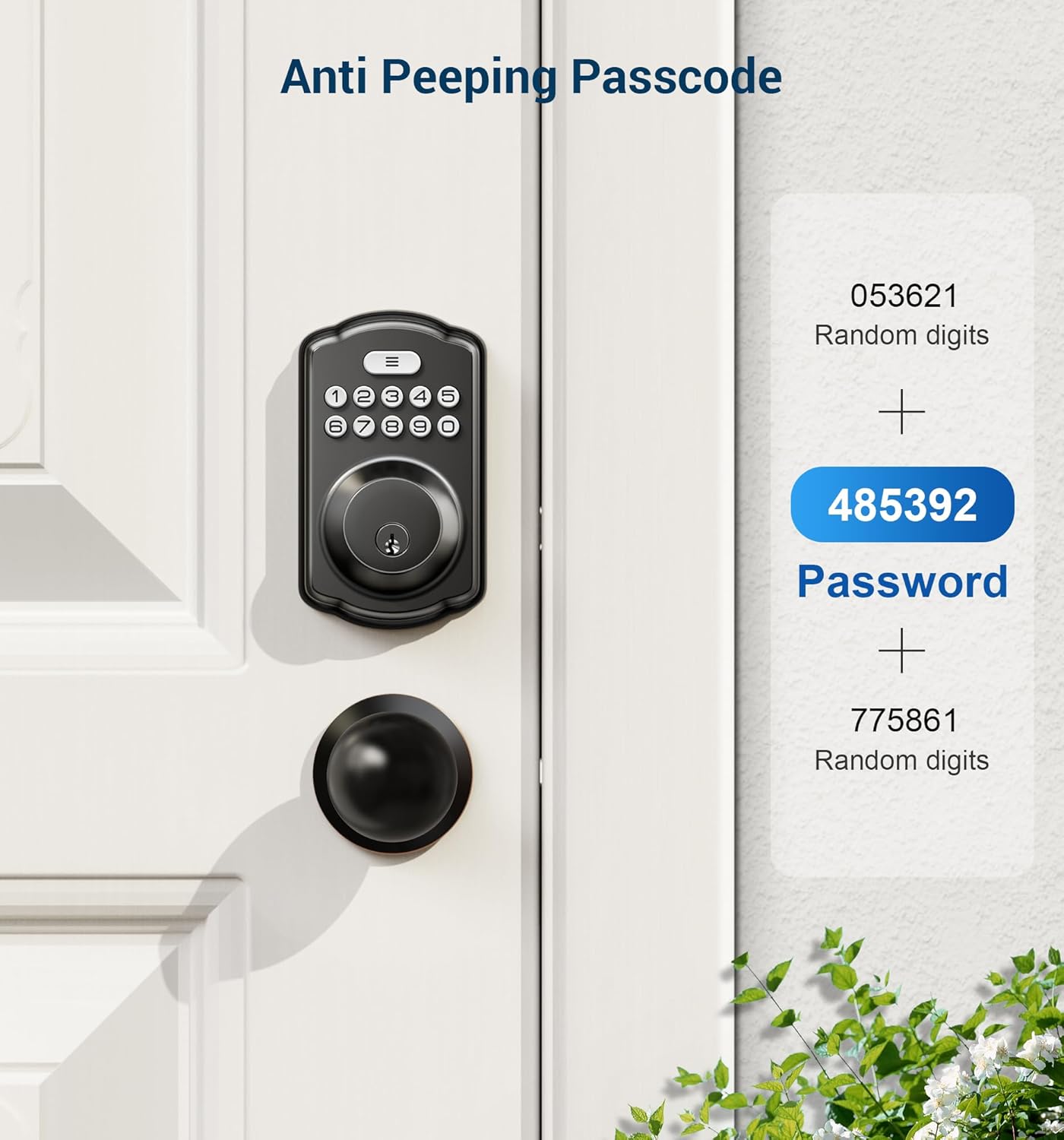
This image visually explains the anti-peeping passcode feature. It shows a keypad lock and a sequence of numbers: random digits, followed by the actual password (highlighted), and then more random digits. This method helps obscure the real password from onlookers.
음소거 모드
This mode silences the keypad beeps for quiet operation. Refer to your quick start guide for programming instructions to enable or disable this feature.
휴가 모드
This mode disables all user codes and fingerprints, allowing access only via the master code or physical key. It is ideal for extended absences to enhance security. Refer to your quick start guide for programming instructions to enable or disable this feature.
유지
배터리 교체
The lock is powered by 4 AA batteries. When the battery level is low, the lock will provide an audible and/or visual alert. Replace batteries promptly to avoid loss of function.
- 내부 어셈블리의 배터리 덮개를 제거합니다.
- 오래된 배터리를 제거하세요.
- 올바른 극성(+/-)을 확인하여 새로운 AA 알카라인 배터리 4개를 삽입합니다.
- 배터리 커버를 다시 장착하세요.
메모: Do not mix old and new batteries, or different types of batteries, as this can damage the lock or reduce battery life.
청소
부드러운 천으로 잠금장치 외부를 청소하세요.amp cloth. Avoid abrasive cleaners, solvents, or chemical sprays, as they may damage the finish or electronic components.
For the fingerprint sensor (KS02B), gently wipe with a clean, dry, lint-free cloth to ensure optimal performance.
문제 해결
| 문제 | 가능한 원인 | 해결책 |
|---|---|---|
| 잠금이 응답하지 않습니다 | 배터리가 방전됨 | AA건전지 4개를 모두 교체하세요. |
| Keypad not lighting up | 배터리가 부족하거나 방전됨 | 배터리를 교체하세요. |
| Cannot unlock with code | Incorrect code entered; Code not programmed; Lock in Vacation Mode | Re-enter code carefully; Program the code; Disable Vacation Mode. |
| Fingerprint not recognized (KS02B) | Finger not placed correctly; Fingerprint not registered; Sensor dirty | Reposition finger; Register fingerprint; Clean sensor. |
| Auto-lock not working | Auto-lock feature disabled or timer set too long | Enable auto-lock and adjust timer in programming settings. |
| Lock is loose | 고정 나사가 헐거워졌습니다. | 모든 고정 나사를 조이세요. |
보증 및 고객 지원
For warranty information or technical assistance, please refer to the warranty card included with your product or contact Veise customer support directly.
Please have your model number (KS02B or KS01C) and purchase date ready when contacting support for faster service.


