
1. 서론
The Sovol SV07 Plus is a high-performance FDM 3D printer designed for both enthusiasts and professionals, offering a large build volume and advanced features for efficient and precise printing. Equipped with Klipper firmware, it delivers exceptional speed and a user-friendly experience through its intuitive touch screen interface.
This manual provides essential information for setting up, operating, maintaining, and troubleshooting your Sovol SV07 Plus 3D printer. Please read it thoroughly before use to ensure safe and optimal performance.
Official Product Introduction: This video provides a general overview of the Sovol SV07 Plus 3D printer's features and capabilities.
Sovol SV07 Plus is Coming!: A brief promotional video highlighting the arrival of the SV07 Plus.
2. 안전 정보
부상이나 프린터 손상을 방지하기 위해 항상 다음 안전 수칙을 준수하십시오.
- Keep hands and fingers away from moving parts during operation.
- Do not touch the hotend or heated bed during or immediately after printing, as they reach high temperatures.
- 프린터를 통풍이 잘 되는 곳의 안정적이고 평평한 표면에 놓으세요.
- Do not leave the printer unattended during operation, especially during long prints.
- Use only recommended filament types and power supply.
- Keep children and pets away from the printer.
- 비상시 즉시 전원을 차단하십시오.
3. 패키지 내용
Your Sovol SV07 Plus package should include:
- 3D printer*1
- Necessary tools for assembly and maintenance (located in the integrated tool drawer).
- USB drive with test file소프트웨어 및 기타.
- 전원 케이블.
- Sample filament.
4. 프린터 오버view
The Sovol SV07 Plus features a robust design with key components optimized for performance and ease of use.
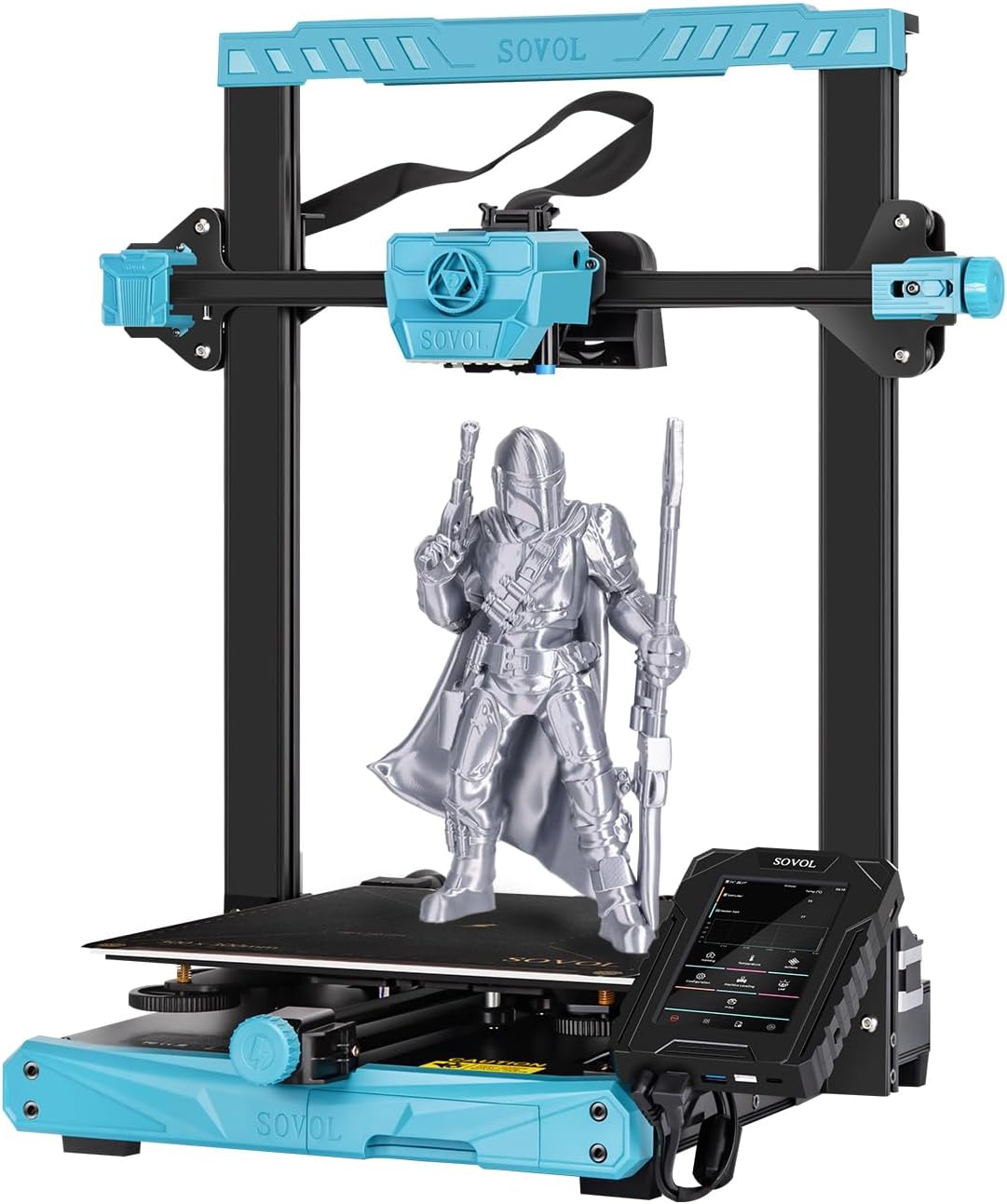
전반적인 view of the Sovol SV07 Plus 3D Printer.
주요 구성 요소:
- 5-inch Klipper Touch Screen: High-resolution interface for intuitive control and access to advanced Klipper functions.
- Planetary Dual Gear Direct Drive Extruder: Ensures precise filament extrusion and is ideal for flexible materials.
- All Metal High Flow Hotend: Capable of reaching 300°C for printing a wide range of materials.
- 가열 침대: Upgraded 420W heated bed for rapid heating and improved adhesion.
- Dual Z-axis: Enhances accuracy and precision of vertical movement.
- Filament Run-out Sensor: Automatically pauses printing when filament runs out or breaks.
- LED 조명: Illuminates the print area for better visibility during printing and leveling.
- Tool Drawer: Conveniently stores essential tools.
5. 설정 및 초기 교정
5.1 조립
The Sovol SV07 Plus comes largely pre-assembled. Follow the quick start guide included in the package for final assembly steps, which typically involve attaching the gantry and connecting a few cables.
5.2 Bed Leveling and Z-Offset Calibration
Accurate bed leveling and Z-offset calibration are crucial for successful first layers and overall print quality. The SV07 Plus features a 25-point auto-leveling system.
Guide and Tutorial: How to Level SV07 & SV07 Plus. This video provides a detailed walkthrough of the bed leveling and Z-offset calibration process.
- Initial Manual Adjustment: Before auto-leveling, ensure the bed leveling nuts are tightened counter-clockwise as much as possible, then loosen them two turns clockwise. This provides a good starting point for the auto-leveling system.
- Z-Calibrate: On the touch screen, navigate to 'Machine Leveling' and select 'Z Calibrate'. The printer will auto-home.
- Z 오프셋 조정: Once the nozzle moves to the center of the bed, place a piece of A4 paper between the nozzle and the hotbed. Adjust the Z-offset using the 'raise nozzle' or 'lower nozzle' buttons until you feel slight resistance when pulling the paper. The nozzle should scratch the paper slightly without completely pressing it.
- 저장하고 다시 시작하세요. Click 'Accept' to apply the values, then confirm and restart the system.
- Bed Level (Screws Adjust): After Z-offset, go back to 'Machine Leveling' and select 'Bed Level'. Click on 'Screws Adjust'. The printer will move the nozzle to each of the four corners. At each corner, use the physical leveling nuts under the bed to adjust the height until the paper test (slight scratch) is achieved. The screen will indicate if you need to turn clockwise (CW) or counter-clockwise (CCW) and by how much. Repeat this process several times until all corners are within acceptable tolerance (e.g., 00:10 or less).
- Bed Mesh: Once the manual screw adjustment is complete, click 'Bed Mesh' on the screen. The printer will perform a detailed 25-point mesh leveling. After the detection is complete, restart the system.
6. 사용 설명서
6.1 필라멘트 장착
Ensure the hotend is preheated to the appropriate temperature for your filament type. Insert the filament into the extruder until it is gripped by the gears. Use the 'Extrude' function on the touch screen to feed the filament through the hotend until it comes out cleanly.
6.2 인쇄 시작
Prepare your 3D model using a slicing software (e.g., Cura with SV07 Plus profile) and save it to a USB drive. Insert the USB drive into the printer's touch screen unit. On the touch screen, navigate to 'Print', select your file from the USB drive, and confirm to start printing.
6.3 Monitoring and Fine-Tuning
During printing, you can monitor progress and fine-tune settings via the touch screen. The Klipper firmware offers various options for real-time adjustments.

The 5-inch Klipper touchscreen provides comprehensive control and monitoring.
If the print nozzle is too close to the bed, resulting in rough printing, fine-tune the Z-offset value upwards. If the print nozzle is too far from the bed, causing adhesion issues, fine-tune the Z-offset value downwards. Always make small adjustments (e.g., 0.01mm or 0.05mm) and observe the effect.
7. 주요 특징
7.1 High-Speed Printing with Klipper Firmware
The SV07 Plus is powered by Klipper firmware, allowing for a maximum print speed of 500mm/s. This significantly reduces print times while maintaining quality. The 5-inch touch screen provides access to Klipper's advanced features like height mapping and input shaping for optimal performance.

Klipper firmware enables high-speed printing and advanced functionalities.
7.2 Large Build Volume & Fast Heating
With a generous build volume of 300x300x350mm, the SV07 Plus accommodates larger models and batch printing. The 600W power supply and upgraded 420W heated bed ensure rapid heating, reaching 60°C in approximately 90 seconds.

Comparison of SV07 Plus (300x300x350mm) and SV07 (220x220x250mm) build volumes.

The 600W power supply and 420W heated bed ensure stable and fast heating.
7.3 Planetary Dual Gear Direct Drive Extruder
Sovol's self-developed direct drive extruder with a planetary dual gear set provides a higher drive ratio and lighter motor, resulting in precise extrusion. An external knob simplifies filament feeding.

상세한 view of the planetary dual gear direct drive extruder for accurate extrusion.
7.4 All Metal High Flow Hotend (Max 300°C)
The all-metal hotend with a larger melt zone allows for printing at high speeds and with various high-temperature materials, including ABS, PC, ASA, Nylon, Carbon Fiber, and more.

The all-metal hotend supports high-temperature printing for diverse filament types.

The printer is compatible with a wide range of filaments including TPU, PLA, PETG, ABS, ASA, PC, WOOD, Nylon, and Carbon Fiber.
7.5 Improved Cooling Design
Equipped with triple cooling fans, the SV07 Plus ensures efficient cooling of prints, leading to better layering and overall print quality, especially at high speeds.

Triple cooling fans provide effective cooling for high-speed printing.
7.6 Dual Z-axis & Anti-backlash Nut
Dual Z-axis screws and stepper motors improve the accuracy and precision of nozzle vertical movement to 0.001mm. An anti-backlash nut further reduces shaking, contributing to more stable printing.

Dual Z-axis for enhanced stability and precision.

Upgraded anti-slip belts and anti-backlash nut for stable and precise movement.
7.7 Filament Run-out Sensor
The integrated filament run-out sensor automatically detects when filament runs out or breaks, pausing the print to allow for filament replacement and preventing failed prints.

The filament run-out sensor automatically pauses printing for filament changes.
7.8 Double Sided PEI Plate & LED Light
The double-sided PEI plate offers excellent adhesion and easy print removal. If one side gets scratched, the other side can be used. An LED light under the extruder provides illumination for observing the bed leveling process and the first layer, even in low light conditions.

The double-sided PEI plate offers durability and ease of use.

The LED light illuminates the print area for better visibility.
7.9 Integrated Tool Drawer
A convenient pull-out tool drawer is integrated into the printer's base, providing quick storage and easy organization for your tools, keeping your workspace tidy.

The integrated tool drawer keeps your workspace organized.
8. 유지관리
Regular maintenance ensures the longevity and optimal performance of your 3D printer:
- 프린트 베드를 청소하세요: Wipe the PEI surface with alcohol before each print to ensure optimal adhesion.
- 노즐 청소: Regularly clean any filament residue from the nozzle. For clogs, perform a cold pull or use a nozzle cleaning needle.
- 움직이는 부품에 윤활유를 바르세요: Apply a small amount of lithium grease to the Z-axis lead screws and smooth rods periodically.
- 벨트 확인: Ensure the X and Y-axis belts are properly tensioned. Adjust using the belt tensioner if necessary.
- 배선 검사: 모든 전기 연결부가 헐거워지거나 손상되었는지 주기적으로 점검하십시오.
9. 문제 해결
다음은 몇 가지 일반적인 문제와 이에 대한 잠재적 해결책입니다.
| 문제 | 가능한 원인 | 해결책 |
|---|---|---|
| 첫 번째 레이어 접착력 불량 | Incorrect Z-offset, dirty bed, warped bed, wrong bed temperature. | Recalibrate Z-offset, clean PEI plate with alcohol, ensure bed is level, adjust bed temperature. |
| 필라멘트가 압출되지 않음 | 노즐 막힘, 필라멘트 엉킴, 온도 오류, 압출기 문제. | Clean nozzle, check filament path, verify hotend temperature, inspect extruder gears. |
| 레이어 시프팅 | Loose belts, motor overheating, print speed too high. | Check and tighten belts, ensure proper cooling for motors, reduce print speed. |
| 실처럼 늘어지거나 흘러나오는 | 잘못된 수축 설정, 너무 높은 온도. | Adjust retraction distance and speed in slicer, lower hotend temperature slightly. |
10. 사양

Sovol SV07 Plus with key dimensions.
| 특징 | 세부 사항 |
|---|---|
| 모델 | SV07 Plus |
| 기술을 인쇄 | FDM(Fused Deposition Modeling) |
| 볼륨을 빌드하세요 | 300 x 300 x 350mm(11.8 x 11.8 x 13.8인치) |
| 최대 인쇄 속도 | 500mm/초 |
| 노즐 온도 | 최대 300°C |
| 가열된 침대 온도 | Max 100°C (Heats to 60°C in 90 seconds) |
| 압출기 유형 | Planetary Dual Gear Direct Drive |
| 레벨링 모드 | 25포인트 자동 레벨링 |
| 펌웨어 | 클리퍼 |
| 표시하다 | 5-inch High Resolution Touch Screen |
| 전원 공급 장치 | 600와트 |
| 연결성 | USB, WiFi (Klipper) |
| 지원되는 필라멘트 | PLA, ABS, PETG, TPU, ASA, PC, Wood, Nylon, Carbon Fiber |
| 제품 치수 | 25 x 23.43 x 10.43 인치 |
| 품목 무게 | 32파운드(14.54kg) |
11. 보증 및 지원
Sovol provides customer support for their products. For specific warranty details, technical assistance, or replacement parts, please refer to the official Sovol web사이트를 방문하거나 고객 서비스에 직접 문의하세요. 보증 청구를 위해 구매 증빙 자료로 구매 영수증을 보관하세요.
제조사 표준 보증 범위를 넘어 보장 범위를 확대하는 추가 보호 플랜을 구매할 수 있습니다.


