1. 서론
Thank you for choosing the ACEBEAM E75 4500 High Lumens Flashlight. This powerful and versatile flashlight is designed for various applications, including outdoor activities, searching, camping, hiking, and everyday carry (EDC). It features a magnetic base, USB Type-C rechargeable battery, and multiple lighting modes. Please read this manual thoroughly before use to ensure proper operation and maintenance.
2. 안전 정보
- 손전등을 눈에 직접 비추지 마십시오. 높은 루멘 출력으로 인해 일시적인 시력 장애가 발생할 수 있습니다.
- 어린이의 손이 닿지 않는 곳에 보관하세요.
- Do not disassemble the sealed head of the flashlight, as this may cause damage to the flashlight and void the warranty.
- Use only the recommended battery type. Improper battery use can lead to damage or explosion.
- The flashlight may become hot during prolonged use, especially in high output modes. Handle with care.
- 방수 기능을 유지하려면 USB 포트 덮개가 단단히 닫혀 있는지 확인하십시오.
3. 패키지 내용
- ACEBEAM E75 Flashlight
- 충전식 리튬 이온 배터리(사전 설치 또는 별도)
- USB Type-C 충전 케이블
- 매는 밧줄
- 예비 O-링
- 사용자 설명서
4. 제품 오버view
The ACEBEAM E75 is a high-performance flashlight featuring four LEDs, a magnetic tail cap, and a side switch for intuitive control. Its robust aluminum construction ensures durability and IPX8 water resistance.

그림 1: 메인 view of the ACEBEAM E75 Flashlight, showcasing its robust design and textured body.
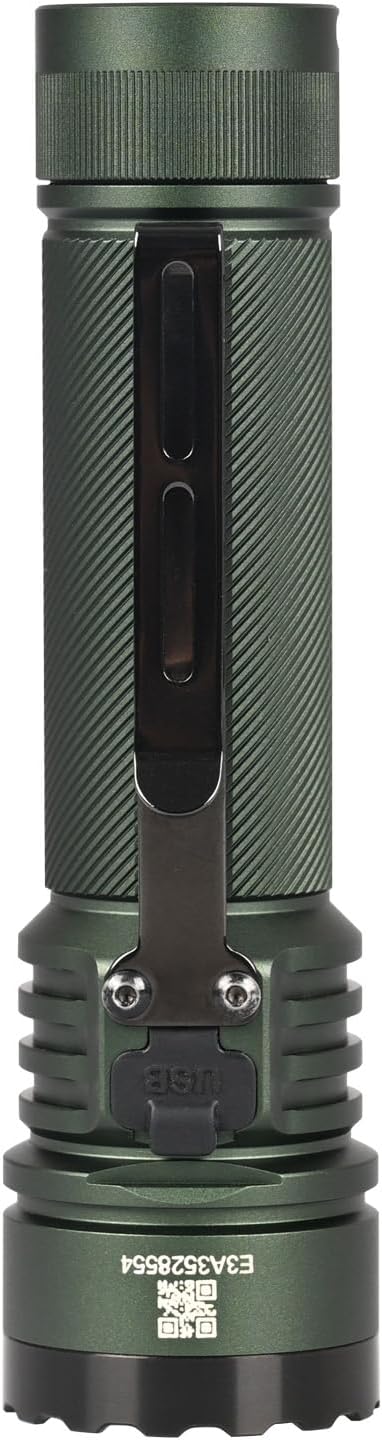
그림 2: 측면 view of the ACEBEAM E75 Flashlight, highlighting the integrated pocket clip for secure carrying.

Figure 3: The ACEBEAM E75 Flashlight shown with its included lanyard attached, providing an additional carrying option.

Figure 4: Diagram illustrating the key features of the E75: quad-core high-performance LEDs, 4500 lumens maximum output, Type-C rechargeable battery, and magnetic tail cap.

Figure 5: The magnetic base of the E75 Flashlight demonstrated, allowing it to attach to metallic surfaces for hands-free operation.
5. 설정
5.1 배터리 설치
- 손전등의 뒷뚜껑을 시계 반대 방향으로 돌려서 빼내세요.
- Insert the included 21700 Lithium-Ion battery with the positive (+) terminal facing towards the head of the flashlight.
- Screw the tail cap back on clockwise until it is fully tightened. Ensure the O-rings are properly seated to maintain water resistance.
5.2 초기 충전
처음 사용하기 전에 배터리를 완전히 충전하는 것이 좋습니다.
- Locate the USB Type-C charging port on the flashlight body, usually covered by a rubber flap.
- Open the rubber flap and connect the USB Type-C cable to the port.
- 케이블의 다른 쪽 끝을 USB 전원(예: 컴퓨터, 벽면 어댑터)에 연결합니다.
- The battery indicator around the side switch will show charging status.
6. 사용 설명서
The ACEBEAM E75 features an all-in-one side switch for convenient operation of all lighting modes.

Figure 6: Diagram detailing the functions of the all-in-one control switch on the ACEBEAM E75 Flashlight.
- 켜기/끄기: 측면 스위치를 한 번 클릭하면 손전등이 켜지거나 꺼집니다.
- 출력 선택: With the light on, press and hold the switch to cycle through Low, Med1, Med2, and High modes. Release the switch at your desired mode. The flashlight will memorize the last selected mode for future use.
- 터보: When the light is unlocked, quickly double-click the switch at any time to activate Turbo mode. Double-click again to switch between Turbo and the previously memorized mode.
- 스트로브 : When the light is unlocked, quickly triple-click the switch at any time to activate Strobe mode.
- 월광: When the light is unlocked and off, press and hold the switch for 0.5 seconds to access Moonlight mode.
- 잠금/잠금 해제: When the light is off, press and hold the switch for 3 seconds to lock the flashlight. The indicator light will flash to confirm. To unlock, press and hold the switch for 3 seconds until the light turns on in Moonlight mode.
7. 충전 및 배터리 표시기
The E75 features a built-in USB Type-C charging port and a battery level indicator for convenient power management.

Figure 7: Close-up of the Type-C charging port and the battery level indicator on the E75 Flashlight.

Figure 8: Visual representation of the power indicator levels on the E75 Flashlight.
- 충전 상태 :
- Red Flash: Charging
- Green On: Fully Charged
- Battery Level Indicator (when light is on):
- Green Light: >20% remaining power
- Red Light: 20% - 10% remaining power (low battery warning)
- Red Flash Light: <10% remaining power (critical battery level)
8. 유지관리
- 청소: 손전등 본체를 부드러운 천으로 닦으세요.amp 천. 연마성 세척제는 사용하지 마십시오.
- 나사산과 O-링: Lubricate the threads and O-rings regularly with silicone grease to maintain water resistance and smooth operation. Replace O-rings if they appear damaged.
- 배터리 관리 : If the flashlight will not be used for an extended period, remove the battery to prevent potential leakage. Store batteries in a cool, dry place.
9. 문제 해결
| 문제 | 가능한 원인 | 해결책 |
|---|---|---|
| 손전등이 켜지지 않습니다. | Battery is depleted or incorrectly inserted. Flashlight is locked. | Charge the battery or ensure it is inserted with the positive (+) terminal facing the head. Unlock the flashlight by pressing and holding the switch for 3 seconds. |
| 조명 출력이 어둡거나 깜박입니다. | 배터리 부족. 연결이 느슨함. | Recharge the battery. Ensure the tail cap is fully tightened. |
| 손전등이 지나치게 뜨거워집니다. | Prolonged use in high output modes. | This is normal for high-lumen flashlights. Reduce output mode or allow to cool down. |
| 물이 침투함. | USB port cover not sealed. Damaged O-rings. | Ensure the USB port cover is fully closed. Inspect and replace O-rings if damaged. |
10. 사양
| 특징 | 세부 사항 |
|---|---|
| 모델 | E75 |
| 광원 | 4 High Performance LEDs (Cool White 6500K) |
| 최대 출력 | 4500루멘 |
| 빔 거리 | 260 미터 |
| 전원 | 21700 리튬 이온 배터리 1개 (포함) |
| 충전 중 | USB Type-C 충전식 |
| 재료 | Hard Anodizing Aircraft Grade Aluminum Alloy |
| 방수성 | IPX8 (Submersible to 2 meters) |
| 충격 저항성 | 1.5 미터 |
| 치수 | 길이 5.09인치 x 헤드 지름 1.37인치 x 본체 지름 1.1인치 |
| 무게 | 7.65 Ounces (excluding battery) |
| 특별 기능 | Magnetic Base, Battery Level Indicator, Mode Memory |
11. 보증 및 지원
ACEBEAM products are manufactured with high-quality materials and craftsmanship. For warranty information, technical support, or service inquiries, please contact ACEBEAM customer service directly or visit the official ACEBEAM web사이트. 보증 청구를 위해 구매 증빙 자료를 보관하세요.
12. 환경 보호
Please dispose of batteries and electronic components responsibly. Do not dispose of batteries in household waste. Consult your local regulations for proper battery recycling and disposal procedures.


