소개
This manual provides detailed instructions for the installation, operation, and maintenance of your SJCODE 1080P Wireless Outdoor Security Camera. Designed for home security, this camera features a solar panel for continuous power, color night vision, PIR motion detection, and two-way audio communication. Please read this manual thoroughly before using the product to ensure proper functionality and safety.
상자 안에 무엇이 들어있나요?
- 보안 카메라
- Solar Panel (Included 120-inch cable)
- 장착 브래킷 및 나사
- USB 충전 케이블
- 사용자 설명서

Image: The SJCODE 1080P Wireless Outdoor Security Camera and its accompanying solar panel, along with a smartphone displaying the live camera feed.
명세서
| 특징 | 세부 사항 |
|---|---|
| 모델 번호 | M6/R6 |
| 실내/실외 사용 | 집 밖의 |
| 전원 | 태양열 전원 |
| 연결성 | 와이파이(2.4GHz) |
| 비디오 해상도 | 1080p (1920 x 1080 픽셀) |
| 나이트 비전 | 컬러 나이트 비전 |
| 동작 감지 | PIR Motion Sensor, AI Human Detection |
| 오디오 | 양방향 대화 |
| 저장 | Cloud Storage (Subscription Sold Separately) |
| 내후성 | IP65 방수 |
| 배터리 용량 | 6000mAh 리튬 폴리머 |
| 분야 View | 120도 |
| 치수 | 2.8 x 1.7 x 3.4 인치 |
| 무게 | 1.19파운드 |
설정
1. 초기 충전
Before first use, fully charge the camera's internal battery using the provided USB cable. Connect the USB cable to the camera's charging port and a standard 5V USB power adapter (not included). The indicator light will show charging status.
2. 앱 설치
Download the companion mobile application (e.g., Aiwit app, as mentioned in reviews) from your smartphone's app store. 검색 "Aiwit" or scan the QR code provided in the quick start guide that came with your product.
3. 페어링 및 연결
- 스마트폰이 2.4GHz Wi-Fi 네트워크에 연결되어 있는지 확인하세요.
- 앱을 열고 계정을 만들거나 로그인하세요.
- Follow the in-app instructions to add a new device. This typically involves powering on the camera and scanning a QR code displayed on your phone with the camera's lens.
- Once connected, you can name your camera and configure initial settings.
4. 장착
Select an optimal outdoor location for your camera and solar panel. The solar panel should receive direct sunlight for most of the day to ensure continuous charging. Use the included mounting bracket and screws to securely attach the camera and solar panel to a wall or other stable surface. Ensure the 120-inch cable from the solar panel can reach the camera's charging port.

Image: Illustration of the solar panel providing continuous power to the security camera when mounted outdoors.
작동 지침
1. 라이브 View
Open the app on your smartphone to access the live video feed from your camera. You can monitor your property in real-time from anywhere with an internet connection.
2. 양방향 대화
The camera supports two-way audio communication. While in live view, tap the microphone icon in the app to speak through the camera's speaker. This allows you to communicate with visitors or deter unwanted guests. Release the icon to listen.
3. 동작 감지 및 알림
The camera is equipped with a PIR motion sensor and AI human detection. When motion is detected, the camera will record and send real-time alerts to your smartphone. You can configure sensitivity settings and enable human detection in the app to reduce false alarms from pets or vehicles.

Image: The AI Human Detection feature accurately identifies human movement while filtering out non-human triggers like pets.
4. 컬러 야간 투시경
The camera provides clear 1080p imagery and color night vision. Built-in infrared night vision lights and intelligent infrared sensors enable bright, colorful video even in low-light conditions, enhancing visibility and detail at night.
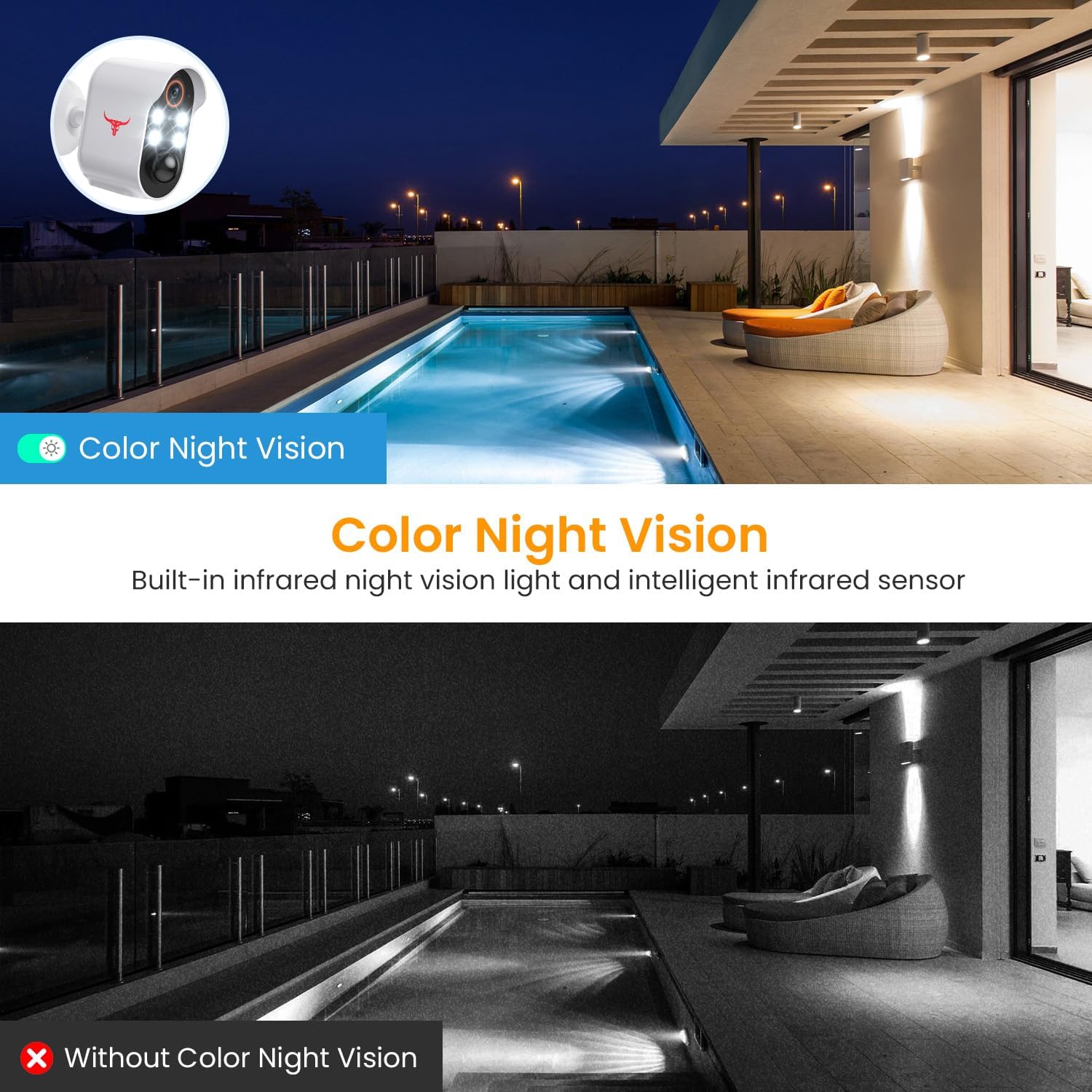
Image: A visual comparison demonstrating the clarity and color provided by the camera's color night vision feature compared to traditional infrared night vision.
5. 클라우드 스토리지
녹화된 푸tage is securely stored in the cloud with AES-128 encryption. An optional subscription plan (sold separately) is required to access and review recorded events. A 30-day free trial is typically included with your purchase.

Image: Visual representation of how the camera's footage is securely uploaded to cloud storage for remote access and review.
유지
1. 태양광 패널 청소
Regularly inspect and clean the solar panel surface to ensure maximum sunlight absorption. Dust, dirt, or debris can reduce charging efficiency. Use a soft, damp 패널을 부드럽게 닦을 천.
2. 배터리 관리
While the solar panel provides continuous power, extreme weather conditions or prolonged periods of low sunlight may affect battery levels. Monitor the battery status via the app. If the battery level drops significantly, you may need to temporarily charge the camera using the USB cable.
3. 내후성
The camera is IP65 water resistant, designed to withstand various weather conditions including rain, shine, and snow. However, avoid submerging the camera in water or exposing it to high-pressure water jets.

Image: The camera and solar panel are designed to withstand various weather conditions, including sun, rain, and snow.
문제 해결
1. Camera Not Connecting to Wi-Fi
- Wi-Fi 네트워크가 2.4GHz인지 확인하십시오. 카메라는 5GHz 네트워크를 지원하지 않습니다.
- 카메라 설치 위치에서 Wi-Fi 신호 강도를 확인하세요. 필요한 경우 카메라를 라우터에 더 가까이 이동하세요.
- Wi-Fi 라우터와 카메라를 다시 시작하세요.
- 앱에 입력한 Wi-Fi 비밀번호가 올바른지 확인하세요.
2. Frequent False Alerts
- 앱에서 동작 감지 감도를 조정하세요.
- Enable AI Human Detection to filter out non-human movements.
- Ensure the camera is not pointed at busy streets or areas with constant movement that is not relevant to security.
3. 배터리 충전 안 됨
- Ensure the solar panel is clean and free of obstructions.
- Verify the solar panel is receiving adequate direct sunlight throughout the day.
- Check the connection between the solar panel cable and the camera's charging port.
- If issues persist, try charging the camera directly with the USB cable to rule out battery issues.
4. No Two-Way Audio
- 앱을 사용하려면 휴대폰의 마이크가 활성화되어 있는지 확인하세요.
- 휴대폰과 앱 모두에서 볼륨 설정을 확인하세요.
- 실시간 오디오 전송을 위해 안정적인 인터넷 연결을 확인하십시오.
공식 제품 영상
비디오: 공식 제품 소개 영상asing the features of the SJCODE Wireless Outdoor Security Camera, including its solar power, two-way talk, and night vision capabilities.
보증 및 지원
For warranty information and technical support, please refer to the contact details provided on the product packaging or within the mobile application. You can also visit the official SJCODE website for frequently asked questions and further assistance.


