1. 서론
This manual provides detailed instructions for the installation, operation, maintenance, and troubleshooting of your XPG CORE Reactor II VE 650W Power Supply Unit (PSU). Please read this manual thoroughly before using the product to ensure proper functionality and safety.
2. 안전 정보
- PSU를 설치, 제거 또는 청소하기 전에 항상 벽면 콘센트에서 전원 코드를 분리하세요.
- PSU c를 열지 마십시오.asing. 고용량tages are present inside, which can cause electric shock. The warranty will be void if the casing가 열립니다.
- 전원 공급 장치는 통풍이 잘 되는 곳에 설치하고, 열원, 직사광선 및 습기를 피하십시오.
- Ensure all cables are securely connected. Loose connections can cause damage to components.
- Use only the modular cables provided with this PSU. Using third-party cables may cause damage and void the warranty.
- 본 제품은 컴퓨터 시스템에서만 사용하도록 설계되었습니다. 다른 용도로 사용하지 마십시오.
3. 패키지 내용
아래 나열된 모든 품목이 제품 패키지에 들어 있는지 확인하세요.
- XPG CORE Reactor II VE 650W Power Supply Unit
- 모듈형 케이블 세트 (12V-2x6 케이블 포함)
- AC 전원 코드
- 장착 나사
- 빠른 시작 가이드

Image: The XPG CORE Reactor II VE 650W power supply unit shown with its retail box, modular cables, AC power cord, and quick start guide.
4. 제품 오버view
The XPG CORE Reactor II VE 650W is an 80 PLUS Gold certified power supply compliant with Intel's ATX 3.1 specifications. It features a fully modular design and an FDB (Fluid Dynamic Bearing) fan for efficient and quiet operation.

이미지: 앞면 view of the XPG CORE Reactor II VE 650W power supply, showcasing its fan grille and XPG branding.

Image: The rear panel of the XPG CORE Reactor II VE 650W power supply, featuring the AC power inlet and the main power switch.

Image: A close-up of the modular cable connection panel on the XPG CORE Reactor II VE 650W PSU, showing labeled ports for Motherboard, CPU & VGA, 12V-2x6, and SATA & Molex connectors.
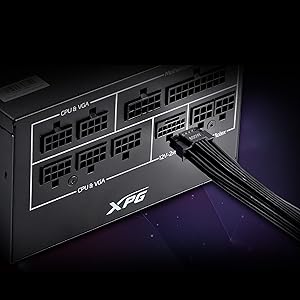
이미지: 자세한 view of the 12V-2x6 connector port on the XPG CORE Reactor II VE 650W PSU, designed for next-generation graphics cards.
5. 설정 및 설치
Follow these steps to properly install your XPG CORE Reactor II VE 650W PSU into your computer system:
- 시스템 준비: 컴퓨터의 전원이 완전히 꺼져 있고 벽면 콘센트에서 플러그가 뽑혀 있는지 확인하십시오. 컴퓨터 케이스를 여십시오.
- 기존 파워서플라이를 제거하십시오(해당되는 경우): Disconnect all cables from your old PSU and remove it from the case.
- 새 파워서플라이를 장착하세요: Insert the XPG CORE Reactor II VE 650W PSU into the designated PSU bay in your computer case. Secure it with the provided mounting screws.
- 필수 케이블 연결:
- 24핀 ATX 케이블을 마더보드에 연결합니다.
- Connect the 4+4-pin or 8-pin EPS/CPU cable(s) to your motherboard's CPU power connector(s).
- Connect the appropriate PCI-E (6+2-pin) or 12V-2x6 cable(s) to your graphics card(s).
- SATA 전원 케이블을 저장 장치(HDD, SSD) 및 광학 드라이브에 연결하십시오.
- Connect Molex cables to any peripherals requiring them.
Ensure all modular cables are firmly seated into both the PSU and the respective components.
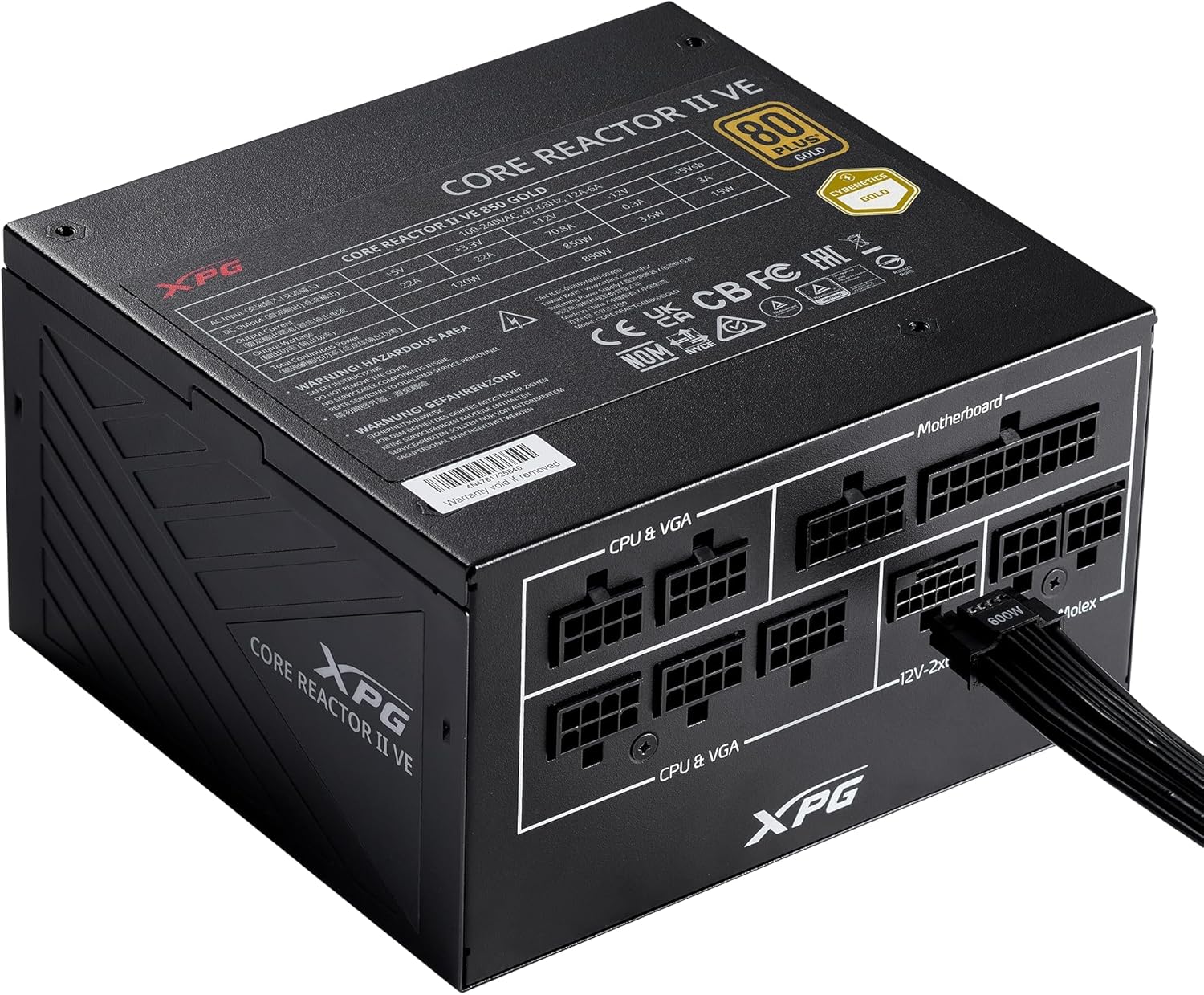
Image: The XPG CORE Reactor II VE 650W power supply with a 12V-2x6 cable connected to its modular port, illustrating a typical cable connection.
- 케이블 관리 : 케이스 내부의 공기 흐름과 미관을 개선하기 위해 케이블을 깔끔하게 정리하세요.
- 케이스를 닫고 전원을 연결하세요: Close your computer case. Connect the AC power cord to the PSU's inlet and then to a wall outlet.
- 전원 켜기: Flip the power switch on the back of the PSU to the 'ON' position and power on your computer.
6. 사용 설명서
The XPG CORE Reactor II VE 650W PSU operates automatically once installed and powered on. It features an FDB fan with intelligent fan control, which adjusts its speed based on the PSU's temperature and load to maintain optimal cooling and minimize noise.
The PSU is designed to provide stable and reliable power to your system. No user intervention is typically required during normal operation.
7. 유지관리
To ensure the longevity and optimal performance of your XPG CORE Reactor II VE 650W PSU, consider the following maintenance tips:
- 먼지 제거: Periodically clean the fan grille and the interior of your computer case to prevent dust buildup. Dust can impede airflow and lead to overheating. Use compressed air for this purpose, ensuring the system is powered off and unplugged.
- 케이블 점검: 가끔씩 모든 모듈식 케이블 연결을 점검하여 안전하게 고정되어 있는지 확인하세요.
- 환경: Operate the PSU in a clean, dry, and well-ventilated environment.
8. 문제 해결
If you encounter issues with your XPG CORE Reactor II VE 650W PSU, refer to the following common troubleshooting steps:
- 전원 없음:
- AC 전원 코드가 전원 공급 장치와 벽면 콘센트에 제대로 연결되어 있는지 확인하십시오.
- 파워서플라이 뒷면의 전원 스위치가 '켜짐' 위치에 있는지 확인하십시오.
- 다른 장치를 연결해 벽면 콘센트가 작동하는지 확인하세요.
- Confirm that the 24-pin ATX and 4+4-pin/8-pin EPS/CPU cables are correctly and firmly connected to the motherboard.
- 시스템 불안정/무작위 종료:
- Ensure all power cables to components (motherboard, CPU, GPU, drives) are securely connected.
- Check for proper ventilation within your computer case. Overheating can cause instability.
- If you have recently added new components, ensure the 650W output is sufficient for your total system load.
- 팬이 회전하지 않음:
- The FDB fan features intelligent control and may not spin at low loads or temperatures. This is normal operation.
- If the fan does not spin under heavy load and the PSU feels excessively hot, contact support.
- 특이한 소음:
- A slight coil whine can sometimes occur under specific loads; this is generally not indicative of a fault.
- If you hear grinding or scraping noises, power off the system immediately and contact support.
이러한 단계를 수행해도 문제가 해결되지 않으면 추가 지원을 받으려면 보증 및 지원 섹션을 참조하세요.
9. 사양
Key technical specifications for the XPG CORE Reactor II VE 650W PSU:
| 특징 | 사양 |
|---|---|
| 모델 번호 | COREREACTORIIVE650G-BKCUS |
| 출력 와트tage | 650 와트 |
| 효율성 인증 | 80 PLUS Gold, CYBENETICS Gold |
| ATX 표준 | ATX 3.1 / EPS v2.92 |
| 폼 팩터 | 에이티엑스 |
| 냉각 방식 | Air (FDB 120mm Fan) |
| 전원 공급 장치 설계 | 전체 모듈식 |
| 제품 크기(L x W x H) | 5.86 x 5.9 x 3.38인치(140x150x86mm) |
| 품목 무게 | 5.07파운드 |
| 커넥터 유형 | ATX, Molex, PCI Express, SATA, 12V-2x6 |
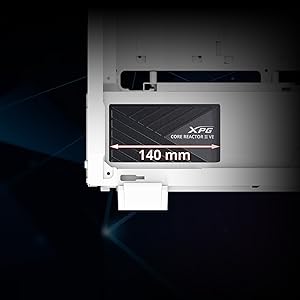
Image: A diagram illustrating the compact 140mm length of the XPG CORE Reactor II VE power supply, highlighting its compatibility with various PC cases.

Image: Visual representation of the multiple protection mechanisms integrated into the PSU, including OPP (Over Power Protection), OVP (Over Voltage Protection), SIP (Surge & Inrush Protection), SCP (Short Circuit Protection), UVP (Under Voltage Protection), OCP (Over Current Protection), OTP (Over Temperature Protection), and NLO (No Load Operation).
10. 보증 및 지원
For warranty information, technical support, or service inquiries regarding your XPG CORE Reactor II VE 650W PSU, please visit the official XPG website or contact their customer support directly. Details can typically be found on the product packaging or the manufacturer's official support pages.
보증 청구를 위해 구매 증빙 자료를 보관하십시오.


