1. 서론
This manual provides essential information for the safe and efficient operation of your Anern AN-SCI-EVO Hybrid Solar Inverter. Please read this manual thoroughly before installation and use, and keep it for future reference.
The Anern AN-SCI-EVO is a high-frequency, grid-connected hybrid inverter designed to integrate solar power with your electrical grid. It can operate without batteries but is compatible with lead-acid, gel, and lithium battery types. Its comprehensive LCD display allows for easy configuration of various functions, including battery charging current, AC/solar charger priority, and input voltag설정.
2. 안전 정보
중요 안전 지침:
- Read all instructions and cautionary markings on the unit and in this manual before operating the inverter.
- 설치는 모든 지역 전기 규정에 따라 자격을 갖춘 인원이 수행해야 합니다.
- 인버터를 분해하지 마십시오. 내부에는 사용자가 수리할 수 있는 부품이 없습니다. 수리는 자격을 갖춘 서비스 담당자에게 맡기십시오.
- Ensure all connections are tight to avoid loose connections that can cause overheating.
- Do not connect the inverter to a power source that exceeds its rated input voltage.
- Always disconnect all power sources (PV, battery, AC) before performing any maintenance or cleaning.
- This inverter is designed for indoor use. Protect it from direct sunlight, rain, snow, and excessive dust.
- 과열을 방지하기 위해 인버터 주변에 적절한 환기가 이루어지도록 하세요.
3. 제품 특징
- Hybrid Operation: Grid-tied inverter capable of operating with or without batteries.
- 순수 사인파 출력: Provides high-quality, stable AC power, protecting sensitive electronics and extending their lifespan.
- 폭넓은 배터리 호환성: Supports lead-acid, gel, and lithium battery types.
- 고급 MPPT 기술: Maximum Power Point Tracking for efficient solar energy harvesting with a wide PV input voltage 30-400 VDC 범위.
- 종합적인 LCD 디스플레이: User-friendly interface for monitoring system status and configuring settings such as battery charging current, AC/solar charger priority, and input voltage 범위.
- 원격 모니터링: Supports WIFI/GPRS remote monitoring for accessing data and controlling the inverter from anywhere (WiFi module included).
- 다중 보호: Includes overcurrent, low voltage, short circuit, overheating, and overcharge protection.

그림 3.1: 전면 view of the Anern AN-SCI-EVO-2000 Hybrid Solar Inverter, showing the LCD display and control buttons.
4. 패키지 내용
Upon unpacking, please verify that all items are included and undamaged:
- Anern AN-SCI-EVO Hybrid Solar Inverter (1 unit)
- WiFi Module (1 unit)
- 사용 설명서 (본 문서)
- 장착 액세서리(해당되는 경우, 자세히 지정되지 않음)
5. 설치 및 설정
Proper installation is crucial for the safe and efficient operation of the inverter. It is recommended that installation be performed by a certified electrician.
5.1 사이트 선택
- Install the inverter indoors, away from direct sunlight, moisture, and corrosive substances.
- Ensure the ambient temperature is within the operating range (refer to specifications).
- Provide at least 20 cm of clearance around the inverter for proper ventilation.
- 인버터를 튼튼한 표면에 수직으로 장착하세요.
5.2 배선 연결
Before making any connections, ensure all power sources (PV array, battery, AC grid) are disconnected and secured against accidental re-connection.
- 배터리 연결: Connect the battery bank to the inverter's battery terminals. Ensure correct polarity (+ to + and - to -). The inverter requires a battery connection to operate.
- PV 어레이 연결: Connect the solar panel array to the inverter's PV input terminals. Observe correct polarity and ensure the PV input voltage is within the specified MPPT range (30-400 VDC) and does not exceed the maximum PV VOC (400 VDC). Recommended PV cable size is 16 AWG.
- AC 출력 연결: Connect your household loads or distribution panel to the inverter's AC output terminals.
- AC Input Connection (Grid/Generator): If connecting to the utility grid or a generator, connect it to the inverter's AC input terminals.
- 접지: 인버터가 현지 전기 규정에 따라 올바르게 접지되었는지 확인하세요.

Figure 5.1: System connection diagram illustrating various power sources and loads for the hybrid inverter.
5.3 WiFi 모듈 설치
The included WiFi module allows for remote monitoring. Connect the module to the designated communication port on the inverter. Follow the instructions provided with the WiFi module for network configuration and app setup.

그림 5.2: 이상view of inverter protection features and WiFi monitoring capability.
6. 사용 설명서
6.1 초기 전원 켜기
- 모든 연결이 안전하게 완료되면 배터리 차단기를 켜십시오.
- 태양광 패널 차단기를 켜세요.
- (전력망/발전기에 연결된 경우) 교류 입력 차단기를 켜십시오.
- The inverter will power on, and the LCD display will illuminate.
6.2 LCD 디스플레이 및 설정
The LCD display provides real-time system information and allows for configuration of various parameters. Use the buttons below the display to navigate menus and adjust settings.
- 모니터링: View 배터리 볼륨tage, PV 입력 볼륨tage, AC 출력 voltage, charging current, and load power.
- 충전 전류: Adjust the battery charging current.
- Charger Priority: Set the priority for AC charger or solar charger.
- 입력 Voltag전자 범위: Configure acceptable input voltage ranges for different applications.
6.3 작동 모드
The inverter supports multiple charging and output modes to meet diverse user requirements:
- Solar Energy Priority: Solar power is primarily used to power loads and charge batteries. Utility power is used only when solar power is insufficient.
- Solar Energy + Utility Simultaneously: Solar power and utility power are used concurrently to power loads and charge batteries.
- Battery Only Charging: The inverter charges batteries from solar or utility, but does not directly power loads from these sources.
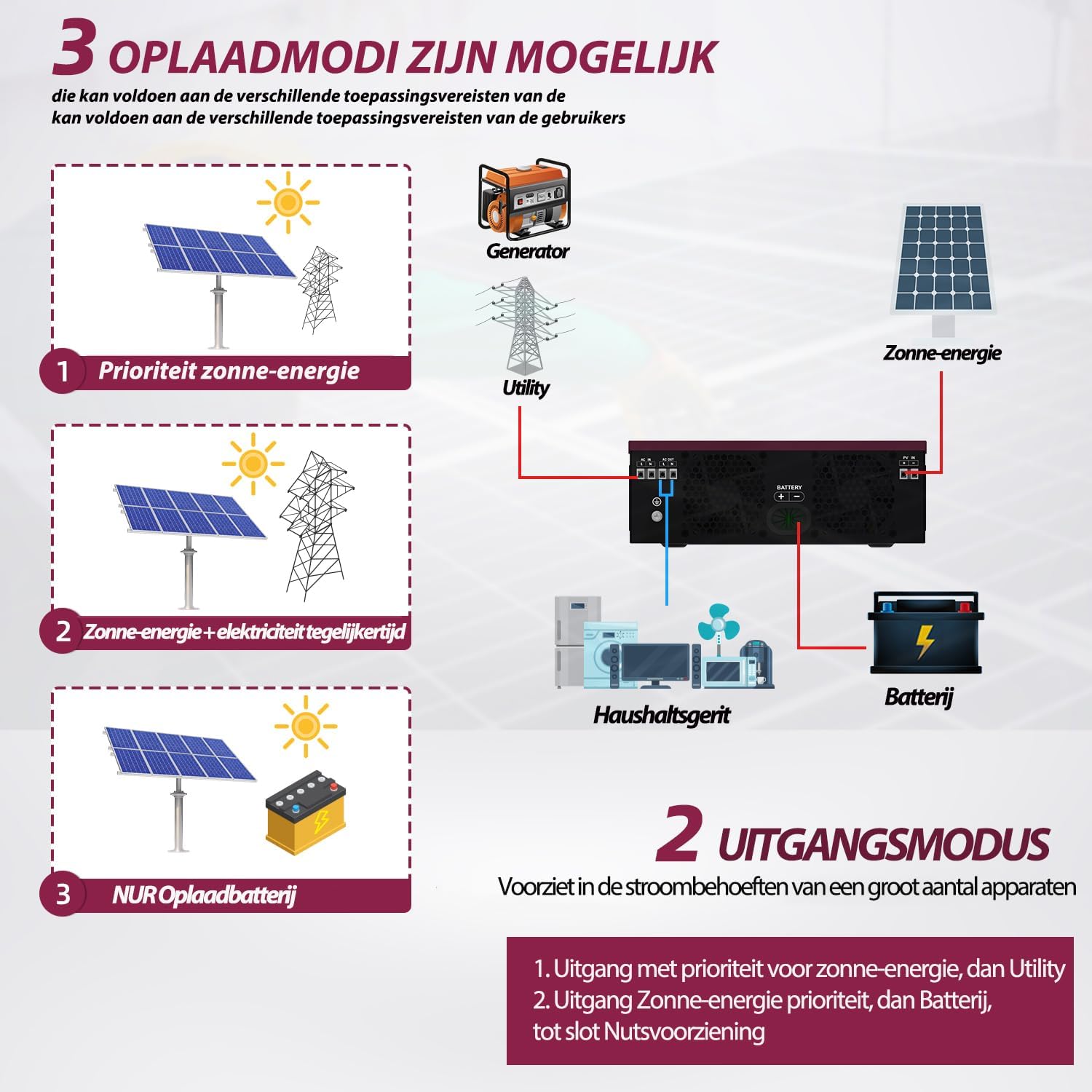
Figure 6.1: Available charging modes for the hybrid solar inverter.
6.4 원격 모니터링
Once the WiFi module is configured, you can monitor the inverter's performance and adjust settings remotely via a mobile application. This allows for real-time data access and control.
7. 유지관리
정기적인 유지관리는 인버터의 수명과 최적의 성능을 보장합니다.
- 청소: Periodically clean the inverter's exterior with a dry cloth. Ensure ventilation openings are free from dust and debris. Do not use liquid cleaners.
- 연결 확인: 매년 모든 전기 연결부(태양광 패널, 배터리, 교류 전원)의 조임 상태와 부식 여부를 점검하십시오. 느슨한 연결부는 조여주십시오.
- 통풍: Ensure the area around the inverter remains clear to allow for proper airflow and heat dissipation.
- 배터리 검사: If using batteries, follow the battery manufacturer's maintenance guidelines.
8. 문제 해결
This section provides solutions to common issues. If the problem persists, contact customer support.
| 문제 | 가능한 원인 | 해결책 |
|---|---|---|
| 인버터 전원이 켜지지 않습니다. | 배터리가 연결되지 않았거나 배터리 전압이 낮습니다.tage. | Ensure battery is connected and charged. The inverter requires a battery to operate. |
| AC 출력이 없습니다. | 과부하, 단락 또는 내부 오류. | Reduce load. Check for short circuits in wiring. Restart inverter. If fault persists, contact support. |
| Inverter reports an error when load is connected. | Load exceeds inverter capacity, or specific load type incompatibility. | Ensure total load does not exceed 2000W. Some inductive loads (e.g., motors, refrigerators) have high startup currents; ensure the inverter's surge capacity (2000W) is sufficient. Try connecting a smaller, resistive load to test. |
| PV input not detected or low. | Insufficient sunlight, incorrect PV wiring, or PV voltage는 MPPT 범위 밖입니다. | Check solar panel connections and ensure adequate sunlight. Verify PV voltage is within 30-400 VDC. |
| 과열 경고. | 환기가 제대로 되지 않거나 주변 온도가 지나치게 높은 경우. | Ensure adequate clearance around the inverter. Clean ventilation openings. Reduce ambient temperature if possible. |
9. 사양
| 매개변수 | 값 |
|---|---|
| 모델 | AN-SCI-EVO-2000 (ECO-2000) |
| 최대 PV 입력 전력 | 2000와트 |
| PV 볼륨tag및 범위 | 30-400V DC |
| 최대 PV VOC(개방 회로 전압)tage) | 400V 직류 |
| 스타트업 규모tage | >130V |
| 권장 태양광 케이블 크기 | 16와이어 |
| 최대 충전 전류 | 80A |
| 공칭 입력 주파수 | 50/60Hz |
| 출력 전력 | 2000와트 |
| 서지 용량 | 2000와트 |
| 치수(길이 x 너비 x 높이) | 45.5 x 35.5 x 20cm |
| 무게 | 6kg |
10. 보증 및 지원
보증: Anern provides a 3-year warranty for this inverter. Please retain your proof of purchase for warranty claims.
반품 정책: A 30-day, uncomplicated return policy is offered.
고객 지원: For technical assistance, troubleshooting, or to obtain a German language manual, please contact Anern customer service through the platform where you purchased the product.


