소개
The Turtle Beach REACT-R Wired Game Controller is officially licensed for Xbox Series X, Xbox Series S, Xbox One, and Windows 10|11 PCs. This controller is designed to enhance your gaming experience with quick-access audio controls, mappable buttons, and immersive vibration feedback. Its ergonomic design ensures comfort during extended gaming sessions.

그림 1: 전면 view of the Turtle Beach REACT-R Wired Game Controller.
패키지 내용
패키지에 모든 품목이 들어 있는지 확인하세요.
- REACT-R 컨트롤러
- 8’ / 2.5m USB Cable
- 빠른 시작 가이드
- 터틀 비치 스티커

Figure 2: Illustration of the items included in the REACT-R Controller package.
제품 끝view
The REACT-R controller integrates several features to enhance your gaming performance and comfort:
- Game-Enhancing Audio Controls: Quick-access audio controls including Superhuman Hearing, game and chat volume balance, and mic mute.
- Superhuman Hearing Sound Setting: Hear every detail, from quiet footsteps to enemy weapon reloads, for a competitive advantage.
- Two Mappable Quick-Action Buttons: Speed up your response with two customizable buttons on the backside of the controller.
- 3.5mm Headset Connection: Utilize Turtle Beach audio functions by plugging in any 3.5mm connected headset.
- 진동 피드백: Dual rumble motors in the handles and triggers provide immersive, realistic gameplay.
- 반응형 컨트롤: Textured triggers and bumpers, an accurate 8-way D-pad, and smooth thumbstick movement ensure faster reactions.
- Ergonomic Textured Grips: Comfortable, fatigue-free shape with textured handle surfaces for a firm grip during long gaming sessions.
- Xbox 공식 라이선스 제품: Ensures reliable performance and compatibility with Xbox Series X|S, Xbox One, and Windows 10|11 PCs.

Figure 3: Detail of the integrated audio controls on the REACT-R controller.
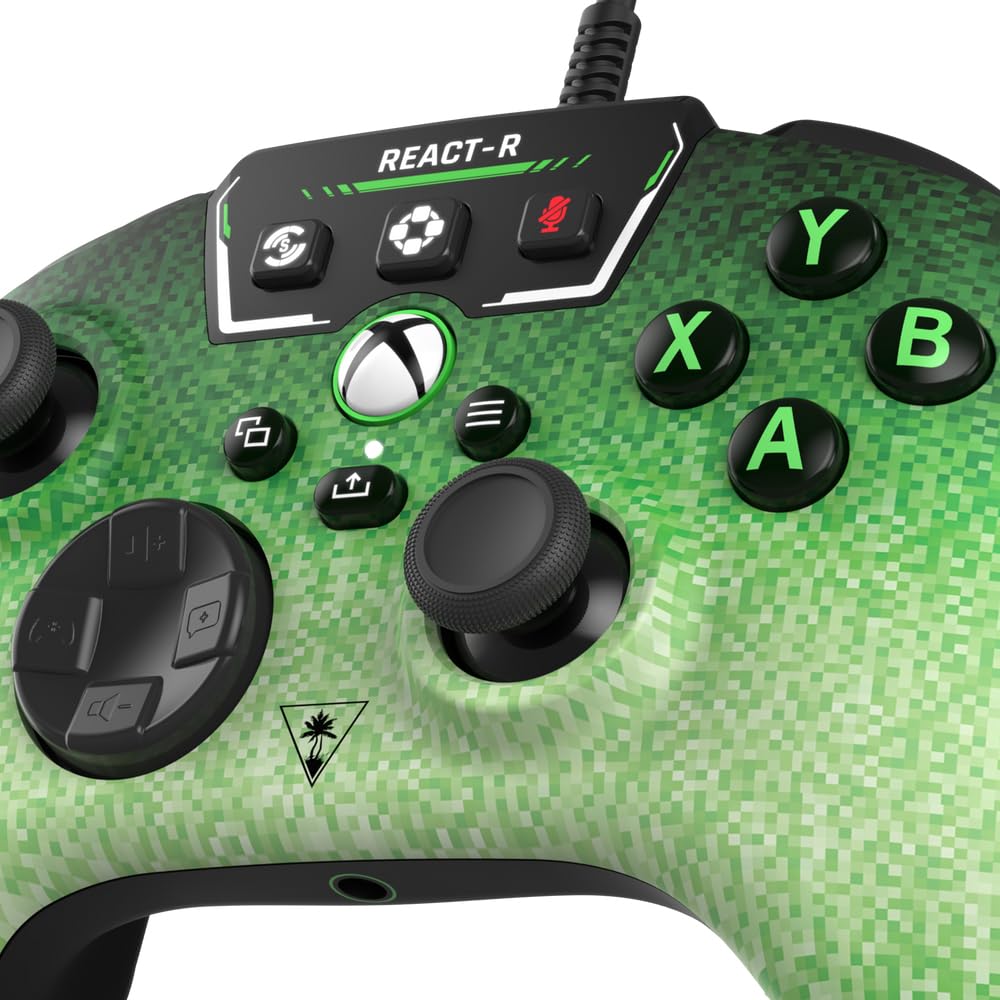
Figure 4: The two mappable quick-action buttons located on the back of the controller.
설정
컨트롤러 연결
- Locate the 8’ / 2.5m USB-C cable included in the package.
- Connect the USB-C end of the cable to the port on the top of the REACT-R controller.
- Connect the standard USB-A end of the cable to an available USB port on your Xbox console (Series X|S or Xbox One) or Windows 10|11 PC.
- 컨트롤러는 자동으로 전원이 켜지고 기기에 연결됩니다.
헤드셋 연결
- Plug any 3.5mm wired gaming headset into the 3.5mm headset jack located at the bottom of the controller.
- Once connected, you can use the integrated audio controls on the controller to manage your headset settings.
작동 지침
오디오 컨트롤
The top panel of the controller features dedicated audio controls:
- 볼륨 +/- : Adjust the overall game audio volume.
- Chat +/-: Adjust the chat volume relative to the game volume.
- 마이크 음소거: Toggle your microphone on or off.
- 초인적인 청력: Activate this mode to enhance critical in-game sounds like footsteps and reloads.
Mappable Quick-Action Buttons
The two buttons on the back of the controller (P1, P2) can be programmed to replicate any other controller button for quicker reactions. Refer to the Quick Start Guide for detailed mapping instructions.
진동 피드백
The dual rumble motors provide tactile feedback for in-game events, enhancing immersion. This feature is active by default.
유지
- 부드럽고 마른 천으로 닦아 컨트롤러를 깨끗하게 유지하세요.
- 컨트롤러를 극한의 온도, 습도 또는 직사광선에 노출시키지 마세요.
- 컨트롤러를 분해하거나 개조하려고 하지 마십시오. 그럴 경우 보증이 무효화됩니다.
문제 해결
If you encounter any issues with your REACT-R controller, please try the following:
- Ensure the USB-C cable is securely connected to both the controller and your gaming device.
- Test the controller on a different USB port or a different compatible device to rule out port or device issues.
- If using a headset, ensure it is fully plugged into the 3.5mm jack and that audio settings are correctly configured on your device.
- For further assistance, please refer to the official Turtle Beach support web사이트를 방문하거나 고객 서비스에 문의하세요.
명세서
| 모델 번호 | TBS-0740-05 |
| 호환성 | Xbox Series X|S, Xbox One, Windows 10|11 PCs |
| 연결성 | Wired (8’ / 2.5m USB-C to USB-A cable) |
| 오디오 출력 | 3.5mm 헤드셋 잭 |
| 치수 | 6.12 x 2.57 x 4.25 인치 |
| 무게 | 13.3 온스 |
| 제조업체 | 거북이 해변 |
보증 및 지원
This product is covered by a limited warranty. For detailed warranty information, product registration, and technical support, please visit the official Turtle Beach web사이트. 보증 청구를 위해 구매 증빙 자료를 보관하세요.
Copyright © 2023 Voyetra Turtle Beach, Inc. All rights reserved. Turtle Beach, the palm tree logo, Superhuman Hearing, and Voyetra are registered trademarks and/or trademarks of VTB, Inc. Microsoft, Xbox, Xbox “Sphere” Design, Xbox Series X|S, Xbox One, and Windows are trademarks of the Microsoft group of companies. All other trademarks are the properties of their respective owners.


