1. 서론
This manual provides essential information for the safe and efficient use of your CUBOT P80 smartphone. Please read it carefully before using the device and keep it for future reference.
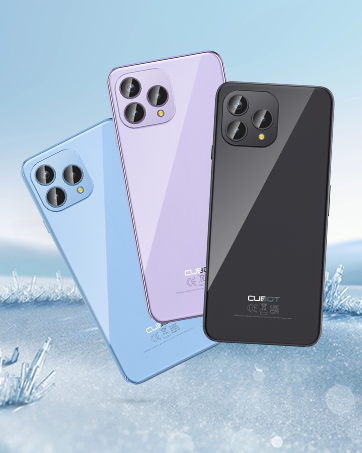
The CUBOT P80 is available in multiple color options.
2. 상자 안에 무엇이 들어있나요?
제품 패키지에 모든 품목이 들어 있는지 확인하세요.
- CUBOT P80 스마트폰
- 휴대폰 보호 케이스
- Phone protection film (pre-applied or separate)
- 충전기 (9V2A)
- USB 케이블(C형)
- Type-C 헤드폰
- SIM pin ejector tool
- 빠른 시작 가이드
- Compliance regulation document

Included accessories with the CUBOT P80 smartphone.
3. 기기 레이아웃 및 물리적 특징
The CUBOT P80 features a sleek design with a 6.58-inch FHD+ display and a triple camera system on the rear.
치수 및 무게
- 두께: 9.75mm (XNUMXmm)
- 무게: 217g

The CUBOT P80's slim profile 가벼운 디자인입니다.
지문 스캐너
The device includes a side-mounted fingerprint scanner for secure and quick unlocking.

Fingerprint sensor location for convenient unlocking.
4. 설정
Inserting SIM Cards and TF Card
The CUBOT P80 supports dual SIM functionality or one SIM card with a TF (microSD) card for expanded storage.
- 휴대폰 측면에서 SIM 트레이를 찾으세요.
- SIM 꺼내기 도구를 트레이 옆에 있는 작은 구멍에 넣고 트레이가 튀어나올 때까지 단단히 누르세요.
- Place your Nano SIM card(s) and/or TF card into the designated slots on the tray. Ensure the gold contacts are facing down.
- 트레이를 조심스럽게 휴대폰 안으로 밀어 넣어 기기 본체와 딱 맞도록 합니다.

SIM and TF card installation options.
초기 전원 켜기
Press and hold the power button located on the side of the device until the CUBOT logo appears. Follow the on-screen instructions to complete the initial setup, including language selection, Wi-Fi connection, and Google account login.
5. 사용 설명서
안드로이드 13 운영체제
The CUBOT P80 runs on Android 13, offering a user-friendly interface, enhanced privacy controls, and access to the Google Play Store for applications.

위에view of the Android 13 operating system.
디스플레이 기능
The device features a 6.58-inch FHD+ Capacitive Touch Screen with a resolution of 2408x1080 pixels, 400 nits peak brightness, and a 20:9 aspect ratio.

Key features of the CUBOT P80 display.
6. 카메라 기능
The CUBOT P80 is equipped with an AI Quad Camera System on the rear and a high-resolution front camera.
카메라 사양
- 메인 카메라: 48MP
- 전면 카메라: 24MP
- 매크로 카메라: 2MP

The CUBOT P80's AI Quad Camera System.
메인 카메라
The 48MP main camera captures images with high detail and clarity.

High-resolution capture with the 48MP main camera.
전면 카메라
The 24MP front camera is designed for clear selfies and video calls, featuring beauty modes.

Selfie capabilities of the 24MP front camera.
매크로 카메라
The 2MP macro lens allows for detailed close-up photography of small objects.

Detailed close-up shots with the 2MP macro camera.
Multiple Camera Modes
The camera application includes various modes such as Night View, Portrait, and Panorama to enhance your photography experience.

Explore various photography modes.
7. 연결성
네트워크 및 Wi-Fi
The CUBOT P80 supports Dual 4G Dual VoLTE for cellular connectivity and 2.4/5GHz Dual Wi-Fi for stable and faster internet access.
- GSM: 850/900/1800/1900MHz
- WCDMA: B1/2/4/5/6/8/19
- FDD : B1/2/3/4/5/7/8/12/13/17/18/19/20/26/28A/28B/66
- TDD: 38/39/40/41
Cellular and Wi-Fi network support.
NFC and GPS
The device includes Multifunctional NFC for cash-free mobile payments and supports GPS, GLONASS, and Galileo for accurate global satellite positioning.
NFC for payments and advanced GPS for navigation.
8. 배터리 및 충전
The CUBOT P80 is equipped with a 5200mAh battery, providing extended usage times. It supports 18W fast charging and OTG (On-The-Go) functionality.
- 대기: 최대 26일
- 전화: 최대 29시간
- 음악 재생: 최대 26시간
- 비디오 재생 : 최대 7시간

Battery life and charging features.
9. 저장 및 성능
The CUBOT P80 is powered by an MT8788 Octa-core processor and features ample memory and storage.
- 프로세서: MediaTek MT8788 Octa-core (12nm process, 2.0 GHz clock speed)
- 숫양: 8GB + 8GB Expansion RAM (total 16GB)
- 내부 저장소(ROM): 256GB
- 확장 가능한 스토리지: TF 카드를 통해 최대 1TB까지 지원

Processor and memory details.

RAM expansion technology for enhanced performance.

Internal and expandable storage options.
10. 중요 공지
통신사 호환성
The CUBOT P80 smartphone does not support AT&T, Cricket, or Verizon networks in the United States. Please confirm your carrier's compatibility before purchasing 또는 이 장치를 사용합니다.

Important information regarding network compatibility.
11. 사양
| 특징 | 사양 |
|---|---|
| 모델 번호 | P80-schwarz-US |
| 운영 체제 | 안드로이드 13.0 |
| 프로세서 | MediaTek MT8788 Octa-core |
| 숫양 | 16GB(8GB + 8GB 확장) |
| 내부 저장소 | 256GB (XNUMX기가바이트) |
| 확장 가능한 스토리지 | 최대 1TB (TF 카드) |
| 화면 크기 | 6.58 인치 |
| 해결 | 1920 x 1080(FHD+) |
| 메인 카메라 | 48MP |
| 전면 카메라 | 24MP |
| 매크로 카메라 | 2MP |
| 배터리 용량 | 5200mAh |
| 충전 중 | 18W 고속 충전 |
| 연결성 | 4G LTE, Dual SIM, Wi-Fi (2.4/5GHz), NFC, Bluetooth |
| 항해 | GPS, GLONASS, 갈릴레오 |
| 오디오 잭 | 3.5mm (XNUMXmm) |
| 치수 | 9.29 x 7.17 x 1.81인치(패키지) |
| 품목 무게 | 7.7 온스 |
12. 문제 해결
일반적인 문제 및 솔루션
- 장치가 켜지지 않음: 배터리가 충전되어 있는지 확인하십시오. 휴대전화를 충전기에 연결하고 몇 분 정도 기다린 후 다시 전원을 켜보세요.
- 네트워크 신호가 약함: Check SIM card insertion. Ensure you are within your carrier's coverage area. Note that the CUBOT P80 is not compatible with AT&T, Cricket, or Verizon.
- 애플리케이션 충돌: Clear the cache of the problematic app (Settings > Apps > [App Name] > Storage > Clear Cache). If the issue persists, try reinstalling the app or performing a factory reset (backup data first).
- 배터리가 빠르게 소모됨: 화면 밝기를 낮추고, 백그라운드에서 실행 중인 사용하지 않는 앱을 종료하고, 불필요한 알림을 비활성화하고, 위치 서비스 사용을 제한하세요.
- Fingerprint scanner not working: Ensure your finger is clean and dry. Re-register your fingerprints in the security settings.
13. 보증 및 지원
For warranty information and technical support, please refer to the official CUBOT web사이트를 방문하거나 판매점에 문의하세요. 보증 청구를 위해 구매 증빙 자료를 보관하세요.
온라인 리소스:
- 방문하세요 CUBOT Store on Amazon 제품 정보 및 업데이트를 확인하세요.
14. 제품 비디오 끝view
공식 제품 영상 쇼asing the CUBOT P80's features and design.


