1. 서론
This manual provides comprehensive instructions for the installation, operation, and maintenance of the MAIMEIMI MA-FLC-821 Throttle Response Controller. This device is designed to modify the electronic throttle signal, offering enhanced throttle response and customizable driving modes for compatible vehicles. Please read this manual thoroughly before installation and use to ensure proper function and safety.
2. 제품 오버view 및 기능
The MAIMEIMI MA-FLC-821 Throttle Response Controller is an electronic device that intercepts and modifies the signal from your vehicle's accelerator pedal to the engine control unit (ECU). This modification results in a more immediate and responsive throttle, reducing the typical delay found in electronic throttle systems. The controller features multiple driving modes and fine-tuning levels to suit various driving preferences and conditions.
주요 특징:
- 9 Drive Modes: Offers nine distinct driving modes, each with nine adjustable intensity levels, allowing for precise customization of throttle response.
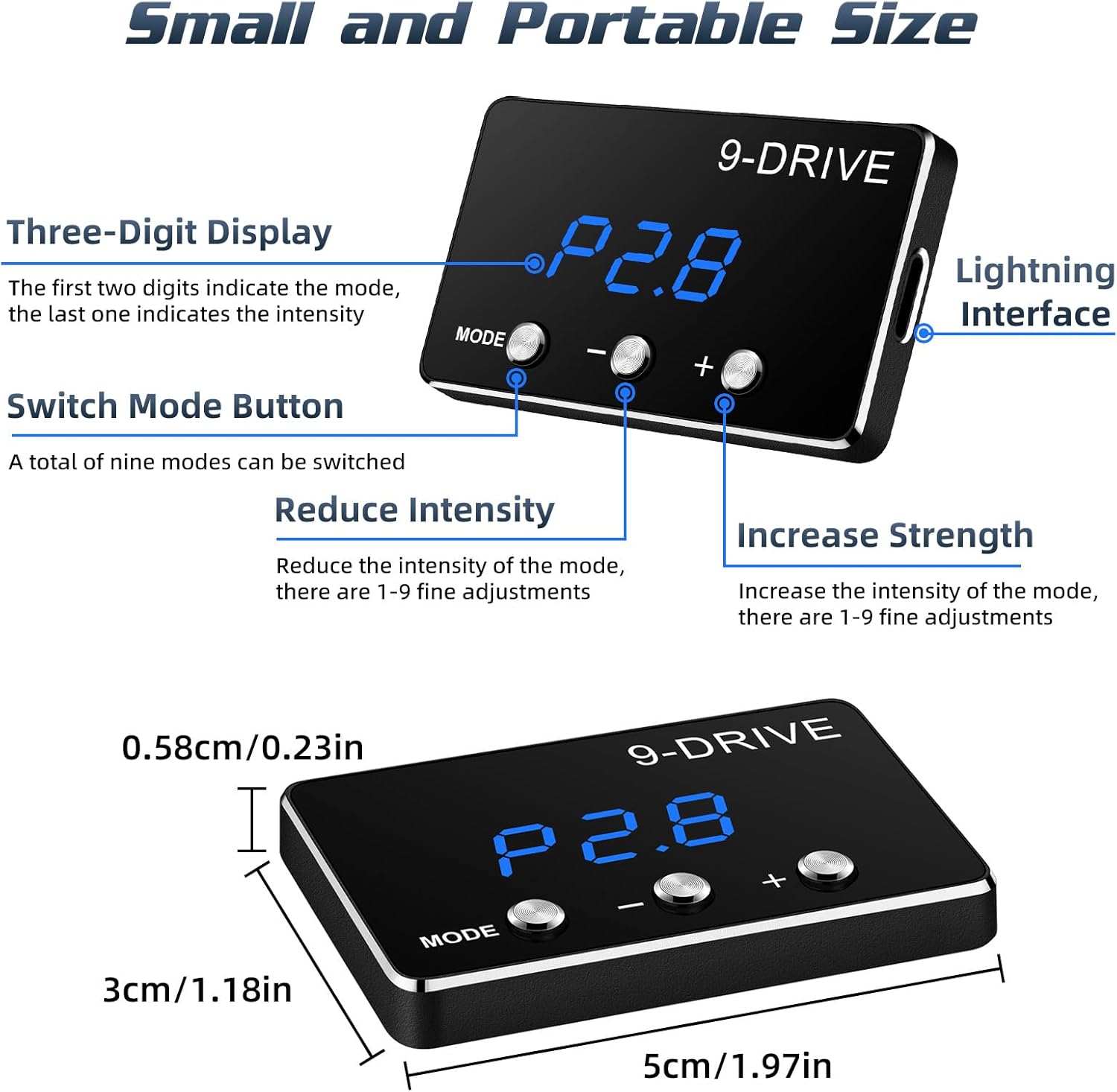
- Clear Display & Easy Adjustment: Equipped with a three-digit LED display to show the current mode and intensity level. Three buttons facilitate easy mode selection and intensity adjustment.
- Small & Portable Design: Compact size (approximately 5cm x 3cm x 0.58cm) for discreet installation and minimal intrusion into the vehicle's interior.
- 플러그 앤 플레이 설치: Designed for straightforward installation without cutting wires or complex modifications.
- 메모리 기능: Retains the last selected driving mode and intensity level after the vehicle is turned off.
3. 호환성
This throttle response controller is compatible with specific Toyota models. Please verify your vehicle's make, model, year, and engine type against the table below to ensure compatibility.

중요 참고 사항:
- This electronic throttle controller is only applicable to vehicles equipped with an electronic throttle.
- It does not support vehicles with mechanical throttles.
- Always ensure your car has an electronic throttle with a compatible plug before installation.
4. 패키지 내용
패키지를 열 때 다음 구성품이 모두 들어 있는지 확인하세요.
- Throttle Response Controller Display Screen
- Main Control Unit (Adapter)
- 연결 케이블
- Zip Ties (for securing cables)
- 사용 설명서 (본 문서)

5. 설치 가이드
Follow these steps carefully for a successful installation. Ensure your vehicle's ignition is OFF before beginning.
- Locate the Accelerator Pedal: Identify the electronic accelerator pedal assembly in your vehicle.
- Disconnect the Pedal Interface: Carefully unplug the wiring harness from the accelerator pedal.
- 컨트롤러를 연결합니다: Connect the MAIMEIMI throttle controller's wiring harness inline with the accelerator pedal interface. One end connects to the vehicle's pedal, and the other to the disconnected harness. Ensure a secure fit.
- 디스플레이 장치를 설치하십시오: Route the cable for the display unit to a convenient location on your dashboard. Use the provided adhesive or zip ties to secure the display unit.
- 안전한 배선: Use the provided zip ties to neatly secure any loose wiring, preventing interference with pedal operation or other vehicle components.

안전 예방 조치:
All adjustments to the throttle controller must be made when the vehicle is safely parked and not in motion. Never attempt to adjust settings while driving.
6. 사용 설명서
The MAIMEIMI MA-FLC-821 features 9 distinct driving modes, each with 9 adjustable intensity levels (1-9). The display shows the mode (e.g., P1, P2, SSS, EC, NOR) and the intensity level (e.g., .8). The first two digits indicate the mode, and the last digit indicates the intensity.
모드 선택:
- 를 누르세요 방법 button to cycle through the available driving modes.
- The display will show the current mode (e.g., P1, P2, SSS, EC, NOR).
강도 조정:
- 모드를 선택하면 다음을 사용하십시오. + button to increase the intensity level (1-9).
- 사용하세요 - button to decrease the intensity level (1-9).
- Higher intensity levels provide a more aggressive throttle response.
Driving Modes Explained:

- NOR (Normal Mode): This is the original factory throttle setting. The controller is active but does not modify the signal.
- P1 Comfort Mode (Automatic/Manual): Provides a smoother, more relaxed throttle response, suitable for daily driving and city conditions.
- P2 Sport Mode (Automatic/Manual): Offers a more dynamic and responsive throttle, ideal for spirited driving and improved acceleration.
- P3 Racing Mode (Automatic/Manual): Delivers the most aggressive throttle response for maximum acceleration and performance.
- EC Fuel-Saving Mode (Automatic/Manual): Optimizes throttle response for improved fuel efficiency, reducing aggressive acceleration.
7. 유지관리
The MAIMEIMI MA-FLC-821 Throttle Response Controller is designed for durability and requires minimal maintenance. To ensure its longevity and optimal performance:
- 기기를 깨끗하고 먼지와 습기가 없는 상태로 유지하세요. 청소 시에는 부드럽고 마른 천을 사용하세요.
- 장치를 극한의 온도나 직사광선에 장기간 노출시키지 마십시오.
- Ensure all connections remain secure. Periodically check the wiring harness for any signs of wear or damage.
- 기기를 열거나 개조하려고 하지 마세요. 보증이 무효화되고 기기가 손상될 수 있습니다.
8. 문제 해결
If you encounter any issues with your MAIMEIMI MA-FLC-821 Throttle Response Controller, please refer to the following troubleshooting tips:
전원/디스플레이 꺼짐:
- Check all connections to ensure they are securely plugged in.
- 차량의 점화가 켜져 있는지 확인하세요.
- Ensure the connecting cable is not damaged.
No Change in Throttle Response:
- Confirm that the device is powered on and displaying a mode other than 'NOR'.
- Check the intensity level; increase it using the '+' button.
- 재설정 절차: With the vehicle ignition ON (engine OFF), press and hold the MODE button until a specific code (e.g., '800') appears. Adjust to '800' if necessary. Fully depress and release the accelerator pedal. Then, press and hold the MODE button again until the main screen reappears. Start the vehicle.
- Ensure your vehicle is compatible with the device (refer to Section 3).
Check Engine Light or Error Codes:
- Immediately disconnect the throttle controller and reconnect the factory accelerator pedal harness.
- Start the vehicle and check if the error codes persist. If they do, consult a qualified mechanic.
- If the codes clear after removing the device, the controller may be incompatible with your specific vehicle's ECU or may be faulty. Contact customer support.
간헐적인 기능:
- Check for loose connections at both the pedal and the controller.
- Ensure the wiring is not pinched or damaged.
- Consider environmental factors like extreme heat or cold, though the device is designed to be robust.
If these steps do not resolve the issue, please contact MAIMEIMI customer support for further assistance.
9. 사양
| 사양 | 세부 사항 |
|---|---|
| 상표 | 마이메이미 |
| 모델 번호 | MA-FLC-821 |
| 품목 무게 | 4.6 온스 |
| 패키지 크기 | 6.26 x 5.79 x 2.13 인치 |
| 드라이브 모드 | 9 (each with 9 intensity levels) |
| 표시하다 | 3 자리 LED |
| 호환성 | Electronic throttle vehicles (specific Toyota models) |
10. 보증 정보
MAIMEIMI products are manufactured to high-quality standards. This product comes with a limited warranty against defects in materials and workmanship under normal use. The warranty period typically covers 12 months from the date of purchase. Please retain your proof of purchase for warranty claims.
보증은 다음 사항을 포함하지 않습니다:
- 부적절한 설치 또는 오용으로 인한 손상.
- 허가받지 않은 수리나 개조로 인해 발생한 손상.
- 정상적인 마모 및 파손.
- Damage due to accidents or external causes.
For detailed warranty terms and conditions, please refer to the official MAIMEIMI web사이트를 방문하거나 고객 지원팀에 문의하세요.
11. 고객 지원
If you have any questions, require technical assistance, or need to make a warranty claim, please contact MAIMEIMI customer support through the following channels:
- 이메일: [고객 지원 이메일 주소를 여기에 입력하세요]
- Web대지: MAIMEIMI Official Store on Amazon
- 핸드폰: [고객 지원 전화번호를 여기에 입력하세요]
Please provide your product model number (MA-FLC-821) and proof of purchase when contacting support to expedite the process.


