소개
This manual provides comprehensive instructions for the Silvergear XL Smartwatch. It covers setup, operation, maintenance, and troubleshooting to ensure you get the most out of your device. The Silvergear XL Smartwatch features a large 2.41-inch IPS display, integrated cameras, 4G connectivity, and extensive fitness tracking capabilities.
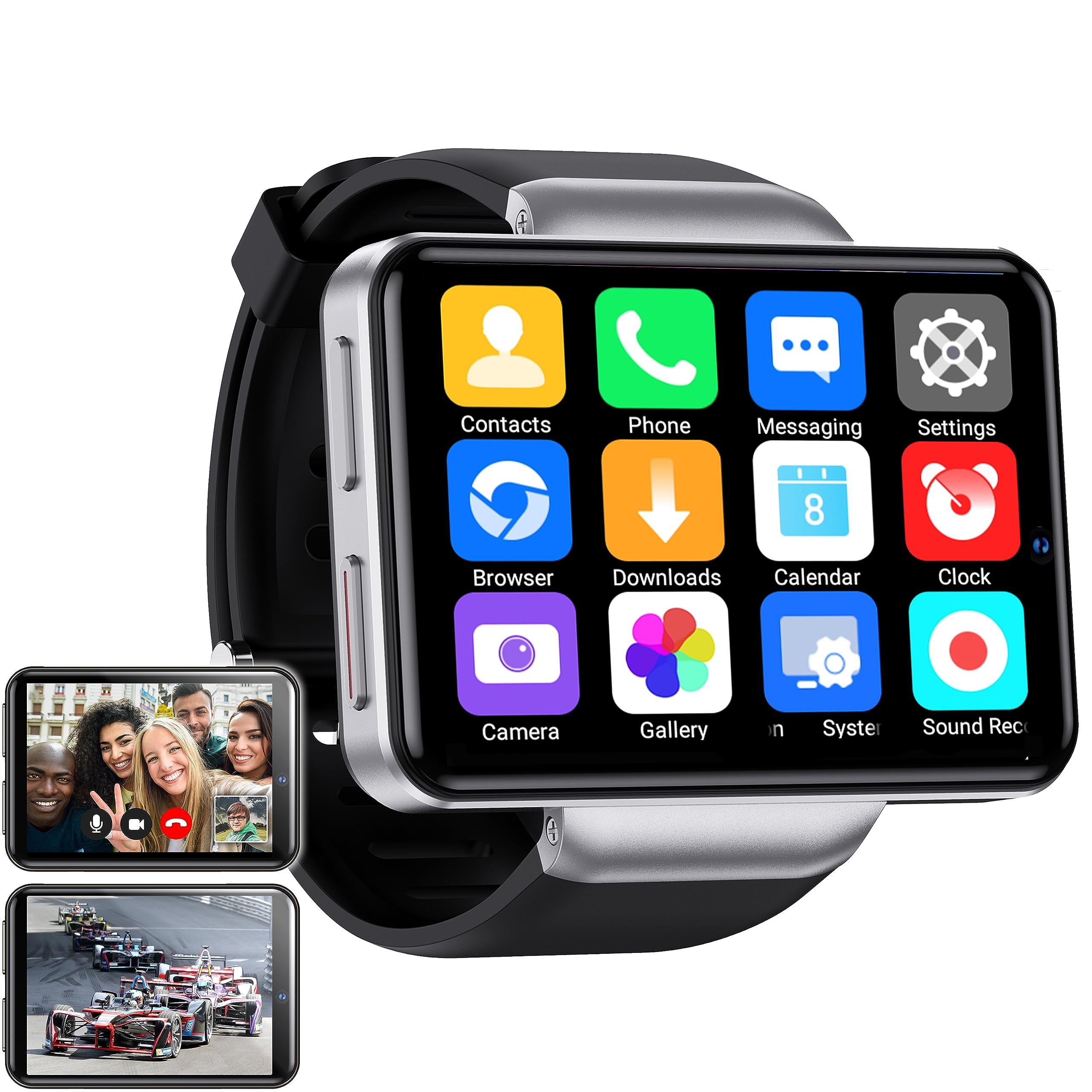
Figure 1: Silvergear XL Smartwatch overview.

Figure 2: The Silvergear XL Smartwatch offers a perfect balance of style, functionality, and advanced technology, including a 2.41-inch IPS display, live video streaming, app downloads, fitness tracking, and communication features.
1. 설정
1.1 언박싱 및 패키지 구성품
Carefully unpack your Silvergear XL Smartwatch and verify all contents.

Figure 3: Package contents including the Smartwatch XL, charging base, screen protector, and two screwdrivers. Dimensions are also shown: 4.5 cm height, 6.5 cm width, 1.5 cm thickness for the watch body, and strap lengths of 8.5 cm and 12 cm. The watch weighs 120 grams.
- Silvergear XL Smartwatch
- 충전베이스
- 스크린 보호기
- 2x Screwdrivers (for SIM card tray)
- 사용 설명서 (본 문서)
1.2 스마트워치 충전
Before first use, fully charge the smartwatch.
- Connect the charging base to a USB power adapter (not included) or a computer's USB port.
- Place the smartwatch onto the charging base, ensuring the charging pins align.
- 시계 화면에 충전 상태가 표시됩니다. 완전 충전에는 약 2~3시간이 소요됩니다.
1.3 SIM 카드 설치
To enable 4G connectivity, calls, and internet access, install a Nano SIM card.

Figure 4: Illustration of how to insert a Nano SIM card into the smartwatch. The image also shows the watch's ability to download apps from the Play Store.
- Locate the SIM card tray on the side of the smartwatch.
- 제공된 드라이버를 사용하여 SIM 카드 트레이를 여십시오.
- Carefully insert a Nano SIM card into the tray, ensuring correct orientation.
- Close the SIM card tray securely with the screwdriver.
1.4 초기 전원 켜기 및 설정
Press and hold the power button until the Silvergear logo appears. Follow the on-screen prompts to complete the initial setup, including language selection, time zone, and network connection.
2. 스마트워치 작동
2.1 기본 탐색
- 터치스크린: 왼쪽, 오른쪽, 위, 아래로 스와이프하여 메뉴와 화면을 탐색하세요. 탭하여 항목을 선택하세요.
- 전원 버튼: 화면을 켜거나 끄려면 누르세요. 전원을 켜거나 끄거나 재시작하려면 길게 누르세요.
- Back Button (if applicable): Some watches have a dedicated back button or gesture. Refer to on-screen prompts.
2.2 통신 기능
With a Nano SIM card installed, you can make and receive calls and messages directly from your smartwatch.
- 전화: Tap the "Phone" icon to access the dialer or contacts.
- 메시징: Tap the "Messaging" icon to send and receive text messages.
- 앱: Download communication apps from the Play Store for additional functionality.
2.3 카메라 기능
The smartwatch is equipped with both front and side cameras for capturing photos and videos.

Figure 5: The smartwatch features a 5MP front camera and a 2MP side camera, allowing you to capture photos and videos directly from your wrist.
- 접근 카메라: Tap the "Camera" icon on the home screen or app drawer.
- 카메라 전환: Use the on-screen icon to switch between the 5MP front camera and the 2MP side camera.
- 포착: 셔터 버튼을 탭하여 사진을 찍거나 비디오 녹화를 시작/중지하세요.
2.4 멀티미디어 엔터테인먼트
Enjoy videos, TV programs, series, and music directly on your smartwatch's extra-large screen.

Figure 6: The extra-large screen allows you to enjoy multimedia content such as sport competitions, TV programmes, series, videos, and music.
- Video/TV: Use pre-installed apps or download streaming services from the Play Store.
- 음악: Play music stored on the device or stream from compatible apps.
2.5 피트니스 및 건강 추적
Monitor your physical activity and health metrics with the integrated sensors.

Figure 7: The smartwatch offers pedometer and fitness tracking for various activities including running, hiking, cycling, basketball, football, jumping rope, and badminton.
- 보수계: 매일의 걸음 수, 거리, 소모 칼로리를 추적합니다.
- 심박수 모니터: Provides accurate heart rate readings.
- 운동 모드: Select from 9 pre-defined exercise types (e.g., running, walking, cycling, swimming) to track your performance.
- 수면 추적: Monitors your sleep patterns (if supported by the device's software).
2.6 App Downloads
Expand your smartwatch's functionality by downloading applications from the Play Store.
- Ensure your smartwatch is connected to Wi-Fi or has an active 4G data connection.
- Tap the "Play Store" icon and browse or search for desired applications.
- Follow on-screen instructions to download and install apps.
3. 유지관리
3.1 청소
스마트워치의 외관과 기능을 유지하려면:
- 부드럽고 보푸라기가 없는 천으로 화면과 본체를 닦으세요.
- 완고한 자국의 경우 약간 damp천에 물을 묻혀 닦으세요. 강한 화학 물질이나 연마재는 사용하지 마세요.
- 충전하기 전에 충전 접점이 깨끗하고 건조한지 확인하세요.
3.2 방수 및 방진
The Silvergear XL Smartwatch is rated IP67 for water and dust resistance.

Figure 8: The smartwatch is IP67 water- and dustproof, designed to withstand various weather conditions. This includes IP67 splashproof and IP67 dustproof ratings.
- IP67 등급: This means the device is protected from dust ingress and can withstand immersion in water up to 1 meter for up to 30 minutes.
- It is suitable for splashes, rain, and incidental exposure to water.
- Avoid prolonged immersion, hot water, or high-pressure water jets.
- Ensure the SIM card tray is properly sealed to maintain water resistance.
3.3 소프트웨어 업데이트
최적의 성능과 새로운 기능에 대한 액세스를 보장하기 위해 주기적으로 소프트웨어 업데이트를 확인하세요.
- Connect your smartwatch to Wi-Fi.
- Navigate to "Settings" > "About Watch" > "Software Update" (or similar path).
- Follow on-screen instructions to download and install any available updates.
4. 문제 해결
| 문제 | 가능한 원인 | 해결책 |
|---|---|---|
| 스마트워치가 켜지지 않습니다. | 배터리가 부족하여 기기가 멈췄습니다. | 기기를 최소 30분 동안 충전하세요. 전원 버튼을 10~15초 동안 길게 눌러 강제로 재시작하세요. |
| 전화를 걸거나 받을 수 없습니다. | No SIM card; SIM card not properly inserted; no network signal; incorrect network settings. | Ensure SIM card is correctly installed and activated. Check network signal strength. Verify network settings in the smartwatch. |
| 화면이 응답하지 않습니다. | 소프트웨어 오류, 화면 보호기 간섭. | Restart the smartwatch. Remove and reapply the screen protector if it's causing issues. |
| Fitness tracking data is inaccurate. | Improper fit; sensor obstruction; software calibration needed. | Ensure the watch is worn snugly on your wrist. Clean the sensor area. Check for software updates. |
| Wi-Fi에 연결할 수 없습니다. | 비밀번호가 잘못되었습니다. 범위를 벗어났습니다. 라우터 문제입니다. | Verify Wi-Fi password. Move closer to the Wi-Fi router. Restart the router. |
If you encounter issues not listed here, or if the suggested solutions do not resolve the problem, please refer to the support section.
5. 사양
Below are the technical specifications for the Silvergear XL Smartwatch (Model: 8711568088660).

Figure 9: Key technical specifications of the Silvergear XL Smartwatch, including Android 7.1.1 OS, MT6739 Quad-Core CPU (1.5 GHz), 2.41-inch full screen, 640x480 resolution, and 4G & WiFi connectivity.
| 특징 | 세부 사항 |
|---|---|
| 상표 | 실버기어 |
| 모델 번호 | 8711568088660 |
| 운영 체제 | Android (version 7.1.1 from image) |
| 화면 크기 | 2.41 인치 |
| 디스플레이 유형 | LCD (IPS from description) |
| 해결 | 640x480 (from image) |
| 프로세서 | MT6739 Quad-Core CPU, 1.5 GHz (from image) |
| 연결성 | 4G, 와이파이 |
| 전면 카메라 | 5메가픽셀 |
| 사이드 카메라 | 2메가픽셀 |
| 메모리 저장 용량 | 500메가바이트 |
| 방수 및 방진 | IP67 |
| GPS | GPS 없음 |
| 호환 장치 | 스마트폰 |
6. 보증 정보
The Silvergear XL Smartwatch comes with a manufacturer's warranty.
- 제조업체 보증: 2년.
- 이 보증은 정상적인 사용 시 발생하는 재료 및 제작상의 결함에 적용됩니다.
- It does not cover damage caused by misuse, accidents, unauthorized modifications, or normal wear and tear.
- 보증 청구를 위해 구매 증명서를 보관하십시오.
7. 지원
For further assistance, technical support, or warranty claims, please contact Silvergear customer service.
- Refer to the Silvergear official web연락처 정보 사이트.
- Have your product model number (8711568088660) and proof of purchase ready when contacting support.


