1. 중요한 안전 정보
Please read this manual carefully before using the AENO Infrared Heater. Failure to follow these instructions may result in electric shock, fire, or serious injury.
- 히터를 청소하거나 유지 보수를 하기 전에 항상 전원 플러그를 뽑으십시오.
- 손상된 코드나 플러그로 히터를 작동하지 마십시오.
- Keep flammable materials (furniture, curtains, bedding, paper, clothes, etc.) at least 3 feet (0.9 meters) from the front, sides, and rear of the heater.
- This heater is for indoor use only. Do not use it outdoors or in wet locations.
- 욕실, 세탁실 또는 물과 접촉할 수 있는 이와 유사한 실내 장소에서는 사용하지 마십시오.
- 감전이나 화재가 발생하거나 히터가 손상될 수 있으므로 통풍구나 배기구에 이물질을 넣거나 이물질이 들어가지 않도록 주의하세요.
- 공기 흡입구나 배출구를 어떤 식으로든 막지 마십시오. 침대처럼 구멍이 막힐 수 있는 부드러운 표면에는 사용하지 마십시오.
- 난방기 작동 중에는 어린이와 반려동물을 잘 살펴봐야 합니다.
2. 제품 오버view
The AENO Infrared Heater is a modern, energy-efficient heating solution designed for indoor spaces. Featuring a slim, elegant glass panel, it provides comfortable infrared heat without drying the air or burning oxygen. It can be used as a freestanding unit or wall-mounted, offering versatile placement options. The heater is equipped with smart Wi-Fi technology for convenient control via a mobile application and has been recognized as a Reddot Winner 2023 for its innovative design.

This image displays the AENO Infrared Heater in its freestanding configuration, highlighting its sleek black panel design. A close-up inset shows the digital control panel on the side of the heater, while a smartphone in the foreground illustrates the user-friendly AENO mobile application for remote control.

This image showcases the AENO Infrared Heater's "Invisible design," featuring one unit freestanding on the left and another mounted vertically on a wall on the right. The design is recognized with the Reddot Winner 2023 award, emphasizing its aesthetic integration into modern interiors.
3. 설정 및 설치
The AENO Infrared Heater offers two convenient installation options: freestanding with included legs or wall-mounted using the provided brackets.
3.1 독립형 설치
- 히터와 모든 부속품을 포장에서 조심스럽게 꺼내십시오.
- Attach the two provided legs to the bottom of the heater using the designated screws. No extra tools are typically required for this step.
- Place the heater on a stable, level surface, ensuring adequate clearance from walls and other objects as specified in the safety guidelines.
3.2 벽걸이 설치
- Identify a suitable wall location, ensuring it is a sturdy surface capable of supporting the heater's weight (approx. 19.6 lbs).
- Use the mounting stencil (if provided) to mark the drilling points for the wall brackets.
- 벽에 구멍을 뚫고 적절한 벽 앵커를 삽입하십시오(벽 재질에 따라 필요시).
- Securely attach the two mounting brackets to the wall.
- Carefully hang the heater onto the mounted brackets, ensuring it is securely seated.

This image provides a visual guide for the easy unpacking and assembly of the AENO Infrared Heater. It details the included components such as mounting brackets, legs, and a quick start guide, and illustrates the straightforward process of attaching the legs for freestanding use or mounting the heater on a wall.

A detailed diagram illustrating the compact dimensions of the AENO Infrared Heater: 0.43 inches in depth, 14.37 inches in width, and 39.37 inches in height. The image also notes the use of premium materials like glass and aluminum, and its origin as "Made in Europe," emphasizing its stylish and innovative design.
4. 사용 설명서
The AENO Infrared Heater can be operated via its integrated control panel or through the AENO mobile application.
4.1 수동 제어
The control panel is located on the side of the heater and features an LED display and touch buttons.
- 전원 버튼: 히터를 켜거나 끄려면 누르세요.
- 온도 조절: Use the '+' and '-' buttons to set your desired temperature. The maximum temperature setting is 248°F.
- 스마트 모드 : Activate or deactivate smart mode for optimized heating.

This image details the LED screen and control buttons on the AENO Infrared Heater, providing a quick reference for setting the heater's functions, including power, temperature, and smart mode.
4.2 Optimal Heating Placement
For optimal heating performance, position the infrared heater to directly face the area or individuals you wish to warm. Infrared heat warms objects and people directly, rather than heating the air.

This visual guide illustrates the optimal placement for the AENO Infrared Heater to achieve effective heating coverage up to 215 sq. ft. It shows correct placements (marked with green checkmarks) where the heater directly warms individuals, and incorrect placements (marked with red crosses) where the heat is obstructed or misdirected.
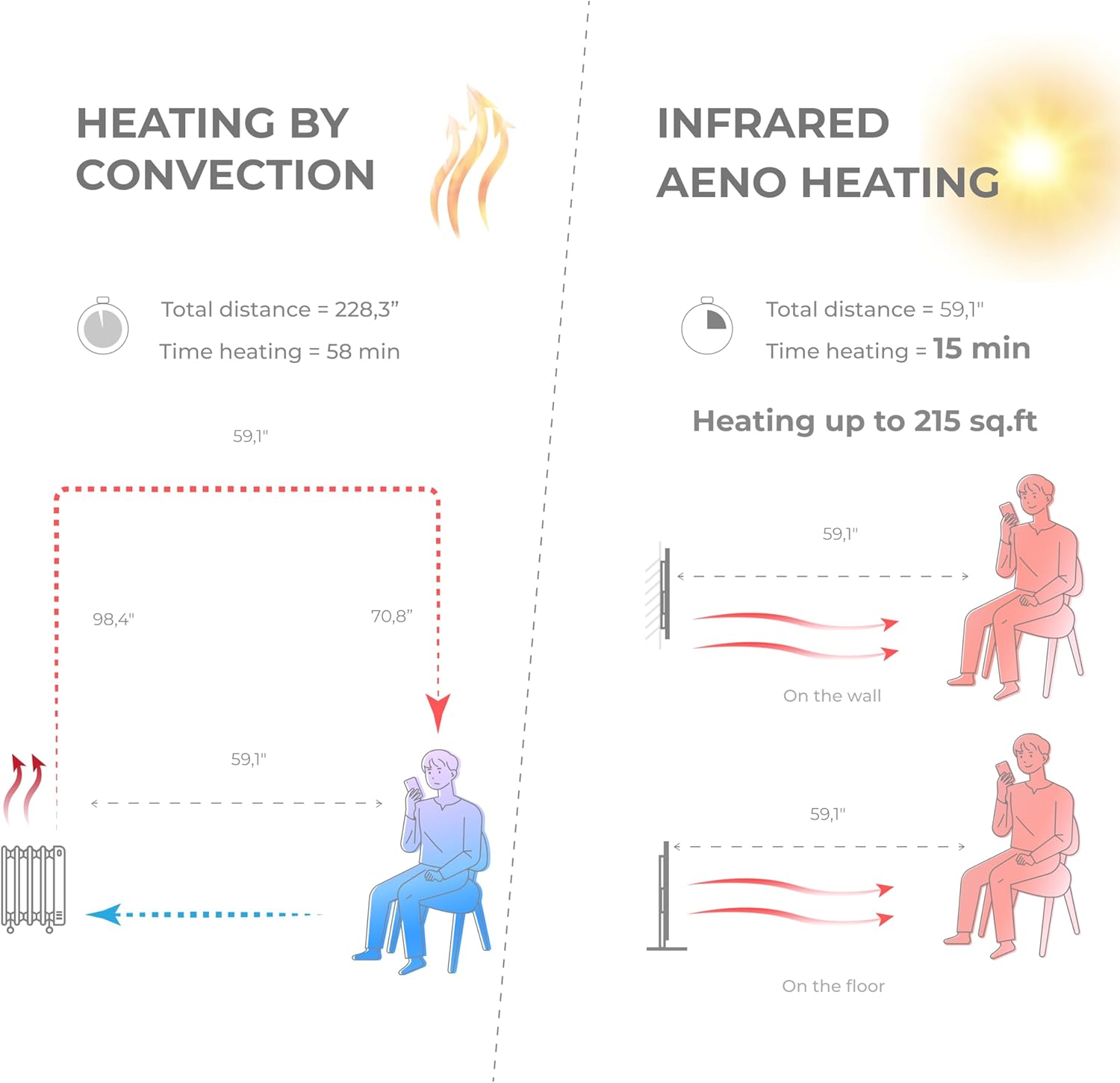
A comparative diagram illustrating the efficiency of AENO Infrared Heating versus traditional convection heating. It shows that infrared heating warms a space up to 215 sq. ft. in 15 minutes, compared to 58 minutes for convection heating, by directly warming objects and people rather than the air.

This image emphasizes the health and comfort benefits of the AENO Infrared Heater. It depicts a serene environment with a person meditating, illustrating that the heater is odorless, silent, does not blow air or cause pollution, and importantly, does not dry out the air or burn oxygen, contributing to a healthier indoor climate.

This image highlights the silent operation of the AENO Infrared Heater, stating "Totally silent 0 dB." It shows the heater in a quiet room setting, reinforcing that it provides warmth without any operational noise, making it ideal for bedrooms, offices, or any space requiring tranquility.
5. AENO App Control
Unlock the full potential of your AENO Infrared Heater by connecting it to the AENO mobile application.
5.1 앱 다운로드
- 검색 "AENO" in the Apple App Store (for iOS devices) or Google Play Store (for Android devices).
- Download and install the AENO application on your smartphone.
5.2 Wi-Fi에 연결하기
- Ensure your heater is plugged in and powered on.
- Open the AENO app and follow the on-screen instructions to add a new device.
- Select your AENO Infrared Heater from the list of discoverable devices.
- Enter your Wi-Fi network credentials when prompted.
- Once connected, the heater's Wi-Fi indicator will confirm successful pairing.
5.3 앱 기능
The AENO app provides comprehensive control and monitoring capabilities:
- 원격 켜기/끄기: 어디에서든 히터를 켜거나 끌 수 있습니다.
- 온도 설정: Precisely adjust the target room temperature.
- 일정: Create custom heating schedules and timers to automate operation.
- 에너지 소비 모니터링: Track and analyze your heater's electricity usage to optimize energy savings.
- Multi-Heater Control: Manage multiple AENO smart devices from a single app.
- 스마트 홈 통합: Compatible with popular smart home ecosystems like Amazon Alexa, Google Home, and Apple Siri.

This image demonstrates the advanced control features of the AENO Infrared Heater via its smartphone application. It shows how users can remotely turn the heater on/off, adjust the panel temperature between 140-248°F, and monitor and analyze electricity consumption from anywhere in the world. Links to download the app are also visible.

This image illustrates the remote control capabilities of the AENO App, allowing users to switch the heater on/off, set room temperature, create heating schedules, manage multiple heaters, control energy consumption, and set up devices within the AENO ecosystem.

This image highlights the energy efficiency of the AENO Infrared Heater, suggesting it can reduce heating costs by up to 50%. It promotes the concept of spot heating as an effective replacement for central heating systems, keeping specific areas warm with adaptive panel temperature.
6. 유지관리
Regular cleaning and proper care will ensure the longevity and efficient operation of your AENO Infrared Heater.
- 청소: 청소하기 전에 항상 히터의 전원을 뽑고 완전히 식히십시오. 부드러운 천을 사용하십시오.amp cloth to wipe the exterior surfaces. Do not use abrasive cleaners, waxes, or polishes.
- 저장: If storing the heater for an extended period, unplug it and store it in a cool, dry place, preferably in its original packaging.
- 사용자가 수리할 수 없는 부품: The heater contains no user-serviceable parts. Do not attempt to disassemble or repair the unit yourself. Refer all servicing to qualified service personnel.
7. 문제 해결
If you experience issues with your AENO Infrared Heater, please consult the following common troubleshooting steps:
- 히터가 켜지지 않습니다:
- 전원 코드가 작동하는 콘센트에 단단히 꽂혀 있는지 확인하세요.
- 회로 차단기가 트립되었는지 확인하십시오.
- Verify the power button on the heater or in the app is pressed.
- 히터가 충분한 열을 발생시키지 못하고 있습니다.
- Confirm the temperature setting is higher than the current room temperature.
- Ensure the heater is placed optimally, facing the desired heating area, and not obstructed.
- Check the room size; the heater is designed for areas up to 215 sq. ft.
- 앱 연결 문제:
- Ensure your smartphone is connected to a 2.4GHz Wi-Fi network (5GHz networks are not supported by some smart devices).
- Restart your Wi-Fi router and the heater.
- 히터가 Wi-Fi 라우터의 신호 범위 내에 있는지 확인하십시오.
- Try re-pairing the heater with the app.
- 이상한 소음이나 냄새:
- The AENO Infrared Heater operates silently. If you hear unusual noises, unplug the unit immediately and contact customer support.
- A slight odor may be present during the first few uses; this is normal and should dissipate quickly. If a strong or burning odor persists, unplug the unit and contact support.
If the problem persists after attempting these steps, please contact AENO customer support for further assistance.
8. 사양
| 특징 | 세부 사항 |
|---|---|
| 상표 | 아에노 |
| 모델 번호 | AGH0004S-US |
| 특징 | App, Manual control, Remote control, Programmable, On/off timer, Energy saving |
| 색상 | 검은색 |
| 폼 팩터 | 패널 |
| 실내/실외 사용 | 실내 |
| 제품 치수 | 0.44인치 깊이 x 14.38인치 너비 x 39.4인치 높이 |
| 제품의 권장 용도 | 집 |
| 장착 유형 | 벽면 장착, 바닥 장착 |
| 객실 유형 | Room, kitchen, living room |
| 난방 범위 | 최대 215제곱피트 |
| 버너 유형 | 적외선 |
| 연료 유형 | 전기 같은 |
| 권tage | 120 볼트 |
| Amp에라 지 | 5.83 Amps |
| 최대 온도 설정 | 화씨 248도 |
| 품목 무게 | 19.6파운드 |
| 첫 번째 이용 가능 날짜 | 5년 2023월 XNUMX일 |
9. 보증 및 지원
Specific warranty details for the AENO Infrared Heater are not provided in this manual. Please refer to the warranty card included with your product or visit the official AENO web최신 보증 정보를 보려면 사이트를 방문하세요.
For technical support, troubleshooting assistance, or any product-related inquiries, please contact AENO customer service through their official web사이트 또는 제품 포장에 제공된 연락처 정보를 참조하세요.


