1. 소개 및 이상view
The Spigen S570W Selfie Stick Tripod Stand is a versatile accessory designed for capturing photos and videos with your smartphone. It features MagSafe compatibility for secure phone attachment, an extendable design, and a detachable Bluetooth remote control for convenient operation.

Figure 1.1: Spigen S570W Selfie Stick Tripod Stand in use with a smartphone.
주요 특징은 다음과 같습니다.
- MagSafe 호환성: Strong magnetic force for seamless integration with MagSafe devices and accessories.
- Reinforced Tripod Stand: Constructed from durable aluminum alloy with dual-braced legs and anti-slip silicone pads for enhanced stability.
- 가볍고 휴대성이 좋음: Weighs approximately 163g, making it suitable for travel, vlogging, and live streaming.
- 확장 가능한 디자인: Adjustable height up to 24.4 inches (620mm) for various shooting angles.
- 충전식 블루투스 리모컨: Magnetic, rechargeable Bluetooth 5.0 remote control for capturing shots up to 10 meters away.
2. 패키지 내용
패키지에 모든 품목이 들어 있는지 확인하세요.
- Spigen S570W Selfie Stick Tripod Stand
- Rechargeable Bluetooth Remote Control
- USB 충전 케이블(USB-A-USB-C)
- 사용자 설명서

Figure 2.1: Contents of the Spigen S570W package, including the selfie stick, remote, and charging cable.
3. 설정
3.1 리모컨 충전하기
- Locate the Bluetooth remote control. It is magnetically attached to the handle of the selfie stick.
- 리모컨을 손잡이에서 분리하세요.
- Connect the provided USB charging cable to the remote control's USB-C port and a compatible USB power source.
- Allow the remote to charge fully before first use. A full charge provides up to 50,000 shots or 6 months of standby time.

Figure 3.1: The magnetic, rechargeable Bluetooth remote control with its USB-C charging port.
3.2 블루투스 리모컨 페어링
- 리모컨이 충전되어 있는지 확인하세요.
- Turn on the remote control (refer to the remote for a power button or indicator light).
- 스마트폰에서 블루투스 설정으로 이동하세요.
- 검색 available devices and select "Spigen S570W" or a similar name.
- 페어링이 완료되면 리모컨을 바로 사용할 수 있습니다.
3.3 스마트폰 연결
The S570W is designed for MagSafe compatible devices and cases.
- Ensure your smartphone or its case has MagSafe compatibility.
- Align the back of your MagSafe-compatible smartphone or case with the magnetic holder on the selfie stick.
- The strong magnetic force will securely attach your phone.

Figure 3.2: Demonstrating the strong magnetic attachment of a MagSafe-compatible phone to the selfie stick.

그림 3.3: 예amples of MagSafe built-in devices and MagSafe cases compatible with the S570W.
4. 사용 설명서
4.1 셀카봉 늘리기
- 핸들을 단단히 잡으십시오.
- Gently pull the phone holder upwards to extend the telescopic arm.
- Extend to your desired length, up to a maximum of 24.4 inches (620mm).
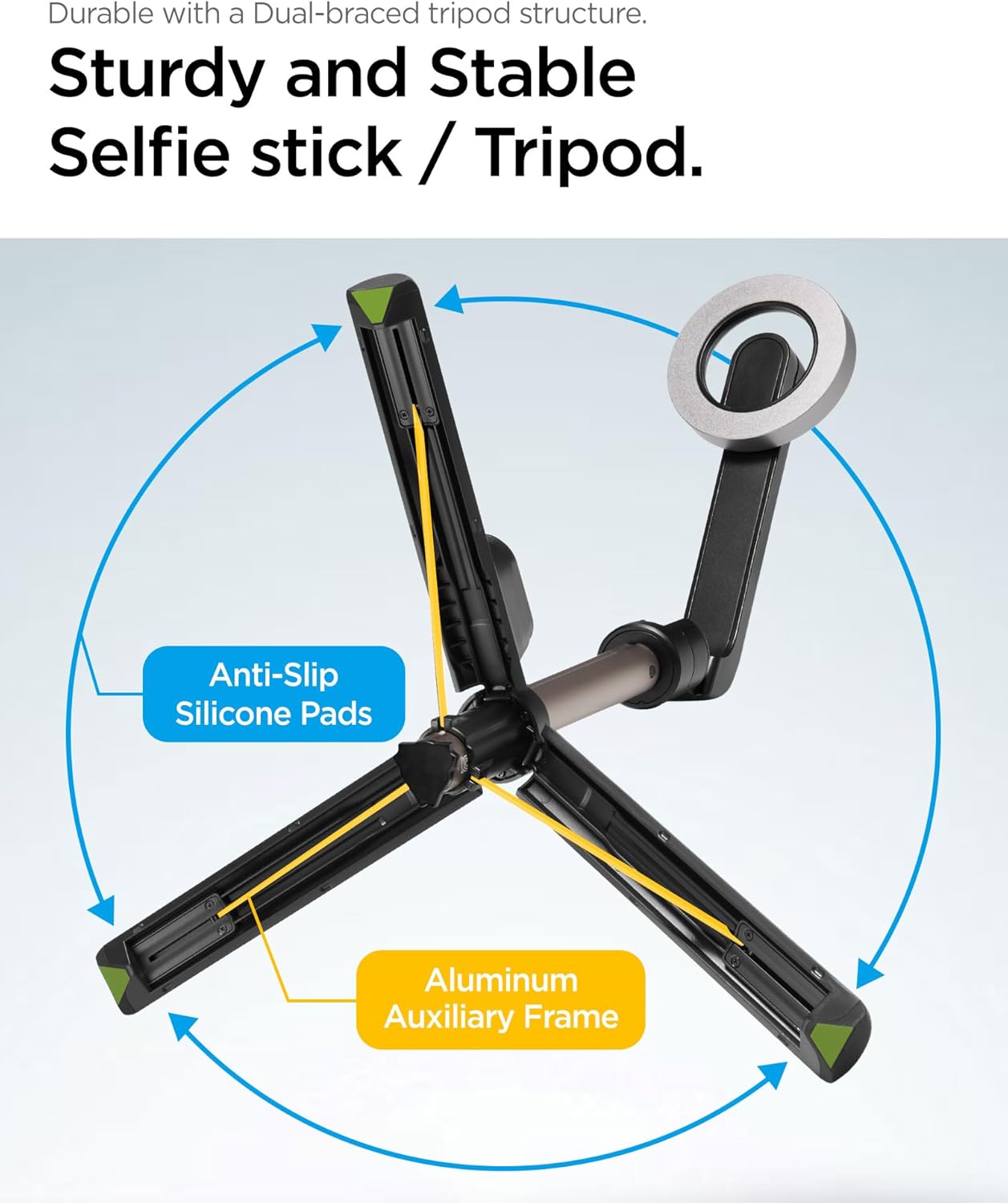
Figure 4.1: The selfie stick fully extended, demonstrating its maximum length.
4.2 삼각대 스탠드로 사용하기
- While holding the handle, gently push the bottom part of the handle outwards.
- The three legs will unfold to form a stable tripod base.
- 삼각대를 평평하고 안정적인 표면에 놓으십시오.
- Adjust the telescopic arm to your desired height.

Figure 4.2: The sturdy tripod structure with dual-braced legs, anti-slip silicone pads, and aluminum auxiliary frame.
4.3 블루투스 리모컨 사용하기
- Ensure the remote control is paired with your smartphone (refer to Section 3.2).
- 스마트폰의 카메라 앱을 여세요.
- Press the button on the remote control to capture a photo or start/stop video recording.
- The remote operates effectively up to 10 meters (33 feet) away.
4.4 Adjusting the Phone Holder Angle
The phone holder can be rotated to achieve various shooting angles.
- Gently rotate the magnetic phone holder to adjust the angle.
- The holder supports rotation up to 180 degrees for flexible positioning.

Figure 4.3: The phone holder can be rotated to capture images from various angles.
5. 유지관리
- 청소: 셀카봉과 리모컨은 부드럽고 마른 천으로 닦으세요. 강한 화학 물질이나 연마재는 사용하지 마세요.
- 저장: Store the device in a cool, dry place away from direct sunlight and extreme temperatures. Ensure the tripod legs are folded and the telescopic arm is retracted for compact storage.
- 배터리 관리 : 리모컨 배터리 수명 유지를 위해 자주 사용하지 않더라도 정기적으로 충전해 주세요.
6. 문제 해결
| 문제 | 가능한 원인 | 해결책 |
|---|---|---|
| 리모컨이 페어링되지 않습니다. | Remote battery low; Bluetooth not enabled on phone; remote not in pairing mode; interference. | Charge the remote control. Ensure Bluetooth is enabled on your phone. Turn the remote off and on again to re-enter pairing mode. Move closer to the phone. |
| Remote control not taking photos/videos. | Not paired; camera app not open; remote out of range. | Verify successful pairing. Open your phone's camera app. Ensure the remote is within 10 meters of the phone. |
| Phone not securely attaching to holder. | Phone/case not MagSafe compatible; foreign objects on magnetic surface. | Ensure your phone or case is MagSafe compatible. Clean the magnetic surface of both the phone/case and the holder. |
| 삼각대가 불안정하게 느껴집니다. | Uneven surface; legs not fully extended/locked; excessive weight. | Place the tripod on a flat, stable surface. Ensure all three legs are fully extended and locked into position. Do not exceed the recommended weight limit (6.6 lbs). |
7. 사양
| 모델 번호 | S570W (AMP06402) |
| 제품 치수(접었을 때) | 6.58 x 2.39 x 2.11 인치 |
| 품목 무게 | 5.8온스(164그램) |
| 최대 높이 | 24.4인치(620밀리미터) |
| 최소 높이 | 6.57인치(167.02밀리미터) |
| 중량 제한 | 6.6 파운드 |
| 블루투스 버전 | 5.0 |
| 원격 제어 범위 | 최대 10미터 |
| 배터리 유형 | 1개의 리튬 이온 배터리(포함) |
| 특별 기능 | Lightweight, Portable, Adjustable, Remote Control, Slip Resistant, MagSafe Compatible |
| 호환 장치 | iPhone 12 series and newer, Pixel 10 series, MagSafe Compatible Cases for Galaxy S25, S24, Z Fold 7, Z Flip 7 Series, and more. |
8. 보증 및 지원
Spigen products are designed for quality and durability. For specific warranty information, please refer to the warranty card included with your product or visit the official Spigen web대지.
For technical support, troubleshooting assistance, or inquiries regarding your Spigen S570W Selfie Stick Tripod Stand, please contact Spigen customer service through their official web사이트 또는 제품 포장에 제공된 연락처 정보를 참조하세요.
온라인 리소스:
- 공식 스피겐 Web대지: www.spigen.com


