1. 서론
The M5Stack Atom Echo is a compact and portable smart speaker development kit designed for voice interaction and AI capabilities. It integrates a microphone and speaker, enabling functions such as voice control and audio playback. This device is ideal for rapid prototyping in various applications including IIoT, home automation, smart retail, and STEM education.
주요 특징은 다음과 같습니다.
- 소형 및 휴대성: Measuring only 24 x 24 x 17 mm, it is highly convenient for on-the-go use.
- Voice Interaction and AI Capabilities: Built-in microphone and speaker support voice control, story-telling, and integration with cloud platforms like AWS and Baidu.
- 무선 음악 재생: Utilizes ESP32's BT capabilities for seamless audio streaming from mobile devices.
- 다양한 연결성: Supports 2.4G Wi-Fi IEEE 802.11b/g/n for reliable wireless connection.
- RGB LED Status Display: An embedded SK6812 RGB LED provides visual indication of the device's operational status.

Figure 1: M5Stack Atom Echo Smart Speaker Dev Kit, a compact and portable device.
2. 제품 구성 요소 및 크기
The Atom Echo features several key components and a compact design, as detailed below.
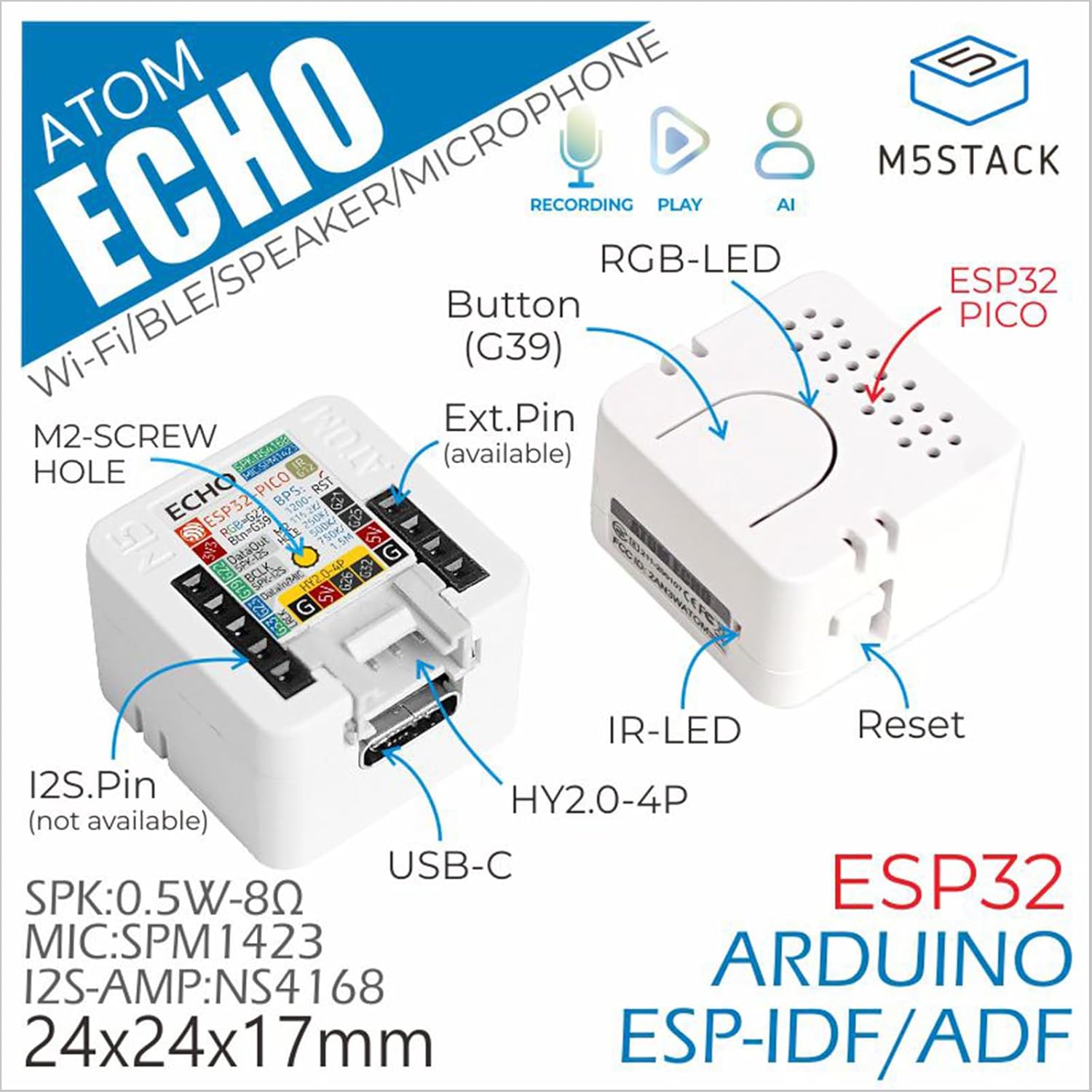
Figure 2: Detailed component diagram of the Atom Echo, highlighting the Button (G39), RGB-LED, ESP32 PICO, IR-LED, Reset button, USB-C port, Extension Pins, M2-screw hole, and I2S.Pin.

Figure 3: Dimensions of the Atom Echo, measuring 24mm (0.94in) in width and depth, and 17mm (0.67in) in height.

Figure 4: Size comparison of the Atom Echo next to a US Quarter, illustrating its compact form factor.
3. 설정 및 연결
The Atom Echo is designed for easy setup and versatile connectivity. It supports both Wi-Fi and Bluetooth for communication.
3.1 전원 켜기
Connect the Atom Echo to a 5V DC power source using the USB-C port. The device will power on automatically.
3.2 무선 연결
The device supports 2.4G Wi-Fi (IEEE 802.11b/g/n) and Bluetooth. Specific connection procedures will depend on the firmware loaded onto the device. Refer to the official M5Stack documentation for detailed programming and connection guides.
For detailed tutorials and quick start guides, please visit the official M5Stack web대지:
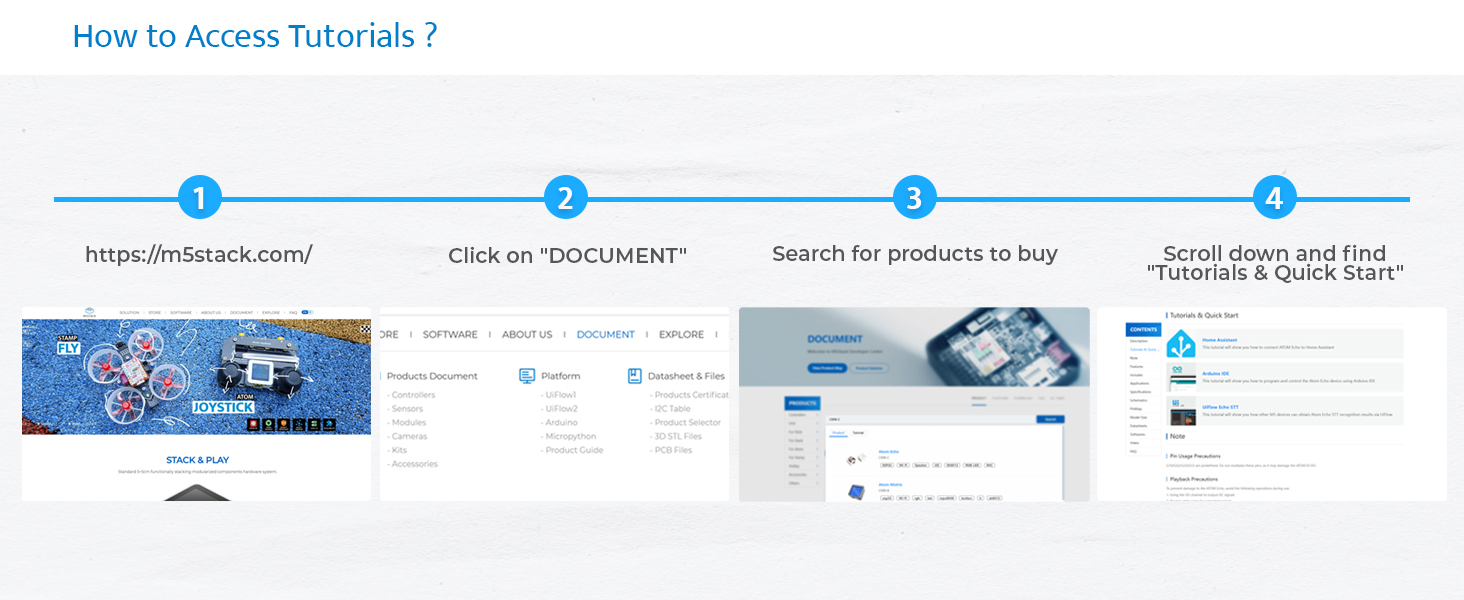
Figure 5: Steps to access tutorials and quick start guides on the M5Stack website (m5stack.com).
4. Operating the Atom Echo
The Atom Echo is primarily operated through its programmable button and voice commands, depending on the loaded application.
4.1 음성 상호작용
The built-in microphone allows for voice input. Depending on the programmed functionality, you can use voice commands for control, ask questions, or interact with AI services.
4.2 오디오 재생
The integrated speaker enables audio output. This can be used for playing music wirelessly via Bluetooth, delivering voice responses, or playing system notifications.
4.3 RGB LED Indicator
The RGB LED (SK6812) provides visual feedback on the device's status, such as connection status, active listening mode, or error indications. The specific color patterns and their meanings are defined by the loaded firmware.

Figure 6: Key features of the Atom Echo, including support for STT services, RGB LED status display, compact and lightweight design, and a GROVE expansion interface.
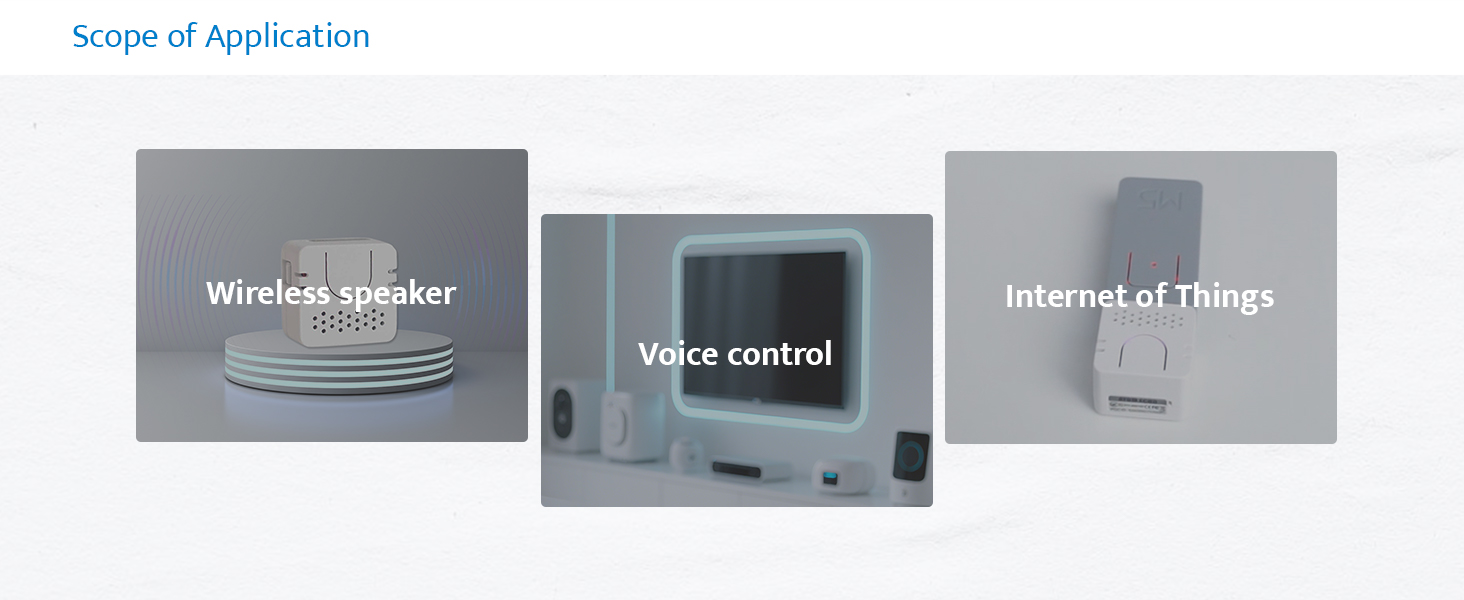
그림 7: 예amples of Atom Echo applications, including use as a wireless speaker, for voice control, and in Internet of Things (IoT) projects.
5. 유지관리
The M5Stack Atom Echo requires minimal maintenance. Keep the device clean and free from dust and moisture.
- 청소: 부드럽고 마른 천을 사용하여 기기 외부를 닦으세요. 액체 세척제나 용제는 사용하지 마세요.
- 저장: 사용하지 않을 때는 장치를 서늘하고 건조한 곳에 보관하십시오.
- 환경 조건: 장치를 극한의 온도, 직사광선 또는 높은 습도에 노출시키지 마십시오.
6. 문제 해결
If you encounter issues with your Atom Echo, consider the following common troubleshooting steps:
- 장치 전원이 켜지지 않음:
- Ensure the USB-C cable is securely connected to both the device and a working 5V power source.
- 다른 USB-C 케이블이나 전원 어댑터를 사용해 보세요.
- 오디오 출력 없음:
- Verify that the device is properly programmed to output audio.
- Check the volume settings within your application or connected device.
- Ensure the speaker is not physically obstructed.
- 마이크가 응답하지 않습니다:
- Confirm that the microphone functionality is enabled and correctly configured in your firmware.
- Ensure there are no physical obstructions covering the microphone.
- Test in a quiet environment, as excessive background noise can affect performance.
- 연결 문제(Wi-Fi/Bluetooth):
- Ensure the device is within range of your Wi-Fi router or Bluetooth device.
- Verify Wi-Fi credentials or Bluetooth pairing status in your firmware.
- Restart the Atom Echo and your router/Bluetooth device.
- 예상치 못한 동작:
- Perform a soft reset using the reset button if available, or by power cycling the device.
- Review your loaded firmware for any programming errors or conflicts.
- Consult the M5Stack official documentation and community forums for specific programming and debugging assistance.
7. 사양
Detailed technical specifications for the M5Stack Atom Echo:

그림 8: 이상view of the Atom Echo's key specifications.
| 사양 | 값 |
|---|---|
| 입력 Voltage | 5볼트(DC) |
| 장착 유형 | 벽걸이형 |
| 재료 | 플라스틱 |
| 모델명 | Atom Echo |
| 스피커 유형 | 멀티미디어 |
| 특징 | 프로그래밍 가능 |
| 추천 용도 | Smart Speaker Development Kit |
| 호환 장치 | 스마트폰, 태블릿 |
| 단위 수 | 1.0 카운트 |
| 컨트롤러 유형 | 단추 |
| 서라운드 사운드 채널 구성 | 2.0 |
| 색상 | 하얀색 |
| 포함된 구성 요소 | 1x ATOM ECHO |
| 제품 치수 | 0.94인치 깊이 x 0.94인치 너비 x 0.67인치 높이 |
| 연령대 (설명) | 모든 연령대 |
| 방수 | 거짓 |
| 보증 유형 | 제한된 |
| 항목 수 | 1 |
| 제어 방법 | 목소리 |
| 무선 통신 기술 | 블루투스, Wi-Fi |
| 스피커 크기 | 16 밀리미터 |
| 전원 | USB-C |
| 우퍼 직경 | 40.2 밀리미터 |
| 방수 레벨 | 방수가 되지 않음 |
| 고객 패키지 유형 | 직진성 |
| 오디오 드라이버 유형 | 동적 드라이버 |
| 블루투스 범위 | 10 미터 |
| 마이크 수 | 1 |
| 서브우퍼 연결 기술 | 무선 전화 |
| 연결 프로토콜 | 블루투스, 와이파이, USB |
| MP3 플레이어가 포함되어 있나요? | 아니요 |
| 회로 수 | 1 |
| 전력 수준의 수 | 1 |
| 프로세서 수 | 1 |
| 제조업체 | M5Stack Technology Co., Ltd. |
| 품목 무게 | 1.13 온스 |
| 품목 모델 번호 | C008-C |
| 첫 번째 이용 가능 날짜 | 12년 2023월 XNUMX일 |
| 원산지 | 중국 |
| 상표 | M5스택 |
| 스피커 최대 출력 전력 | 0.5 와트 |
| 주파수 응답 | 240Hz |
| 연결 기술 | Bluetooth, Wi-Fi, USB, IR |
| 오디오 출력 모드 | 단핵증 |
8. 상자 안에 무엇이 들어있나요?
The M5Stack Atom Echo package includes the following items:
- 1x ATOM ECHO unit

Figure 9: Visual representation of the Atom Echo unit included in the package.
9. 보증 및 지원
The M5Stack Atom Echo comes with a limited warranty. For specific warranty terms and conditions, please refer to the documentation provided with your purchase or visit the official M5Stack web대지.
For technical support, additional resources, and community forums, please visit the M5Stack official web대지:


