소개
This manual provides instructions for the installation, operation, and maintenance of your TAFFIO Digital Instrumental Cluster Speedometer. This product is designed to upgrade your vehicle's speedometer to a digital display, offering enhanced features and a modern interface.
호환성
The TAFFIO Digital Instrumental Cluster Speedometer is compatible with the following BMW models:
- BMW 5-Series E60, E61 (Years: 2003-2010)
- BMW 6-Series E63, E64 (Years: 2003-2010)
This unit is suitable for models both with and without a head-up display. It supports both gasoline and diesel engine types.
주요 특징
- 플러그 앤 플레이 설치: Designed for direct replacement without additional adapters or mounting frames.
- 코딩이 필요 없습니다: Simply replace the original speedometer.
- Customized Original Design: Integrates seamlessly with the vehicle's interior.
- 다양한 테마: Offers 3 distinct display themes.
- 오류 없는 작동: Designed to prevent error or fault messages.
- 기존 기능을 유지합니다: All original cluster functions are maintained.
- Supports Mileage and Fahrenheit (°F) Display: Customizable display units.
- 다국어 지원: Includes French, German, English, Spanish, Russian, Japanese, Turkish, Arabic, and more.
설정 및 설치
The TAFFIO Digital Instrumental Cluster Speedometer is designed for a straightforward plug-and-play installation. No complex coding or additional adapters are required.
- 준비: 설치를 시작하기 전에 차량의 시동이 꺼져 있고 배터리가 분리되어 있는지 확인하십시오.
- Remove Original Speedometer: Carefully remove the existing instrumental cluster from your BMW. Refer to your vehicle's service manual for specific instructions on removing the original unit.
- Connect New Speedometer: Connect the wiring harness from your vehicle to the TAFFIO Digital Speedometer. Ensure all connections are secure.
- Install New Speedometer: Insert the TAFFIO Digital Speedometer into the dashboard opening. Secure it in place using the original mounting points.
- 배터리를 다시 연결하십시오: 차량 배터리를 다시 연결합니다.
- 초기 전원 켜기: Turn on the vehicle's ignition to verify proper function. The new digital cluster should power on and display information.
메모: If you are unsure about any step, it is recommended to seek professional installation.
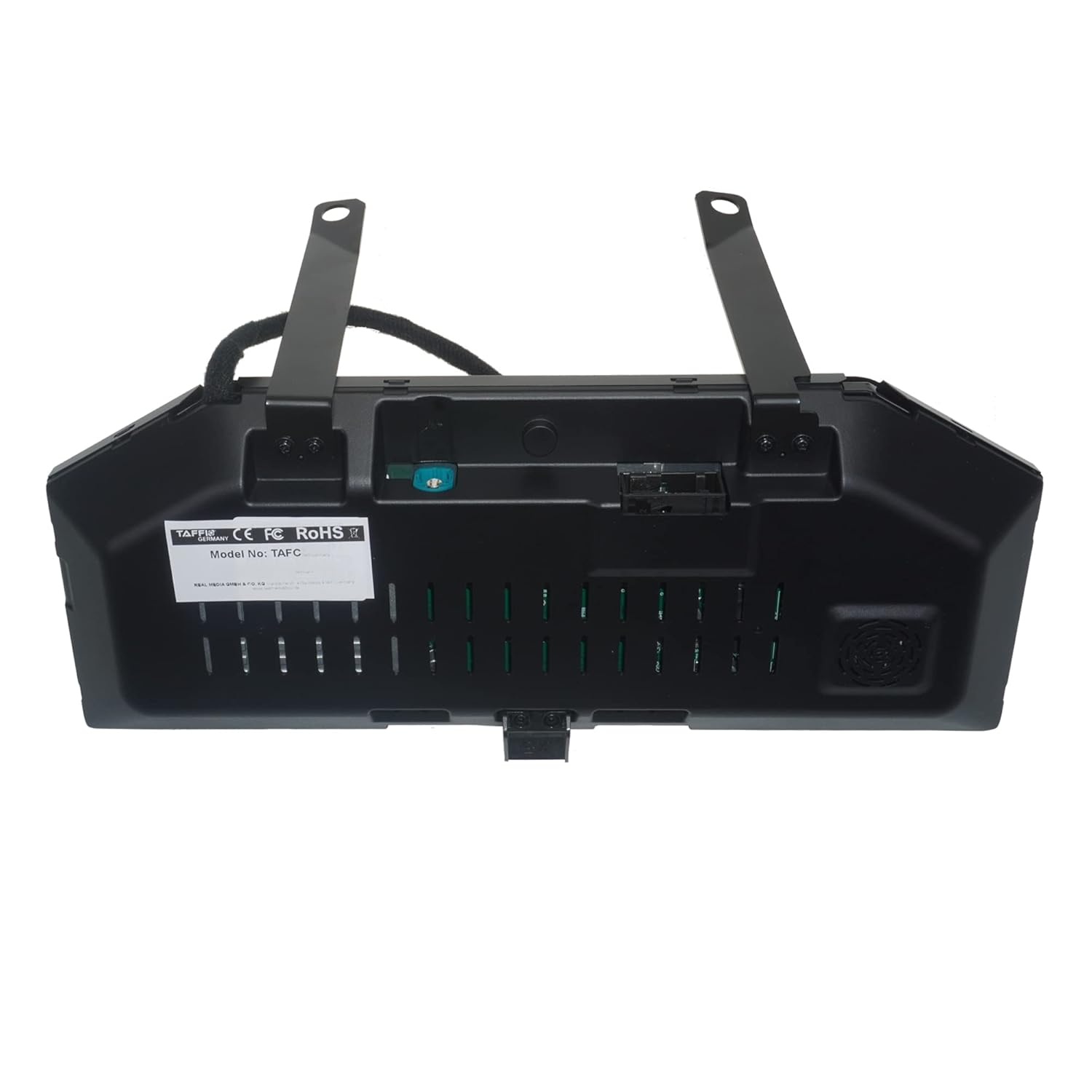
이미지: 후면 view of the TAFFIO Digital Speedometer, illustrating the connection points for installation.
작동 지침
The digital cluster provides various display options and information. Control is primarily managed through the steering wheel controls, specifically the BC (Board Computer) button.
Navigating Menus and Information
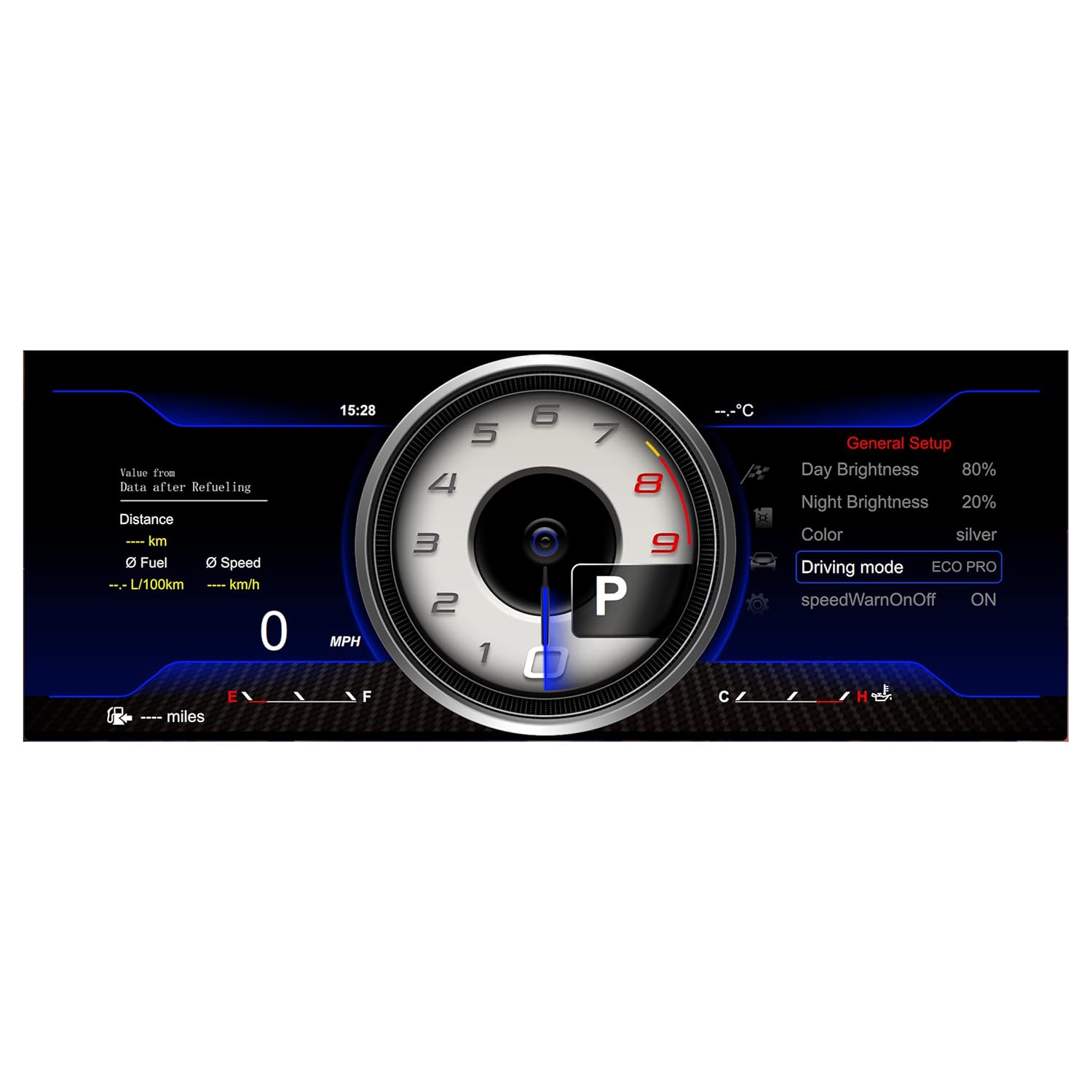
Image: Illustration of the steering wheel controls, indicating the BC button used for menu navigation.
- To scroll through the speedometer's menus and view different information, press the BC button on your steering wheel.
- To select a function or confirm a setting, press and hold the BC button.
Display Themes
The unit offers 3 distinct display themes to customize the appearance of your instrumental cluster.

Image: Display Theme 1, showing a classic speedometer and tachometer layout with real-time vehicle information.

Image: Display Theme 2, featuring a more modern layout with system settings and real-time data.

Image: Display Theme 3, offering a different aesthetic with general setup options visible.
일반 설정
Access the general setup menu to adjust various display parameters, including brightness, color, driving mode, and speed warnings.

Image: Screenshot of the General Setup menu, showing options for Day Brightness, Night Brightness, Color, Driving Mode, and Speed Warning.
유지
The TAFFIO Digital Instrumental Cluster Speedometer requires minimal maintenance.
- 청소: Use a soft, dry, anti-static cloth to clean the screen. Avoid abrasive cleaners or solvents.
- 소프트웨어 업데이트: The unit supports software updates via the provided USB cable. Periodically check the official TAFFIO web최적의 성능과 새로운 기능에 대한 액세스를 보장하기 위해 사용 가능한 펌웨어 업데이트 사이트를 방문하세요.
- 환경 조건: Operate the unit within the vehicle's standard operating temperature range. Avoid extreme temperatures or direct prolonged sunlight exposure when parked.
문제 해결
If you encounter any issues with your TAFFIO Digital Instrumental Cluster Speedometer, refer to the following common troubleshooting steps:
- 장치가 켜지지 않습니다:
- Check all electrical connections to ensure they are securely seated.
- 차량 배터리가 제대로 연결되어 있고 충전되어 있는지 확인하십시오.
- Inspect the fuse related to the instrumental cluster in your vehicle's fuse box.
- 화면이 표시되지 않거나 부분적으로만 표시됩니다.
- 기기에 전원이 공급되고 있는지 확인하십시오.
- Perform a soft reset by turning the vehicle off, disconnecting the battery for a few minutes, and then reconnecting it.
- Incorrect Readings (Speed, RPM, etc.):
- Verify that the unit is correctly configured for your vehicle model and engine type (gasoline/diesel).
- Check for any available software updates that might address calibration issues.
- Error Messages Displayed:
- While the unit is designed to be error-free, if an error message appears, consult your vehicle's diagnostic system or contact customer support with the specific error code.
If the problem persists after attempting these steps, please contact TAFFIO customer support.
명세서
| 특징 | 세부 사항 |
|---|---|
| 운영 체제 | LINUX system |
| 메인 칩 | T507 (CPU 4 core 1.5GHZ) |
| 화면 유형 | HD 화면 |
| 해결 | 1920*720 |
| 제어 방법 | 핸들 컨트롤 |
| 운영 볼륨tage | 9V-16V |
| 재료 | 금속, 플라스틱 |
| 측정 정확도 | +/-0.5 |
| 모델 번호 | TAFC-1293 |
| GTIN | 04262370644819 |
배송 내용
The package for your TAFFIO Digital Instrumental Cluster Speedometer includes the following items:

Image: Contents of the package, showing the Digital Cluster unit, a separate Cluster Cover, and a USB cable (optional for updates).
- 1x TAFFIO Digital Speedometer Unit
- 1x USB Cable (for optional updates)
- 1x Warranty Certificate
- Note: A cluster cover may be included depending on the specific package.
보증 및 지원
Your TAFFIO Digital Instrumental Cluster Speedometer comes with a 2년 보증. Please retain your invoice or proof of purchase for warranty claims.
For technical support, warranty claims, or further assistance, please contact your retailer or the manufacturer directly. Refer to the warranty certificate for specific contact details.


