1. 서론
The Laserliner MultiWet-Finder Plus is a versatile diagnostic tool designed for non-destructive measurement of material moisture and ambient conditions. It provides quick and reliable readings for various building materials, along with air temperature, relative humidity, and dew point temperature. This manual provides essential information for the safe and efficient operation of your device.

그림 1: The Laserliner MultiWet-Finder Plus device. This image shows the front view of the device, highlighting its large digital display, control buttons, and the spherical sensor at the top.
2. 안전 지침
Please read these safety instructions carefully before using the device. Failure to follow these instructions may result in electric shock, fire, or injury.
- Keep the device away from moisture and direct sunlight.
- Do not open the device. Repairs should only be performed by authorized personnel.
- Use only specified batteries. Ensure correct polarity during installation.
- 강한 충격이나 기기를 떨어뜨리는 것을 피하십시오.
- Do not use the device in explosive atmospheres or near flammable materials.
- 배터리와 기기를 지역 규정에 따라 폐기하세요.
3. 제품 오버view
3.1 장치 구성 요소
The MultiWet-Finder Plus features a robust design with intuitive controls and a clear display.
- 구형 센서: For non-destructive material moisture measurement.
- LCD 디스플레이: Shows measurement values, modes, and indicators.
- MODE 버튼: To switch between measurement modes (Index, CM%, MASS%).
- REF 버튼: To set a reference value.
- MAX/SET Button: 에게 view maximum/minimum values or confirm settings.
- 찾기 버튼: To activate the measurement.
- Temperature/Humidity Sensors: Located on the side for ambient condition measurements.

그림 2: 옆 view of the device showing the integrated sensors for air temperature and relative humidity. The image also indicates the measurement ranges for these sensors: air temperature from -10°C to 60°C, relative humidity from 20% to 90% RH, and dew point temperature from -20°C to 60°C.
3.2 디스플레이 표시
LCD 디스플레이는 포괄적인 정보를 제공합니다.
- 온도(°C): Ambient air temperature.
- Relative Humidity (% RH): Ambient air humidity.
- Dew Point Temperature (°C): Calculated dew point.
- Moisture Index: A relative value indicating moisture content.
- CM% / MASS%: Specific moisture content for selected materials.
- DRY/WET Bar Graph: Visual indication of moisture level (green for dry, red for wet).

그림 3: The device's display showing readings in "INDEX MODE". This view includes air temperature, relative humidity, dew point, and a large numerical index value, along with the DRY/WET bar graph.
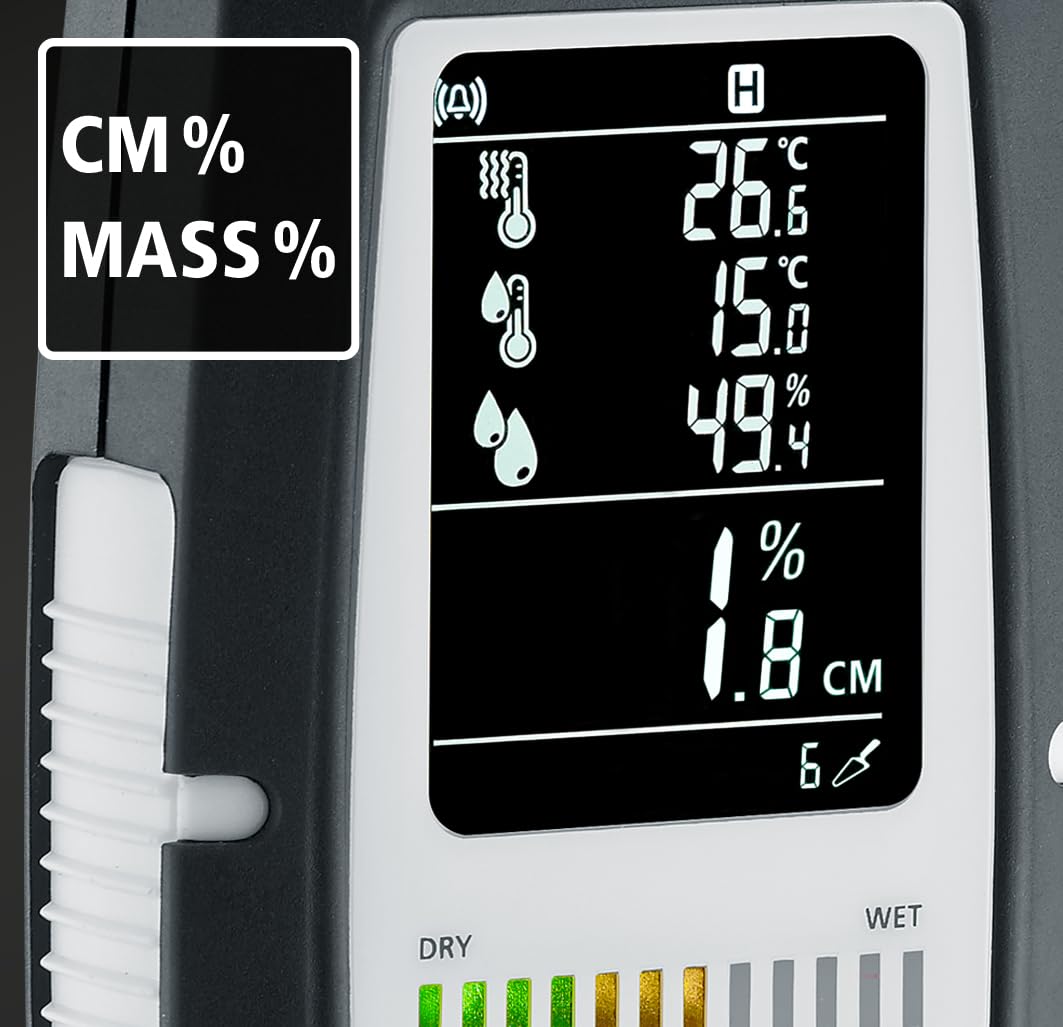
그림 4: The device's display showing readings in "CM%" or "MASS%" mode. This view provides specific moisture content percentages, alongside the ambient condition readings.
4. 설정
4.1 배터리 설치
The MultiWet-Finder Plus requires standard AAA batteries for operation.
- 장치 뒷면에서 배터리 덮개를 찾으세요.
- Open the cover by sliding or unscrewing it (refer to the diagram if available).
- 필요한 개수의 AAA 배터리를 넣고, 극성(+/-)을 정확히 확인하십시오.
- 배터리 덮개를 단단히 닫으세요.

그림 5: The MultiWet-Finder Plus shown alongside its packaging, which indicates the use of AAA batteries. This image implies the battery type required for the device.
5. 사용 설명서
5.1 전원 켜기/끄기
를 누르고 계세요 방법 기기를 켜거나 끄는 버튼입니다.
5.2 측정 모드 선택
짧게 누르세요 방법 사용 가능한 측정 모드를 순환하는 버튼:
- INDEX Mode: Provides a relative moisture index, useful for quick comparisons and identifying moisture patterns.
- CM% / MASS% Mode: Displays specific moisture content as a percentage for selected material types. Refer to the device's internal material tables for accurate readings.
5.3 Taking a Material Moisture Measurement
- 원하는 측정 모드를 선택하세요. 방법 단추.
- Place the spherical sensor directly onto the surface of the material to be measured. Ensure full contact.
- 를 누르세요 찾다 버튼을 누르면 측정이 시작됩니다.
- Read the moisture value on the display. The device measures moisture up to a depth of approximately 40 mm.

그림 6: Illustration demonstrating the non-destructive measurement capability of the MultiWet-Finder Plus. The image shows the spherical sensor penetrating a material surface, indicating a measurement depth of up to 40 mm.

그림 7: Close-up of the device's display, highlighting the DRY/WET bar graph and the control buttons. The bar graph visually represents the moisture level, transitioning from green (dry) to red (wet).
5.4 Ambient Condition Measurement
The device continuously measures air temperature, relative humidity, and calculates the dew point temperature. These values are displayed on the upper part of the LCD screen.
5.5 참조 함수(REF)
그만큼 참고 button allows you to set a reference value. This is useful for comparing current measurements against a known dry or acceptable moisture level in a specific material.
- Take a measurement on a known dry area of the material.
- 를 누르고 계세요 참고 button to set this value as the reference.
- Subsequent measurements will show the deviation from this reference.
5.6 Max/Min Function (MAX SET)
를 누르세요 MAX/SET 버튼을 view the maximum or minimum measured values during a session. This helps in identifying the highest or lowest moisture points.
5.7 Digital Connection (App)
The MultiWet-Finder Plus supports digital connection to a smartphone application for data logging and analysis. Refer to the app's instructions for pairing and usage.
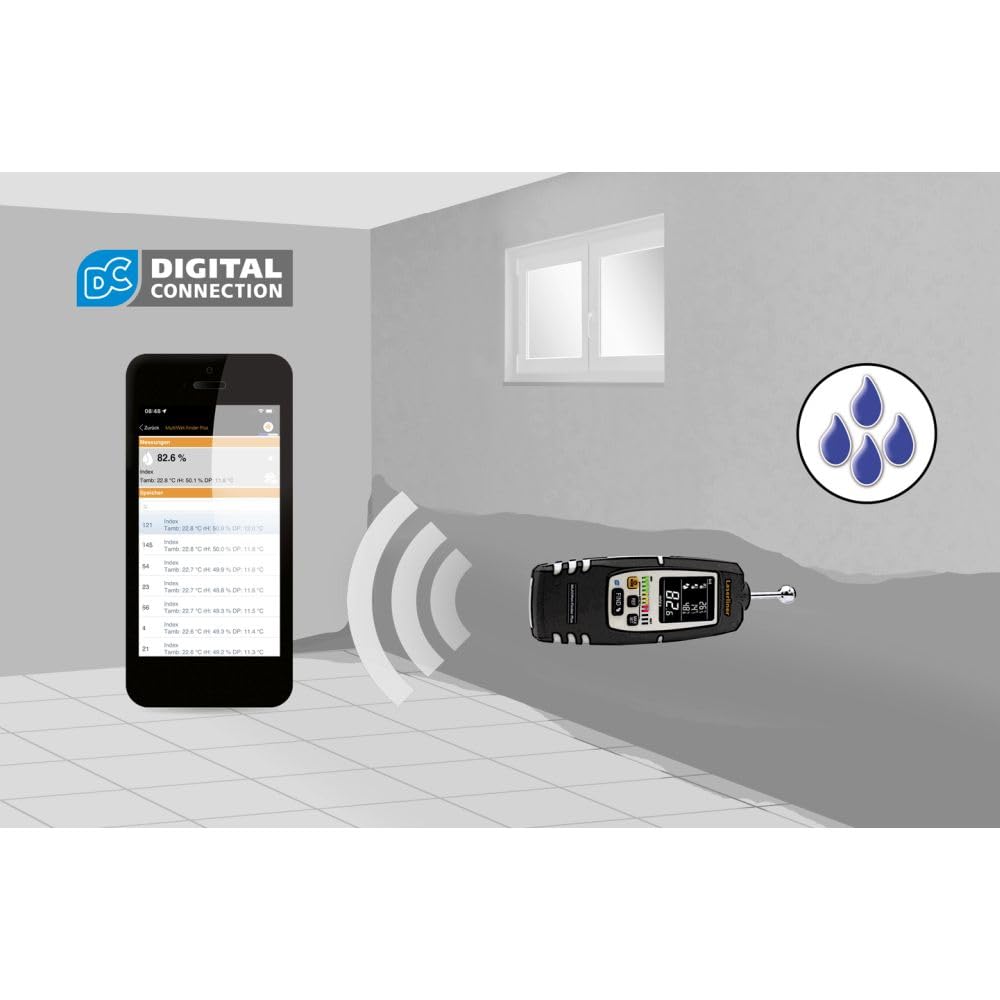
그림 8: The MultiWet-Finder Plus wirelessly connected to a smartphone displaying the "DIGITAL CONNECTION" feature. This image illustrates the device's capability to transmit data to a mobile application for further analysis and recording.

그림 9: The MultiWet-Finder Plus being used in a bathroom setting, indicating its application in detecting moisture in damp environments. The image shows the device pointed towards a wall, with a water droplet icon suggesting moisture detection.
6. 유지관리
- 청소: 부드러운 천으로 장치를 닦으십시오. damp 천. 연마성 세척제나 용매를 사용하지 마십시오.
- 저장: Store the device in a dry, cool place, away from direct sunlight. Remove batteries if storing for extended periods to prevent leakage.
- 구경 측정: The device is factory calibrated. If you suspect inaccuracies, contact Laserliner support for recalibration services.
7. 문제 해결
| 문제 | 가능한 원인 | 해결책 |
|---|---|---|
| 장치의 전원이 켜지지 않습니다. | 배터리가 방전되었거나 잘못 삽입되었습니다. | 배터리를 새 배터리로 교체하고 극성이 올바른지 확인하세요. |
| 습도 측정값이 부정확합니다. | Poor contact with material, incorrect mode selected, or material outside measurement range. | Ensure full contact with the spherical sensor. Select the appropriate material mode. Consult specifications for measurement range. |
| 디스플레이가 비어 있거나 깜빡입니다. | Low battery power or internal error. | 배터리를 교체하십시오. 문제가 지속되면 고객 지원 센터에 문의하십시오. |
8. 사양
| 특징 | 세부 사항 |
|---|---|
| 모델 번호 | 082.091A |
| 제품 치수 | 5.51 x 5.51 x 8.66 인치 |
| 무게 | 1.32 파운드 |
| 제조업체 | 레이저 라이너 |
| 재료 | Stainless Steel (sensor ball, device body is likely plastic) |
| Measurement Depth | Approx. 40 mm (non-destructive) |
| 기온 범위 | -10°C ~ 60°C |
| 상대 습도 범위 | 상대습도 20% ~ 90% |
| 이슬점 온도 범위 | -20°C ~ 60°C |
9. 보증 및 지원
For warranty information, technical support, or service inquiries, please contact Laserliner customer service or visit their official web사이트. 구매 증빙 자료로 구매 영수증을 보관하세요.
제조업체: 레이저 라이너
Web대지: www.laserliner.com (전amp(링크는 실제 링크와 다를 수 있습니다)


