1. 서론
Welcome to the user manual for your new ZZB ZB10 10.1-inch Android 14 Tablet PC. This guide provides essential information for setting up, operating, maintaining, and troubleshooting your device. Please read this manual thoroughly to ensure optimal performance and longevity of your tablet.

그림 1: 전면 view of the ZZB ZB10 Tablet.
2. 상자 안에 무엇이 들어있나요?
Upon opening your ZZB ZB10 Tablet PC package, please verify that all the following items are included:
- ZZB ZB10 10.1-inch Android 14 Tablet PC
- C타입 케이블
- 사용 설명서 (본 문서)

Figure 2: The ZZB ZB10 Tablet and its packaging.
3. 제품 오버view
Familiarize yourself with the physical components of your ZZB ZB10 Tablet.
3.1 물리적 구성 요소
- 표시하다: 10.1인치 IPS 화면.
- 전면 카메라: Located above the screen.
- 후방 카메라: 뒷면에 위치해 있습니다.
- 전원 버튼: 일반적으로 측면이나 상단 가장자리에 있습니다.
- 볼륨 버튼: 오디오 레벨을 조정합니다.
- USB 타입-C 포트: 충전 및 데이터 전송용입니다.
- MicroSD 카드 슬롯: 확장 가능한 저장 공간.

그림 3: 후면 view of the ZZB ZB10 Tablet, highlighting the camera and model information.
4. 설정
4.1 태블릿 충전
Before first use, fully charge your tablet. Connect the provided Type-C cable to the tablet's charging port and the other end to a compatible USB power adapter (not included) or a computer's USB port. The battery indicator on the screen will show charging status.
4.2 전원 켜기/끄기
- 전원을 켜려면: 화면이 켜질 때까지 전원 버튼을 길게 누릅니다.
- 전원을 끄려면: Press and hold the Power button until a menu appears, then select 'Power off'.
- 재시작하기 위해: Press and hold the Power button until a menu appears, then select 'Restart'.
4.3 초기 설정
태블릿을 처음 켜면 초기 설정 과정을 안내해 줍니다. 일반적으로 다음 내용이 포함됩니다.
- 언어 선택
- Wi-Fi 네트워크에 연결 중입니다.
- Setting up your Google account (or skipping for later).
- Review이용 약관에 동의합니다.
5. 사용 설명서
5.1 기본 탐색
The ZZB ZB10 Tablet runs on Android 14, offering an intuitive touch interface.
- 수도꼭지: 항목을 선택하거나 앱을 엽니다.
- 강타: 화면을 탐색하거나 콘텐츠를 스크롤합니다.
- 핀치 투 줌: 화면의 내용을 확대하거나 축소하세요.
- 길게 누르기 : 상황에 맞는 메뉴에 접근하거나 아이콘을 이동합니다.
5.2 Wi-Fi에 연결하기
- 이동하다 설정 > 네트워크 및 인터넷 > 와이파이.
- Wi-Fi 전환 On.
- 목록에서 원하는 네트워크를 선택하세요.
- 메시지가 표시되면 비밀번호를 입력한 다음 탭하세요. 연결하다.
5.3 블루투스 페어링
- 이동하다 설정 > 연결된 장치 > 블루투스.
- 블루투스 전환 On.
- 페어링하려는 기기가 페어링 모드인지 확인하십시오.
- Select the device from the 'Available devices' list and follow on-screen prompts.
5.4 카메라 사용
이 태블릿은 2MP 전면 카메라와 8MP 후면 카메라를 탑재하고 있습니다.
- 열기 카메라 앱.
- 셔터 버튼을 탭하여 사진을 촬영하세요.
- 카메라 아이콘을 사용하여 전면 카메라와 후면 카메라를 전환합니다.
- 비디오를 녹화하려면 비디오 모드를 선택하세요.

Figure 4: Using the tablet's camera for photos or video calls.
5.5 스토리지 관리
The tablet comes with 32GB of internal storage and supports up to 1TB expandable storage via a MicroSD card.
- To insert a MicroSD card, locate the card slot on the side of the tablet.
- 마이크로SD 카드가 딸깍 소리가 나면서 제자리에 고정될 때까지 부드럽게 삽입하십시오.
- You can manage storage in 설정 > 저장.

Figure 5: The tablet supports extended storage up to 1TB.
5.6 읽기 모드
The tablet features a reading mode designed to reduce eye strain by adjusting screen colors and brightness. This mode can typically be activated from the quick settings panel (swipe down from the top of the screen) or within the display settings.
6. 유지관리
6.1 청소
Use a soft, lint-free cloth to clean the screen and body of the tablet. Avoid using harsh chemicals or abrasive materials, which can damage the device.
6.2 배터리 관리
- 태블릿을 극한 온도에 노출시키지 마세요.
- 배터리가 자주 완전히 방전되지 않도록 하세요.
- 충전 시에는 제공된 Type-C 케이블만 사용하세요.
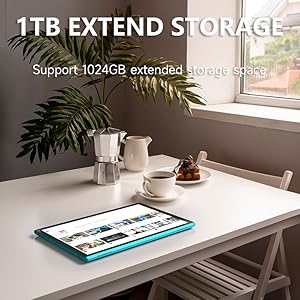
Figure 6: The tablet features a 6000mAh battery for extended use.
6.3 소프트웨어 업데이트
태블릿에 최신 기능과 보안 패치가 적용되도록 정기적으로 시스템 업데이트를 확인하세요. 다음 링크로 이동하세요. 설정 > 체계 > 시스템 업데이트.
7. 문제 해결
태블릿에 문제가 발생하면 다음의 일반적인 해결 방법을 참조하세요.
| 문제 | 가능한 해결책 |
|---|---|
| 태블릿이 켜지지 않습니다 | Ensure the battery is charged. Connect to a power source for at least 30 minutes. |
| 화면이 반응하지 않습니다 | Restart the tablet by holding the power button for 10-15 seconds. |
| Wi-Fi 연결 문제 | Restart your Wi-Fi router. Forget the network in tablet settings and reconnect. |
| 앱이 충돌하거나 정지됩니다. | Clear the app's cache (Settings > Apps > [App Name] > Storage > Clear cache). If the problem persists, uninstall and reinstall the app. |
| 느린 성능 | 불필요한 백그라운드 앱을 종료하세요. 캐시와 임시 파일을 삭제하세요. file문제가 지속될 경우 공장 초기화를 고려하십시오(먼저 데이터를 백업하십시오). |
8. 사양
Key technical specifications for the ZZB ZB10 Tablet PC:
- 모델: 지비10
- 운영 체제: 안드로이드 14
- 표시하다: 10.1인치 IPS, 1280 x 800 픽셀
- 숫양: 6GB (including 4GB virtual memory)
- 내부 저장소: 32GB 롬
- 확장 가능한 스토리지: MicroSD 카드를 통해 최대 1TB까지
- 후방 카메라: 8 MP
- 전면 카메라: 2 MP
- 무선 연결 : Wi-Fi 802.11ac, Bluetooth
- 배터리: 6000mAh, up to 12 hours average life
- 치수: 12 x 7 x 0.3 인치
- 무게: 1 파운드
Figure 7: The tablet's 10.1-inch IPS display.
9. 보증 및 지원
For warranty information and customer support, please refer to the documentation provided with your purchase or visit the official ZZB web사이트. 보증 청구를 위해 구매 증빙 자료를 보관하세요.


