소개
This manual provides essential instructions for the safe and effective use of your Tronsmart Force Max Portable Outdoor Speaker. Please read this manual thoroughly before operating the device and retain it for future reference.

Image: The Tronsmart Force Max Portable Outdoor Speaker, a black rectangular speaker with a mesh grille and the 'Tronsmart' logo prominently displayed on the front. It features a rugged design with visible screws and a handle on one side.
패키지 내용
패키지에 모든 품목이 들어 있는지 확인하세요.
- 1 x Tronsmart Force Max Outdoor Speaker
- 1 x User Manual (This document, also available as PDF)
- 1 x Type-C 충전 케이블
- 1 x 보조 케이블
- 1 x 휴대용 스트랩
제품 끝view
The Tronsmart Force Max is an 80W portable outdoor speaker designed for robust audio performance. It features a 2.2 channel system with four drivers and dual passive radiators for omnidirectional sound. The speaker is equipped with a retractable strap for portability and is IPX6 waterproof, making it suitable for various outdoor environments.

Image: An exploded diagram illustrating the internal components of the Tronsmart Force Max speaker, highlighting its two tweeters and two woofers, which form the 2.2 channel audio system.
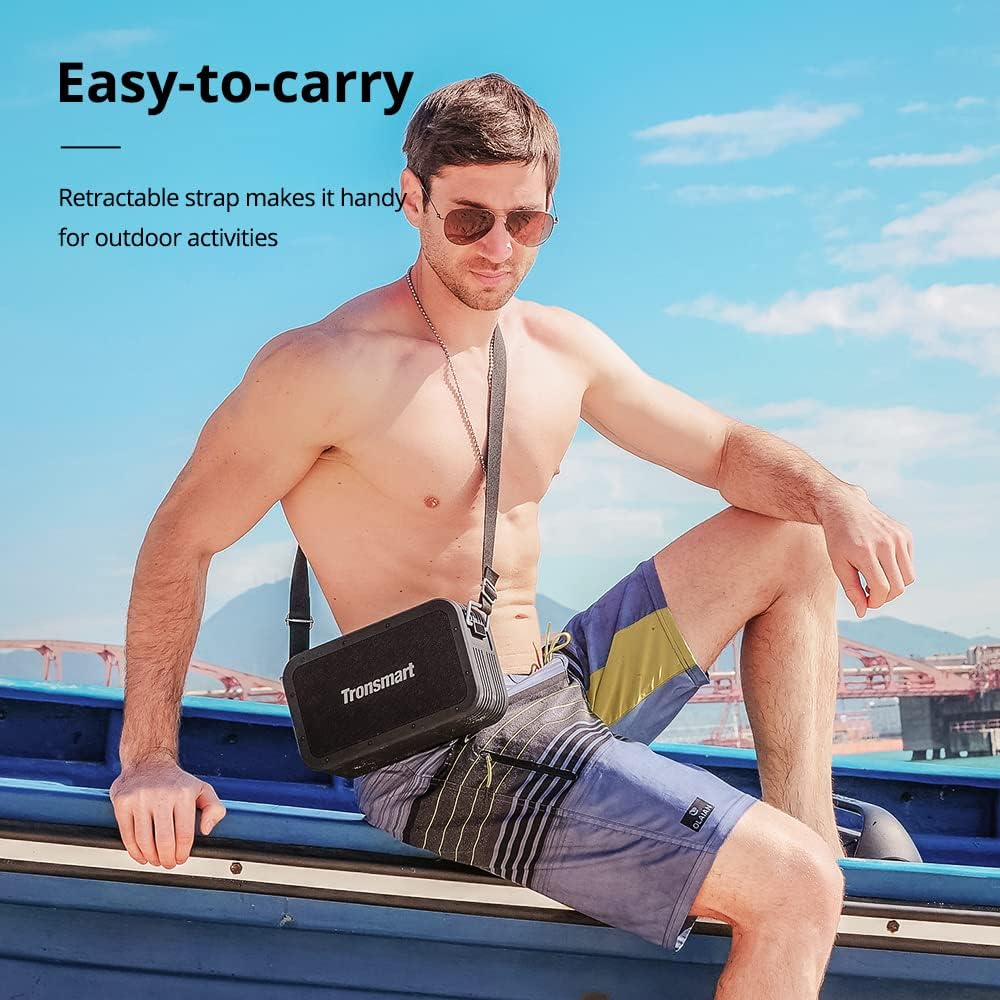
Image: A man sitting on a boat, wearing the Tronsmart Force Max speaker across his body using its retractable carrying strap, demonstrating its portability for outdoor activities.
설정
1. 스피커 충전
Before first use, fully charge the speaker. Connect the provided Type-C charging cable to the speaker's charging port and a compatible USB power adapter (not included). The charging indicator will illuminate during charging and turn off when fully charged. A full charge takes approximately 4 hours.
2. 전원 켜기 / 끄기
스피커를 켜거나 끄려면 전원 버튼을 2~3초 동안 길게 누르세요. 소리 표시등이 작동을 확인합니다.
3. 블루투스 페어링
- 스피커 전원을 켜세요. 그러면 LED 표시등이 깜빡이면서 자동으로 블루투스 페어링 모드로 전환됩니다.
- 기기(스마트폰, 태블릿 등)에서 Bluetooth를 활성화하세요.
- 검색 'Tronsmart Force Max' in your device's Bluetooth list and select it to connect.
- Once connected, the LED indicator will remain solid, and a confirmation sound will play.
4. Connecting via AUX, USB Drive, or Micro SD Card
The speaker supports audio input via a 3.5mm AUX cable, a USB drive, or a Micro SD card. Insert the respective media or cable into the designated port on the speaker. The speaker will automatically switch to the corresponding input mode.
작동 지침
1. 기본 재생 제어
- 재생/일시 중지: 재생/일시 정지 버튼을 누르세요.
- 볼륨 업: '+' 버튼을 누르세요.
- 볼륨 작게 : '-' 버튼을 누르세요.
- 다음 트랙: '+' 버튼을 길게 누르세요.
- 이전 트랙 : '-' 버튼을 길게 누르세요.
2. Tri-bass EQ Effects
The speaker offers three distinct EQ modes: Vocal, 3D Bass, and Deep Bass. Press the 'EQ' button to cycle through these modes and select your preferred audio profile.

Image: A graphic illustrating the Tri-bass EQ Effects feature of the Tronsmart Force Max speaker, showing options for Vocal, 3D Bass, and Deep Bass sound profiles.
3. True Wireless Stereo(TWS) 페어링
To achieve a stereo sound experience, you can pair two Tronsmart Force Max speakers together:
- 두 스피커 모두 전원이 켜져 있고 Bluetooth 장치에 연결되어 있지 않은지 확인하세요.
- On one speaker, press the TWS button. It will enter TWS pairing mode.
- 두 스피커는 자동으로 서로 연결됩니다. 연결이 완료되면 확인음이 들립니다.
- Once paired, connect your device to one of the speakers via Bluetooth as described in the 'Bluetooth Pairing' section. Both speakers will now play audio in stereo.

Image: Two Tronsmart Force Max speakers placed on a table outdoors, demonstrating their True Wireless Stereo pairing capability to create a wider soundstage for a group of people.
4. Using the Voice Assistant
With your smartphone connected via Bluetooth, press the dedicated Voice Assistant button on the speaker to activate Siri or Google Assistant on your device. You can then issue voice commands through the speaker's built-in microphone.

Image: The Tronsmart Force Max speaker on an outdoor table, with speech bubbles above it displaying icons for Siri, Cortana, and Google Assistant, indicating its compatibility with voice assistants.
5. 핸즈프리 통화
When connected to your smartphone via Bluetooth, you can answer or end calls directly using the speaker's controls. The built-in microphone allows for hands-free communication.
6. 파워뱅크 기능
The Tronsmart Force Max features a 15,000 mAh battery that can also be used to charge other devices. Connect your device to the speaker's USB-A output port using a compatible charging cable (not included) to utilize this function.

Image: The Tronsmart Force Max speaker on a wooden table, with a smartphone connected to it via a USB cable, demonstrating its built-in power bank functionality to charge external devices.
유지
1. 방수 관리 (IPX6)
The speaker is IPX6 waterproof, meaning it is protected against high-pressure water jets from any direction. However, it is not designed for submersion. Ensure all port covers are securely closed before exposing the speaker to water. After exposure to water, wipe the speaker dry with a soft cloth.

Image: The Tronsmart Force Max speaker being splashed with water, illustrating its IPX6 waterproof rating and suitability for outdoor use.
2. 일반 청소
부드러운 천으로 스피커를 청소하세요.amp 천을 사용하십시오. 연마성 세제, 알코올 또는 화학 용제는 표면을 손상시킬 수 있으므로 사용하지 마십시오.
3. 보관
Store the speaker in a cool, dry place away from direct sunlight and extreme temperatures. If storing for an extended period, charge the battery to approximately 50% every three months to maintain battery health.
문제 해결
- 스피커가 켜지지 않습니다: 배터리가 충전되어 있는지 확인하세요. 스피커를 전원에 연결하고 다시 시도해 보세요.
- Bluetooth를 통해 페어링할 수 없습니다. Ensure the speaker is in pairing mode (flashing LED). Turn off and on your device's Bluetooth. If issues persist, clear the speaker from your device's Bluetooth history and try pairing again.
- 소리가 나지 않습니다: 스피커와 연결된 기기의 볼륨 레벨을 확인하세요. 올바른 입력 모드(블루투스, AUX, USB, Micro SD)가 선택되었는지 확인하십시오.
- 음질이 좋지 않음: 간섭을 줄이려면 스피커를 블루투스 기기에 더 가까이 이동하세요. 스피커와 기기 사이에 장애물이 없는지 확인하십시오.
명세서
| 특징 | 세부 사항 |
|---|---|
| 모델명 | 포스 맥스 |
| 상표 | 트론스마트 |
| 스피커 유형 | 집 밖의 |
| 스피커 최대 출력 전력 | 80 와트 |
| 서라운드 사운드 채널 구성 | 2.2 |
| 오디오 출력 모드 | Tri-frequency Audio |
| 연결 기술 | 블루투스 |
| 무선 통신 기술 | 블루투스 |
| 블루투스 범위 | 59피트(18미터) |
| 제어 방법 | 목소리 |
| 방수 레벨 | IPX6 방수 |
| 배터리 용량 | 15000밀리amp 시간 |
| 충전 시간 | 4시간 |
| Playtime (50% volume) | 최대 13시간 |
| 제품 치수 | 10.2인치 깊이 x 6인치 너비 x 3.4인치 높이(258 x 153 x 86mm) |
| 품목 무게 | 5.6파운드(2.54kg) |
| 호환 장치 | 스마트폰, 태블릿 |
| 입력 옵션 | Bluetooth, 3.5mm AUX, USB Drive, Micro SD Card |

Image: The Tronsmart Force Max speaker positioned next to a campfire at dusk, with text indicating '13 Hours of Playtime', highlighting its long battery life for outdoor use.
보증 정보
The Tronsmart Force Max Portable Outdoor Speaker comes with a 1년 보증 from the date of purchase. This warranty covers manufacturing defects and workmanship. It does not cover damage caused by misuse, accidents, unauthorized modifications, or normal wear and tear. Please retain your proof of purchase for warranty claims.
지원하다
For further assistance or detailed inquiries, please refer to the official Tronsmart website or contact customer support. An electronic version of this user manual is available for download 여기.


