1. 서론
Thank you for choosing the SPLITSKY NZFS Kids Alarm Clock. This device combines an alarm clock, white noise sleep aid, and an 8-mode RGB night light, designed to assist with sleep and wake-up routines for children and adults. Please read this manual thoroughly to understand its features and ensure proper operation.
안전 정보:
- 기기를 물과 습도가 높은 환경에서 멀리 두십시오.
- 장치를 직접 분해하거나 수리하려고 하지 마십시오.
- Use only the provided USB-C power cable or a certified equivalent.
- 장치 주변의 적절한 환기를 보장하십시오.
2. 패키지 내용
패키지에 모든 품목이 들어 있는지 확인하세요.
- SPLITSKY NZFS Kids Alarm Clock
- 1.2M (4.7 inch) USB-C Power Cable
- 사용 설명서 (본 문서)
- 1 x CR2032 Lithium Ion Battery (pre-installed for memory backup)
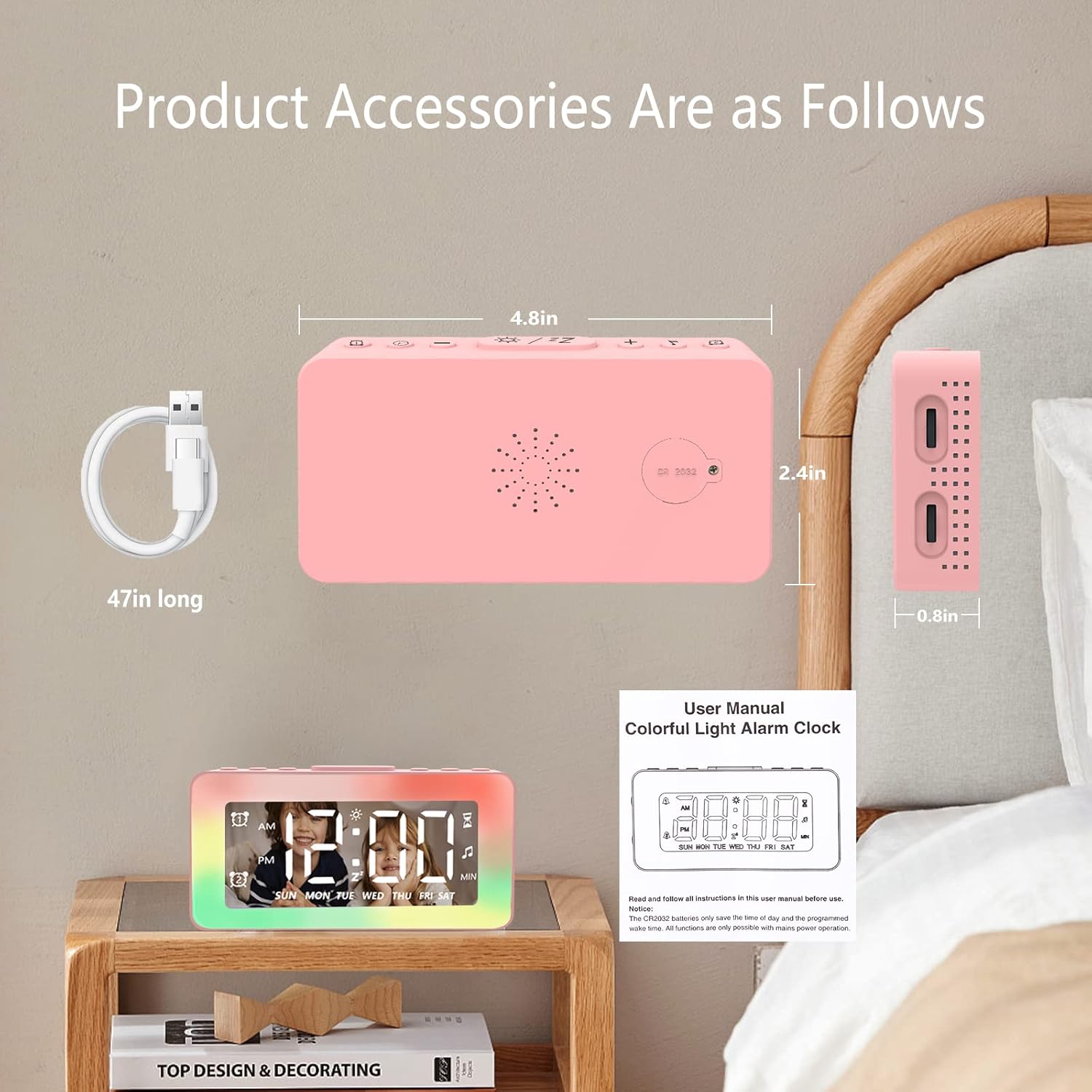
Image: The SPLITSKY NZFS Kids Alarm Clock, a USB-C power cable, and the user manual are included in the package.
3. 제품 오버view
알람시계의 버튼과 포트에 익숙해지세요.

이미지: 상세 view of the alarm clock's top buttons and side ports, including Alarm 1, Time Setting, Light Minus/Settings, Snooze/Light Mode Switch, Light Plus/Setup, Music Switch, Alarm 2, Volume Setting, Time Brightness Setting, USB Output Charging Port, and Type-C Input Interface.
- 알람 1 버튼: Set and activate Alarm 1.
- 시간 설정 버튼: 현재 시간을 조정합니다.
- Light Minus / Settings Button: Decrease light brightness or navigate settings.
- Snooze / Light Mode Switch Button: Activate snooze, or cycle through light modes.
- Light Plus / Setup Button: Increase light brightness or confirm settings.
- Music Switch Button: Cycle through white noise sounds.
- 알람 2 버튼: Set and activate Alarm 2.
- Volume Setting Wheel (Side): Adjust alarm and white noise volume.
- Time Brightness Setting Wheel (Side): 디스플레이 밝기를 조정합니다.
- USB Output Charging Port (Side): Charge external devices.
- Type-C Input Interface (Side): Connect power cable to the alarm clock.
4. 설정
4.1 전원 연결
- Connect the provided USB-C power cable to the Type-C Input Interface on the side of the alarm clock.
- USB-C 케이블의 다른 쪽 끝을 호환되는 USB 전원 어댑터(포함되지 않음) 또는 USB 포트에 꽂습니다.
- 디스플레이에 불이 들어오면 시계가 켜진 것입니다.

Image: The SPLITSKY NZFS Kids Alarm Clock is shown powered on and connected via its USB-C port, also demonstrating its capability to charge a smartphone.
4.2 배터리 설치 (메모리 백업)
The alarm clock includes a pre-installed CR2032 battery. This battery serves as a memory backup to retain time and alarm settings during a power outage or when the main power is disconnected. It does not power the clock for regular operation.
- If the battery needs replacement, locate the battery compartment on the back of the unit.
- 작은 드라이버를 사용하여 수납칸을 엽니다.
- 올바른 극성을 확인하여 새 CR2032 배터리로 교체하세요.
- 격실을 단단히 닫으십시오.
5. 사용 설명서
5.1 Setting the Time (12H/24H Format)
- 를 누르고 계세요 시간 설정 버튼 until the hour digits begin to flash.
- 사용하세요 Light Minus / Settings Button (아래로) 또는 Light Plus / Setup Button (up) to adjust the hour.
- 를 누르세요 시간 설정 버튼 again to move to minute adjustment. Adjust minutes using the Light Minus/Plus buttons.
- 를 누르세요 시간 설정 버튼 a third time to select 12-hour or 24-hour format. Adjust using the Light Minus/Plus buttons.
- 를 누르세요 시간 설정 버튼 시간 설정 모드를 확인하고 종료하려면 다시 한번 누르세요.
5.2 Setting Alarms (Dual Alarm, Daily/Weekday/Weekend Mode)
이 시계는 두 개의 독립적인 알람(알람 1과 알람 2)을 지원합니다.
- 를 누르고 계세요 알람 1 버튼 (알람 1의 경우) 또는 알람 2 버튼 (for Alarm 2) until the alarm hour digits flash.
- 사용하세요 Light Minus / Settings Button or Light Plus / Setup Button 시간을 조정합니다.
- Press the respective Alarm Button again to move to minute adjustment. Adjust minutes using the Light Minus/Plus buttons.
- Press the respective Alarm Button again to select the alarm mode:
- 데일리 모드 : 알람이 매일 울립니다.
- 평일 모드: 알람은 월요일부터 금요일까지 울립니다.
- Weekend Mode: 알람은 토요일과 일요일에 울립니다.
- Press the respective Alarm Button once more to confirm and exit alarm setting mode.
- 알람을 활성화/비활성화하려면 버튼을 짧게 누르세요. 알람 1 버튼 or 알람 2 버튼디스플레이에 알람 아이콘이 나타나거나 사라집니다.
5.3 스누즈 기능
When an alarm sounds, tap the Snooze / Light Mode Switch Button on top to activate snooze. The alarm will pause for 9 minutes and then sound again. This can be repeated multiple times.
5.4 Night Light (8 Modes RGB, 10-level dimming)
The alarm clock features 6 solid color lights and 2 ambient colorful lights.
- 짧게 누르세요 Snooze / Light Mode Switch Button to turn on the night light and cycle through the 8 color modes.
- To adjust the brightness (10 levels), use the Light Minus / Settings Button or Light Plus / Setup Button while the night light is active.
- To turn off the night light, continue pressing the Snooze / Light Mode Switch Button 불이 꺼질 때까지.

Image: Multiple SPLITSKY NZFS Kids Alarm Clocks are shown, each displaying a different color from the 8 available RGB night light modes.
5.5 White Noise Sleep Aid (8 Sounds)
The clock offers 8 soothing sounds to aid sleep.
- 짧게 누르세요 음악 전환 버튼 to turn on the white noise and cycle through the available sounds.
- To adjust the volume (16 levels), use the Volume Setting Wheel on the side of the clock.
- To turn off the white noise, continue pressing the 음악 전환 버튼 until the sound stops.

Image: The SPLITSKY NZFS Kids Alarm Clock is displayed on a bedside table, with icons illustrating the various white noise options such as rain, cicadas, piano, bonfire, waves, birdsong, and church bells.
5.6 Sleep Timer (10-120 minutes)
The sleep timer allows you to set a duration for the white noise and/or night light to play before automatically turning off.
- While white noise or night light is active, press and hold the 음악 전환 버튼 (for white noise timer) or Snooze / Light Mode Switch Button (for light timer).
- 사용하세요 Light Minus / Settings Button or Light Plus / Setup Button to select the desired timer duration (10, 20, 30, 60, 90, 120 minutes).
- Press the respective button again to confirm the timer setting. The timer icon will appear on the display.
5.7 디스플레이 밝기 조정
Adjust the brightness of the LED time display using the Time Brightness Setting Wheel on the side of the clock.
5.8 USB 충전 포트
The USB output charging port on the side of the alarm clock can be used to charge other small electronic devices, such as smartphones. Connect your device's charging cable to this port.
6. 유지관리
6.1 청소
- 청소하기 전에 장치의 플러그를 뽑았는지 확인하십시오.
- 부드럽고 마른 천으로 표면을 닦습니다.
- 연마성 세척제, 용제 또는 화학 스프레이를 사용하지 마십시오.
6.2 보관
When not in use for extended periods, store the alarm clock in a cool, dry place, away from direct sunlight and extreme temperatures.
7. 문제 해결
If you encounter issues with your SPLITSKY NZFS Kids Alarm Clock, refer to the table below for common problems and solutions.
| 문제 | 가능한 원인 | 해결책 |
|---|---|---|
| 시계 화면이 꺼져 있거나 흐릿합니다. | Not connected to power; Time brightness set too low. | Ensure USB-C cable is securely connected to a power source. Adjust the Time Brightness Setting Wheel. |
| 알람이 울리지 않습니다. | 경보가 작동하지 않았습니다. 경보음이 너무 작습니다. | Check if the alarm icon is displayed. If not, short press the respective Alarm Button to activate. Adjust the Volume Setting Wheel. |
| Time/settings reset after power disconnection. | CR2032 백업 배터리가 방전되었거나 없습니다. | Replace the CR2032 battery in the battery compartment. |
| Night light or white noise not working. | Function not activated; Sleep timer active. | 짧게 누르세요 Snooze / Light Mode Switch Button or 음악 전환 버튼 to activate. Check if a sleep timer is set. |
8. 사양
| 특징 | 세부 사항 |
|---|---|
| 상표 | 스플리츠키 |
| 모델 번호 | NZFS |
| 디스플레이 유형 | 디지털 LED |
| 제품 치수 | 3.17"W x 3.17"H (approximately 8.05 cm W x 8.05 cm H) |
| 품목 무게 | 8.1온스(약 230그램) |
| 전원 | Corded Electric (USB-C), Battery Powered (CR2032 for memory) |
| 야간 조명 모드 | 8 (6 solid colors, 2 ambient colorful) with 10-level dimming |
| 백색 소음 소리 | 8가지 편안한 소리 |
| 경보음 | 7 wake-up alarm tones with 16-level volume control |
| 알람 기능 | Dual Alarm, Daily/Weekday/Weekend modes, 9-minute Snooze |
| 타이머 기능 | 10-120 minute sleep timer for sounds and lights |
| 연결성 | USB-C Input, USB-A Output (for charging external devices) |
| 재료 | 아크릴로 니트릴 부타디엔 스티렌 |
9. 보증 및 지원
9.1 보증 정보
Please refer to the warranty information provided at the time of purchase or contact your retailer for details regarding the product warranty. Keep your proof of purchase for any warranty claims.
9.2 고객 지원
For technical assistance, troubleshooting beyond this manual, or general inquiries, please contact the seller through the platform where you purchased the product. Provide your order number and a detailed description of the issue for prompt support.


