소개
The Keychron Q6 Pro is a full-size, full-metal custom mechanical keyboard designed for an unparalleled typing experience. It features QMK/VIA programmability, wireless Bluetooth and wired USB-C connectivity, hot-swappable switches, a double-gasket design, KSA double-shot PBT keycaps, screw-in stabilizers, and south-facing RGB backlighting. This manual provides essential information for setting up, operating, maintaining, and troubleshooting your Keychron Q6 Pro keyboard.

Image: The Keychron Q6 Pro keyboard, showcasing its full layout and a close-up of a K Pro Banana switch.
패키지 내용
시작하기 전에 패키지에 모든 품목이 들어 있는지 확인하세요.
- 1x Fully Assembled Keyboard (including Aluminum Case, PCB, PC Plate, Sound Absorbing Foam, Case Foam, 16x Gaskets, 8 sets x Stabilizers, 1 set x Keycaps (Double-Shot KSA PBT), 1 set x Switches)
- 1x Type-C to Type-C 케이블
- 1x Type-A-Type-C 어댑터
- 1x 스위치 풀러
- 1x 키캡 풀러
- 1x 드라이버
- 1x 육각 키
- 사용자 설명서
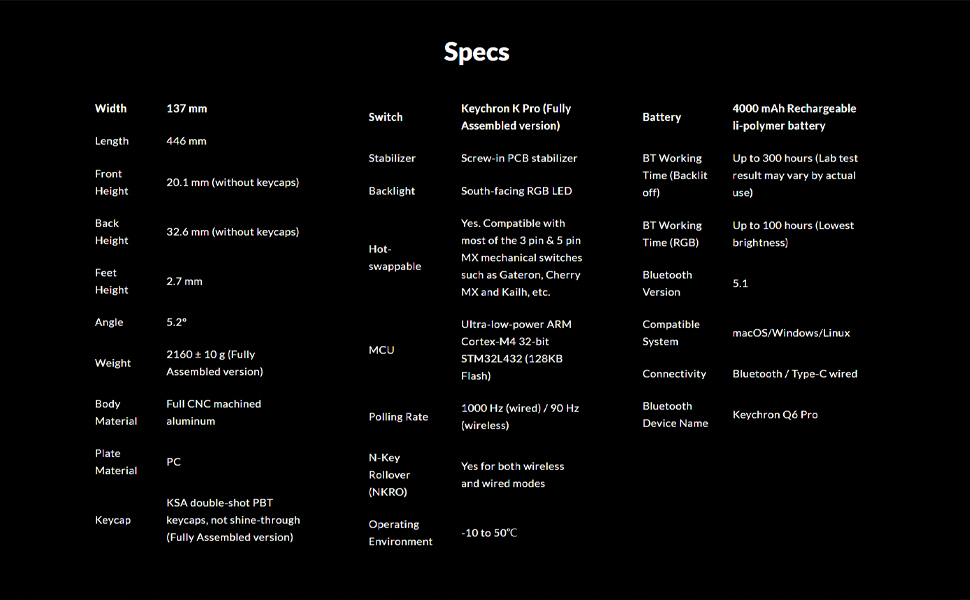
Image: An illustration showing all components included in the Keychron Q6 Pro package.
설정
1. 초기 연결
The Keychron Q6 Pro supports both wired and wireless (Bluetooth) connectivity.
유선 모드 :
Connect the keyboard to your computer using the provided Type-C to Type-C cable or the Type-C to Type-A adapter. The keyboard will automatically be recognized. The polling rate in wired mode is 1000 Hz.
무선(블루투스) 모드:
- 키보드가 충전되어 있는지 확인하세요.
- Flip the switch on the back of the keyboard to the Bluetooth mode.
- On your device (laptop, phone, tablet), enable Bluetooth and search for "Keychron Q6 Pro".
- Select the keyboard to pair. The keyboard can connect to up to 3 devices wirelessly.
The polling rate in wireless mode is 90 Hz.
2. 운영 체제 전환
The Q6 Pro is fully compatible with both Mac and Windows operating systems. Use the OS switch located on the back of the keyboard to select the appropriate layout for your system.

Image: The Keychron Q6 Pro keyboard demonstrating its multi-device wireless connectivity with a phone, tablet, and laptop.
작동 지침
1. QMK/VIA 맞춤형
The Keychron Q6 Pro supports QMK/VIA for advanced customization. This allows you to remap any key, create macro commands, shortcuts, or key combinations.
- Keychron 공식 웹사이트에서 VIA 소프트웨어를 다운로드하세요. web대지.
- Connect the keyboard in wired mode to ensure proper detection by VIA.
- Use the VIA interface to customize key assignments, create macros, and adjust lighting effects.

Image: A visual representation of the VIA software interface, used for programming and customizing the keyboard's functions.
2. RGB 백라이트
The keyboard features south-facing RGB backlighting with 22 types of preset effects. You can fine-tune the RGB hue, saturation, brightness, effect speed, and different modes directly on the keyboard or through QMK/VIA.

Image: The Keychron Q6 Pro keyboard illuminated with its south-facing RGB backlighting, displaying a spectrum of colors.
3. 핫스왑 가능 스위치
The Q6 Pro allows you to hot-swap every switch with almost all 3-pin and 5-pin MX style mechanical switches on the market (e.g., Cherry, Gateron, Kailh, Panda) without soldering.

이미지: 클로즈업 view of the Keychron Q6 Pro keyboard with several keycaps and switches removed, illustrating the hot-swappable sockets.
4. 회전식 조절 손잡이 기능
The programmable rotary knob provides convenient control over various functions, typically volume control by default. Its function can be customized via QMK/VIA.
유지
1. 키보드 청소
- 키보드를 컴퓨터에서 분리합니다.
- 키캡 풀러를 사용하여 키캡을 제거하여 철저히 청소하세요.
- 압축 공기를 사용하여 스위치 사이의 먼지와 이물질을 제거합니다.
- Wipe keycaps and the keyboard frame with a soft, slightly damp 천으로 닦아주세요. 과도한 습기는 피해주세요.
2. 스위치 및 키캡 교체
Thanks to the hot-swappable design, switches and keycaps can be easily replaced.
- 제공된 키캡 풀러를 사용하여 원하는 키캡을 조심스럽게 제거하세요.
- Use the provided switch puller to carefully remove the switch from its socket.
- 새 스위치의 핀을 PCB의 구멍에 맞추고 딸깍 소리가 나면서 제자리에 들어갈 때까지 단단히 누르세요. 핀이 구부러지지 않았는지 확인하세요.
- 새 키캡을 스위치 스템에 끼우고 아래로 누르세요.

이미지: 자세한 view of the Keychron Q6 Pro keyboard with several keycaps detached, revealing the underlying switch stems and stabilizers.
문제 해결
If you encounter issues with your Keychron Q6 Pro, please refer to the following common solutions:
| 문제 | 가능한 원인 / 해결책 |
|---|---|
| 키보드가 응답하지 않음(유선) |
|
| 키보드가 연결되지 않음(블루투스) |
|
| RGB 백라이트가 작동하지 않거나 잘못되었습니다. |
|
| 특정 키가 작동하지 않습니다 |
|
For further assistance, please visit the official Keychron support website or consult the full user guide PDF available online.
명세서
| 특징 | 세부 사항 |
|---|---|
| 모델 | Keychron Q6 Pro (Q6P-M4) |
| 공들여 나열한 것 | Full-size (108-Key) |
| 본체 소재 | Full CNC machined aluminum |
| 키캡 재질 | Double-shot KSA PBT |
| 스위치 유형 | Keychron K Pro Banana (Hot-swappable) |
| 백라이트 | 남향 RGB LED |
| 연결성 | Bluetooth 5.1 / Type-C wired |
| 폴링 속도(유선) | 1000Hz |
| 폴링 속도(무선) | 90Hz |
| MCU | 초저전력 ARM Cortex-M4 32비트 STM32L432 (128KB 플래시 메모리) |
| 배터리 | 4000 mAh Rechargeable Li-polymer battery |
| Battery Working Time (Backlight off) | 최대 300시간 |
| Battery Working Time (RGB) | 최대 100시간(최저 밝기) |
| 호환 시스템 | 맥OS/윈도우/리눅스 |
| 무게 | Approximately 6.6 pounds (2160 ± 10 g) |
| 치수(길이x너비x높이) | 17.56 x 5.39 x 1.28인치(446 x 137 x 32.6mm) |
| 운영 환경 | -10 ~ 50°C |
보증 및 지원
Keychron products are designed for durability and performance. For information regarding product warranty, please refer to the official Keychron web사이트에 접속하거나 제품에 포함된 보증 카드를 확인하세요.
For technical support, frequently asked questions, or to download the latest VIA software and firmware, please visit the Keychron support page:
You can also find additional resources, including the User Manual and User Guide PDFs, on the product's Amazon page under the "Product guides and documents" section.


