1. 서론
This manual provides comprehensive instructions for the Vrabocry LM091 RGBCCT 4 Zone Touch RF Remote Control. This remote is designed to control RGBCCT LED strips and bulbs, offering intuitive control over color, brightness, and color temperature. Please read this manual thoroughly before use to ensure proper operation and to maximize the product's lifespan.
2. 제품 오버view
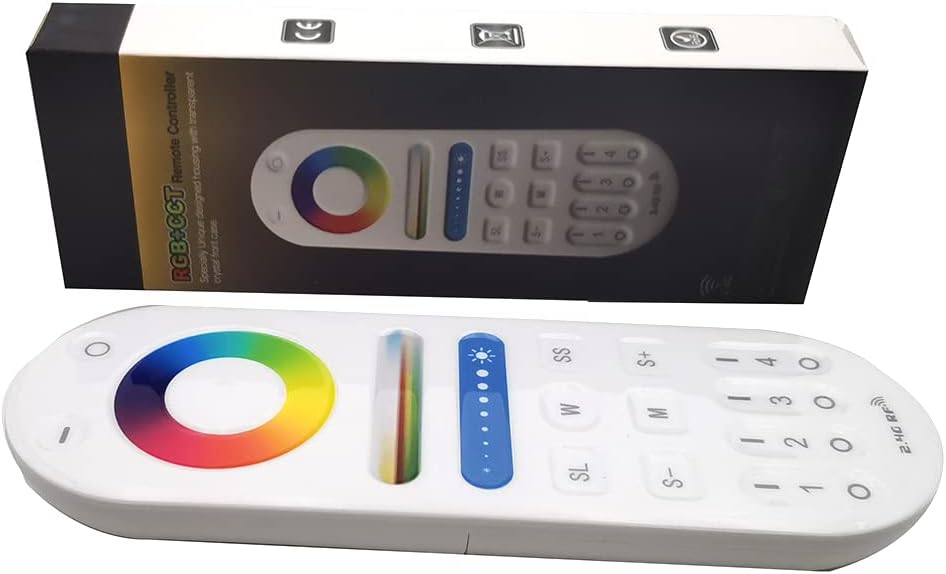
Image 1: The Vrabocry LM091 RGBCCT remote control shown alongside its product packaging.
2.1 주요 특징
- RGBCCT Control: Capable of controlling RGBCCT 6-pin (V+, R, G, B, WW, CW) LED strips and bulbs.
- 4존 제어: Manage up to four distinct lighting zones independently or simultaneously.
- 터치 컬러 링: Intuitive color selection via a sensitive touch color ring.
- 밝기 및 색온도 조절: Fine-tune lighting intensity and white light temperature (warm white to cool white).
- 2.4GHz RF Transmission: Reliable wireless control with a range of up to 98 feet (30 meters).
- 호환성: Works with various Mi-Boxer/Mi-Light RGBCCT series controllers such as WL5, LS2, FUT045, FUT039, and others.
- 인체공학적 디자인: 잡기도 편하고 조작하기도 편합니다.
2.2 원격 제어 레이아웃

이미지 2: 앞면 view of the LM091 remote control, showing the touch color ring, brightness slider, and various control buttons.
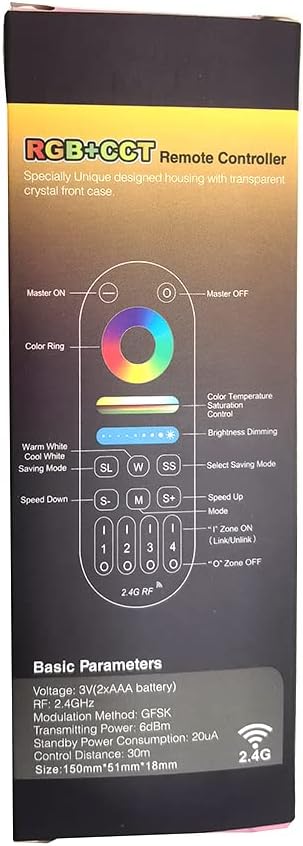
Image 3: A detailed diagram illustrating the functions of each button on the LM091 remote control, as depicted on its packaging.
3. 설정
3.1 배터리 설치
- 리모콘 뒷면에 있는 배터리함 덮개를 찾으세요.
- 덮개를 밀어 엽니다.
- AAA 배터리 두 개를 올바른 극성(+ 및 -)에 맞춰 삽입합니다.
- 배터리 덮개를 다시 장착하세요.

Image 4: The back of the LM091 remote control with the battery compartment open, showing where to insert AAA batteries.
3.2 리모컨 페어링
To control your LED lights, the remote control must be paired with a compatible RGBCCT controller (e.g., Mi-Boxer/Mi-Light series). The pairing process typically involves the following steps:
- Ensure your LED controller is powered off.
- Power on the LED controller. Within 3 seconds of powering on, press the desired zone number button (1, 2, 3, or 4) on the LM091 remote control three times.
- The connected LED lights should flash three times to indicate successful pairing.
- If pairing fails, power off the controller and repeat the process.
페어링 해제: To unpair, power on the LED controller. Within 3 seconds, press the desired zone number button five times. The lights should flash six times to confirm unpairing.
4. 사용 설명서
The LM091 remote control allows for precise adjustment of your RGBCCT LED lighting. Refer to Image 3 for button identification.
- 마스터 온/오프: Press the 'Master ON' button (top right) to turn all paired lights on. Press the 'Master OFF' button (top left) to turn all paired lights off.
- 구역 선택: Press buttons '1', '2', '3', or '4' to select a specific lighting zone. Once a zone is selected, all subsequent commands will apply only to that zone. To control all zones simultaneously, press the 'Master ON' button.
- 색상 링: Touch the color ring to select any static color.
- 색온도 제어: Use the 'W' (Warm White) and 'SS' (Cool White) buttons to adjust the color temperature of the white light. This function requires a CCT (Dual White) 3-wire LED strip (V+, WW, CW) or an RGBCCT strip.
- 밝기 조절: Use the brightness slider to increase or decrease the light intensity. The 'S+' and 'S-' buttons can also be used for fine-tuning brightness.
- 모드 선택(M): Press the 'M' button to cycle through various dynamic lighting modes.
- 속도 조절(S+/S-): When a dynamic mode is active, use the 'S+' and 'S-' buttons to increase or decrease the speed of the mode.
- Saving Mode (SL): The 'SL' button may be used to save or recall custom lighting settings, depending on the connected controller's capabilities.
5. 유지관리
- 청소: 리모컨은 부드럽고 마른 천으로 닦으세요. 연마성 세제나 용제를 사용하지 마세요.
- 배터리 교체: Replace batteries when the remote's response becomes sluggish or inconsistent. Always use new AAA batteries and dispose of old batteries responsibly.
- 저장: 리모컨은 직사광선과 극한의 온도를 피해 건조한 곳에 보관하세요.
6. 문제 해결
| 문제 | 가능한 원인 | 해결책 |
|---|---|---|
| 리모콘이 응답하지 않음 | Low or dead batteries. Remote is out of range. Not paired correctly. | Replace batteries. Move closer to the LED controller. Re-pair the remote control with the LED controller (refer to Section 3.2). |
| Lights not changing color/brightness | Incorrect zone selected. Controller not compatible with RGBCCT. | Ensure the correct zone is selected or press 'Master ON'. Verify that your LED controller and strip are RGBCCT compatible. |
| Color temperature adjustment not working | LED strip is not CCT or RGBCCT. | This function requires a CCT (Dual White) 3-wire LED strip (V+, WW, CW) or an RGBCCT strip. Ensure your strip supports this feature. |
7. 사양
- 모델: LM091
- 권tage: 3V (2 x AAA Batteries)
- 전송 주파수: 2.4GHz
- 변조 방법 : GFSK
- 전송 전력: 6dBm
- 대기 전력 소비량: 20uA
- 제어 거리: 최대 98피트(30미터)
- 작동 온도: -20°C ~ 60°C (-4°F ~ 140°F)
- 지원되는 최대 장치 수: 1 (per remote, but one controller can be controlled by four remotes)
- 버튼 수: 4 (zone buttons) + other control buttons
- 컨트롤러 유형 : Remote control, Touch
8. 보증 및 지원
For warranty information and technical support, please refer to the documentation provided with your purchase or contact Vrabocry customer service through the retailer where the product was purchased. Keep your proof of purchase for any warranty claims.