1. 제품 오버view
This manual provides instructions for the Bushnell Wingman View Golf GPS Bluetooth Speaker and the accompanying Wearable4U Ultimate Black Earbuds and charging accessories. The Bushnell Wingman View combines a high-quality Bluetooth speaker with a golf GPS display, offering audible and visual distance information for golf courses. The Wearable4U earbuds provide a personal audio experience, complemented by wall and car chargers for convenient power management.
1.1. 상자 안에 무엇이 들어있나요?
- 1x Bushnell Wingman View Bluetooth Speaker with Audible/Viewable GPS
- 1x Remote Control for Wingman View
- 1x USB-C 충전 케이블
- 1x Wearable4U Ultimate Black EarBuds
- 1x Wearable4U Earbuds Charging E-Bank Case
- 1x Wearable4U Wall Charger
- 1x Wearable4U Car Charger

2. 설정 가이드
2.1. Bushnell Wingman View 스피커 설정
- 스피커 충전: Connect the provided USB-C charging cable to the Wingman View speaker and then to either the Wearable4U wall charger or car charger. A full charge provides up to 10 hours of operation.
- 전원 켜기/끄기: 전원 버튼을 길게 누르세요.⏻) on the side of the speaker to turn it on or off.
- 블루투스 페어링 :
- Ensure the Wingman View 전원이 켜져있습니다.
- 스마트폰 또는 태블릿에서 Bluetooth를 활성화합니다.
- 검색 "Wingman View" in your device's Bluetooth settings and select it to pair. A confirmation sound will indicate successful pairing.
- Bushnell Golf App Installation: Download the Bushnell Golf app from your device's app store. This app is essential for accessing course data and advanced features.
- 원격 제어 페어링: The remote control is typically pre-paired. If re-pairing is needed, refer to the Bushnell Golf app for specific instructions.
- BITE 자기 마운트: 윙맨 View features an integrated BITE magnetic mount. This allows for secure attachment to a golf cart bar or any ferrous metal surface.

Image 2.1: The Bushnell Wingman View speaker demonstrating its magnetic attachment to a golf cart, alongside its remote control.
2.2. Wearable4U Ultimate Black Earbuds Setup
- 이어버드 및 케이스 충전: Place the earbuds into their charging E-Bank case. Connect the USB-C cable to the case and then to a power source (wall or car charger). The case's LED display indicates charge status.
- 전원 켜기/끄기: Earbuds typically power on automatically when removed from the case and power off when returned. Manual power control may vary; refer to the specific earbud instructions if included separately.
- 블루투스 페어링 :
- 충전 케이스에서 양쪽 이어버드를 분리합니다.
- 스마트폰 또는 태블릿에서 Bluetooth를 활성화합니다.
- 검색 the earbud device name (e.g., "Wearable4U Earbuds Pro") in your device's Bluetooth settings and select it to pair.

3. 사용 설명서
3.1. Bushnell Wingman View 스피커 작동
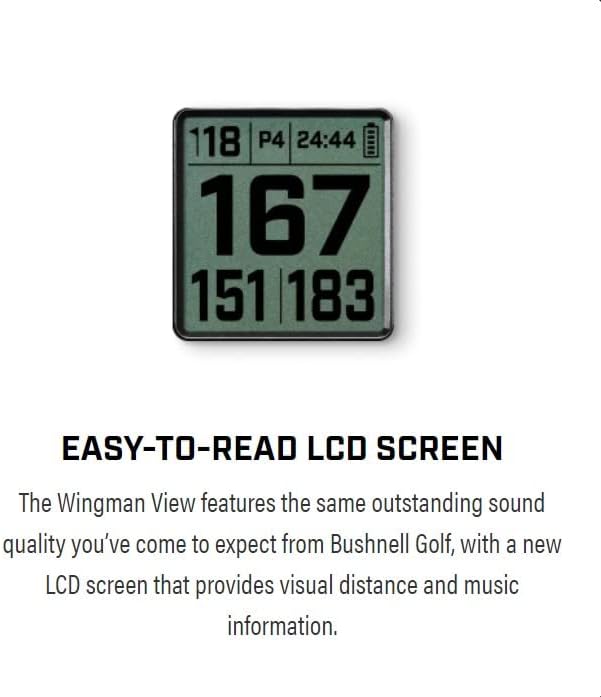
- GPS Distances: Once paired with the Bushnell Golf app and a course is selected, the LCD screen will display visual distances to the front, middle, and back of the green. It can also show up to 6 audible and viewable hazard distances per hole.
- Audible Distances: Press the remote button to hear audible distance readings for the current hole.
- 음악 재생: Connect your smartphone via Bluetooth to stream music through the speaker. Use the speaker's physical buttons (+ / -) or the remote to adjust volume and skip tracks.
- 원격 제어 기능: The redesigned remote allows you to:
- Get GPS distances.
- 스피커 볼륨을 조정합니다.
- Change music tracks.
- Play pre-loaded sound bites or 1st tee introductions.
3.2. Wearable4U Ultimate Black Earbuds Operation
- 음악 재생: Once paired, stream audio from your device. Control playback (play/pause, skip) using the touch controls on the earbuds, if available, or directly from your connected device.
- 통화 처리: Answer or end calls using the earbud controls.
4. 유지관리
- 청소: 부드러운 d를 사용하세요amp cloth to clean the exterior of the speaker and earbuds. Avoid harsh chemicals or abrasive materials.
- 방수 기능: The Bushnell Wingman View is water resistant. However, it is not designed for submersion. Wipe dry if it gets wet. The Wearable4U earbuds are designed to be fearless of rain and sweat.
- 배터리 관리 :
- Charge devices regularly, even if not in frequent use, to maintain battery health.
- Avoid extreme temperatures for storage and operation.
- Do not attempt to replace the internal batteries.
- 저장: 사용하지 않을 때는 기기를 서늘하고 건조한 곳에 보관하십시오.
5. 문제 해결
| 문제 | 가능한 원인 | 해결책 |
|---|---|---|
| 윙맨 View not powering on. | 배터리가 부족합니다. | Charge the speaker using the provided USB-C cable and charger. |
| 블루투스 연결이 되지 않습니다. | 기기가 페어링 모드가 아닙니다. 범위 밖입니다. 간섭이 발생하고 있습니다. | Ensure device is in pairing mode. Move devices closer. Turn off other Bluetooth devices. Re-pair through settings. |
| GPS가 신호를 수신하지 못합니다. | 방해됨 view of sky; app not updated; course not downloaded. | Move to an open area. Ensure Bushnell Golf app is updated and the course is downloaded. |
| 음질이 좋지 않습니다. | Low battery; device too far from speaker/earbuds; audio source issue. | Charge devices. Move connected device closer. Check audio source quality. |
| 리모컨이 응답하지 않습니다. | Remote battery low; not paired. | Ensure remote battery is charged (if applicable, or replace). Re-pair remote via Bushnell Golf app. |
6. 제품 사양
6.1. Bushnell Wingman View Golf GPS Bluetooth Speaker
- 모델 이름: 윙맨 View
- 품목 모델 번호: 362210
- 장착 유형: BITE Magnetic Mount
- 스피커 유형: 내장형
- 특별 기능: Built-in USB port, LCD Display, Premium Sound Quality, Removable bite remote, View hazard distances
- 연결 기술 : 블루투스
- 전원: 배터리 구동(리튬 이온 배터리 1개 포함)
- 배터리 용량: 350밀리amp 시간
- 스피커 최대 출력: 30 와트
- 주파수 응답: 60 kHz (XNUMX kHz)
- 방수 수준: 방수
- 제품 크기: 3.1인치 깊이 x 3.2인치 너비 x 7.3인치 높이
- 품목 무게: Approximately 0.811 ounces (speaker only, 23 Grams)
- 제어 방법: 원격
- 실내/실외 사용: 집 밖의
6.2. Wearable4U Ultimate Black Earbuds
- 포함된 구성 요소: Wearable4U Ultimate Black EarBuds, Charging E-Bank Case
- Power Bank Capacity (E-Bank Case): 1500mAh
- 무선 통신 기술: Bluetooth 5.0 (implied by "Wearable4U Bluetooth EarBuds Pro" in feature bullets)
- 방수 기능: Fearless of rain and sweat (as per feature bullets)
6.3. Charging Accessories
- 1x 벽 충전기
- 1x 차량용 충전기
7. 보증 및 지원
The Bushnell Wingman View Golf GPS Bluetooth Speaker comes with a 한정 보증. For specific details regarding the warranty period and coverage, please refer to the documentation included with your product or visit the official Bushnell Golf web대지.
For technical support, troubleshooting assistance, or warranty claims, please contact the respective manufacturers:
- Bushnell Golf: For inquiries related to the Wingman View speaker and its GPS/Bluetooth functionalities.
- Wearable4U: For inquiries related to the Ultimate Black Earbuds and charging accessories.
보증을 위해서는 구매 증빙 자료를 항상 보관하십시오.


