1. 서론
The xTool Smoke Purifier is an essential accessory designed to create a healthy and safe working environment when operating laser engravers indoors. It efficiently removes smoke, dust, and harmful gases generated during laser processing, ensuring clean air quality. This manual provides comprehensive instructions for the setup, operation, and maintenance of your smoke purifier.
2. 안전 정보
Please read and understand all safety instructions before operating the xTool Smoke Purifier. Failure to follow these instructions may result in injury or damage to the product.
- 기기가 안정적이고 평평한 표면에 놓여 있는지 확인하십시오.
- 작동 중에는 공기 흡입구나 배출구를 막지 마십시오.
- 기기와 함께 제공된 전원 어댑터만 사용하세요.
- 장치를 물이나 기타 액체에서 멀리 두십시오.
- 기기를 직접 열거나 수리하려고 하지 마십시오. 도움이 필요하시면 고객 지원팀에 문의하십시오.
- Regularly check and replace filters as recommended to maintain optimal performance and safety.
- Ensure proper ventilation in the workspace, even with the purifier in use, especially when processing materials that produce strong odors or fumes.
3. 패키지 내용
아래 나열된 모든 품목이 패키지에 포함되어 있는지 확인하세요.
- xTool Smoke Purifier Unit
- Pipe Adapter (for xTool M1)
- Pipe Adapter (for Smoke Purifier)
- 파이프 Clamp (for Smoke Purifier)
- 파이프 Clamp (for xTool M1)
- 전원 케이블
- 드라이버
- 사용자 설명서
- Filter Pack (includes replacement pre-filter)

4. 설정
4.1 언박싱 및 조립
1. 모든 구성품을 포장에서 조심스럽게 꺼내세요.
2. Place the xTool Smoke Purifier on a stable surface near your laser engraver.
3. Connect the flexible exhaust hose to the smoke purifier's air inlet using the appropriate pipe adapter and clamp. Ensure a secure fit to prevent smoke leakage.
4. Connect the other end of the exhaust hose to your laser engraver's exhaust port, again using the correct adapter and clamp. For D1/D1 Pro models, ensure a protective cover is in place for effective smoke capture.


4.2 필터 설치
The xTool Smoke Purifier comes with a pre-installed 3-stage filtration system. Ensure all filters are correctly seated before first use. Refer to the Maintenance section for future filter replacement.

5. 사용 설명서
5.1 전원 켜기/끄기 및 팬 속도 조정
1. Connect the power cable to the smoke purifier and a suitable power outlet.
2. Turn the rotary knob on the front panel clockwise to power on the device. Continue turning to adjust the fan speed from minimum to maximum. Turn counter-clockwise to reduce speed and power off.
3. For optimal smoke removal, adjust the fan speed according to the material being processed and the density of fumes generated.

5.2 호환성
The xTool Smoke Purifier is designed for wide compatibility with various xTool laser engravers, including:
- x툴 M1
- xTool M1 울트라
- xTool F1 울트라
- xTool S1
- xTool P2
- xTool D1 (requires cover)
- xTool D1 Pro (requires cover)
It is also suitable for use with most other enclosed laser engravers.
6. 주요 특징
6.1 Powerful 150W Suction
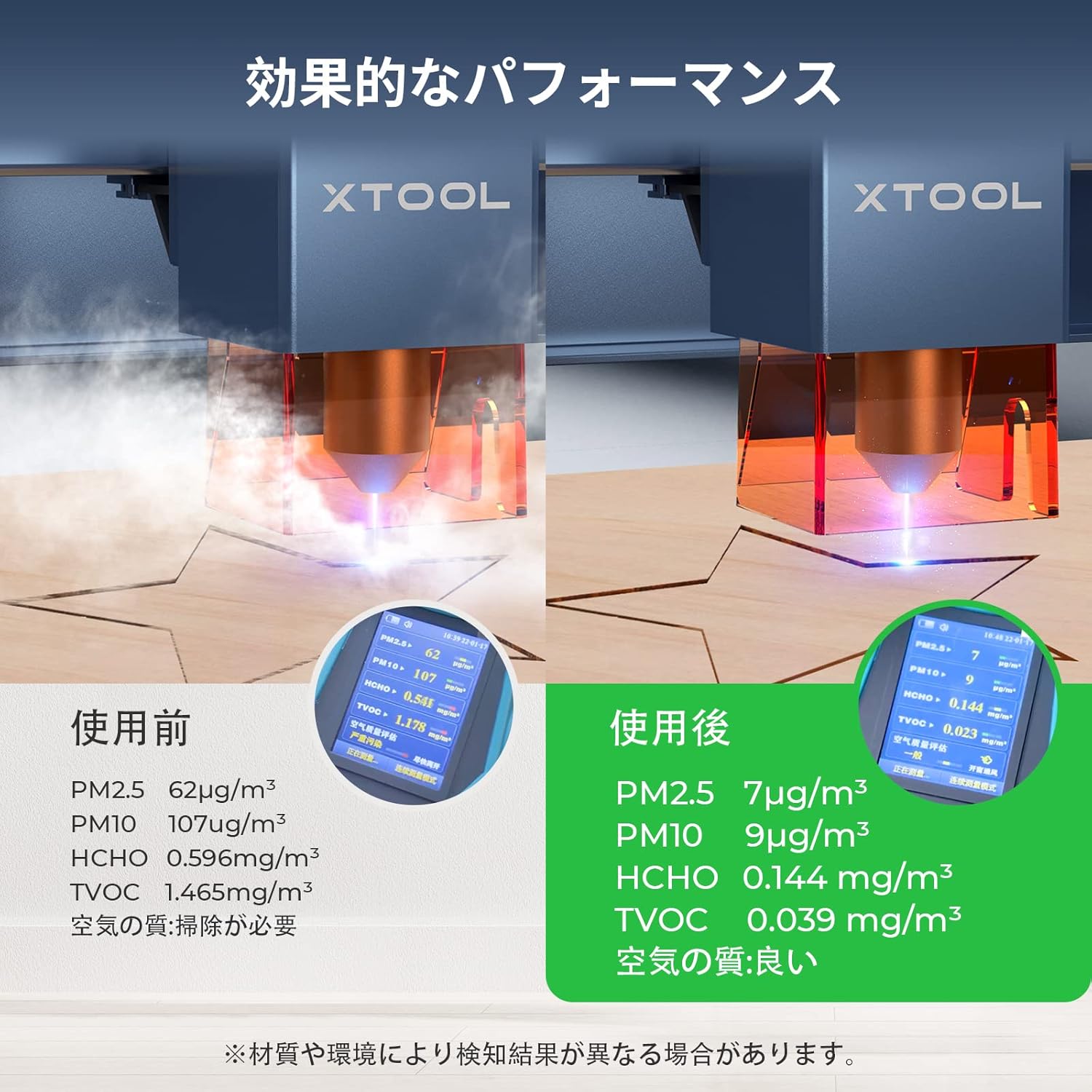
The xTool Smoke Purifier features a powerful 150W suction capability, designed to efficiently remove smoke and harmful substances generated during laser engraving. This ensures a healthy and safe indoor working environment for users.
6.2 Advanced 3-Stage 여과
Equipped with a high-quality 3-stage filter system, including a 25mm pre-filter, an expanded HEPA filter, and premium activated carbon, the purifier captures all smoke, dust, and harmful gases. It achieves a filtration and purification efficiency of 99.97%.
6.3 Sealed Design for Smoke Leak Prevention
The integrated design of the xTool Smoke Purifier prevents random smoke emission. Its unique form covers the air inlet, and the external exhaust port is designed with a metal buckle. By maintaining only the air inlet and outlet, smoke leakage is prevented, significantly enhancing air purification effectiveness.
6.4 Ergonomic and Quiet Operation
Operating at a maximum noise level of only 55dB, the xTool fume extractor ensures a quiet and comfortable working environment during laser cutter use. It features handles and wheels for easy mobility. The knob switch allows for precise adjustment of fan speed to maximize purification efficiency.

7. 유지관리
7.1 필터 교체
The lifespan of the filters depends on usage frequency and the types of materials processed. Replace filters when you notice a decrease in suction power or an increase in odors.
- 사전 필터: The pre-filter can be washed and reused multiple times. Clean it regularly to extend the life of the other filters.
- HEPA 및 활성탄 필터: These filters are not washable and must be replaced when saturated. Replacement filter kits are available from xTool.
7.2 장치 청소
Wipe the exterior of the smoke purifier with a soft, dry cloth. Do not use abrasive cleaners or solvents.
8. 문제 해결
If you encounter issues with your xTool Smoke Purifier, refer to the following common problems and solutions:
- 감소된 흡입력: Check if the filters are clogged and require cleaning or replacement. Ensure the exhaust hose connections are secure and not obstructed.
- Smoke Leakage: Verify that all hose connections are tightly clamped and that the laser engraver's cover (if applicable) is properly sealed. The integrated design aims to minimize leaks, but external factors can contribute.
- 특이한 냄새: This indicates that the activated carbon filter is saturated and needs replacement.
- 장치 전원이 켜지지 않음: Ensure the power cable is securely connected to both the device and the power outlet. Check the power switch position.
If the problem persists, please contact xTool customer support for further assistance.
9. 사양
| 특징 | 세부 사항 |
|---|---|
| 제조업체 | (주)메이크블록 |
| 모델 번호 | 1421 |
| 패키지 크기 | 54.9 x 52.2 x 34.3cm |
| 색상 | 하얀색 |
| 패키지 무게 | 19.55 킬로그램 |
| 필요한 배터리 | 아니요 |
| 브랜드 이름 | 엑스툴 |
| 제품 치수 | 20 depth x 20 width x 80 height cm |
| 전원 | 코드식 전기 |
| 제어 방법 | 만지다 |
10. Product Application Context
The xTool Smoke Purifier is designed to work seamlessly with various xTool laser engravers, enhancing the user experience by managing fumes and particles. Below are videos showcasing some of the compatible laser engravers in action, demonstrating the types of projects where the smoke purifier would be beneficial.
11. 보증 및 지원
The xTool Smoke Purifier comes with a standard manufacturer's warranty. For detailed warranty information, product support, or service inquiries, please visit the official xTool web사이트에서 확인하거나 고객 서비스에 직접 문의하세요. 구매 증빙 자료로 구매 영수증을 보관하세요.


