1. 서론
Thank you for choosing the Jesebang BD86 Bluetooth 5.4 Wireless Earbuds. This manual provides detailed instructions on how to set up, operate, and maintain your new earbuds. Please read this manual carefully before use to ensure optimal performance and longevity of your device.

Image 1.1: Jesebang BD86 Wireless Earbuds and Charging Case.
2. 패키지 내용
다음 품목이 패키지에 포함되어 있는지 확인하세요.
- Jesebang BD86 Wireless Earbuds (Left and Right)
- 무선 충전 케이스
- USB-C 충전 케이블
- 사용자 설명서
3. 제품 오버view
Familiarize yourself with the components of your Jesebang BD86 earbuds and charging case.
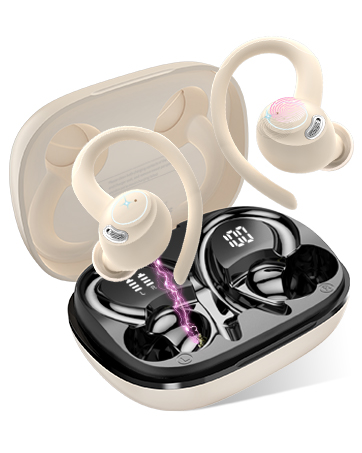
Image 3.1: Component Diagram. This image illustrates the key parts of the earbuds and charging case, including Mic 1, LED Indicator, Mic 2, Charging Pin on the earbuds, and the Dual LED Display and Type-C Input on the charging case.
- 이어 버드 : Equipped with Mic 1, LED Indicator, Mic 2, and Charging Pins.
- 충전 케이스: Features a Dual LED Display for battery status and a Type-C Input for charging.
4. 설정
4.1. 이어버드와 케이스 충전
처음 사용하기 전에 이어버드와 충전 케이스를 완전히 충전하세요.
- Connect the USB-C charging cable to the Type-C input port on the charging case.
- 케이블의 다른 쪽 끝을 USB 전원(예: 컴퓨터, 벽면 어댑터)에 연결합니다.
- 이어버드를 충전 케이스에 넣으세요. 충전을 시작하려면 이어버드가 제대로 장착되었는지 확인하세요.
충전 케이스의 LED 디스플레이에 배터리 잔량이 표시됩니다.tage of the case and individual charge levels for each earbud. A full charge takes approximately 1.5 hours. The earbuds provide up to 6 hours of playback on a single charge, with the charging case extending total playback to 30 hours.

Image 4.1: Charging Case LED Display. This image shows the charging case with its LED display indicating the battery levels for both the case and the individual left and right earbuds.
4.2. 기기와 페어링
The Jesebang BD86 earbuds feature one-touch automatic pairing.
- 기기의 Bluetooth가 켜져 있는지 확인하세요.
- 충전 케이스를 열고 이어버드 두 개를 모두 꺼내세요. 자동으로 전원이 켜지고 페어링 모드로 진입합니다.
- On your device, search for Bluetooth devices and select "BD86" from the list.
- Once connected, you will hear a confirmation prompt, and the earbuds' LED indicators will stop flashing.
초기 페어링 후, 이어버드는 케이스에서 꺼내면 마지막으로 페어링된 장치에 자동으로 연결됩니다.

Image 4.2: Bluetooth Pairing. This image displays a smartphone screen with the Bluetooth settings open, showing the "BD86" earbuds available for connection.
5. 사용 설명서
5.1. 터치 컨트롤
The Jesebang BD86 earbuds feature intuitive touch controls for managing audio playback and calls.

Image 5.1: Smart Touch Controls. This diagram illustrates the various touch gestures and their corresponding functions on the earbuds, including changing tracks, play/pause, rejecting calls, activating voice assistants, power on/off, and answering calls.
| 몸짓 | 기능 |
|---|---|
| Touch and hold (L/R) for 2 seconds | 트랙 변경 |
| 더블탭(L/R) | Play/Pause, Reject Call |
| 트리플 탭(좌/우) | 음성 어시스턴트 활성화(Siri, Google 어시스턴트) |
| Touch and hold (L/R) for 5 seconds | 전원 켜기/끄기 |
| 싱글 탭(L/R) | 전화에 응답하다 |
5.2. 오디오 기능
The BD86 earbuds are designed for an immersive audio experience:
- HiFi 스테레오 사운드: Equipped with 14.2mm composite titanized diaphragm dynamic drivers, these earbuds restore high-frequency elements for rich, detailed audio.
- 통화 지우기: Integrated with 4 HD microphones and ENC (Environmental Noise Cancellation) technology to ensure clear call quality by reducing background noise.
- 바람 소리 감소 : Advanced wind flow technology minimizes wind noise, ensuring clear communication even in windy conditions.

Image 5.2: Acoustic Design. This image illustrates the internal acoustic components of the earbud, highlighting the 13mm drivers, ENC Noise Cancelling, and HD Call capabilities.
5.3. 방수성
The earbuds are rated IP7 waterproof, providing protection against sweat and rain. This allows for use during sports and in various weather conditions.

Image 5.3: IP7 Water Resistance. The image shows the earbuds with water droplets, symbolizing their IP7 dust and water resistance, suitable for daily use.
6. 유지관리
이어버드의 수명과 최적의 성능을 보장하려면 다음 유지 관리 지침을 따르세요.
- 청소: 부드럽고 마른 보풀 없는 천으로 이어버드와 충전 케이스를 정기적으로 닦으세요. 연마재나 강한 화학 물질은 사용하지 마세요.
- 충전 연락처: 이어폰과 케이스 내부의 충전 접점을 마른 면봉으로 주기적으로 청소하여 연결 상태가 양호한지 확인하세요.
- 저장: 사용하지 않을 때는 이어버드를 충전 케이스에 보관하여 먼지와 손상으로부터 보호하세요.
- 극한의 환경을 피하세요: Do not expose the earbuds to extreme temperatures, high humidity, or direct sunlight for extended periods.
7. 문제 해결
If you encounter any issues with your Jesebang BD86 earbuds, refer to the following common solutions:
| 문제 | 가능한 해결책 |
|---|---|
| 이어폰이 페어링되지 않음 | Ensure earbuds are charged. Turn off and on your device's Bluetooth. Place earbuds back in case, close, then reopen and try pairing again. |
| 하나의 이어 버드에서 소리가 나지 않음 | Check individual earbud charge. Try re-pairing both earbuds. Ensure both earbuds are removed from the case simultaneously. |
| 볼륨이 낮거나 음질이 좋지 않음 | Adjust volume on both your device and the earbuds. Clean any debris from the earbud speakers. Ensure earbuds are properly seated in your ears. |
| 충전 문제 | Ensure the charging cable is securely connected. Clean the charging contacts on both earbuds and the case. Try a different USB power source or cable. |
| 이어버드가 자주 끊어집니다 | Ensure you are within the Bluetooth range (up to 15 meters). Avoid obstacles between your device and the earbuds. Try re-pairing. |
8. 사양
| 특징 | 세부 사항 |
|---|---|
| 모델 | BD86 |
| 상표 | 제세방 |
| 블루투스 버전 | 5.4 |
| 무선 범위 | 최대 15미터 |
| 이어버드 배터리 수명 | 최대 6시간(1회 충전) |
| 총 재생 시간(케이스 포함) | 최대 30시간 |
| 충전 시간 | 약 1.5시간 |
| 방수성 | IP7 (Impermeabile) |
| 마이크로폰 | 4 HD Mics with ENC Noise Cancellation |
| 드라이버 크기 | 14.2mm Composite Titanized Diaphragm Dynamic Driver |
| 제어 방법 | 터치 컨트롤 |
| 음성 지원 지원 | Siri, Google 어시스턴트 |
| 충전 포트 | USB-C |
| 무게(이어버드당) | 3.3그램 |
| 치수(제품) | 5.5 x 4.5 x 1.8cm |
| 호환 장치 | IOS, Android, PC, Tablets, Laptops, Car Audio Systems |
9. 보증 및 지원
9.1. 제품 보증
Jesebang offers a 2년 보증 for the BD86 Wireless Earbuds. This warranty covers manufacturing defects and ensures that any issues arising within this period will be addressed. Please retain your proof of purchase for warranty claims.

Image 9.1: 2 Years Warranty. This image displays a badge indicating a 2-year warranty, highlighting Jesebang's commitment to quality.
9.2. 고객 지원
Our professional customer support team is available 24/7 to assist you with any questions or concerns you may have regarding your product. Our goal is to provide high-level customer support to ensure a satisfying purchase experience.
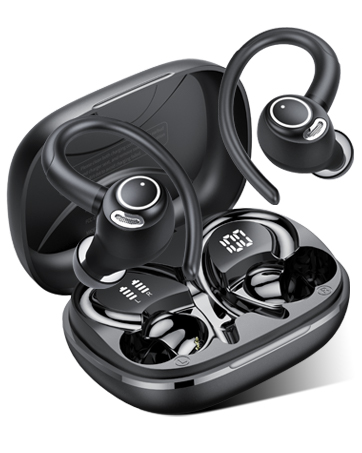
Image 9.2: 24/7 Customer Support. This image shows hands holding a glowing clock icon with '24/7', representing continuous customer support.
For support, please refer to the contact information provided with your product packaging or visit the official Jesebang web대지.
