1. 서론
This manual provides essential information for the safe operation and maintenance of your DEERC DE28 RC Helicopter. Please read this manual thoroughly before operating the helicopter to ensure proper function and to prevent damage or injury. The DEERC DE28 is designed for indoor use and features a durable metal airframe, altitude hold, one-key take-off/landing, and multiple speed modes for various skill levels.

Image: The DEERC DE28 RC Helicopter, its remote control, and two interchangeable body shells (red and blue/white).
2. 안전 지침
WARNING: Failure to follow these instructions may result in injury or damage to the product.
- 실내에서만 사용 가능: This helicopter is designed for indoor flight. Do not operate outdoors, as wind can cause loss of control.
- 연령 권장 사항: 14세 이상 사용자에게 권장합니다. 8세 미만 사용자는 보호자의 감독이 필요합니다.
- 비행 경로 확보: Ensure the flight area is clear of obstacles, people, and pets. Maintain a safe distance from walls, furniture, and other objects.
- 배터리 안전:
- 제공된 충전기와 배터리만 사용하십시오.
- 배터리를 과충전하거나 단락시키지 마십시오.
- 배터리를 극단적인 온도나 직사광선에 노출시키지 마십시오.
- If batteries swell or leak, discontinue use immediately and dispose of them properly.
- 로터 블레이드: Keep fingers, hair, and loose clothing away from rotating blades. Do not touch the helicopter while the blades are spinning.
- 감독: Always supervise children when they are operating the helicopter.
- 충격 회피: While durable, repeated hard impacts can damage the helicopter. Avoid crashing.
3. Package Contents and Component Identification
Verify that all items listed below are included in your package. If any items are missing or damaged, please contact DEERC customer support.
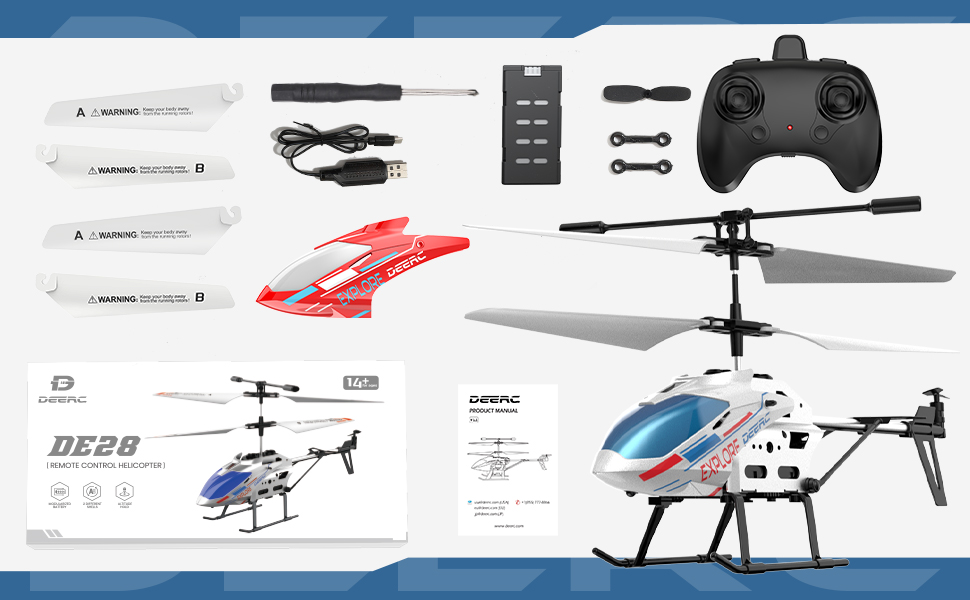
이미지: 이상view of the DEERC DE28 RC Helicopter package contents.
패키지 내용:
- DEERC DE28 RC Helicopter (1)
- 2.4GHz 리모컨 (1)
- Rechargeable Helicopter Batteries (2)
- USB 충전 케이블 (1)
- Spare Main Rotor Blades (A & B) (2 sets)
- Spare Tail Rotor Blade (1)
- 드라이버 (1)
- Extra Helicopter Shell (1)
- 사용자 설명서 (1)
구성 요소 식별:

Image: The DEERC DE28 helicopter showcasing its full aluminum alloy body and key features like fast acceleration, altitude hold, one-key takeoff/land, LED light, 2.4GHz, 3 speed modes, gyroscope system, and 2 shells.
- 메인 로터 블레이드: Provide lift and thrust.
- Tail Rotor Blade: Controls yaw (rotation around vertical axis).
- LED 조명: Front-mounted light for visibility and aesthetics.
- 착륙 스키드: Provide stable landing and protect the helicopter.
- 배터리 칸: Located on the underside of the helicopter.
- 전원 스위치: On/Off switch for the helicopter.
- 충전 포트: USB 충전 케이블을 연결합니다.
- 원격 제어:
- Left Stick: Throttle (up/down) and Yaw (left/right).
- Right Stick: Forward/Backward, Left/Right Sideways flight.
- One-Key Take-off/Landing Button.
- Speed Mode Button.
- Power Indicator LED.
- 전원 스위치.

Image: The DEERC DE28 helicopter with its two interchangeable shells, blue/white and red.
4. 설정 가이드
4.1 헬리콥터 배터리 충전
- 헬리콥터의 충전 포트에 USB 충전 케이블을 연결하세요.
- Plug the other end of the USB cable into a USB power adapter (e.g., computer USB port, phone charger, power bank).
- USB 케이블의 충전 표시등은 충전 중에 켜지고 완전히 충전되면 꺼집니다.
- A full charge typically takes approximately 60-90 minutes. Do not leave charging unattended.
- 충전이 완료되면 케이블을 분리하세요.

Image: The helicopter's battery compartment, illustrating the battery and its approximate 12-minute flight time per charge.
4.2 리모컨 배터리 설치
- 리모컨 뒷면의 배터리 수납칸을 엽니다.
- AAA 배터리 3개(별도 구매)를 배터리 칸에 넣을 때, 극성(+/-)을 정확히 확인하십시오.
- 배터리 덮개를 단단히 닫으세요.
4.3 헬리콥터와 리모컨 페어링
- Ensure both the helicopter and remote control are fully charged/have fresh batteries.
- 헬리콥터를 평평하고 수평인 표면에 놓으세요.
- 헬리콥터의 전원 스위치를 켜세요. 헬리콥터의 LED 표시등이 깜빡일 것입니다.
- 리모컨의 전원 스위치를 켜세요. 리모컨 표시등이 깜박일 것입니다.
- Push the left throttle stick (left joystick) all the way up, then pull it all the way down.
- Both the helicopter's and remote control's indicator lights will become solid, indicating successful pairing.
- 페어링에 실패하면 두 기기의 전원을 모두 끄고 단계를 다시 반복하십시오.

Image: The 2.4GHz remote control in use, demonstrating its connection to the helicopter.
5. 운영
5.1 기본 비행 제어
- 원키 테이크오프: After pairing, press the One-Key Take-off/Landing button. The helicopter will automatically ascend and hover at a stable altitude.
- 스로틀(왼쪽 스틱 위/아래): 헬리콥터의 고도를 조절합니다. 위로 밀면 상승하고, 아래로 당기면 하강합니다.
- 요(왼쪽 스틱 좌/우): Controls the helicopter's rotation. Push left to rotate counter-clockwise, right to rotate clockwise.
- 앞/뒤 (오른쪽 스틱 위/아래): Controls the helicopter's forward and backward movement.
- 좌우 측면 이동 (오른쪽 스틱으로 좌우 이동): Controls the helicopter's sideways movement (strafe).
- 고도 유지: The helicopter will automatically maintain its current altitude when the throttle stick is released, allowing for easier control.
- 원키 랜딩: During flight, press the One-Key Take-off/Landing button again. The helicopter will slowly descend and land automatically.

Image: The helicopter demonstrating its One-Key Take-off and Altitude Hold features.
5.2가지 속도 모드
The DEERC DE28 features 3 speed modes to accommodate different skill levels. Press the Speed Mode button on the remote control to cycle through the modes:
- 저속: Ideal for beginners and indoor flight in confined spaces. Provides stable and gentle control.
- 중간 속도: A balanced mode for intermediate users, offering more responsiveness.
- 고속: For experienced pilots seeking maximum agility and faster flight.

Image: The helicopter demonstrating its three speed levels, suitable for both adults and children.
5.3 LED 조명 제어
The helicopter is equipped with bright LED lights for enhanced visibility, especially in low-light conditions. The LED lights typically turn on automatically when the helicopter is powered on. Refer to the remote control diagram for any dedicated light control buttons, if available.

Image: The helicopter's front LED light illuminated.
6. 유지관리
6.1 청소
- Always turn off the helicopter and remote control before cleaning.
- Wipe the helicopter with a soft, dry cloth. Do not use water or chemical cleaners, as they may damage the electronics.
- Remove any dust or debris from the rotor blades and motors.
6.2 블레이드 교체
If a rotor blade becomes damaged, it can be replaced using the spare blades provided and the included screwdriver.
- Identify the damaged blade (A or B).
- Carefully unscrew the small screw holding the blade in place.
- Remove the damaged blade.
- Align the new blade (ensure it's the correct A or B type) and secure it with the screw. Do not overtighten.

Image: The durable and flexible design of the helicopter blades.
6.3 보관
- Store the helicopter and remote control in a cool, dry place away from direct sunlight and moisture.
- 장기간 보관할 경우, 누출을 방지하기 위해 리모컨에서 배터리를 제거하세요.
7. 문제 해결
| 문제 | 가능한 원인 | 해결책 |
|---|---|---|
| 헬리콥터가 원격 조종에 반응하지 않습니다. | Not paired; Low battery (helicopter or remote); Remote control off. | Ensure both are on and paired. Charge helicopter battery. Replace remote control batteries. |
| 헬리콥터가 이륙하지 못하거나 비행 성능이 떨어집니다. | Low helicopter battery; Damaged blades; Obstruction. | Charge helicopter battery fully. Replace damaged blades. Clear any obstructions. |
| Helicopter drifts or spins uncontrollably. | Not calibrated on a flat surface; Damaged tail rotor; Strong airflow. | Ensure helicopter is placed on a flat surface for pairing. Check and replace tail rotor if damaged. Fly in a calm environment. |
| LED 조명이 작동하지 않습니다. | Helicopter off; Malfunction. | Ensure helicopter is powered on. If still not working, contact support. |
8. 사양
| 특징 | 세부 사항 |
|---|---|
| 모델 번호 | CADE4-DE28 |
| 치수(길이 x 너비 x 높이) | 19.99 x 4.5 x 12.5cm(7.87 x 1.77 x 4.92인치) |
| 무게 | 290g |
| 제어 주파수 | 2.4GHz |
| 채널 | 3.5 채널 |
| 비행 시간 | 배터리 하나당 약 12분 사용 가능 |
| 충전 시간 | 약 60-90분 |
| 추천연령 | 14세 이상 |
| 특징 | Altitude Hold, One-Key Take-off/Landing, 3 Speed Modes, LED Light, Gyroscope System |

Image: Dimensions of the DEERC DE28 RC Helicopter.
9. 보증 및 지원
DEERC products are manufactured to high quality standards. For information regarding warranty coverage, returns, or technical support, please refer to the official DEERC web사이트를 방문하거나 고객 서비스에 직접 문의하세요.
DEERC 공식 담당자 Web대지: www.deerc.com
Please have your model number (DE28) and purchase details ready when contacting support.


