1. 서론
구매해주셔서 감사합니다asing the SOAR XL ShockBox BTH6 Wireless Bluetooth Speaker. This speaker is designed to provide high-quality audio with versatile connectivity options, including Bluetooth 5.0, AM/FM radio, USB, and Aux inputs. Its portable and shockproof design, combined with dynamic multicolor LED lights, makes it suitable for various environments. Please read this manual carefully to ensure proper use and maintenance of your device.
2. 제품 오버view
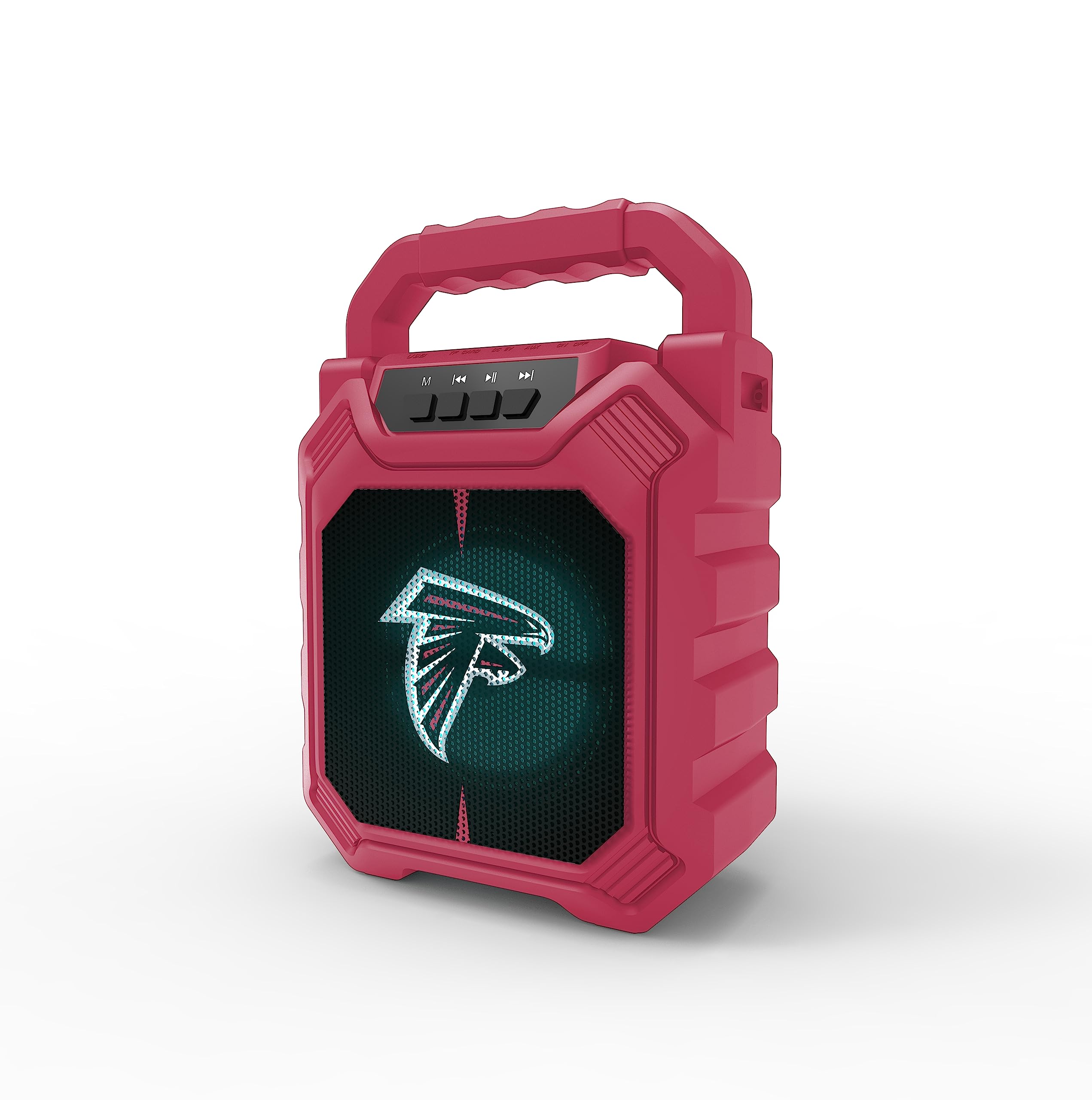
이미지 1: 앞면 view of the SOAR XL ShockBox BTH6 Wireless Bluetooth Speaker, featuring the Atlanta Falcons logo.
주요 특징:
- 블루투스 5.0 연결: For seamless wireless audio streaming.
- 다중 오디오 입력: Supports AM/FM radio, USB, and Aux connections.
- 휴대성 있는 디자인: Features a convenient top handle and shockproof construction.
- 긴 배터리 수명: Provides over 5 hours of playback on a single charge.
- 동적 LED 조명: Multicolor LED lights pulse with the music.
- 진정한 무선 스테레오(TWS): Connect two speakers for enhanced stereo sound.
3. 제어 및 포트

Image 2: Top panel of the speaker, illustrating the control buttons and various input ports.
버튼 기능:
- 전원 버튼: Press and hold to turn the speaker ON/OFF. Short press to switch modes (Bluetooth, FM, USB, Aux).
- 'M'(모드) 버튼: Short press to cycle through input modes (Bluetooth, FM Radio, USB, Aux).
- 이전 트랙 / 볼륨 낮추기: Short press for previous track (in Bluetooth/USB mode). Press and hold to decrease volume.
- 재생/일시 정지 버튼: Short press to play or pause audio. In FM mode, short press to auto-scan and save stations.
- 다음 곡 / 볼륨 높이기: Short press for next track (in Bluetooth/USB mode). Press and hold to increase volume.
입력 포트 :
- 마이크로 USB 충전 포트: 스피커를 충전합니다.
- USB 포트: USB 플래시 드라이브에서 오디오를 재생합니다.
- 보조 입력 포트(3.5mm): 보조 케이블을 통해 외부 오디오 장치를 연결하는 데 사용합니다.
- MicroSD 카드 슬롯: MicroSD 카드에서 오디오를 재생하기 위한 용도입니다.
4. 설정 및 작동
4.1 스피커 충전
- Connect the provided micro-USB cable to the charging port on the speaker.
- 케이블의 다른 쪽 끝을 USB 전원 어댑터(포함되지 않음)나 컴퓨터의 USB 포트에 연결합니다.
- 충전 표시등이 켜집니다. 완전히 충전되면 표시등의 색상이 바뀌거나 꺼질 수 있습니다.
- A full charge provides over 5 hours of playback time.
4.2 전원 켜기/끄기
- To turn ON, press and hold the Power button until you hear an audible prompt.
- To turn OFF, press and hold the Power button again until the speaker powers down.
4.3 블루투스 페어링
- 스피커를 켜세요. 그러면 LED 표시등이 깜빡이고 음성 안내가 나오면서 자동으로 블루투스 페어링 모드로 진입합니다.
- 기기(스마트폰, 태블릿 등)에서 Bluetooth를 활성화하고 사용 가능한 기기를 검색하세요.
- Select "SOAR BTH6" from the list of devices.
- 페어링이 완료되면 스피커에서 소리로 확인음이 울리고 LED 표시등이 깜빡임을 멈춥니다.
- 스피커의 전원을 켜면 해당 기기가 범위 내에 있고 Bluetooth가 활성화되어 있는 경우 마지막으로 페어링된 기기에 자동으로 다시 연결됩니다.
4.4 FM 라디오 작동
- Turn on the speaker and press the 'M' (Mode) button until you enter FM Radio mode.
- To auto-scan and save available FM stations, short press the Play/Pause button. The speaker will scan and store stations automatically.
- Use the Previous Track and Next Track buttons to navigate between saved stations.
4.5 USB and Aux Input
- USB 입력 : USB 플래시 드라이브를 USB 포트에 삽입하세요. 스피커가 자동으로 USB 모드로 전환되어 오디오 재생을 시작합니다. files.
- 보조 입력: Connect an external audio device (e.g., MP3 player) to the Aux-in port using a 3.5mm audio cable. Press the 'M' button to switch to Aux mode.
4.6개 LED 조명 모드

Image 3: The speaker displaying its dynamic LED lights in a vibrant setting.
The speaker features dynamic multicolor LED lights that pulse to the rhythm of the music. These lights activate automatically when the speaker is in use. There are no user-adjustable modes for the LED lights; they are designed to enhance the audio experience visually.
4.7 True Wireless Stereo(TWS) 페어링

Image 4: Two SOAR XL ShockBox BTH6 speakers paired together for True Wireless Stereo (TWS) sound.
더욱 풍부한 사운드를 구현하기 위해tage, you can pair two SOAR XL ShockBox BTH6 speakers together using the TWS function:
- Ensure both speakers are turned OFF.
- Turn ON both speakers. They will enter Bluetooth pairing mode.
- On one of the speakers (this will be your primary speaker), double-press the 'M' (Mode) button. The speakers will attempt to connect to each other.
- 페어링이 성공적으로 완료되면 소리로 확인 메시지가 표시됩니다. 두 스피커의 LED 표시등이 동기화됩니다.
- 이제 4.3절에 설명된 대로 Bluetooth를 통해 기기를 기본 스피커에 연결하세요. 오디오는 두 스피커에서 스테레오로 재생됩니다.
5. 유지관리
- 청소: 부드럽고 마른 천을 사용하여 스피커 외부를 닦으세요. 연마성 세제나 용제를 사용하지 마세요.
- 저장: 스피커는 직사광선과 극한의 온도를 피해 시원하고 건조한 곳에 보관하세요.
- 배터리 관리 : 배터리 수명을 연장하려면 자주 사용하지 않더라도 스피커를 정기적으로 충전하십시오. 배터리를 장시간 완전히 방전시키지 마십시오.
- 방수 기능: While designed to be durable, avoid submerging the speaker in water.
6. 문제 해결
| 문제 | 가능한 해결책 |
|---|---|
| 스피커가 켜지지 않습니다. | Ensure the battery is charged. Connect the speaker to a power source using the micro-USB cable. |
| 블루투스로 페어링할 수 없습니다. | Make sure the speaker is in Bluetooth mode and within range (approx. 10 meters). Turn off and on your device's Bluetooth. Forget "SOAR BTH6" from your device's Bluetooth list and try pairing again. |
| 소리가 나지 않거나 볼륨이 작습니다. | 스피커와 연결된 기기의 볼륨 레벨을 확인하세요. 올바른 입력 모드가 선택되어 있는지 확인하세요. |
| FM 라디오 수신 상태가 좋지 않습니다. | Adjust the speaker's position. Ensure you are in an area with good signal strength. |
| TWS 페어링이 실패합니다. | Ensure both speakers are fully charged and not connected to any other Bluetooth devices. Follow the TWS pairing steps carefully. |
7. 사양
| 특징 | 세부 사항 |
|---|---|
| 모델 번호 | BTH6 (Variant: NFL-BTH6-DLPH) |
| 블루투스 버전 | 5.0 |
| 오디오 입력 | Bluetooth, AM/FM Radio, USB, Aux-in, MicroSD |
| 플레이 타임 | Over 5 hours (per charge) |
| 충전 포트 | 마이크로 USB |
| 제조업체 | 프라임 브랜드 그룹 주식회사 |
| 첫 번째 이용 가능 날짜 | 6년 2023월 XNUMX일 |
8. 공식 제품 영상
영상 1: 공식 제품 소개 영상asing the features and dynamic LED lights of the SOAR BTH6 Wireless Bluetooth Speaker.
9. 보증 및 지원
For warranty information and customer support, please refer to the documentation included with your product or contact the manufacturer, Prime Brands Group Inc., directly. Details regarding specific warranty periods and support procedures are typically provided at the point of purchase or on the manufacturer's official web대지.


