소개
This manual provides instructions for the proper setup, operation, and maintenance of your Motorola Talkabout T460 Two Way Radio. Please read this manual thoroughly before using your device to ensure optimal performance and safety.
The Motorola Talkabout T460 is designed for reliable communication with features such as IP54 weatherproof rating, 22 channels, 121 privacy codes, and various power options.
패키지 내용
The Motorola Talkabout T460 8-Pack includes the following items:
- 8 Motorola T460 2-Way Radios
- 8 NiMH Rechargeable Battery Packs
- 4 Micro USB Wall Charging Cables
- 벨트 클립 8개
- 4 사용자 가이드
설정
1. 배터리 설치
Your T460 radio can be powered by either the included NiMH rechargeable battery pack or three AA alkaline batteries (not included).
- 라디오가 꺼져 있는지 확인하십시오.
- 라디오 뒷면에서 배터리 덮개를 찾으세요.
- 걸쇠를 아래로 누르고 덮개를 밀어서 빼내세요.
- Insert the NiMH battery pack or three AA batteries, observing the polarity markings (+/-).
- 배터리 칸 덮개를 다시 끼우고, 제자리에 단단히 고정되었는지 확인하세요.
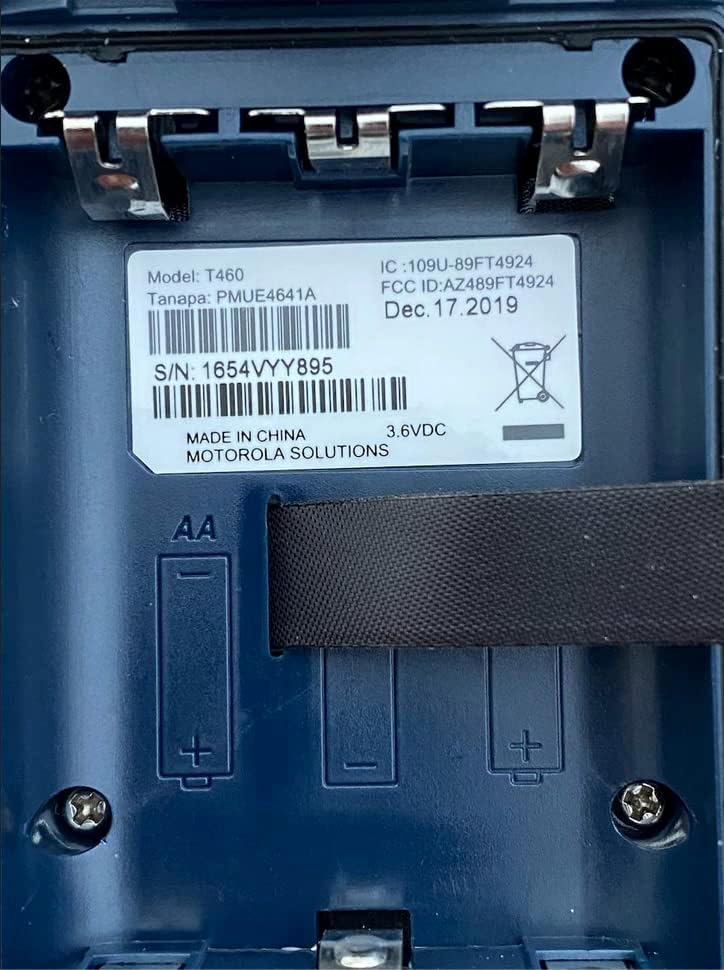
그림 1: Battery compartment of the Motorola T460 radio, showing the label with model information and slots for AA batteries.
2. Charging the NiMH Battery Pack
The included NiMH battery packs can be charged using the micro-USB wall charging cables. Charging can be done via a standard wall outlet, a vehicle adapter, or a computer USB port.
- Connect the micro-USB cable to the charging port on the radio.
- Connect the other end of the cable to a power source (wall adapter, vehicle adapter, or computer).
- 라디오 디스플레이의 배터리 표시등은 충전 상태를 보여줍니다.
- 완전히 충전하는 데는 일반적으로 몇 시간이 걸립니다.
3. 벨트 클립 부착
To attach the belt clip, align the clip with the grooves on the back of the radio and slide it downwards until it locks into place.
작동 지침
1. 전원 켜기/끄기
To turn the radio on or off, rotate the On/Off/Volume knob clockwise or counter-clockwise until you hear a click.
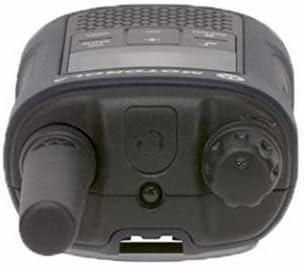
그림 2: 맨 위 view of the Motorola T460 radio, highlighting the On/Off/Volume knob on the right side.
2. 볼륨 조절
Rotate the On/Off/Volume knob to adjust the listening volume.
3. 채널 선택
Your T460 radio has 22 channels. Use the 메뉴 버튼과 위/아래 채널을 선택하는 버튼입니다.
4. 개인정보보호규정
The radio supports 121 privacy codes per channel, totaling 2,662 combinations. This helps reduce interference from other users. To set a privacy code, enter the menu and navigate to the privacy code setting for the selected channel.
5. 송신 및 수신
- 전송하려면: Press and hold the Push-to-Talk (PTT) button located on the side of the radio. Speak clearly into the microphone. Release the PTT button to listen.
- 받으려면: Ensure the PTT button is not pressed. The radio will automatically receive transmissions on the selected channel and privacy code.

그림 3: 맨 아래 view of the Motorola T460 radio, displaying the 'Talkabout' branding. The PTT button is on the side, not visible in this view.
6. PTT Power Boost
The PTT power boost feature allows you to temporarily increase the transmitter power output to extend transmission range when needed. This feature also helps conserve battery life when maximum range is not required.
7. iVOX/VOX (Hands-Free Communication)
The iVOX/VOX feature enables hands-free communication by detecting your voice and automatically transmitting. This is useful when your hands are occupied. Refer to the radio's on-screen menu for activation and sensitivity settings.
8. VibraCall™ Alert
Activate the VibraCall feature for silent alerts in situations where an audible ring tone might be disruptive.
9. 호출음
Customize your radio's call tone by selecting from the available options in the menu settings.
10. Weather Alert and NOAA Weather Radio
The T460 can receive real-time weather conditions and alerts. Turn on the weather channel or enable weather alerts to stay informed. Note: NOAA radio service availability may vary by region. Consult your local weather office for details.
11. 비상 경보 버튼
In an emergency, press the dedicated emergency alert button. The radio will transmit an alert siren followed by spoken or incidental sounds, signaling distress to other radios within range.
12. 내장형 LED 손전등
Activate the integrated LED flashlight for illumination during low-light conditions or emergencies.
유지
1. 배터리 관리
- Always use genuine Motorola NiMH battery packs or recommended AA alkaline batteries.
- Charge NiMH batteries fully before first use.
- Do not overcharge or leave batteries discharged for extended periods.
- Remove batteries if the radio will not be used for a long time.
2. 청소
라디오 외부를 부드러운 천으로 닦으세요.amp cloth. Do not use harsh chemicals or abrasive cleaners. Ensure the charging port cover is securely closed to maintain the IP54 weatherproof rating.
3. 방수 처리
The T460 radio has an IP54 weatherproof rating, meaning it is protected against dust and splashing water from any direction. While it can withstand rain and snow, it is not designed for submersion. Ensure all port covers are sealed to maintain water resistance.
문제 해결
| 문제 | 가능한 해결책 |
|---|---|
| 라디오가 켜지지 않습니다. |
|
| 전송하거나 수신할 수 없습니다. |
|
| 오디오 품질이 좋지 않습니다. |
|
| 배터리 수명이 짧습니다. |
|
명세서
| 모델 | T460 |
| 채널 | 22 FRS 채널 |
| 개인정보보호법 | 121 (CTCSS/DCS) |
| 내후성 | IP54 비바람에 잘 견디는 |
| 배터리 유형 | NiMH Rechargeable Pack (included) or 3 AA Alkaline Batteries (not included) |
| 배터리 수명(대략) | 니켈수소(NiMH) 배터리는 최대 10시간, AA 배터리는 최대 26시간 사용 가능합니다. |
| 권tage | 9 볼트 |
| 디스플레이 유형 | 주도의 |
| 특별 기능 | Weather Alert, Emergency Alert, iVOX/VOX, VibraCall, LED Flashlight, PTT Power Boost |
| 제품 무게 (8개입) | 5.52파운드 |
| 패키지 크기 (8개입) | 10.63 x 9.96 x 9.84 인치 |
보증 정보
The Motorola Talkabout T460 Two Way Radio comes with a 1년 제조사 보증 구매일로부터. 본 보증은 정상적인 사용 중 발생하는 재료 및 제조상의 결함에 적용됩니다. 보증 청구를 위해 구매 증빙 자료를 보관해 주십시오.
For full warranty terms and conditions, please refer to the separate warranty document included with your product or visit the official Motorola Solutions web대지.
지원하다
For technical assistance, troubleshooting beyond this manual, or to inquire about replacement parts, please contact Motorola Solutions customer support.
- 온라인 지원: Visit the official Motorola Solutions webFAQ 및 지원 리소스를 위한 사이트입니다.
- 전화 지원: 제품 포장 또는 공식 웹사이트에 제공된 연락처 정보를 참조하십시오. web대지.


