NANAMI A8S

NANAMI Magnetic Wireless Charger

모델: A8S

사용자 설명서

1. 서론

Thank you for choosing the NANAMI Magnetic Wireless Charger. This device is designed to provide convenient and efficient wireless charging for your MagSafe-compatible iPhone models and AirPods. Please read this manual carefully before use to ensure proper operation and safety.

2. 패키지 내용

  • NANAMI Magnetic Wireless Charger Unit x 1
  • USB-C to USB-A Charging Cable (120cm) x 1

3. 사양

모델 번호A8S
상표나나미
입력 Voltage9 볼트
출력 와트tage최대 10W
연결 유형USB
USB 포트 수1
색상하얀색
제품 무게110g
치수16.3 x 11.6 x 1.7cm
호환 장치iPhone 16/15/14/13/12 Series, AirPods 4/3/Pro (2nd Gen) with Wireless Charging Case, Galaxy Buds +/Pro, Soundcore Life P3/P2(Mini)/Liberty Air2(Pro)/Neo2, other Qi-compatible smartphones and wireless earphones.

4. 설정

  1. 충전기 연결: Insert the USB-C end of the provided charging cable into the port on the NANAMI Magnetic Wireless Charger.
  2. 전원: Connect the USB-A end of the charging cable to a compatible USB power adapter (not included) with a minimum output of 9V/2A or 5V/3A for optimal performance.
  3. 놓기: 무선 충전기를 평평하고 안정된 표면에 놓습니다.

Ensure the power adapter is properly connected to a wall outlet.

5. 사용 설명서

  1. 충전 시작: Place your MagSafe-compatible iPhone or AirPods (with wireless charging case) directly onto the center of the NANAMI Magnetic Wireless Charger. The device will magnetically align for optimal charging.
  2. 충전 표시기: A subtle LED indicator on the charger will illuminate to confirm that charging has begun. The light will turn off after a few seconds to avoid disturbance, especially in dark environments.
  3. 충전 속도: The charger delivers up to 10W for compatible devices. Charging speed may vary based on the device, battery level, and environmental factors.
  4. 케이스 호환성: The charger supports charging through non-metallic phone cases up to 3-4mm thick. For best results, remove cases thicker than 4mm or those containing metal, magnetic strips, or credit cards.
Comparison of wired vs. wireless charging and unstable vs. stable wireless charging
그림 1: Advantages of the NANAMI Magnetic Wireless Charger, showing ease of use compared to wired charging and stable magnetic alignment compared to unstable wireless pads.
Image showing iPhone 15, iPhone 14, iPhone 13 series and AirPods Pro (2nd Gen) and AirPods (3rd Gen) compatible with the charger.
Figure 2: Compatibility with various iPhone models (12, 13, 14, 15 series) and AirPods.
Diagram illustrating case compatibility, showing MagSafe compatible cases and silicone cases are supported, while metal rings, metal cases, magnets, and credit cards are not.
Figure 3: Case compatibility guidelines. MagSafe-compatible and silicone cases are supported. Avoid metal objects, magnets, or credit cards.

6. 안전 기능

The NANAMI Magnetic Wireless Charger incorporates advanced safety mechanisms to protect your devices and ensure safe operation:

  • 과전류 보호: 과전류로 인한 손상을 방지합니다.
  • 오버볼tage 보호: 볼륨에 대한 보호 장치tag전자 스파이크.
  • 단락 방지: 전기 단락으로부터 보호합니다.
  • 과충전 보호 : Stops charging once the device battery is full, extending battery lifespan.
  • 온도 조절: 과열을 방지하기 위해 충전기의 온도를 모니터링하고 조절합니다.
  • 이물질 감지(FOD): Automatically detects metal objects on the charging surface and prevents charging to avoid heat generation and potential damage.
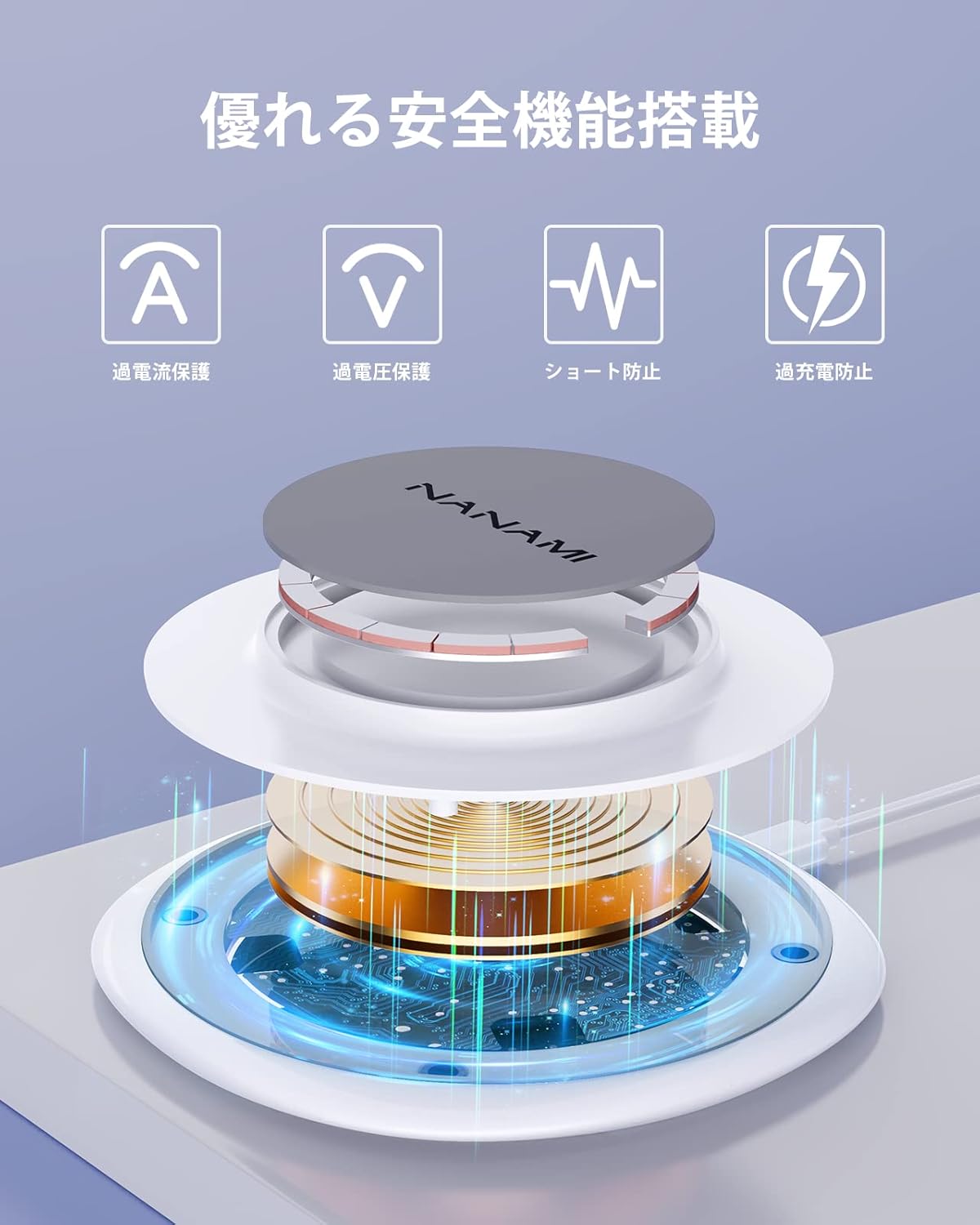
Diagram illustrating the internal components and safety features of the NANAMI wireless charger, including overcurrent, overvoltage, short-circuit, and overcharge protection.
Figure 4: Internal structure highlighting the multiple safety features integrated into the charger.
Image showing the NANAMI wireless charger with an iPhone charging on it, next to a laptop, illustrating a camera-friendly design that does not obstruct the phone's camera.
Figure 5: The charger's design ensures no obstruction to the device's camera lens during charging.

7. 유지관리

  • 청소: Disconnect the charger from the power source before cleaning. Use a soft, dry cloth to wipe the surface. Do not use harsh chemicals or abrasive materials.
  • 저장: 직사광선이나 극한의 온도를 피하고 서늘하고 건조한 곳에 충전기를 보관하세요.
  • 손질: 충전기를 떨어뜨리거나 강한 충격을 주지 마십시오.

8. 문제 해결

문제가능한 원인해결책
기기가 충전되지 않음
  • Improper placement of device
  • 이물질이 감지되었습니다
  • Incompatible phone case
  • Power adapter not connected or insufficient output
  • 장치가 Qi 호환되지 않습니다
  • Ensure device is centered on the charger.
  • Remove any metal objects, magnets, or credit cards.
  • Remove phone case or use a compatible one (max 3-4mm non-metallic).
  • Check power connection and use a 9V/2A or 5V/3A adapter.
  • Verify device supports wireless charging.
느린 충전
  • Power adapter output is too low
  • Device case is too thick
  • Background apps running on device
  • Use a power adapter with sufficient output (9V/2A or 5V/3A).
  • 휴대폰 케이스를 벗으세요.
  • 기기에서 불필요한 앱을 종료하세요.
Charger LED not lighting up
  • 전원 공급이 없습니다
  • 충전기 오작동
  • Check power cable connection and power adapter.
  • 문제가 지속되면 고객 지원에 문의하십시오.

9. 보증 및 지원

This NANAMI product comes with an 18개월 보증 from the date of purchase. Your order number serves as proof of purchase and warranty. In the unlikely event of a defect or issue within the warranty period, please follow these steps:

  1. Locate your order in your purchase history on Amazon.
  2. Click on the 'Contact Seller' link associated with your order.
  3. Describe the issue clearly.

Our customer support team guarantees a response within 24 hours to assist you with troubleshooting, replacement, or refund as per our warranty policy.

관련 문서 - A8S

사전view NANAMI X5 Wireless Car Charger User Manual and Specifications
Comprehensive guide for the NANAMI X5 Wireless Car Charger, covering installation, features, product parameters, and regulatory information. Learn how to use your wireless car charger safely and effectively.
사전view HM006 3-in-1 무선 충전기 사용 설명서
HM006 3-in-1 무선 충전기 사용 설명서에는 제품 외관, 충전 사양, 사용 방법 및 휴대폰, 스마트워치, 이어폰 동시 충전에 대한 기술 데이터가 자세히 설명되어 있습니다.
사전view A8S Smart Magnetic Wireless Charger User Manual and Specifications
Comprehensive user manual for the A8S Smart Magnetic Wireless Charger, detailing product specifications, usage precautions, safety notices, warranty information, and FCC compliance statements.
사전view NovaStar MX40 Pro LED Display Controller V1.4.0 Release Notes
Release notes for the NovaStar MX40 Pro LED Display Controller, version 1.4.0. Details include upgrade instructions, new version introduction, optimization details, bug fixes, and known issues.
사전view NovaStar KU20 LED 디스플레이 컨트롤러 사양
NovaStar KU20 LED 디스플레이 컨트롤러의 상세 사양입니다. 기능, 입출력, 고급 기능, 장치 제어, 외관, 크기, 제품 사양, 비디오 소스 지원 및 중요 참고 사항을 다룹니다.
사전view NovaStar COEX VMP V1.4.0 Release Notes: Features, Updates, and Bug Fixes
NovaStar COEX VMP V1.4.0 Release Notes: Discover new features like Adaptive Thermal Compensation and ST 2110 support, along with optimizations for backup, project management, optical ports, and offline mode. Includes bug fixes and known issues for NovaStar LED display control systems.