소개
This manual provides essential instructions for the safe operation, maintenance, and troubleshooting of your Hisense RVCG144AB Robot Vacuum Mop. Please read this manual thoroughly before using the product and retain it for future reference.
안전 지침
부상이나 손상의 위험을 줄이려면 다음 안전 예방 조치를 준수하세요.
- 처음 사용하기 전에 로봇이 완전히 충전되었는지 확인하십시오.
- 화염이나 인화성 물질 근처에서 로봇을 작동하지 마십시오.
- 머리카락, 느슨한 옷, 손가락 및 신체의 모든 부분을 구멍이나 움직이는 부품에서 멀리 두십시오.
- 어린이가 로봇을 조작하지 못하게 하십시오. 로봇 작동 중에는 어린이와 반려동물을 주의 깊게 살펴보십시오.
- Use only the original charging adapter and dock provided by Hisense.
- 청소하기 전에 전선, 작은 물건, 깨지기 쉬운 물건 등을 바닥에서 치워 얽힘이나 손상을 방지하세요.
- 로봇을 사용하여 큰 파편, 액체 또는 불타는 물체를 집어 올리지 마십시오.
- 최적의 성능을 유지하려면 브러시와 필터를 정기적으로 청소하십시오.
제품 끝view
The Hisense RVCG144AB is a versatile robot vacuum mop designed for efficient floor cleaning. It features gyroscopic mapping for systematic navigation, adjustable power and water levels, and convenient control via a mobile application.
패키지 내용
포장을 풀 때 모든 구성품이 들어 있는지 확인하세요.
- Hisense RVCG144AB Robot Vacuum Mop
- 충전 스테이션
- 충전 케이블
- 원격 제어
- HEPA Filter (1 piece)
- Cleaning Pad (Mop Cloth)
- 측면 브러시 (2개)
- 사용 설명서(이 설명서)
로봇 부품
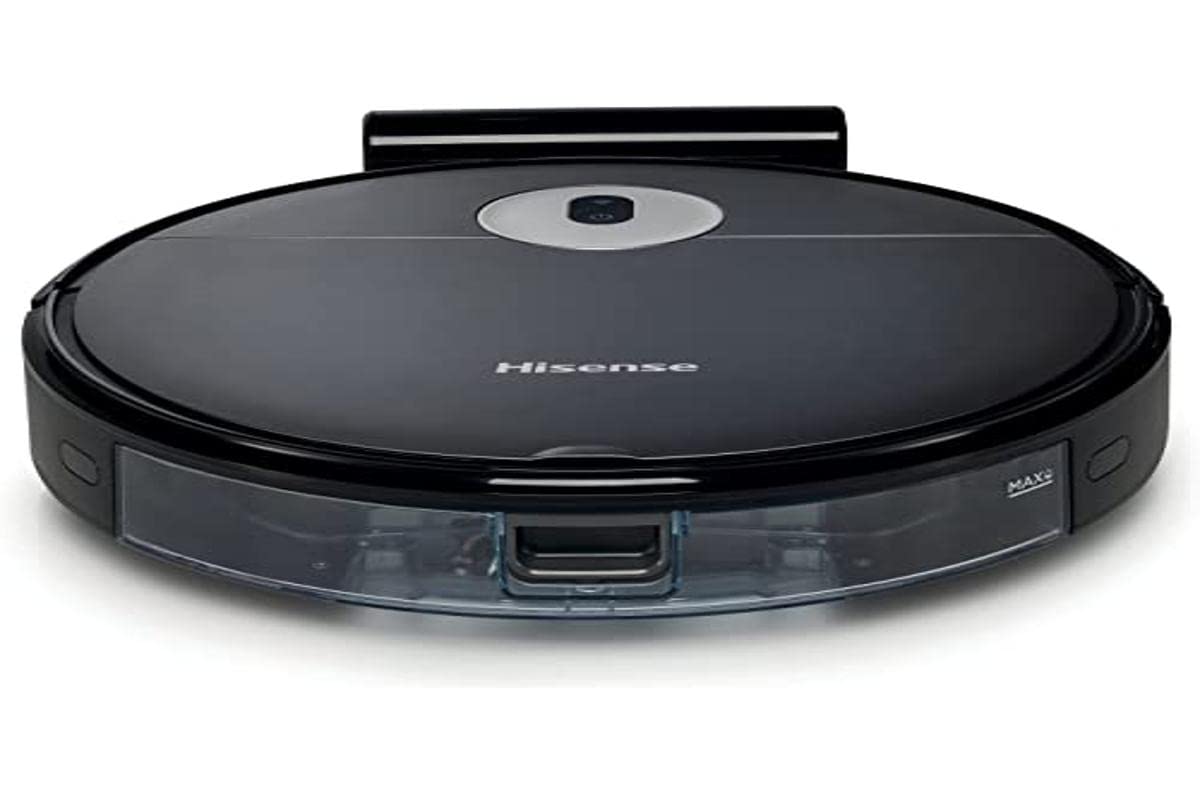
Image: The Hisense RVCG144AB Robot Vacuum Mop, showcasin세련된 검은색 디자인과 컴팩트한 폼팩터를 자랑합니다.
The robot includes a floating roller brush for adapting to different floor conditions and dual-sided brushes for edge cleaning and preventing hair entanglement.
설정
1. 충전소 배치
Place the charging station against a wall in an open area, ensuring there are no obstacles within 1 meter (3 feet) to the sides and 2 meters (6 feet) in front of the station. Connect the charging cable to the station and plug it into a power outlet.

Image: Illustration of the charging station, showing its power connection and recommended clear space around it.
2. 초기 충전
Place the robot onto the charging station. Ensure the charging contacts on the robot align with those on the station. The robot will begin charging automatically. For first use, allow the robot to charge completely, which typically takes several hours.
3. 사이드 브러시 설치
측면 브러시를 로봇 하단의 기둥에 딸깍 소리가 나면서 제자리에 고정될 때까지 누르십시오.
4. 앱 연결(Wi-Fi)
- 스마트폰의 앱스토어에서 Hisense ConnectLife 앱을 다운로드하세요.
- 계정을 등록하고 로그인합니다.
- Follow the in-app instructions to add your RVCG144AB robot vacuum. This typically involves connecting the robot to your home Wi-Fi network.
- 최적의 연결을 위해 Wi-Fi 네트워크가 2.4GHz 대역을 사용하는지 확인하세요.
작동 지침
1. 청소 시작 및 중지
- 수동 시작: 로봇의 전원 버튼을 한 번 누르면 청소가 시작됩니다. 다시 누르면 청소가 일시 정지됩니다.
- 앱 제어: Use the Hisense ConnectLife app to start, pause, or stop cleaning from anywhere.
- 원격 제어: Use the provided remote control to initiate or stop cleaning.
2. 청소 모드
이 로봇은 다양한 요구에 맞춰 여러 가지 청소 모드를 제공합니다.
- 자동 청소: 로봇은 지능적으로 움직이며 접근 가능한 모든 영역을 청소합니다.
- Selective Room/Zone Cleaning: Use the app to define specific rooms or areas for cleaning.
- 딥 클리닝 : For thorough cleaning of a specific area.
- 지그재그 청소: A systematic cleaning pattern to cover large areas efficiently.
- 가장자리 청소: 로봇은 벽과 가구 가장자리를 따라 청소합니다.
3. Adjusting Suction Power and Water Flow
The robot features 3 levels of suction power and water flow. These can be adjusted via the mobile app to match your cleaning requirements and floor type.
4. 청소 일정 예약
Set up cleaning schedules through the Hisense ConnectLife app. This allows the robot to automatically clean at preferred times and days.
유지
Regular maintenance ensures optimal performance and extends the lifespan of your robot vacuum mop.
1. 쓰레기통 비우기
Open the top cover of the robot and remove the dustbin. Empty its contents into a trash bin. It is recommended to empty the dustbin after each cleaning cycle.

이미지: 클로즈업 view of the robot's dustbin being removed for emptying, highlighting its capacity.
2. HEPA 필터 청소
Remove the HEPA filter from the dustbin. Tap it gently to remove dust. Do not wash the HEPA filter with water; replace it every 3-6 months depending on usage.
3. 메인 브러시 청소
Remove the main brush cover and then the main brush. Use the cleaning tool to remove hair and debris tangled around the brush. Reinstall the brush and cover.
4. 사이드 브러시 청소
Periodically check the side brushes for tangled hair or debris. Remove them by pulling gently and clean as needed. Replace if damaged.
5. 물탱크와 걸레 패드 청소
Detach the water tank and empty any remaining water. Clean the mop pad by hand or machine wash. Allow all components to dry completely before reassembly.

Image: The water tank and mop pad assembly, illustrating how to detach and clean them.
6. 센서 및 충전 접점 청소
Wipe the cliff sensors, wall sensors, and charging contacts on both the robot and the charging station with a clean, dry cloth to ensure proper function.
문제 해결
일반적인 문제와 해결 방법은 이 섹션을 참조하세요.
| 문제 | 가능한 원인 | 해결책 |
|---|---|---|
| 로봇이 켜지지 않고 충전되지 않습니다. | Battery depleted; charging contacts dirty; charging station not powered. | Ensure robot is on charging station; clean charging contacts; check power to charging station. |
| 로봇이 자주 멈춥니다. | Obstacles on floor; robot caught on wires or rugs. | Clear floor of obstacles, wires, and thick rugs before cleaning. |
| 세척 성능이 좋지 않음. | 쓰레기통이 가득 찼습니다. 솔이 엉켰습니다. 필터가 막혔습니다. | Empty dustbin; clean main and side brushes; clean or replace HEPA filter. |
| 앱이 로봇에 연결할 수 없습니다. | Incorrect Wi-Fi password; robot out of Wi-Fi range; 5GHz Wi-Fi network. | Wi-Fi 비밀번호를 확인하고, 로봇을 라우터에 더 가까이 이동시키고, 2.4GHz Wi-Fi를 사용하고 있는지 확인하십시오. |
명세서
Technical specifications for the Hisense RVCG144AB Robot Vacuum Mop:
| 특징 | 세부 사항 |
|---|---|
| 상표 | 하이센스 |
| 모델 번호 | RVCG144AB |
| 색상 | 검은색 |
| 힘 | 55 와트 |
| 흡입력 | 4000파스칼 |
| Number of Speeds/Levels | 3 (Power and Wash) |
| 배터리 유형 | 리튬이온 |
| 배터리 용량 | 2600mAh |
| 실행 시간 | 최대 90분 |
| 쓰레기통 용량 | 500ml |
| 물탱크 용량 | 250ml |
| 필터 유형 | 헤파 |
| 항해 | Gyroscopic Mapping |
| 제어 유형 | App Control (Wi-Fi), Remote Control |
| 제품 치수 | 35L x 35W x 4Hcm |
| 품목 무게 | 5.4 킬로그램 |
| 권장 표면 | Marble, laminate, linoleum, carpet, wood |
보증 및 지원
For warranty information, please refer to the warranty card included with your product packaging or visit the official Hisense web본 사이트는 기술 지원이나 서비스 관련 문의를 위한 것이 아닙니다. 기술 지원 또는 서비스 관련 문의는 하이센스 공식 고객 서비스 센터로 문의해 주시기 바랍니다.
자세한 정보와 지원 리소스는 다음에서 찾을 수 있습니다. Hisense official web대지.


