1. 서론
Thank you for choosing the HIKMICRO HEIMDAL H4D Digital Night Vision Monocular. This device is designed for observation in low light and complete darkness, featuring a high-resolution sensor and AMOLED display for clear imaging.
주요 특징:
- 1.39" AMOLED display with 454 x 454 resolution
- High-resolution 2560 x 1440 sensor
- Integrated 850 nm infrared illuminator with smart IR function
- Day/Night/Auto/Defog modes
- 전자식 손떨림 보정 (EIS)
- Detection range up to 200 meters
- Replaceable and rechargeable battery with over 4 hours of use
- Compact and portable design, waterproof and dustproof (IP67)
- Integrated 32 GB EMMC for storing recorded videos and photos
- Wireless connection via HIKMICRO Sight app, local album function
패키지 내용:
- HIKMICRO HEIMDAL H4D Digital Night Vision Monocular
- 배터리
- 먼지 천
- 보호백
- 손목 스트랩
- USB-C 케이블
- 빠른 설명
2. 제품 오버view
Familiarize yourself with the components and controls of your HIKMICRO HEIMDAL H4D monocular.
장치 레이아웃
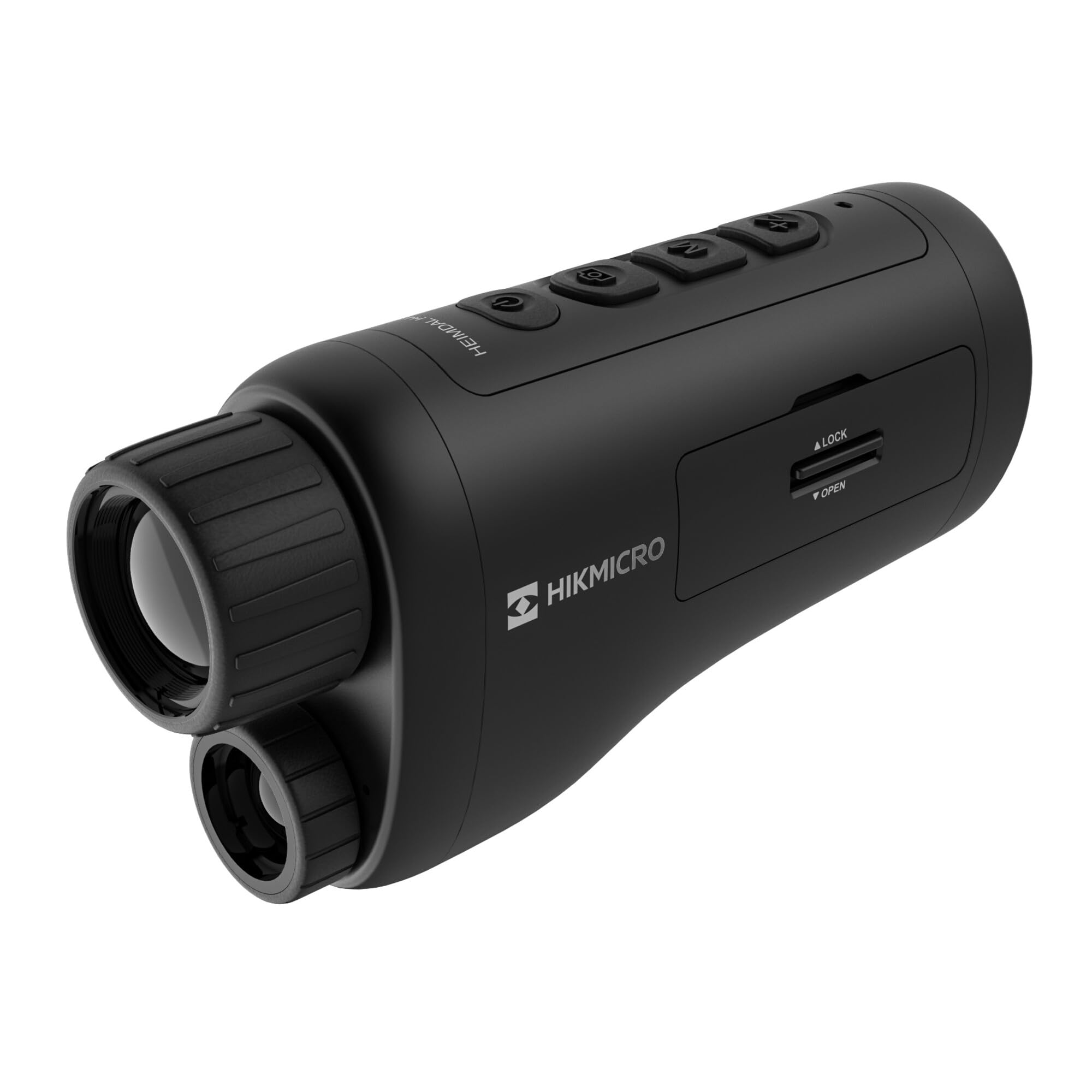
각진 view of the HIKMICRO HEIMDAL H4D monocular, showing its compact, ergonomic design and the main lens.
컨트롤 및 버튼

맨 위 view of the monocular showing the power button, photo/video record button, mode button, and zoom/IR adjustment buttons.
Lenses and Focus

앞쪽 view displaying the objective lens and the integrated infrared illuminator.
배터리 칸

옆 view showing the battery compartment with 'LOCK' and 'OPEN' indicators.
3. 설정
배터리 설치
- 기기 측면에 있는 배터리함을 찾으세요.
- 잠금 장치를 '열림' 위치로 밀어주세요.
- 충전식 배터리를 올바른 극성에 맞춰 삽입하세요.
- Close the compartment and slide the lock mechanism to the 'LOCK' position.
배터리 충전
Connect the device to a power source using the provided USB-C cable. The charging indicator will show the charging status.
초기 전원 켜기
전원 버튼(일반적으로 로 표시됨)을 길게 누르세요. Ⓘ) until the HIKMICRO logo appears on the display.
4. 사용 설명서
전원 켜기/끄기
- 전원 켜기: 전원 버튼을 약 3초 동안 길게 누릅니다.
- 전원 끄기 : Press and hold the power button for approximately 3 seconds until the device shuts down.
초점 조정
Rotate the focus ring on the objective lens to achieve a clear image of your target.
모드 선택
Press the 'M' (Mode) button to cycle through observation modes: Day, Night, Auto, and Defog.
Zoom and IR Adjustment
Use the '+' and '-' buttons to adjust the digital zoom level. These buttons also control the intensity of the infrared illuminator in night mode.
사진 및 비디오 촬영
- 사진 찍기: Press the photo/video button (usually marked with 📷) once to capture an image.
- 비디오 녹화: Press and hold the photo/video button to start recording. Press again to stop.
Connecting to HIKMICRO Sight App
Download the HIKMICRO Sight app from your device's app store. Follow the in-app instructions to connect your monocular for live view원격 제어 및 미디어 관리 기능도 포함됩니다.
5. 유지관리
청소
- Use the provided dust cloth or a soft, lint-free cloth to clean the lenses.
- For stubborn dirt, use a lens cleaning solution specifically designed for optics.
- 부드러운 천으로 기기 본체를 닦아주세요.amp 천. 연마성 세척제나 용매를 사용하지 마십시오.
저장
- Store the monocular in its protective bag in a cool, dry place when not in use.
- 장시간 기기를 사용하지 않을 경우 배터리를 제거하세요.
배터리 관리
- Charge the battery regularly, even if not in frequent use, to maintain its lifespan.
- 충전 및 보관 시 극한의 온도 변화를 피하십시오.
6. 문제 해결
일반적인 문제 및 솔루션
| 문제 | 가능한 원인 | 해결책 |
|---|---|---|
| 장치의 전원이 켜지지 않습니다. | 배터리가 방전되었거나 잘못 설치되었습니다. | 배터리를 충전하십시오. 배터리가 올바른 극성으로 삽입되었는지 확인하십시오. |
| 이미지가 흐릿합니다. | 초점이 조정되지 않았습니다. | 대물렌즈의 초점 링을 돌려 이미지가 선명해질 때까지 돌립니다. |
| 어둠 속에서는 이미지 품질이 좋지 않습니다. | IR 조명기가 꺼져 있거나 낮은 강도로 설정되어 있습니다. | Activate the IR illuminator or increase its intensity using the '+' button. Ensure you are in Night mode. |
| Cannot connect to HIKMICRO Sight app. | Bluetooth/Wi-Fi is off on device or phone, or app is not updated. | Ensure Bluetooth/Wi-Fi is enabled on both devices. Restart the app and monocular. Check for app updates. |
| 장치가 정지되거나 응답하지 않습니다. | 일시적인 소프트웨어 오류입니다. | 기기가 다시 시작될 때까지 전원 버튼을 길게 눌러 소프트 리셋을 실행하세요. 문제가 지속되면 지원팀에 문의하세요. |
7. 사양
| 특징 | 세부 사항 |
|---|---|
| 센서 해상도 | 2560 x 1440 |
| 디스플레이 유형 | 아몰레드 |
| 디스플레이 해상도 | 454 x 454 |
| 디스플레이 크기 | 1.39인치(3.5cm) |
| 적외선 조명기 | Integrated 850 nm |
| 감지 범위 | 최대 200미터 |
| 저장 | 32 GB EMMC (internal) |
| 배터리 수명 | More than 4 hours (replaceable, rechargeable) |
| 방수 등급 | IP67 |
| 치수 | 153mm x 50mm x 80mm(6.02인치 x 1.97인치 x 3.15인치) |
| 무게 | 375그램(0.83파운드) |
| 재료 | 플라스틱 |
| 호환 장치 | Rifle, Compound Bow |
| 장착 유형 | 피카티니 마운트 |
| Sport Use | Camping, 하이킹 |
| 색상 | 하얀색 |
8. 보증 및 지원
HIKMICRO products are covered by a limited warranty. For detailed warranty information, please refer to the official HIKMICRO web사이트를 방문하거나 현지 대리점에 문의하십시오.
For technical support, troubleshooting assistance, or service inquiries, please visit the official HIKMICRO support page or contact their customer service department.
공식적인 Web대지: www.hikmicrotech.com


