1. 서론
This manual provides essential instructions for the safe and efficient operation of your Supersonic SC-1073ERF Solar Power Bluetooth Speaker with FM Radio, LED Torch Light, and Fan. Please read this manual thoroughly before using the device and retain it for future reference.
2. 안전 정보
- 기기를 극한의 온도, 장시간 직사광선(충전 시간 제외) 또는 높은 습도에 노출시키지 마세요.
- 장치를 떨어뜨리거나 강한 충격을 가하지 마십시오.
- 제품을 직접 분해, 수리 또는 개조하지 마십시오. 수리가 필요한 경우 자격을 갖춘 서비스 담당자에게 문의하십시오.
- 장치를 물과 기타 액체에서 멀리하세요.
- Ensure proper ventilation when operating the fan. Do not obstruct the fan blades.
- When using the LED torch, avoid direct eye exposure to the light.
- 배터리와 전자 부품은 현지 규정에 따라 책임감 있게 폐기하세요.
3. 패키지 내용
다음 품목이 패키지에 포함되어 있는지 확인하세요.
- Supersonic SC-1073ERF Unit
- 마이크로 USB 충전 케이블
- 사용 설명서(이 문서)
- 리모컨 (CR5 배터리 1개 포함)
4. 제품 특징
- 무선 블루투스 5.0: 호환 장치에서 무선으로 오디오를 스트리밍하세요.
- 다중 연결성: Supports Bluetooth, USB, Micro SD, and 3.5mm auxiliary input.
- FM 라디오 : Built-in FM tuner with a 360° antenna for clear reception.
- 3단계 속도 조절 팬: Integrated fan with Low, Medium, and High settings for personal cooling.
- 태양열 충전: Equipped with a solar panel for convenient outdoor recharging.
- 충전식 배터리: Internal battery provides portable power.
- LED 손전등: 내장형 손전등으로 조명을 밝힙니다.
5. 구성 요소 식별
Familiarize yourself with the various parts of your SC-1073ERF unit:

이미지: 후면 view of the SC-1073ERF, highlighting the solar panel, USB/SD card slots, AUX input, and flashlight.

이미지: 측면 view of the SC-1073ERF, displaying the control panel buttons and the fan.
- 태양광 패널: For charging the internal battery using sunlight.
- LED 손전등: Front-facing light for illumination.
- 제어 버튼: Power, Mode, Play/Pause, Skip/Tune, Volume.
- 팬 : 3-speed fan for personal cooling.
- 스피커 그릴: 오디오 출력.
- FM 안테나: Extendable antenna for radio reception.
- USB 포트: USB 드라이브 재생용입니다.
- 마이크로 SD 카드 슬롯: Micro SD 카드 재생용입니다.
- 보조 입력: 외부 오디오 장치용 3.5mm 잭.
- 마이크로 USB 충전 포트: USB 케이블을 이용하여 기기를 충전하세요.
- 전원 스위치: 장치의 켜기/끄기 스위치입니다.
6. 설정
초기 충전
Before first use, fully charge the unit using the provided Micro USB cable. Connect the cable to the Micro USB charging port on the device and the other end to a USB power adapter (not included) or a computer USB port. The charging indicator will illuminate during charging and turn off when fully charged.
태양열 충전
For solar charging, place the unit with the solar panel facing direct sunlight. Ensure no obstructions block the panel. Solar charging is slower than USB charging and is ideal for maintaining charge or for use in outdoor environments with limited power access.

Image: The SC-1073ERF placed outdoors with its solar panel exposed to sunlight for charging.
7. 사용 설명서
전원 켜기/끄기
Slide the Power Switch to the 'ON' position to turn on the device. Slide it to 'OFF' to power down.
모드 선택
Press the 'MODE' button to cycle through available modes: Bluetooth, FM Radio, USB, Micro SD, and AUX.
블루투스 동작
- Turn on the SC-1073ERF and select Bluetooth mode. The device will enter pairing mode, indicated by a flashing LED.
- 모바일 기기(스마트폰, 태블릿 등)에서 Bluetooth를 활성화하세요.
- 검색 available devices and select "SC-1073ERF" from the list.
- Once paired, the LED indicator will stop flashing, and you can play audio from your device.
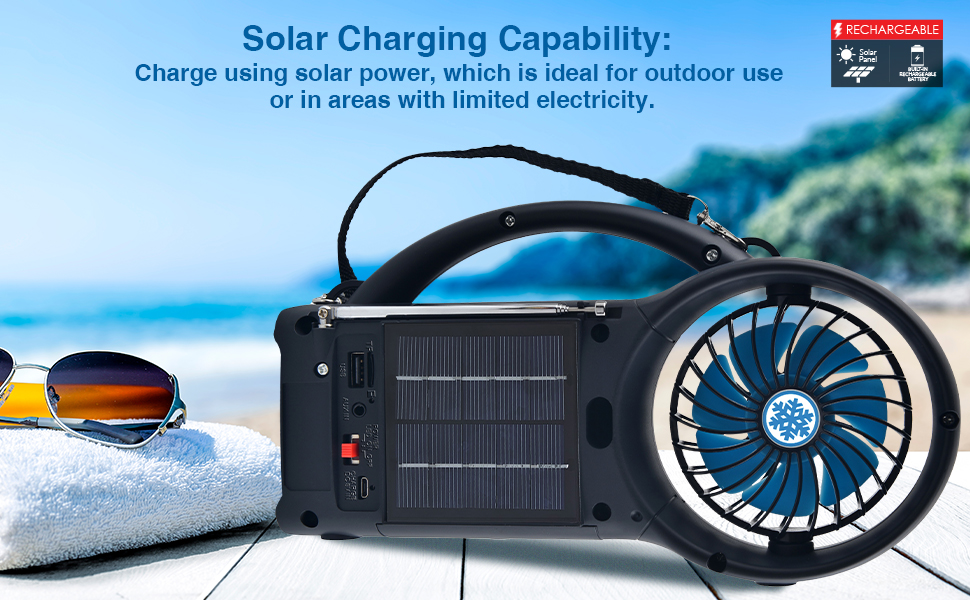
Image: A user wirelessly connecting their mobile device to the SC-1073ERF via Bluetooth to stream music.
FM 라디오 작동
- 최적의 수신을 위해 FM 안테나를 펼치십시오.
- 'MODE' 버튼을 사용하여 FM 라디오 모드를 선택하십시오.
- '재생/일시정지' 버튼을 길게 누르면 사용 가능한 FM 방송국을 자동으로 검색하고 저장할 수 있습니다.
- Use the 'Skip/Tune' buttons to navigate between saved stations.
USB/마이크로 SD 재생
- USB 포트에 USB 드라이브를 삽입하거나 Micro SD 카드 슬롯에 Micro SD 카드를 삽입하십시오.
- The device will automatically switch to USB or Micro SD mode and begin playback. If not, select the correct mode using the 'MODE' button.
- Use the 'Play/Pause' and 'Skip/Tune' buttons to control playback.
AUX 입력
Connect an external audio device (e.g., MP3 player) to the 3.5mm AUX input using a 3.5mm audio cable (not included). Select AUX mode using the 'MODE' button. Audio playback is controlled via the connected external device.
팬 작동
Press the dedicated fan button to turn the fan on. Press it repeatedly to cycle through the three wind speeds: Low, Medium, and High. Press again to turn the fan off.
LED Torch Light Operation
Press the dedicated flashlight button to turn the LED torch light on. Press it again to turn it off.
볼륨 조절
Use the '+' and '-' buttons on the unit or the remote control to adjust the volume.
Video: A demonstration of the Supersonic SC-1073ERF's various functions, including Bluetooth connectivity, FM radio, fan, and LED torch light.
8. 유지관리
- 부드럽고 마른 천으로 기기를 닦으세요. 연마성 세제나 용제는 사용하지 마세요.
- 효율적인 충전을 위해 태양광 패널을 깨끗하게 유지하세요.
- 장기간 사용하지 않을 때에는 시원하고 건조한 곳에 보관하세요.
- Periodically charge the battery, even if not in use, to prolong its lifespan.
9. 문제 해결
| 문제 | 가능한 원인 | 해결책 |
|---|---|---|
| 전원이 없습니다 | 배터리가 소진되었습니다. | Charge the unit via USB or solar panel. |
| 소리가 나지 않습니다 | 볼륨이 너무 작거나 음소거되었습니다. 잘못된 모드가 선택되었습니다. | Increase volume. Ensure correct mode (Bluetooth, FM, USB, SD, AUX) is selected. |
| 블루투스 페어링이 실패했습니다 | Device is not in pairing mode. Bluetooth is off on source device. | Ensure SC-1073ERF is in Bluetooth mode and flashing. Turn Bluetooth on your source device and re-scan. |
| FM 수신 불량 | 안테나가 펼쳐지지 않았습니다. 신호가 약합니다. | Fully extend the FM antenna. Reposition the unit for better signal. |
| 팬이 작동하지 않습니다 | Fan is off. Battery is low. | Press the fan button to turn it on. Charge the unit. |
10. 사양
- 모델: SC-1073ERF
- 상표: 초음속
- 전원: 태양열, USB 충전
- 연결성: Bluetooth 5.0, USB, Micro SD, 3.5mm AUX
- 팬 속도: 3(낮음, 중간, 높음)
- 손전등: 주도의
- 라디오: FM
- 크기(가로x세로x높이): 9.8" x 2.5" x 5.6"(대략)
- 무게: 1.15파운드(대략)
- 왓tage: 4 와트
- Noise Level (Fan): 55데시벨
- 배터리: Rechargeable (1 CR5 battery included for remote)
- 용법: 집 밖의
11. 보증 및 지원
For warranty information or technical support, please refer to the warranty card included with your purchase or visit the official Supersonic web사이트. 보증 청구를 위해 구매 증빙 자료를 보관하세요.


