소개
구매해주셔서 감사합니다asing the EENOUR SB6620 LED Camping Lantern. This manual provides important information regarding the safe operation, maintenance, and specifications of your new lantern. Please read this manual thoroughly before use and retain it for future reference.
패키지 내용
패키지에 모든 품목이 들어 있는지 확인하세요.
- EENOUR SB6620 LED Lantern
- USB-C 충전 케이블
- 사용 설명서 (본 문서)
- 배터리(사전 설치됨)

Image: Contents of the EENOUR SB6620 LED Lantern package, showing the lantern, USB-C cable, and user manual.
제품 특징
- 충전식 디자인: Equipped with a universal Type-C charging port for convenient recharging.
- 다양한 조명: Features 3 color switching options and 4 lighting modes.
- 무단계 디밍: Adjust brightness from 10% to 100% with a dial switch.
- High Brightness & 360° Illumination: Up to 280 lumens for effective, all-around illumination.
- 배터리 수명 연장: Provides up to 48 hours of continuous lighting.
- 내구성 및 방수성: IPX6 rated for water and splash resistance, made from reinforced ABS material.
- 가지고 다닐 수 있는: Compact size and lightweight design (280g).
- 다목적: c에 적합amping, hiking, emergencies, night fishing, and more.

Image: The EENOUR SB6620 LED Lantern illuminating a camping table, demonstrating its 360-degree high brightness.

Image: Collage showing the EENOUR SB6620 LED Lantern in diverse applications, including tent lighting, emergency use, as a night light, and for mountain climbing.
설정
초기 충전
Before first use, fully charge the lantern. Connect the provided USB-C cable to the lantern's charging port and plug the other end into a compatible USB power source (e.g., wall adapter, power bank, computer USB port). The charging indicator will show the charging status. A full charge typically takes 3-4 hours.
Placement and Hanging
The lantern can be placed on any flat surface or hung using its integrated handle. The handle allows for easy attachment to tent hooks, stands, or car interiors.
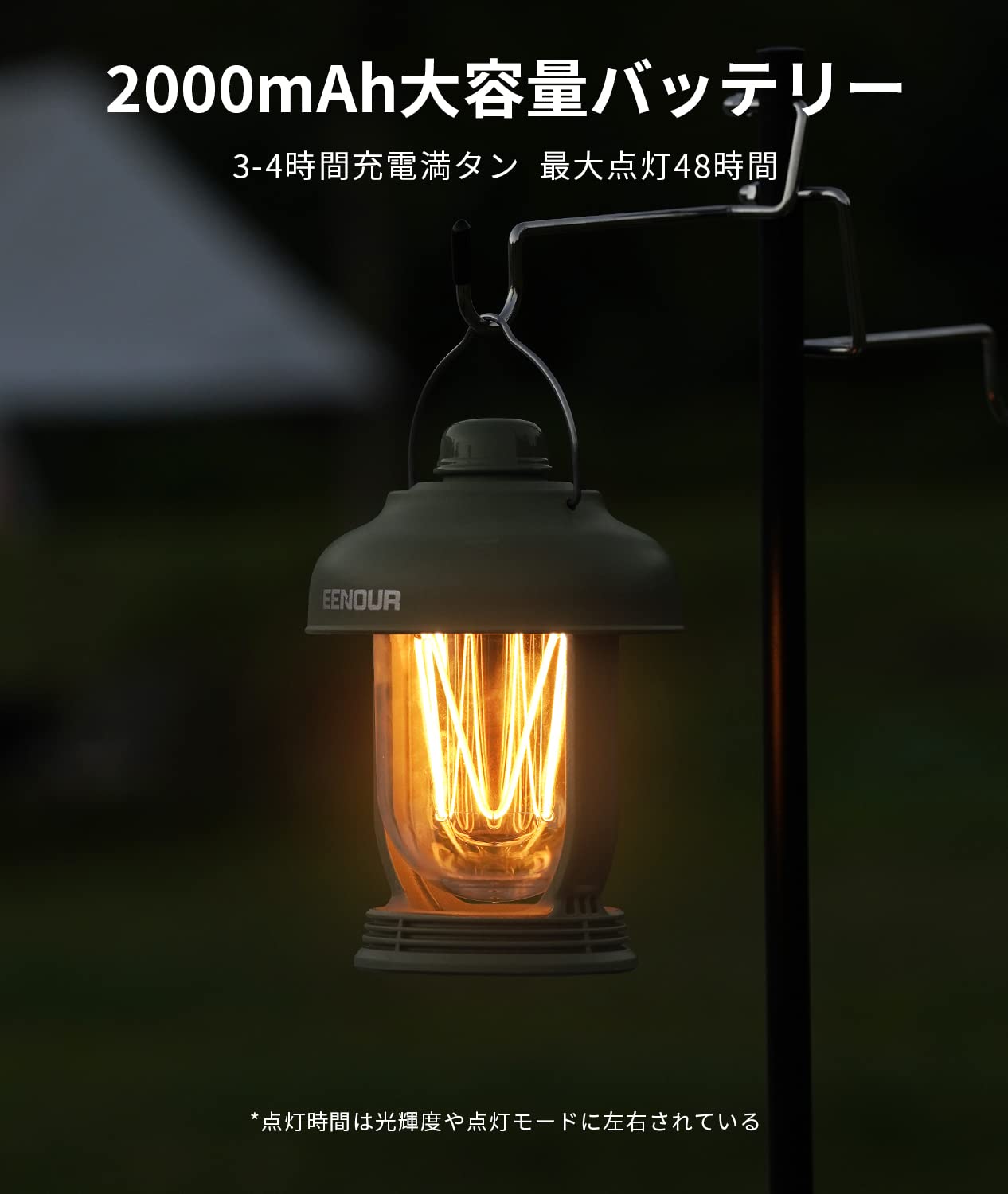
Image: The EENOUR SB6620 LED Lantern hanging from a hook, demonstrating its versatility for placement.
작동 지침
전원 켜기/끄기 및 모드 전환
The lantern features a single dial switch for all operations:
- 전원 켜기/끄기: Press the dial switch once to turn the lantern on. Press it again to turn it off.
- 모드 전환: While the lantern is on, press the dial switch repeatedly to cycle through the 4 lighting modes:
- Light Strip (Amber)
- Candle Light Mode (Flickering Amber)
- LED Light (Daylight White)
- Mixed Mode (Light Strip + LED Light)
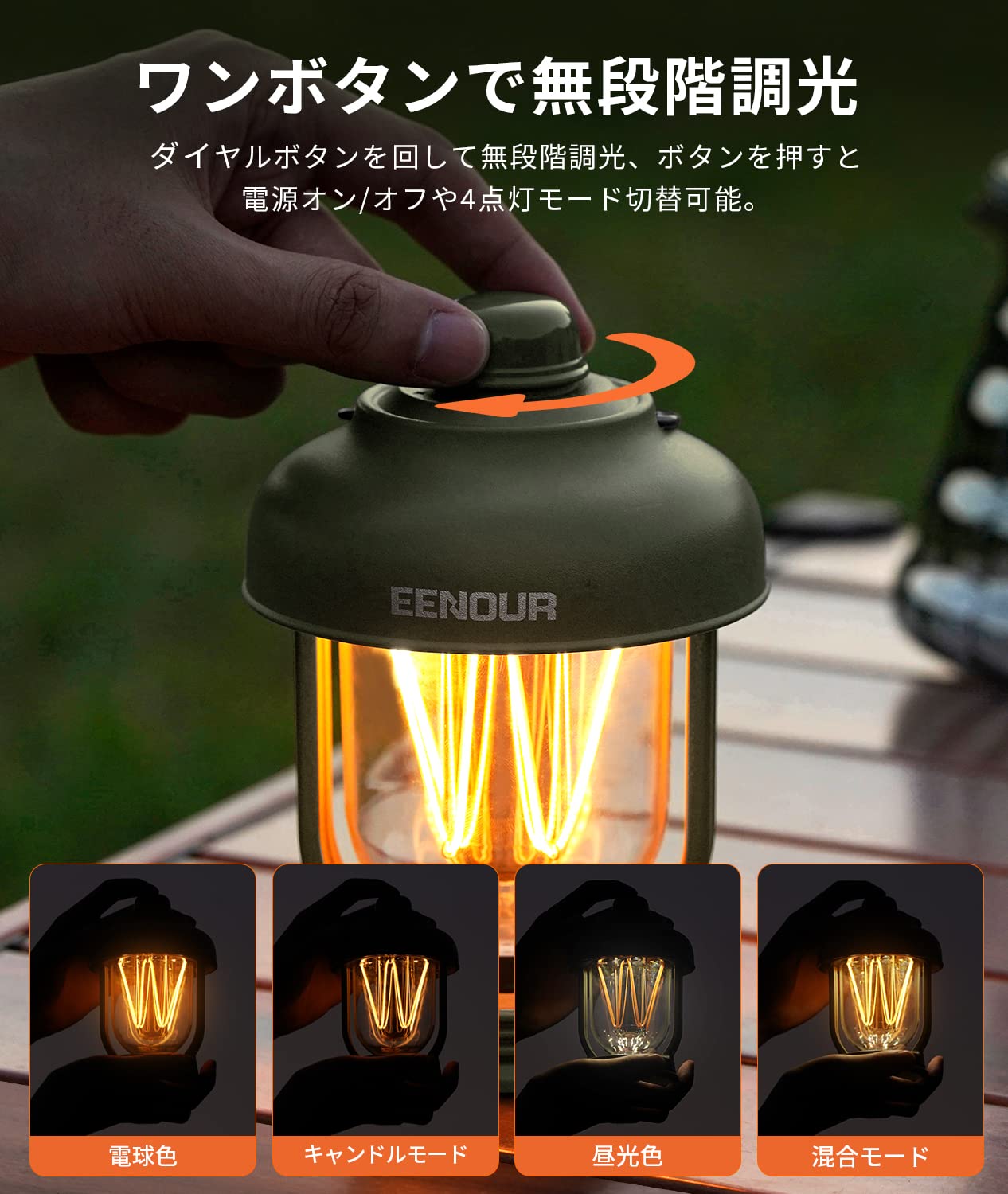
Image: Illustration of the dial switch operation and the four distinct lighting modes available on the EENOUR SB6620 LED Lantern.
무단계 디밍
밝기를 조정하려면:
- While the lantern is on, rotate the dial switch clockwise to increase brightness (10% to 100%).
- Rotate the dial switch counter-clockwise to decrease brightness (100% to 10%).
색상 전환
The lantern offers 3 color options by combining the amber light strip with the daylight white LED. These are integrated into the 4 lighting modes as described above.
랜턴 충전하기
When the battery is low, connect the USB-C cable to the charging port. The charging indicator will illuminate. Once fully charged, the indicator will change or turn off, depending on the model. Avoid overcharging to prolong battery life.
유지
- 청소: 부드러운 천으로 랜턴을 닦으세요.amp 천. 연마성 세척제나 용매를 사용하지 마십시오.
- 저장: Store the lantern in a cool, dry place when not in use. For long-term storage, charge the battery to about 50% every 3-6 months to maintain battery health.
- 방수 기능: The lantern is IPX6 waterproof, meaning it can withstand powerful water jets. However, it is not designed for prolonged submersion. Ensure the charging port cover is securely closed to maintain water resistance.

Image: The EENOUR SB6620 LED Lantern under a water spray, illustrating its IPX6 water resistance.
문제 해결
| 문제 | 가능한 원인 | 해결책 |
|---|---|---|
| 랜턴이 켜지지 않습니다. | 배터리가 소진되었습니다. | Charge the lantern fully using the USB-C cable. |
| 밝기를 조절할 수 없습니다. | Dial switch not rotated correctly. | Ensure the lantern is on and rotate the dial switch slowly to adjust brightness. |
| Lantern not charging. | 케이블 또는 전원 공급 장치에 문제가 있습니다. | 다른 USB-C 케이블이나 전원 어댑터를 사용해 보세요. 연결이 제대로 되었는지 확인하세요. |
| 노출 후 물이 침투합니다. | 충전 포트 덮개가 밀봉되어 있지 않습니다. | Always ensure the charging port cover is tightly sealed before exposing the lantern to water. |
명세서
| 특징 | 세부 사항 |
|---|---|
| 모델 | SB6620 |
| 배터리 용량 | 2000mAh |
| 광 출력(최대) | 280루멘 |
| 배터리 수명(최대) | 48 Hours (at lowest brightness) |
| 충전 시간 | 3-4시간 |
| 방수성 | IPX6 |
| 재료 | 아크릴로니트릴 부타디엔 스티렌(ABS) |
| 치수(직경 x 높이) | 9.5cm x 13cm |
| 무게 | 280g |
| 전원 | 주도의 |
Image: Detailed product specifications and dimensions for the EENOUR SB6620 LED Lantern.
안전 정보
- Do not look directly into the LED light to avoid eye strain.
- 어린이의 손이 닿지 않는 곳에 보관하세요.
- 랜턴을 분해하거나 개조하지 마십시오. 손상이 발생할 수 있으며 보증이 무효화될 수 있습니다.
- 충전 시에는 제공된 USB-C 케이블이나 인증된 동등 제품만 사용하세요.
- 랜턴을 장시간 극한의 온도나 직사광선에 노출시키지 마십시오.
- 현지 규정에 따라 책임감 있게 제품을 폐기하십시오.
보증 및 지원
For warranty information or technical support, please refer to the contact details provided with your purchase documentation or visit the official EENOUR website. Please have your model number (SB6620) and purchase date ready when contacting support.


