1. 서론
This manual provides detailed instructions for the installation, operation, and maintenance of your VIMIN VM-GS1620 18-Port Gigabit Ethernet Switch. Please read this manual thoroughly before using the device to ensure proper setup and optimal performance. Keep this manual for future reference.
2. 제품 오버view
The VIMIN VM-GS1620 is an unmanaged 18-port Gigabit Ethernet switch designed for high-speed network expansion. It features 16 Gigabit Ethernet ports (10/100/1000 Mbps) and 2 dedicated 1000Mbps uplink ports. The switch supports IEEE802.3af/at standards and includes a One Key VLAN function for enhanced network security and bandwidth management. Its durable metal housing allows for versatile desktop or rack-mount installation.
2.1 전면 및 후면 패널

그림 1: Front and Rear Panels of the VIMIN VM-GS1620 Switch. The front panel displays 16 Gigabit ports (1-16), 2 Uplink ports (17-18), LED indicators for Power and Data, and a VLAN switch. The rear panel shows the AC power input.
전면 패널 기능:
- 포트 1-16: 10/100/1000 Mbps Gigabit Ethernet ports for connecting network devices.
- 포트 17-18(업링크): Dedicated 1000 Mbps Gigabit uplink ports for connecting to a router or main network.
- 전원 LED: 전원 상태를 나타냅니다.
- Data/Link/Act LEDs: Indicate data activity and link status for each port.
- VLAN 스위치: Toggles the One Key VLAN function on or off.
후면 패널 기능:
- AC 전원 입력: Connects to the provided power cord (AC/IN 100-240V).
2.2 주요 특징
- 고속 연결: 16 Gigabit Ethernet ports and 2 Gigabit uplink ports for fast data transfer.
- One Key VLAN: Enhances network security by isolating ports 1-16 while allowing communication with uplink ports.
- 강력한 보호: Features 4KV lightning protection for device and network safety.
- 내구성 있는 디자인: Sturdy metal housing ensures longevity and efficient heat dissipation.
- 팬리스 작동: Provides quiet operation, suitable for various environments.
- 플러그 앤 플레이: No complex configuration required for basic network setup.
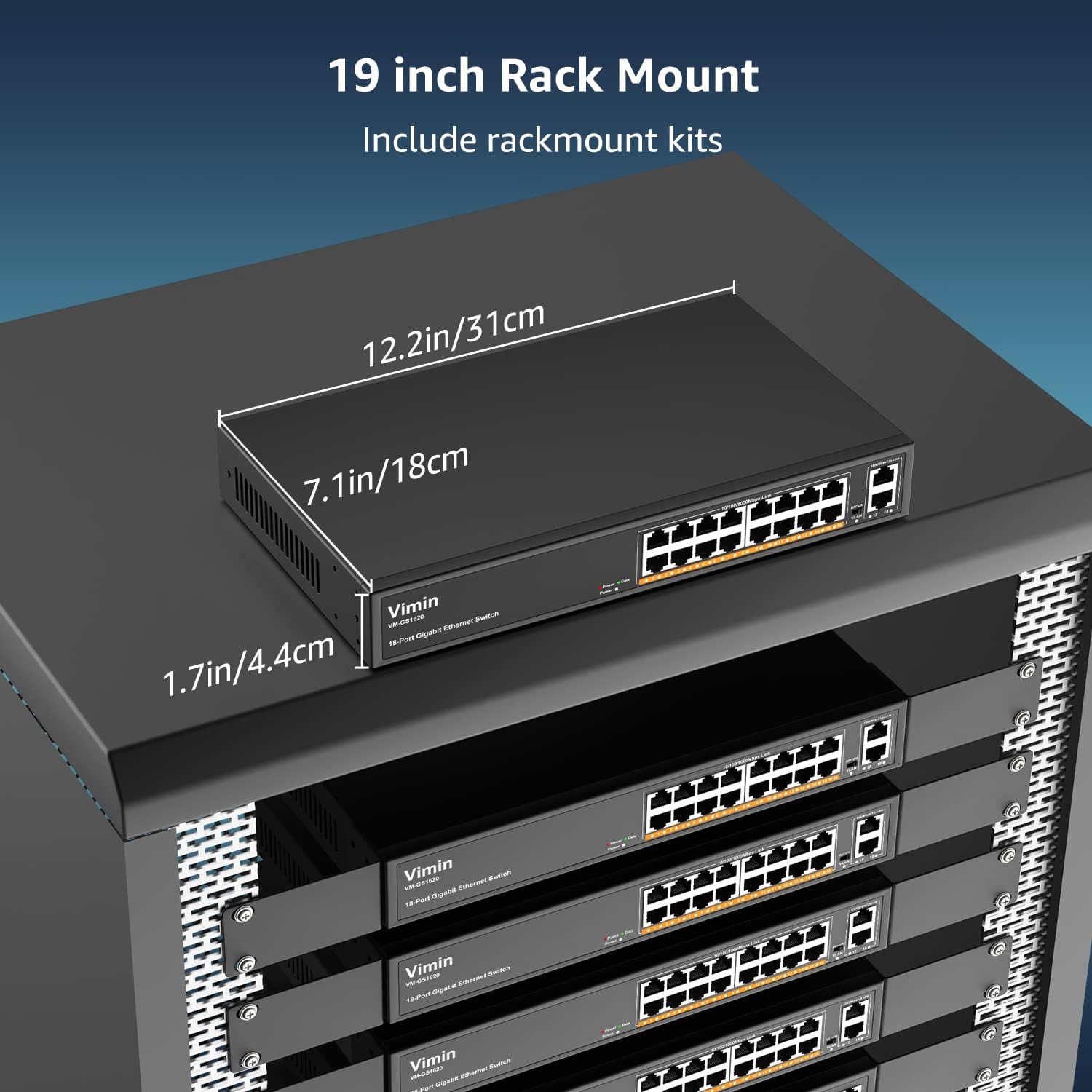
그림 2: The VIMIN VM-GS1620 features a fanless, quiet design within a durable metal case for reliable performance.
3. 패키지 내용
Please verify the contents of your package. If any items are missing or damaged, contact VIMIN support immediately.
- VIMIN VM-GS1620 18-Port Gigabit Ethernet Switch
- AC 전원 코드
- Rack-Mount Kits (for 19-inch rack installation)
- 사용 설명서 (본 문서)
4. 설정 지침
4.1 물리적 설치
The VIMIN VM-GS1620 switch can be installed on a desktop or mounted in a 19-inch rack.
데스크탑 배치:
- 스위치를 평평하고 안정된 표면에 놓으십시오.
- Ensure adequate ventilation around the device. Do not block the ventilation holes.
- 스위치를 열원, 직사광선 및 과도한 습기로부터 멀리하십시오.
랙 마운트 설치:
- 제공된 나사를 사용하여 제공된 랙 장착 브래킷을 스위치 측면에 부착합니다.
- 스위치를 적절한 랙 나사(별도 구매)를 사용하여 표준 19인치 장비 랙에 고정하십시오.
- Ensure proper airflow within the rack to prevent overheating.

그림 3: The VIMIN VM-GS1620 switch can be installed in a 19-inch rack using the included rack-mount kits. Dimensions are approximately 12.2in (31cm) wide, 7.1in (18cm) deep, and 1.7in (4.4cm) high.
4.2 전원 연결
- Connect one end of the AC power cord to the power input on the rear panel of the switch.
- Plug the other end of the power cord into a standard electrical outlet (AC 100-240V).
- 전면 패널의 전원 LED가 켜지면 스위치에 전원이 공급되고 있음을 나타냅니다.
4.3 네트워크 연결
The VIMIN VM-GS1620 is a Plug and Play device, requiring no software configuration for basic operation.
- Connect your network devices (e.g., computers, printers, IP cameras, access points) to any of the Gigabit Ports 1-16 using standard Ethernet cables.
- Connect your router or main network backbone to one of the Uplink Ports 17-18.
- Once a device is connected and powered on, the corresponding Link/Act LED for that port will illuminate, indicating a successful connection and activity.

그림 4: Simple Plug and Play connection. Insert an Ethernet cable into any available port.

그림 5: Connection diagram illustrating power connection, device connections to the switch, and the resulting network functionality.
5. 사용 설명서
5.1 기본 작업
Once the switch is powered on and devices are connected, the VIMIN VM-GS1620 operates automatically. It functions as an unmanaged switch, forwarding data packets between connected devices at Gigabit speeds without requiring any user configuration.
5.2 One Key VLAN Mode
The switch features a physical VLAN switch on the front panel. This function allows you to quickly enable or disable VLAN isolation.
- VLAN OFF (Default): All ports (1-18) operate as a standard switch, allowing all connected devices to communicate with each other.
- VLAN ON: When the VLAN switch is set to ON, ports 1-16 are isolated from each other. Devices connected to ports 1-16 can only communicate with the uplink ports (17-18) and not directly with other devices on ports 1-16. This enhances network security and can improve bandwidth utilization by preventing broadcast storms within the isolated segments.

그림 6: The One Key VLAN switch isolates ports 1-16 from each other, allowing them to communicate only with the uplink ports (17-18). This setup is useful for segmenting a network for security or performance.
6. 유지관리
The VIMIN VM-GS1620 switch is designed for minimal maintenance. Follow these guidelines to ensure its longevity:
- 청소: 부드럽고 마른 천으로 스위치 외부를 닦으세요. 액체나 에어로졸 세척제는 사용하지 마세요.
- 통풍: Ensure that the ventilation holes are not obstructed to allow for proper heat dissipation.
- 환경: Operate the switch within its specified environmental conditions (temperature, humidity).
- 케이블 관리 : 신호 저하를 방지하려면 네트워크 케이블을 꼬임이나 과도한 굽힘 없이 정리하세요.
7. 문제 해결
If you encounter issues with your VIMIN VM-GS1620 switch, refer to the following common troubleshooting steps:
- 전원 없음:
- 전원 코드가 스위치와 콘센트에 제대로 연결되어 있는지 확인하십시오.
- 콘센트가 제대로 작동하는지 확인하십시오.
- 전면 패널의 전원 LED가 켜져 있는지 확인하십시오.
- 포트에 링크/활동이 없습니다.
- 이더넷 케이블이 스위치 포트와 연결된 장치에 제대로 연결되어 있는지 확인하십시오.
- 케이블에 결함이 있는지 확인하려면 다른 이더넷 케이블을 사용해 보세요.
- 해당 장치를 스위치의 다른 포트에 연결하십시오.
- 연결된 장치의 전원이 켜져 있고 올바르게 작동하는지 확인하세요.
- 네트워크 속도가 느립니다:
- 연결된 모든 장치와 케이블이 기가비트 이더넷(Cat5e 이상)을 지원하는지 확인하십시오.
- 과도한 네트워크 트래픽이나 대역폭을 많이 사용하는 애플리케이션이 있는지 확인하십시오.
- Consider enabling VLAN mode if network segmentation is desired to reduce broadcast domains.
- Devices Cannot Communicate (VLAN ON):
- If the VLAN switch is ON, devices on ports 1-16 are isolated from each other and can only communicate with uplink ports. This is expected behavior.
- If you require direct communication between all devices, ensure the VLAN switch is set to OFF.
If the problem persists after trying these steps, please contact VIMIN technical support.
8. 사양
| 특징 | 설명 |
|---|---|
| 모델 | VM-GS1620 |
| 포트 | 16 x 10/100/1000Mbps RJ45 Ports, 2 x 1000Mbps Uplink RJ45 Ports |
| 데이터 전송 속도 | 초당 1000메가비트(기가비트) |
| 스위칭 용량 | 36Gbps |
| 표준 | IEEE 802.3, IEEE 802.3u, IEEE 802.3ab, IEEE 802.3x, IEEE 802.3af/at |
| VLAN 지원 | One Key VLAN (Port Isolation) |
| 번개 보호 | 4KV |
| 전원 입력 | 교류 100-240V |
| 케이스 소재 | 금속 |
| 설치 | Desktop, 19-inch Rack-Mount |
| 크기(장치) | 대략. 12.2 x 7.1 x 1.7인치(31 x 18 x 4.4cm) |
| 품목 무게 | 3.85파운드(1.75kg) |
| 호환 장치 | Desktop, Gaming Console, Laptop, Printer, IP Camera, Access Point |
9. 보증 및 지원
VIMIN stands behind the quality and reliability of its products.
9.1 보증 정보
This VIMIN VM-GS1620 switch comes with a 1년 보증 구매일로부터 적용됩니다. 이 보증은 정상적인 사용 조건에서 발생하는 제조상의 결함 및 오작동에 적용됩니다. 단, 오용, 사고, 무단 개조 또는 자연재해로 인한 손상은 보증 대상에서 제외됩니다.
9.2 기술 지원
VIMIN provides 평생 기술 지원 for this product. If you have any questions, require assistance with installation, or encounter any issues not covered in the troubleshooting section, please contact our professional technical team.

그림 7: VIMIN offers dedicated customer support.
연락처 정보:
- 이메일: support@vimintech.com
- Our support team is available to provide 24-hour high-quality service.


