Poly Edge E220 IP 데스크폰 사용 설명서
Your guide to setting up and using your Poly Edge E220 IP Desk Phone.
1. 서론
The Poly Edge E220 is a versatile IP desk phone designed for modern office environments, offering advanced communication features. It supports up to 16 lines with 4-line keys and includes integrated Bluetooth for seamless mobile phone and headset pairing. This manual provides detailed instructions for setup, operation, and maintenance of your device.
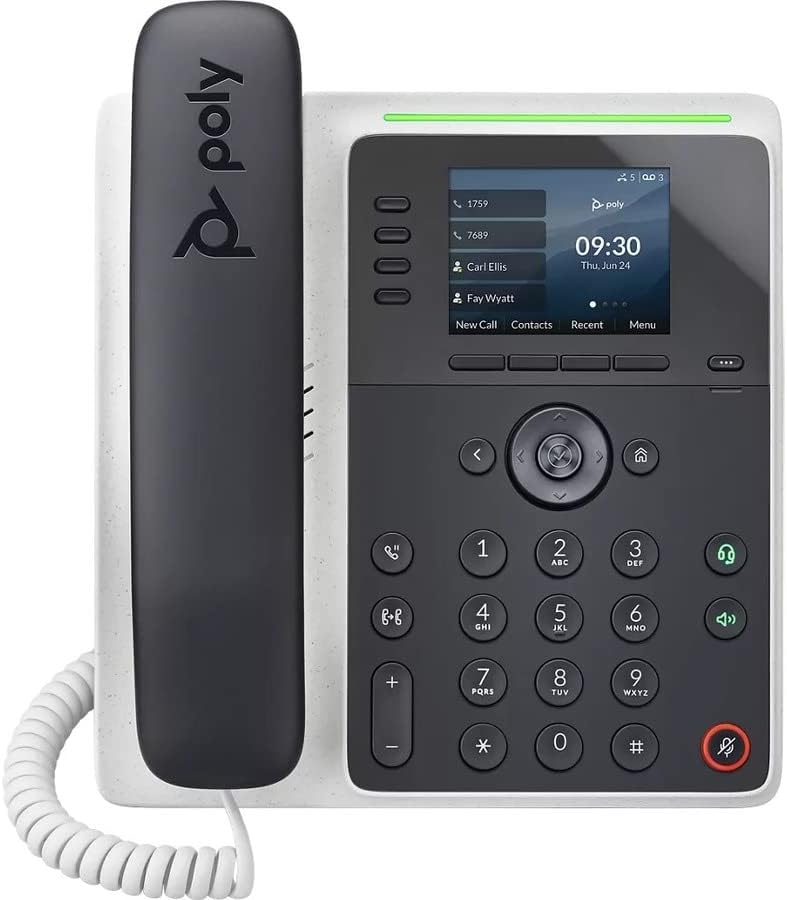
이미지: 앞면 view of the Poly Edge E220 IP Desk Phone, showcasin디스플레이, 키패드 및 핸드셋을 포함합니다.
2. 상자 안에 무엇이 들어있나요?
패키지에 다음 구성품이 모두 포함되어 있는지 확인하세요.
- Poly Edge E220 IP Desk Phone Unit
- 핸드셋
- 핸드셋 코일 코드
- Cat5E Ethernet Cable
- Integrated Wall Mount (pre-attached or separate)
- 베이스 스탠드
Note: A power supply is NOT included with this renewed product and must be acquired separately if Power over Ethernet (PoE) is not available.
3. 제품 특징
- 4-Line Keys: Supports up to 16 lines for flexible call management.
- 통합 블루투스: Allows for seamless pairing with mobile phones and Bluetooth headsets.
- 고해상도 디스플레이: Provides clear visibility for call information and menu navigation.
- HD 음성: Delivers superior audio quality for clearer conversations.
- Multi-Line Operation: Manage multiple active calls simultaneously.
- 전화 회의 기능: Supports 3-way conferencing.
4. 설정 및 설치
4.1 휴대폰 조립하기
- Attach the Base Stand: Align the tabs on the base stand with the slots on the back of the phone unit. Slide the stand into place until it clicks securely.
- Connect the Handset: Plug one end of the coil cord into the handset and the other end into the handset port on the side of the phone unit.
4.2 케이블 연결
Locate the ports on the back and side of the phone unit.

이미지: 측면 view of the Poly Edge E220 IP Desk Phone, highlighting the various connection ports and the adjustable stand.
- 네트워크 연결 : Connect one end of the Cat5E Ethernet cable to the LAN port on the phone and the other end to your network switch or router. If your network provides Power over Ethernet (PoE), the phone will power on automatically.
- 전원 연결(PoE가 없는 경우): PoE를 사용할 수 없는 경우, 적절한 전원 어댑터(별도 구매)를 전화기의 전원 포트에 연결한 다음 전원 콘센트에 연결하십시오.
- Optional Headset Connection: If using a wired headset, connect it to the dedicated headset port.
4.3 초기 전원 켜기
Once connected, the phone will power on and begin its boot sequence. This may take a few moments. The display will show the Poly logo, followed by network configuration and registration status. If prompted, enter your network credentials or contact your IT administrator for setup assistance.
5. 사용 설명서
5.1 전화 걸기 및 받기
- 전화를 걸려면: Pick up the handset, press the Speaker button, or press a line key. Dial the number and press the Dial soft key or wait for the call to connect.
- 전화를 받으려면: Pick up the handset, press the Speaker button, or press the flashing line key.
- 통화를 종료하려면: 수화기를 제자리에 놓거나 통화 종료 소프트 키를 누르십시오.

Image: A man engaged in a phone call using the Poly Edge E220 IP Desk Phone in a professional office environment.
5.2 블루투스 사용하기
The Poly Edge E220 allows you to pair your mobile phone or Bluetooth headset for enhanced flexibility.
- 블루투스 활성화: Navigate to the phone's menu, select Settings, then Bluetooth, and ensure Bluetooth is enabled.
- 장치 페어링: Put your Bluetooth device (mobile phone or headset) into pairing mode. On the phone, select 'Add New Device' or 'Scan for Devices'. Select your device from the list and follow the on-screen prompts to complete pairing.
- 연결: Once paired, your device should automatically connect when in range. You can manually connect/disconnect from the Bluetooth menu.

Image: A woman working at a desk, utilizing the Poly Edge E220 IP Desk Phone alongside her laptop, demonstrating its integration into a modern workspace.
5.3 고급 기능
- 잡고 있다: During a call, press the Hold soft key to place the call on hold. Press it again to resume.
- 이전: During a call, press the Transfer soft key, dial the new number, and then press Transfer again to complete.
- 회의: During an active call, press the Conference soft key, dial the number of the third party, and then press Conference again to join all parties.
- 음성사서함: Press the Voicemail button to access your voicemail messages.
6. 유지관리
To ensure the longevity and optimal performance of your Poly Edge E220 IP Desk Phone, follow these maintenance guidelines:
- 청소: Use a soft, dry, lint-free cloth to clean the phone's surface and display. For stubborn marks, slightly damp천에 물을 묻혀 닦아주세요. 강한 화학 물질, 연마성 세제 또는 에어로졸 스프레이는 사용하지 마세요.
- 환경: 휴대폰을 직사광선, 과도한 열, 습기를 피해 건조한 곳에 보관하세요.
- 케이블 관리 : 포트나 케이블이 손상되지 않도록 모든 케이블을 깔끔하게 정리하고 장력이 가해지지 않도록 하십시오.
- 소프트웨어 업데이트: Periodically check with your IT administrator for available software updates to ensure your phone has the latest features and security enhancements.
7. 문제 해결
If you encounter issues with your Poly Edge E220, refer to the table below for common problems and solutions.
| 문제 | 가능한 원인 | 해결책 |
|---|---|---|
| 전화기 전원이 켜지지 않습니다 | No power supply or PoE connection | Ensure Ethernet cable is connected to a PoE-enabled port, or connect a compatible power adapter. |
| 다이얼 톤이 없습니다 | Network issue or phone not registered | Check network cable connection. Verify network status on the phone display. Contact IT support if registration fails. |
| 발신자의 목소리가 들리지 않습니다 / 발신자가 나의 목소리를 들을 수 없습니다 | Volume too low, faulty handset/headset, or network audio issue | Adjust volume. Test with speakerphone. Check handset/headset connection. Restart phone. |
| Bluetooth 장치가 페어링되지 않음 | 장치가 페어링 모드에 있지 않거나 범위를 벗어났습니다. | Ensure Bluetooth device is in pairing mode and within range. Restart both devices. |
If the problem persists after attempting these solutions, please contact your IT department or the product support team for further assistance.
8. 사양
Key technical specifications for the Poly Edge E220 IP Desk Phone:
| 특징 | 세부 사항 |
|---|---|
| 제품 치수 | 12.1 x 10.3 x 3.4 인치 |
| 품목 무게 | 2.55파운드 |
| 전화 유형 | 유선 IP 전화 |
| 전원 | Corded Electric (Power Supply NOT Included) / Power over Ethernet (PoE) |
| 다이얼러 유형 | 단일 키패드 |
| 응답 시스템 유형 | Digital (requires service provider support) |
| 컨퍼런스 콜 기능 | 3방향 |
| 다중 라인 작업 | Yes, supports up to 16 lines with 4-line keys |
| 블루투스 | Integrated for mobile phone and headset pairing |
9. 보증 및 지원
As a renewed product, the Poly Edge E220 IP Desk Phone typically comes with a limited warranty provided by the refurbisher or seller. Please refer to your purchase documentation for specific warranty terms and conditions. For technical support, troubleshooting beyond this manual, or warranty claims, please contact the seller or your IT administrator.


