1. 서론
The FMS Reflex V2 Flight Controller is an advanced gyro stabilization system designed to enhance the flight experience of various RC aircraft, including fixed-wing airplanes, warbirds, and helicopters. It acts as a 'co-pilot' to assist pilots in maintaining stable and controlled flight, offering different modes to suit varying skill levels and flight conditions. This manual provides essential information for the proper setup, operation, and maintenance of your Reflex V2 unit.
2. 주요 특징
- 재프로그래밍 가능: The Reflex V2 can be easily reprogrammed with different model files using dedicated software, allowing for versatility across various aircraft types and pilot preferences.
- 세 가지 비행 모드: Offers Stabilized, Optimized, and Off modes, selectable via a 2 or 3-position switch on your transmitter.
- 컴팩트한 디자인: Small form factor for easy integration into most RC aircraft.
3. 설정 및 연결
Proper connection of the Reflex V2 to your receiver and aircraft's control surfaces is crucial for correct operation. Refer to the diagrams below for port identification and typical wiring.

이미지 1: 상단 view of the FMS Reflex V2 Flight Controller, highlighting the various input and output ports for connection to the receiver and servos.
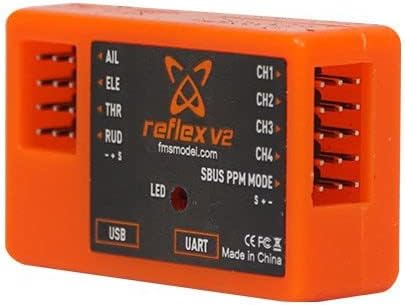
이미지 2: 측면 view of the FMS Reflex V2 Flight Controller, showing the USB and UART ports used for software configuration and updates.
3.1 포트 식별
- AIL (Aileron): Connects to the aileron channel of your receiver.
- ELE (Elevator): Connects to the elevator channel of your receiver.
- THR (Throttle): Connects to the throttle channel of your receiver.
- RUD (Rudder): Connects to the rudder channel of your receiver.
- CH1-CH4: Auxiliary channels for additional functions or control surfaces.
- USB: Used for connecting the flight controller to a computer for software configuration and firmware updates.
- UART: Universal Asynchronous Receiver/Transmitter port, typically for advanced telemetry or peripheral connections.
- SBUS PPM MODE: Input for SBUS or PPM compatible receivers, allowing for single-line connection.
- 주도의: 상태 표시등.
3.2 Software Reprogramming
The Reflex V2 requires specific software for initial setup, calibration, and reprogramming with different aircraft profiles. This software is typically available from the manufacturer's website. Connect the unit to your computer via the USB port and follow the software instructions for configuration.
4. 작동 모드
The FMS Reflex V2 offers three distinct flight modes to cater to different piloting needs. These modes are typically selected using a 2 or 3-position switch on your radio transmitter.
4.1 Stabilized Mode
Designed primarily for beginners, this mode provides significant assistance in maintaining stable flight. When the control sticks are released, the Reflex V2 will rapidly level the aircraft from almost any attitude. It utilizes accelerometer and gyro data to achieve this, offering pilots a sense of security and making initial flight training easier.
4.2 Optimized Mode
In Optimized Mode, the Reflex V2 uses advanced solid-state gyros to actively maintain the aircraft's attitude. It counteracts external disturbances such as wind gusts and crosswinds, providing a smoother and more precise flight experience without fully taking over control. This mode is suitable for intermediate to advanced pilots who desire enhanced stability and precision.
4.3 Off Mode
When Off Mode is selected, all gyro functionality of the Reflex V2 is disabled. The aircraft is flown completely manually, relying solely on the pilot's direct control inputs. This mode is for experienced pilots who prefer full manual control or for specific maneuvers where gyro assistance is not desired.
5. Applicable Aircraft
The FMS Reflex V2 Flight Controller is compatible with a wide range of FMS RC aircraft. The reprogrammable nature of the unit allows it to be configured for various models. Some of the compatible aircraft include:
- 1400mm Pitts V2
- 1400mm 182
- 1700mm F4U V3
- 980mm P-40
- 1100mm MXS V2
- 1200mm CJ-6
- 1800mm 레인저
- 1220mm Super EZ
- 1700mm F7F
- 1100mm PC-21
- 1400mm J3 V4
- 1700mm PA-18
- 80mm Rafale
- 70mm F-18 V2
- 80mm BAE Hawk
- 80mm Futura V3
- 80mm F-4
- 70mm A-10 V2
- 70mm Avanti V3
- 2000mm Beaver V2
- 1220mm 레인저
- 1500mm P-51
- 1400mm F4U
- 1100mm Zero
- 1400mm Kingfish
- 800mm F-4U
- 800mm T-28
- 750mm Edge540
- 1400mm P51
6. 사양
| 특징 | 사양 |
|---|---|
| 모델 번호 | V2 비행 컨트롤러 |
| 크기(대략) | 19.0 x 30.0 x 9.0mm |
| 수량 | 1개 |
| 기술적 매개변수 | 값 2 |
7. 문제 해결
If you encounter issues with your FMS Reflex V2 Flight Controller, consider the following troubleshooting steps:
- 응답 없음: Ensure all connections to the receiver and servos are secure and correctly oriented. Check for proper power supply to the flight controller and receiver.
- 잘못된 제어 응답: Verify that the control surface directions are correctly set in your transmitter and the Reflex V2 software. Recalibrate if necessary.
- 불안정한 비행: Ensure the Reflex V2 unit is securely mounted and free from vibrations. Check that the correct aircraft profile is loaded via the software.
- LED 상태 : Observe the LED indicator for any error codes or status indications as described in the software manual.
- 소프트웨어 문제: If experiencing problems with reprogramming or configuration, ensure you are using the latest version of the FMS Reflex V2 software and drivers. Try a different USB port or cable.
For persistent issues, consult the official FMS support resources or contact your retailer.
8. 보증 및 지원
For warranty information, please refer to the terms and conditions provided by your retailer at the time of purchase. The manufacturer, FMS, typically provides support for their products. For technical assistance, software downloads, or further inquiries, please visit the official FMS web사이트를 방문하거나 고객 지원 채널에 문의하세요.


