1. 소개 및 이상view
This manual provides detailed instructions for the installation, operation, and maintenance of your Yansoo 3-Channel Dash Cam. Please read this manual thoroughly before using the device to ensure proper functionality and safety.
제품 특징:
- 3채널 녹음: Simultaneously captures video from the front (170° wide-angle), rear (165°), and inside (140°) of your vehicle.
- 고화질 비디오: Supports 1080P Front video + AHD-720P Rear video + AHD-720P Inside video.
- 향상된 야간 투시경: Features 4 unique infrared LED fill lights, F1.8 aperture, and WDR technology for optimal performance in low light.
- 비상 잠금 장치(G-센서): Automatically detects sudden shocks or collisions and locks the current video footag덮어쓰기를 방지합니다.
- 루프 녹음: Continuously records and automatically overwrites the oldest unlocked video files 메모리 카드가 가득 찼을 때.
- 주차 모니터: Activates recording when motion or shocking is detected while parked (requires separate hardwire kit for 24/7 monitoring).
- Adjustable Interior Camera: The interior lens can be rotated 60° for flexible positioning.
패키지 내용:
- Yansoo 3-Channel Dash Cam Unit
- 케이블이 있는 후면 카메라
- 석션 컵 마운트
- Car Charger (Type-C)
- USB 데이터 케이블
- 사용자 설명서
- Mounting Hardware for Rear Camera
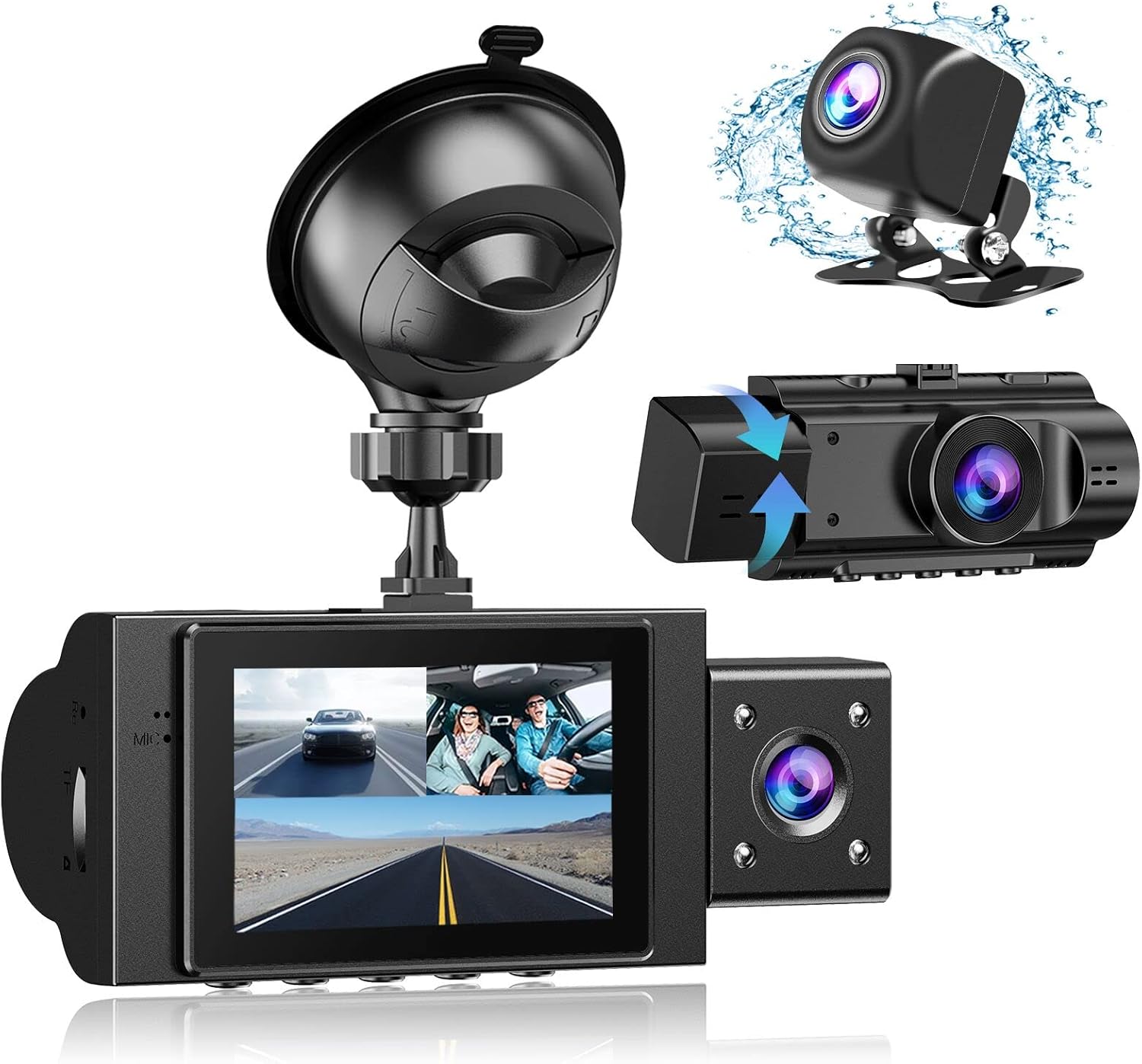
Image: The Yansoo 3-Channel Dash Cam unit with its suction cup mount and the separate rear camera, illustrating the complete package.
2. 설정
2.1 메모리 카드 삽입
The dash cam supports Micro Memory cards up to 64GB (Class 10 or above recommended, not included). Please format the card in the camera menu before first use.
- Locate the memory card slot on the side of the dash cam.
- Insert the Micro Memory card into the slot until it clicks into place.
- 제거하려면 카드가 튀어나올 때까지 살살 밀어주세요.

Image: A four-panel illustration showing the steps to insert a Micro SD card into the dash cam's slot.
2.2 대시캠 장착
Mount the main dash cam unit to your windshield using the provided suction cup mount. Choose a location that does not obstruct your view 운전하는 동안.
- 앞 유리의 선택한 부분을 철저히 닦으세요.
- 흡착식 거치대를 블랙박스 본체에 부착하세요.
- 흡입 컵을 앞 유리창에 단단히 대고 레버를 돌려 고정합니다.
- 카메라 각도를 조정하여 명확한 시야를 확보하세요. view 앞으로의 길에 대하여.

Image: The Yansoo 3-Channel Dash Cam mounted on a car's windshield, showing its position relative to the driver's view.
2.3 후방 카메라 설치
The rear camera provides a view of the vehicle's rear. It can be installed inside the rear window or externally above the license plate.
- 후방 카메라 케이블을 블랙박스 본체에 연결하세요.
- Route the cable neatly along the vehicle's interior trim to the rear.
- Mount the rear camera in the desired location, ensuring a clear view.

Image: A diagram illustrating the recommended cable routing path for the dash cam and rear camera within a car's interior.
2.4 전원 연결
Connect the dash cam to your vehicle's cigarette lighter socket using the provided car charger. The camera will automatically power on and begin recording when the vehicle starts.

Image: The Yansoo 3-Channel Dash Cam connected to a power source, indicating its readiness for operation.
3. 사용 설명서
3.1 기본 작업
- 전원 켜기/끄기: The camera powers on/off automatically with your vehicle's ignition. You can also manually power on/off by pressing and holding the power button.
- 녹음 시작/중지: Recording starts automatically when the camera powers on. Press the "OK" button to manually stop or start recording.
- 디스플레이 전환 Views: Press the "Up" button to cycle through different display modes (Front, Inside, Rear, Picture-in-Picture combinations).
Video: Demonstration of the Yansoo X88 Dash Cam's recording capabilities, showcasing its ability to capture clear video footage.
영상: 푸tage from the Yansoo X88 Dash Cam demonstrating its clear day and night recording capabilities.
Video: A demonstration of the Yansoo X88 Dash Cam's 1080P Full HD recording quality.
3.2 메뉴 설정
To access the menu settings, stop recording (if active) by pressing the "OK" button, then press the "M" button twice.
- 해결: Adjust video resolution for front, inside, and rear cameras.
- 루프 녹음: 동영상 세그먼트의 길이를 설정하세요(예: 1분, 3분, 5분).
- G-센서 감도: Adjust the sensitivity of the emergency lock feature.
- 주차 모니터: Enable or disable the parking monitoring function.
- 날짜/시간: 정확한 시간을 위해 올바른 날짜와 시간을 설정하세요amp녹음에 관한 것입니다.
- 언어: Select your preferred language for the menu.
Video: A step-by-step guide on how to set the date and time on the Yansoo Dash Cam.
4. 유지관리
- 일반 서식: Format the memory card regularly (e.g., once a month) to prevent data corruption and ensure optimal recording performance.
- 렌즈 세척: 부드럽고 보풀 없는 천으로 카메라 렌즈를 깨끗하게 유지하세요. 렌즈에 흠집이 생길 수 있는 마모성 재질은 사용하지 마세요.
- 펌웨어 업데이트: Check the official Yansoo web성능 향상 및 새로운 기능 추가를 위한 펌웨어 업데이트가 있는지 확인하려면 해당 사이트를 방문하십시오.
- 온도 고려 사항: 대시캠을 장시간 극한의 온도에 노출시키지 마세요.
5. 문제 해결
| 문제 | 가능한 원인 | 해결책 |
|---|---|---|
| 카메라 전원이 켜지지 않습니다. | 시거잭에 전원이 공급되지 않습니다. 연결이 헐거워졌습니다. | Check car charger connection; ensure vehicle ignition is on. |
| 녹화가 예기치 않게 중단됩니다. | Memory card full or corrupted; G-Sensor triggered. | Format memory card; adjust G-Sensor sensitivity. |
| 비디오 푸tage는 흐릿합니다. | Protective film on lens; dirty lens. | Remove protective film; clean lenses with a soft cloth. |
| 날짜/시간이 잘못되었습니다. | Date/Time not set or battery low. | Set Date/Time in menu; ensure continuous power supply. |
| 카메라가 멈추거나 오작동합니다. | 소프트웨어 오류. | Use a needle to press the "RE" (Reset) button. |
6. 사양
| 특징 | 세부 사항 |
|---|---|
| 제품 치수 | 4.13 x 1.57 x 1.77 인치 |
| 품목 무게 | 1.23파운드 |
| 비디오 캡처 해상도 | 1080p (Front), 720p (Inside & Rear) |
| 분야의 View | 170° (Front), 140° (Inside), 165° (Rear) |
| 연결 기술 | USB |
| 특징 | G-Sensor, Loop Recording, Parking Monitor, Night Vision |
| 장착 유형 | 석션 마운트 |
| 제조업체 | 얀수 |
7. 보증 및 지원
Yansoo offers comprehensive after-sales support for your dash cam.
- 보증: 1-YEAR warranty from the date of purchase.
- 기술적 인 지원: 7*24 hours technical service is available.
- 연락하다: For any questions or issues, please contact our customer service team via Amazon or the after-sales email provided in the original product packaging.
- 사용자 매뉴얼(PDF): 사용자 설명서의 디지털 버전을 다운로드할 수 있습니다. 여기.