1. 서론
The BenQ ZOWIE EC2-CW is a wireless ergonomic gaming mouse designed for esports, offering stable, high-quality performance. Its asymmetrical shape is crafted for natural right-hand placement, providing comfortable support for various grip styles. This manual provides essential information for setting up, operating, maintaining, and troubleshooting your device.

Figure 1: BenQ ZOWIE EC2-CW Wireless Ergonomic Gaming Mouse
2. 설정
2.1 상자 내용물
- BenQ ZOWIE EC2-CW Wireless Ergonomic Gaming Mouse
- USB 무선 수신기
- 향상된 무선 수신기
- USB-C to USB-A 케이블(2m / 6.6피트)
- USB Type-C 어댑터
- Skatez (Type D Black)
2.2 초기 연결
- Connect the USB Wireless Receiver to an available USB-A port on your computer. For optimal signal stability, use the Enhanced Wireless Receiver and USB Type-C Adapter to position the receiver closer to the mouse.
- 밑면에 있는 전원 스위치를 사용하여 마우스를 켜십시오.
- The mouse is driverless, meaning no additional software installation is required for basic functionality. Your computer should automatically detect the device.
- For charging, connect the USB-C to USB-A cable to the front port of the mouse.
3. 사용 설명서
3.1 DPI 및 투표율 조정
The EC2-CW mouse allows for on-the-fly adjustment of DPI (Dots Per Inch) and USB Report Rate without requiring software. Buttons on the underside of the mouse control these settings.
- DPI 설정: Adjust between 400, 800, 1600, and 3200 DPI.
- USB 보고율: Adjust between 125 Hz, 500 Hz, and 1000 Hz.
- Adjustable Lift-off Distance: Customize the distance at which the sensor stops tracking when lifted from the surface.

Figure 2: Underside of the mouse showing DPI and polling rate controls.
3.2 Ergonomic Design and Grip Styles
The asymmetrical ergonomic shape is designed for natural placement of your right hand, accommodating various grip styles for professional players.
- 팜 그립: The top shell provides a natural curve for your hand with relaxed support to your palm and fingers.
- 클로 그립: The curved back provides even contact to the lower palm for better grip, keeping movement flexible from the front end of your palm to your fingers.

Figure 3: Palm grip illustration.

Figure 4: Claw grip illustration.
3.3 스크롤 휠
The mouse features a 24-step scroll wheel, providing precise control for in-game actions or navigation.
4. 특징
- Asymmetrical Ergonomic Shape: Designed for natural placement of your right hand, a widely used option for professional players.
- 24-step Scroll Wheel: Offers precise tactile feedback for scrolling.
- Wireless Design with Enhanced Receiver: Ensures stable, high-quality performance in competitive environments.
- 무인 운전: Plug and play functionality without the need for additional software.
4.1 Product Size Comparison
The EC2-CW is a medium-sized mouse. BenQ ZOWIE offers various sizes (EC1-CW (L), EC2-CW (M), EC3-CW (S)) to suit different hand sizes and preferences.
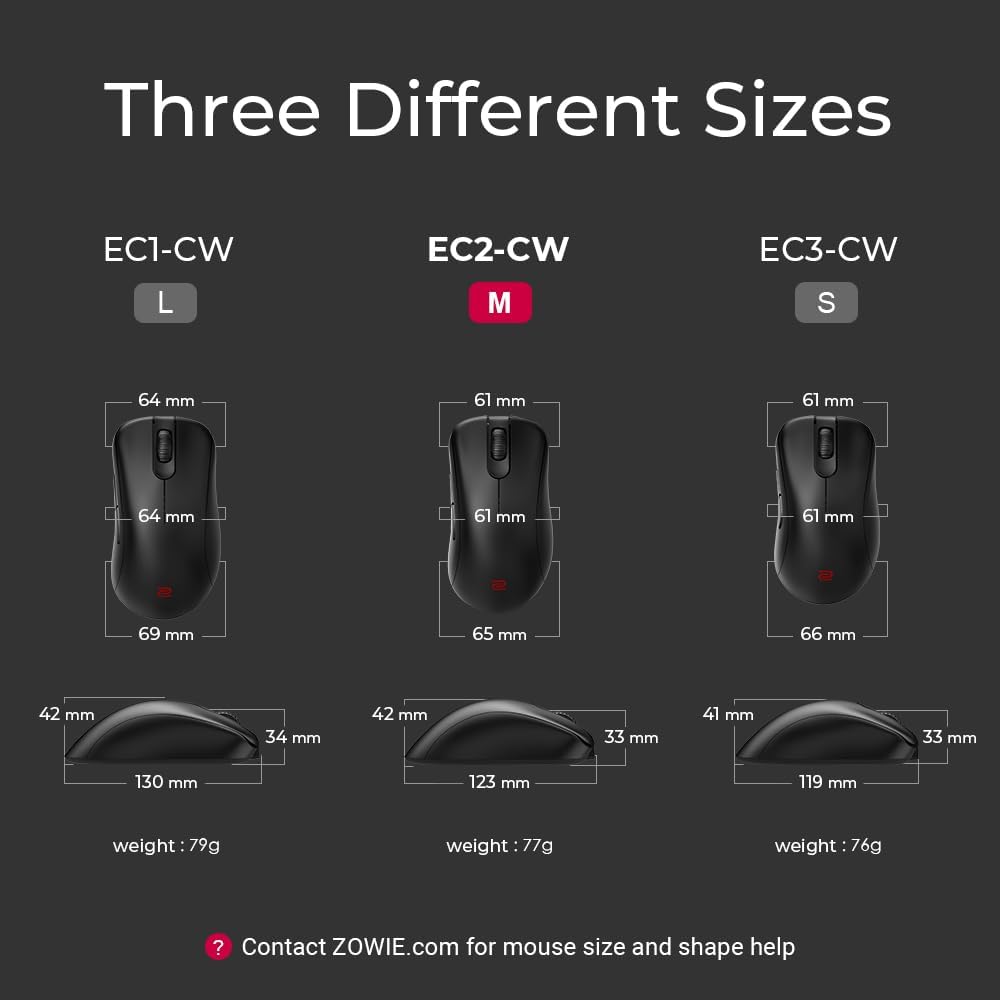
Figure 5: ZOWIE EC-CW Series size comparison.
5. 유지관리
- 청소: 부드럽고 마른 천을 사용하여 마우스를 닦으세요. 강한 화학 물질이나 연마재는 사용하지 마세요.
- 배터리 관리 : Charge the mouse when the indicator light turns red. Avoid completely draining the battery frequently to prolong its lifespan.
- 저장: 마우스를 직사광선과 극한의 온도를 피해 시원하고 건조한 곳에 보관하세요.
6. 문제 해결
- 연결 없음: Ensure the USB Wireless Receiver is properly connected to your computer and the mouse is powered on. Try a different USB port.
- Lag/Interference: Ensure the Enhanced Wireless Receiver is positioned close to the mouse and away from other wireless devices that may cause interference.
- DPI/폴링률 변경 안 함: Press the respective buttons firmly on the underside of the mouse. Refer to the indicator lights for confirmation.
- 스크롤 휠 문제: If the scroll wheel is unresponsive or jumps, ensure it is clean and free of debris.
- 배터리가 충전되지 않음: Ensure the USB-C cable is securely connected to both the mouse and a power source. Check the charging indicator light.
7. 사양
| 사양 | 세부 사항 |
|---|---|
| 상표 | 벤큐 |
| 시리즈 | EC2-CW |
| 품목 모델 번호 | EC2-CW |
| 하드웨어 플랫폼 | PC |
| 운영 체제 | 윈도우 |
| 품목 무게 | 2.7 온스 |
| 제품 치수 | 4.84 x 2.56 x 1.65 인치 |
| 색상 | 검은색 |
| 전원 | 배터리 구동 |
| 배터리 | 1개의 리튬 이온 배터리 필요(포함) |
| 연결 기술 | USB, 와이파이 |
| 특징 | Enhanced receiver for stable signal transmission, Ergonomic Design, Natural curve for your hand with a relaxed support, Rechargeable, Wireless |
| 움직임 감지 기술 | 광학 |
8. 공식 제품 영상
ZOWIE EC-CW Wireless Gaming Mouse - Sports Science
Video 1: An informational video detailing the sports science behind the ZOWIE EC-CW Wireless Gaming Mouse.
ZOWIE EC-CW Wireless Gaming Mouse - the story behind
Video 2: A video explaining the development and philosophy behind the ZOWIE EC-CW Wireless Gaming Mouse.
9. 보증 및 지원
The BenQ ZOWIE EC2-CW Wireless Ergonomic Gaming Mouse comes with a 3-Year Protection Plan. For further assistance with mouse size, shape, or any other inquiries, please contact ZOWIE.com support.


