1. 서론
The Alpena CyberGlow Automotive Interior Trim RGB LED Lights are designed to provide customizable ambient lighting for your vehicle's interior. This kit includes two flexible LED strips, a control unit, a wireless remote, and a 12V power adapter, allowing for easy installation and personalized lighting effects.
2. 패키지 내용
설치를 시작하기 전에 모든 구성 요소가 있는지 확인하세요.
- 2 x CyberGlow RGB LED Light Strips (7 ft each)
- 1 x Control Unit with Wiring Harness
- 1 x 무선 원격 제어
- 1 x 12V Power Adapter (Cigarette Lighter Plug)
- Adhesive Mounting Strips
- 사용 설명서
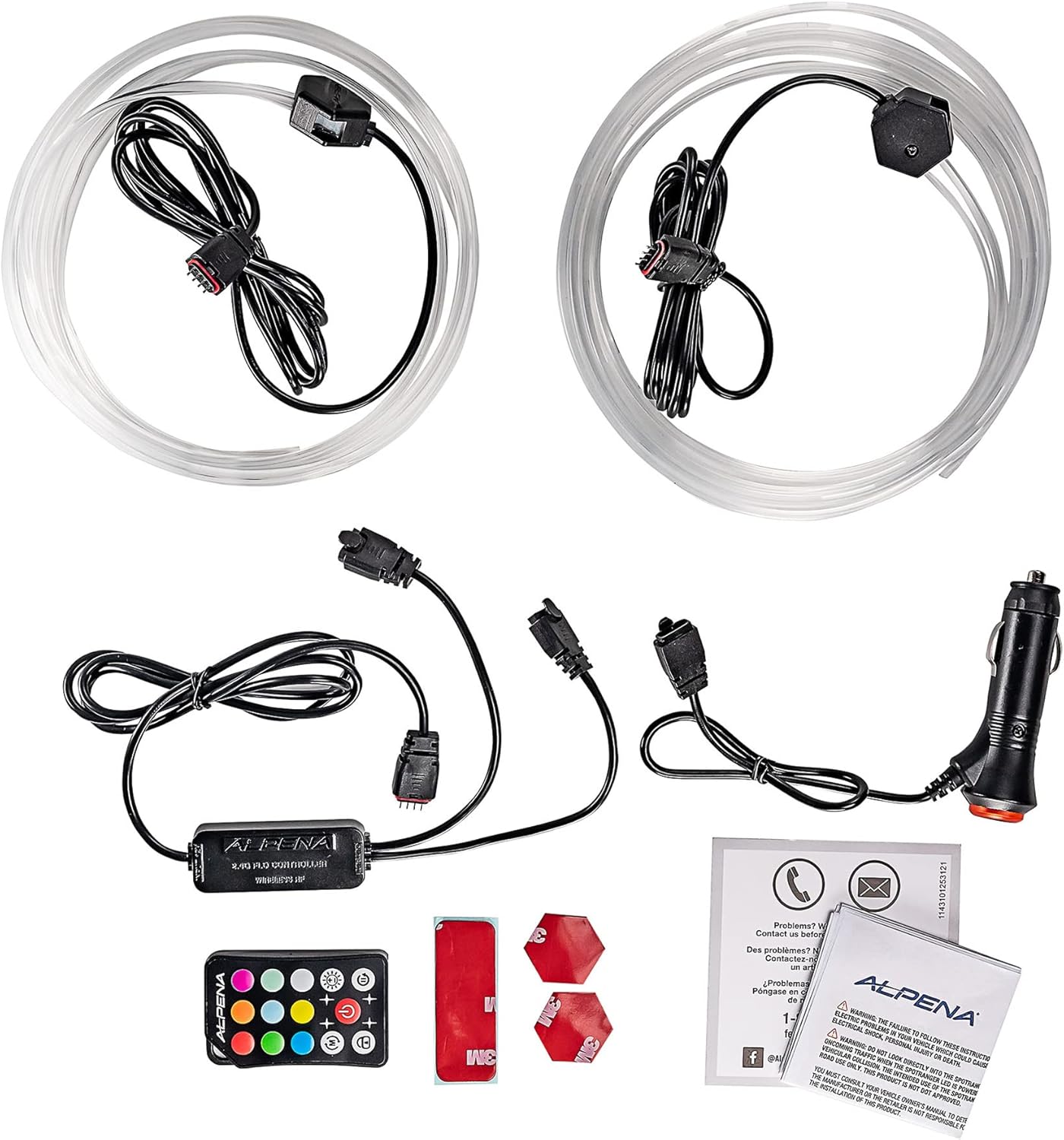
Image 2.1: All components included in the Alpena CyberGlow LED Light Kit. This includes two light strips, a control unit, a remote, a 12V power adapter, and adhesive strips.
3. 안전 정보
- 설치하기 전에 차량의 전원이 꺼져 있는지 확인하십시오.
- Do not cut or modify the LED strips or wiring harness.
- This product is designed for 12V automotive systems only.
- Avoid installing in areas that obstruct driver visibility or vehicle controls.
- This product is not water resistant. Avoid exposure to moisture.
- 어린이의 손이 닿지 않는 곳에 보관하세요.
4. 설정 및 설치
- 계획 배치: Determine the desired locations for the LED strips within your vehicle's interior trim. Ensure the strips can reach the control unit and the control unit can reach the 12V power adapter.
- 깨끗한 표면: Thoroughly clean and dry the surfaces where the LED strips will be mounted. Use an alcohol wipe if necessary to remove any grease or dirt, ensuring optimal adhesion.
- 접착제 부착: Peel the backing from the adhesive mounting strips and firmly press them onto the back of the LED light strips.
- Mount LED Strips: Carefully peel the remaining backing from the adhesive strips and press the LED strips firmly onto the chosen interior trim surfaces. Apply pressure for several seconds to ensure a secure bond.
- Connect to Control Unit: Connect the ends of the LED light strips to the corresponding ports on the control unit. Ensure connections are secure.
- 전원 연결: Plug the 12V power adapter into your vehicle's cigarette lighter socket.
- 안전한 배선: Route and secure all wiring to prevent interference with vehicle operation and to maintain a tidy appearance. Use cable ties or clips if needed (not included).
5. 사용 설명서
The Alpena CyberGlow LED lights are operated using the included wireless remote control.
- 전원 버튼: 를 누르세요 켜짐/꺼짐 조명을 켜거나 끄는 버튼입니다.
- 색상 선택: Use the dedicated color buttons (e.g., 빨간색, 녹색, 파란색, 하얀색) to select a static color.
- 밝기 조정: 사용하세요 Brightness Up (+) 그리고 Brightness Down (-) buttons to adjust the intensity of the selected color or mode.
- 모드 선택: Cycle through various dynamic lighting modes (e.g., flash, fade, strobe, smooth) using the 방법 button or specific mode buttons if available on your remote.
- 속도 조정 : 동적 모드의 경우 다음을 사용하세요. 속도를 높이다 그리고 다운 속도 buttons to control the speed of the effect.
Ensure the remote control has a clear line of sight to the control unit for optimal performance.
6. 유지관리
- 청소: Gently wipe the LED strips and control unit with a soft, dry cloth. Do not use abrasive cleaners or solvents.
- 연결 확인: Periodically inspect all connections (LED strips to control unit, control unit to power adapter) to ensure they are secure and free from corrosion.
- 원격 배터리: If the remote control's range or responsiveness decreases, replace its battery (typically a CR2025 or CR2032 coin cell, refer to remote for specific type).
7. 문제 해결
| 문제 | 가능한 원인 | 해결책 |
|---|---|---|
| 표시등이 켜지지 않습니다. |
|
|
| 리모컨이 응답하지 않습니다. |
|
|
| 조명이 깜빡이거나 색상이 잘못 표시됩니다. |
|
|
8. 사양
- 상표: 알페나
- 모델: CyberGlow (78192E)
- 입력 Voltage: 12V 직류
- 조명 유형: RGB LED 스트립
- 스트립 길이: 7 ft per strip (2 strips included)
- 제어: 무선 원격 제어
- 적합 유형: Universal Fit (Automotive Interior)
- 방수 기능: 방수가 되지 않음
- 한국어: 084902781922
9. 보증 및 지원
For warranty information or technical support, please refer to the documentation included with your product or visit the official Alpena web사이트. 보증 청구를 위해 구매 증빙 자료를 보관하세요.
제조업체: 알페나
첫 이용 가능 날짜: 6년 2023월 XNUMX일


