1. 서론
This manual provides detailed instructions for the assembly, installation, operation, and maintenance of your AMANSON H07 ATX Mid Tower PC Case. Please read this manual thoroughly before beginning installation to ensure proper setup and safe operation. Keep this manual for future reference.

Figure 1.1: AMANSON H07 ATX Mid Tower PC Case with illuminated internal components.
2. 안전 정보
- PC 케이스 내부에서 설치 또는 유지 보수 작업을 수행하기 전에 항상 전원 공급 장치의 전원을 벽면 콘센트에서 분리하십시오.
- 손상을 방지하기 위해 모든 구성품을 조심스럽게 다루십시오.
- 민감한 전자 부품의 정전기 방전(ESD) 손상을 방지하려면 정전기 방지 손목 스트랩을 착용하세요.
- 작은 부품과 포장재는 어린이의 손이 닿지 않는 곳에 보관하세요.
- 과열을 방지하려면 PC 케이스 주변의 적절한 환기를 확보하세요.
3. 패키지 내용
패키지에 모든 품목이 들어 있는지 확인하세요.
- AMANSON H07 ATX Mid Tower PC Case
- 부속품 상자 (나사, 스탠드오프, 케이블 타이 등)
- 사용 설명서 (본 문서)
4. 구성요소 종료view
The AMANSON H07 PC case features a panoramic design with tempered glass panels for full visibility of your internal components. It supports various motherboard sizes and extensive cooling configurations.

Figure 4.1: Top I/O Panel with power button, USB 3.0, USB 2.0, and audio ports.
상단 I/O 패널에는 다음이 포함됩니다.
- 전원 버튼
- 재설정 버튼
- 2x USB 2.0 포트
- 1x USB 3.0 포트
- 오디오 입/출력 잭
5. 설정 및 설치
5.1. 사건 준비
The AMANSON H07 features tool-less hinged tempered glass side panels for easy access. Gently open the side panel by pulling it from the rear edge. The panels can also be removed by lifting them off their hinges for full access during installation.

Figure 5.1: Hinged tempered glass side panel for easy access.
5.2. 마더보드 설치
The H07 supports E-ATX, ATX, Micro-ATX, and ITX motherboards. Install the necessary standoffs for your motherboard form factor. Carefully align your motherboard with the standoffs and I/O shield, then secure it with screws.
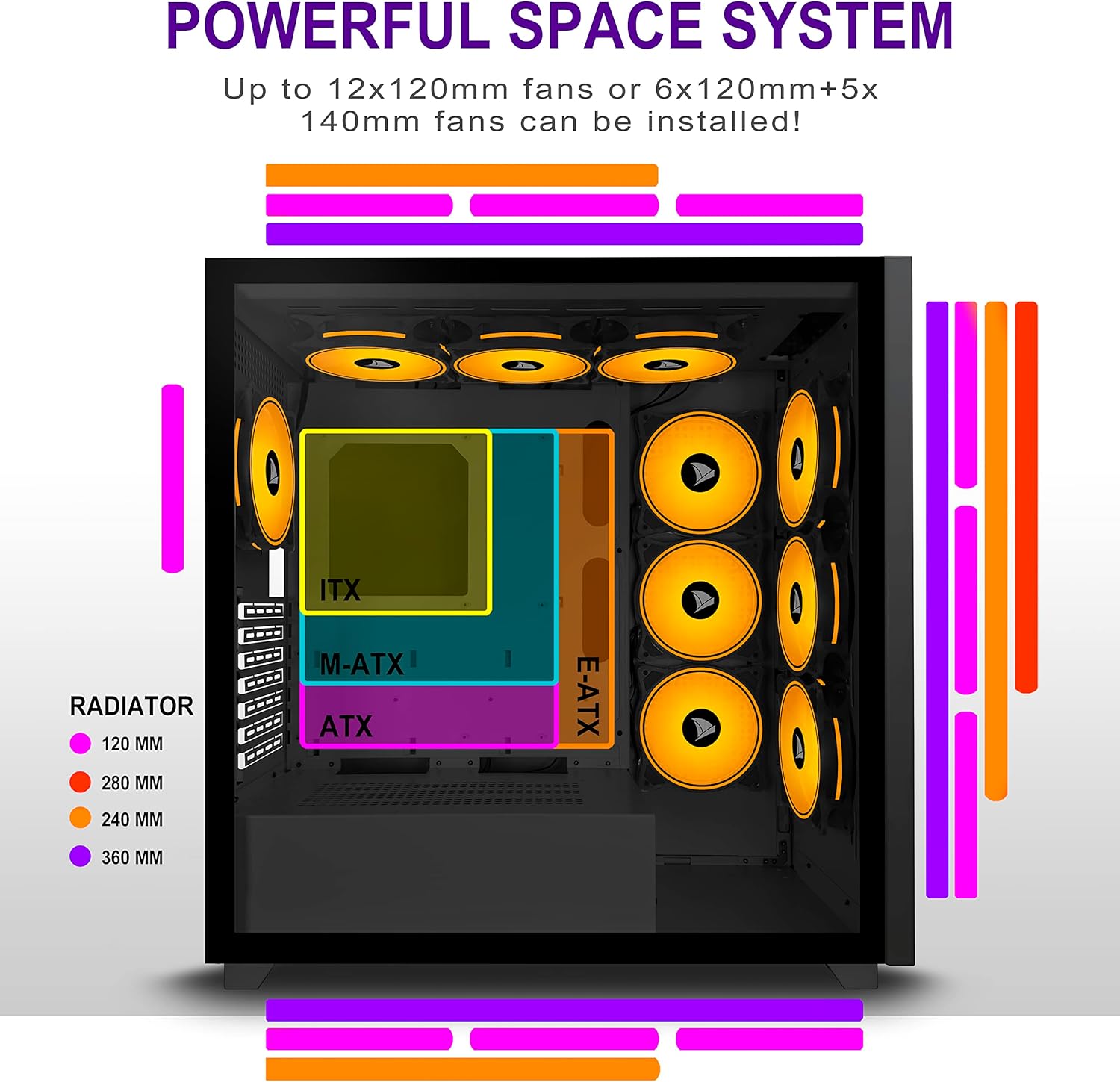
Figure 5.2: Motherboard and cooling component placement options.
5.3. 전원 공급 장치 설치
Install your power supply unit (PSU) into the dedicated compartment at the bottom rear of the case. Secure it with screws from the rear of the case.
5.4. 저장 장치 설치
The case provides multiple mounting points for storage devices. Install your 3.5" HDDs and 2.5" SSDs into the designated trays and mounting locations. Refer to the case diagram for specific locations.

Figure 5.3: Storage drive mounting options for HDDs and SSDs.
5.5. 확장 카드(GPU) 설치
Remove the necessary PCI-E slot covers from the rear of the case. Insert your graphics card or other expansion cards into the motherboard's PCI-E slots and secure them with screws.
5.6. 케이블 관리
Utilize the cable routing cutouts and tie-down points behind the motherboard tray to manage cables. This improves airflow and maintains a clean aesthetic.
6. 사용 설명서
6.1. 전원 켜기 / 끄기
Press the power button located on the top I/O panel to turn on your PC. To shut down, use the operating system's shutdown function or press and hold the power button for several seconds.
6.2. Using Front I/O Ports
Connect USB devices to the USB 2.0 or USB 3.0 ports. Use the audio jacks for headphones, microphones, or speakers.
7. 유지관리
7.1. 청소
케이스 외부는 부드러운 천으로 정기적으로 청소하세요.amp cloth. For internal cleaning, use compressed air to remove dust from fans and components. Ensure the PC is powered off and unplugged before cleaning.
7.2. 먼지 필터
The AMANSON H07 may include removable dust filters. Clean these filters periodically to maintain optimal airflow and cooling performance.
8. 문제 해결
- PC 전원이 켜지지 않습니다. Check all power connections, including the PSU to the wall, the PSU to the motherboard, and the front panel power switch cable to the motherboard.
- Overheating issues: Ensure all fans are properly installed and functioning. Verify that dust filters are clean and not obstructing airflow. Check thermal paste application on CPU cooler.
- USB 포트가 작동하지 않습니다. Confirm that the front panel USB cables are correctly connected to the motherboard headers.
- 오디오 잭이 작동하지 않습니다: Verify that the front panel audio cable is correctly connected to the motherboard's audio header.
9. 사양
Below are the technical specifications for the AMANSON H07 PC Case:
| 특징 | 세부 사항 |
|---|---|
| 모델 | H07 |
| 케이스 유형 | 미드 타워 |
| 마더보드 호환성 | E-ATX, ATX, Micro ATX, ITX |
| 재료 | 강화 유리 |
| 제품 크기(LxWxH) | 19.69 x 13.78 x 19.69인치(500 x 350 x 500mm) |
| 품목 무게 | 24.2파운드 |
| USB 2.0 포트 수 | 2 |
| USB 3.0 포트 수 | 1 |
| 확장 슬롯 수 | 8 |
| 냉각 방식 | 공기 |
| 전원 공급 장치 장착 유형 | 바텀 마운트 |

Figure 9.1: AMANSON H07 PC Case dimensions (520mm height, 510mm length, 250mm width).
10. 보증 정보
Please refer to the product packaging or the official AMANSON web자세한 보증 조건은 해당 웹사이트를 참조하십시오. 보증 청구를 위해 구매 증빙 자료를 보관하십시오.
11. 지원
For technical assistance or customer support, please visit the official AMANSON web사이트 또는 고객 서비스 부서에 문의하세요. 연락처 정보는 일반적으로 제품 포장이나 브랜드에서 확인할 수 있습니다. web대지.


