1. 서론
This manual provides detailed instructions for the ENDORFY Thock Wireless Mechanical Keyboard, model EY5A078. It covers setup, operation, maintenance, and troubleshooting to ensure optimal performance and longevity of your device. Please read this manual thoroughly before using the keyboard.

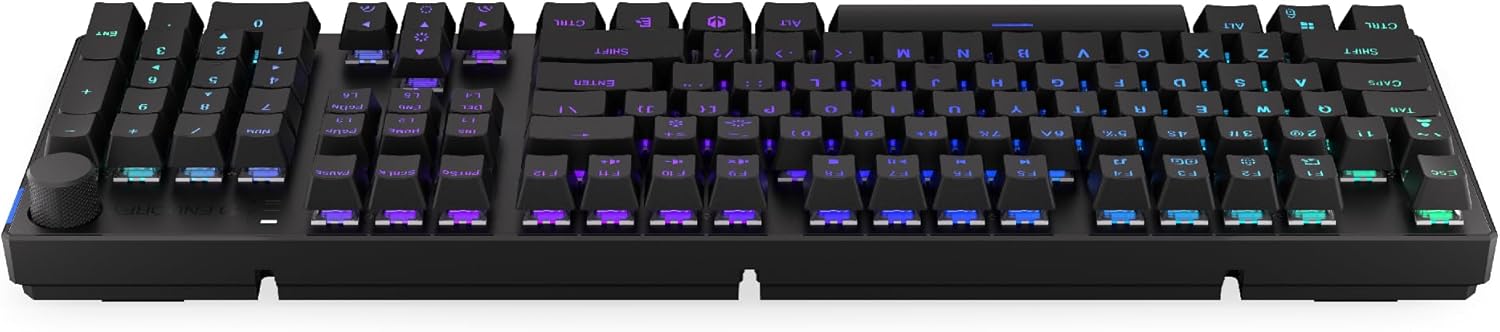
Image 1.1: The ENDORFY Thock Wireless Mechanical Keyboard EY5A078. This image displays the full QWERTY layout with illuminated keys, showcasing the keyboard's design and RGB capabilities.
2. 패키지 내용
패키지에 모든 품목이 들어 있는지 확인하세요.
- ENDORFY Thock Wireless Mechanical Keyboard EY5A078
- USB-C to USB-A 케이블(분리형)
- 2.4GHz USB 수신기
- 키캡 풀러
- 스위치 풀러
- 사용 설명서 (본 문서)
3. 설정 및 연결
The ENDORFY Thock Wireless Mechanical Keyboard offers three connection modes: wired, 2.4 GHz wireless, and Bluetooth.
3.1. 유선 연결
- Locate the USB-C port on the keyboard (typically on the back or top edge).
- Connect the provided USB-C to USB-A cable to the keyboard.
- 케이블의 USB-A 끝을 컴퓨터의 사용 가능한 USB 포트에 연결합니다.
- 키보드가 자동으로 감지되어 바로 사용할 수 있습니다.
이미지 3.1: 측면 view 키보드의 USB-C 포트를 강조 표시하여 유선 연결 및 충전에 사용되도록 했습니다.
3.2. 2.4GHz 무선 연결
- Locate the 2.4 GHz USB receiver. It may be stored in a compartment on the underside of the keyboard.
- Plug the 2.4 GHz USB receiver into an available USB port on your computer.
- On the keyboard, locate the mode switch (usually on the back or side) and set it to the 2.4 GHz wireless mode (often indicated by a specific icon or "2.4G").
- The keyboard should automatically connect. An indicator light may confirm the connection.

Image 3.2: Underside of the keyboard, showing the compartment for storing the 2.4 GHz USB receiver and adjustable feet.
3.3. 블루투스 연결
- On the keyboard, set the mode switch to Bluetooth mode (often indicated by a Bluetooth icon or "BT").
- The keyboard may have multiple Bluetooth profiles (e.g., BT1, BT2, BT3). Select one by pressing Fn + 1, Fn + 2, or Fn + 3. The corresponding indicator light will flash.
- 컴퓨터나 기기에서 Bluetooth 설정을 열고 새 기기를 검색하세요.
- Select "ENDORFY Thock Wireless" (or similar name) from the list of available devices.
- 화면의 지시에 따라 페어링 과정을 완료하세요.
- 페어링이 완료되면 키보드의 표시등이 깜빡임을 멈추고 계속 켜져 있습니다.
4. 운영
4.1. 주요 기능 및 단축키
The keyboard features various function key combinations (Fn + Key) for multimedia control, lighting adjustments, and other settings.
- Fn + F1-F12: Multimedia and system functions (e.g., volume control, media playback, calculator). Refer to the keycap legends for specific functions.
- Fn + 화살표 키: RGB 조명 효과(예: 밝기, 속도, 방향)를 조정합니다.
- Fn + 1/2/3: 블루투스 프로 모드 간 전환files.
- Fn + 4: Switch to 2.4 GHz wireless mode.
- Fn + 5: 유선 모드로 전환합니다.
4.2. RGB 조명 제어
The ENDORFY Thock keyboard features programmable RGB backlighting. Use the following combinations to customize the lighting:
- Fn + 오른쪽 화살표: 조명 효과를 변경하세요.
- Fn + 왼쪽 화살표: 조명 효과 방향을 변경합니다.
- Fn + 위쪽 화살표: 밝기를 높입니다.
- Fn + 아래쪽 화살표: 밝기를 줄입니다.
- Fn + 입력: 색상을 변경합니다.
- Fn + 델: 효과 속도를 조정하세요.
4.3. 볼륨 노브
The dedicated volume knob located on the top right of the keyboard allows for quick audio adjustments.
- 시계 방향으로 회전하세요: 볼륨을 높이세요.
- 시계 반대 방향으로 회전: 볼륨을 낮추세요.
- 아래로 누르기: 오디오 음소거/음소거 해제.

Image 4.1: Detail of the volume knob and status indicator lights, located on the upper right side of the keyboard.
4.4. 핫스왑 가능 스위치
The ENDORFY Thock keyboard features hot-swappable switches, allowing you to change mechanical switches without soldering. This enables customization of typing feel.
- 키캡 제거: 제공된 키캡 풀러를 사용하여 원하는 키캡을 조심스럽게 제거하세요.
- 스위치 제거: 제공된 스위치 풀러를 사용하여 스위치의 위쪽과 아래쪽 클립을 조심스럽게 잡고 위쪽으로 똑바로 당기십시오.
- 새 스위치 삽입: 새 스위치의 핀을 PCB의 구멍에 맞춰 정렬합니다. 스위치가 딸깍 소리가 나면서 제자리에 고정될 때까지 세게 누릅니다. 핀이 구부러지지 않았는지 확인하십시오.
- 키캡 교체: 키캡을 새 스위치 스템에 다시 끼우세요.

이미지 4.2: 클로즈업 view of the Kailh Box Brown mechanical switches, demonstrating the hot-swappable design.
5. 유지관리
5.1. 키보드 청소
정기적으로 청소하면 키보드의 성능과 외관을 유지하는 데 도움이 됩니다.
- 청소하기 전에 키보드를 컴퓨터에서 분리하세요.
- 키캡 풀러를 사용하여 키캡을 제거하여 철저히 청소하세요.
- 압축 공기를 사용하여 키 사이의 먼지와 이물질을 제거합니다.
- 키캡과 키보드 표면을 부드러운 천으로 닦으세요.amp 옷감. 가혹한 화학 물질을 피하십시오.
- 키보드를 다시 연결하기 전에 완전히 건조되었는지 확인하십시오.
5.2. 키캡 및 스위치 교체
Refer to Section 4.4 for detailed instructions on replacing keycaps and switches. Use only compatible keycaps and switches to avoid damage.
6. 문제 해결
| 문제 | 가능한 원인 | 해결책 |
|---|---|---|
| 키보드가 응답하지 않음(유선) | 케이블 연결이 느슨하거나 USB 포트에 결함이 있습니다. | USB-C 케이블이 제대로 연결되어 있는지 확인하세요. 다른 USB 포트나 케이블을 사용해 보세요. |
| 키보드가 응답하지 않음(무선) | 배터리 부족, 모드 오류, 수신기 미연결, 페어링 문제. | Charge the keyboard. Ensure mode switch is set correctly (2.4G or BT). Re-pair Bluetooth or re-insert 2.4 GHz receiver. |
| RGB 조명이 작동하지 않습니다 | 조명이 꺼져 있고, 배터리가 부족하고, 소프트웨어 문제입니다. | Check lighting controls (Fn + Arrow keys). Charge the keyboard. Restart computer. |
| 키가 두 번 입력되거나 입력이 제대로 되지 않음 | Dust/debris under switch, faulty switch. | Clean under keycaps with compressed air. If issue persists, replace the switch (refer to Section 4.4). |
7. 사양
- 모델: EY5A078
- 상표: 엔도르피
- 연결성: Wired (USB-C), 2.4 GHz Wireless, Bluetooth
- 스위치 유형: Kailh Box Brown (Hot-swappable)
- 키캡: PBT 더블샷
- 공들여 나열한 것: Full-size QWERTY
- 백라이트: 프로그래밍 가능한 RGB
- 운영 체제: 리눅스, 맥 OS X 10.12 시에라, 윈도우 10
- 색상: 검은색
- 재료: 폴리부틸렌 테레프탈레이트(PBT)
- 특별 기능: Detachable cable, Volume knob with mute, Hot-swappable switches
- 배터리: 리튬이온(포함)
8. 보증 및 지원
ENDORFY products are covered by a manufacturer's warranty. For detailed warranty information, please refer to the warranty card included with your product or visit the official ENDORFY website. For technical support, product inquiries, or service requests, please contact ENDORFY customer support through their official channels.
공식적인 Web대지: www.endorpy.com
9. 안전 정보
- 키보드를 액체와 과도한 습기로부터 멀리하세요.
- 키보드를 극한의 온도에 노출시키지 마십시오.
- Do not attempt to disassemble or modify the keyboard beyond hot-swapping switches and keycaps, as this may void the warranty and cause damage.
- 제공되거나 권장되는 충전 케이블만 사용하세요.
- 배터리와 전자 부품은 현지 규정에 따라 책임감 있게 폐기하세요.


