소개
Thank you for choosing the MAIDeSITe M1 Pro Electric Height Adjustable Desk. This manual provides essential information for the safe and efficient use of your new desk. Please read these instructions carefully before assembly and operation, and retain them for future reference.
The MAIDeSITe M1 Pro desk is designed to enhance your workspace ergonomics, allowing seamless transitions between sitting and standing positions. It features a robust frame, a spacious desktop, and a smart control panel with memory presets and safety functions.
안전 정보
- Ensure all components are present and undamaged before assembly. Do not use if any parts are missing or faulty.
- 부상을 예방하기 위해 작동 중에는 어린이와 애완동물이 책상에 접근하지 못하도록 하세요.
- Do not place hands or other objects near moving parts of the desk frame during height adjustment.
- Ensure the power cable is not pinched or damaged. Only use the provided power adapter.
- Do not overload the desk. The maximum load capacity is 80 kg.
- 제어판이나 전기 부품에 액체를 쏟지 않도록 하십시오.
- 실내에서만 사용하세요.
패키지 내용
패키지에 모든 부품이 포함되어 있는지 확인해 주십시오.
- Desktop sections (140 x 70 cm)
- Electric lifting columns and frame
- LED 디스플레이가 있는 제어판
- 전원 어댑터 및 케이블
- 조립용 하드웨어(나사, 공구)
- Accessories: Storage bag, drawer, cable management tray, casters, hooks
- 사용자 설명서
설정 및 조립
The MAIDeSITe M1 Pro desk is designed for easy assembly. Follow the steps below using the provided tools and hardware.

그림 1: 폭발했다 view showing all components of the MAIDeSITe M1 Pro desk, illustrating how they fit together for assembly. This includes the desktop, frame, lifting columns, control panel, and various accessories.
- 구성 요소 풀기: 모든 부품을 포장에서 조심스럽게 꺼낸 후 긁힘을 방지하기 위해 깨끗하고 부드러운 표면에 놓으세요.
- 프레임 조립: Attach the lifting columns to the crossbar and foot supports using the provided screws. Ensure all connections are secure.
- 데스크톱 첨부: Place the desktop sections onto the assembled frame. Align the pre-drilled holes and secure the desktop with the appropriate screws.
- 제어판 설치: Mount the control panel to the underside of the desktop in the designated area. Connect the control panel cable to the motor control box.
- 전원 연결: 전원 어댑터를 제어 상자에 연결한 다음 벽면 콘센트에 꽂으세요.
- 액세서리 부착: Install the storage bag, drawer, cable management tray, and hooks as desired. Attach the casters to the foot supports if you wish to use them for mobility.
작동 지침
Your MAIDeSITe M1 Pro desk features an intuitive control panel for easy height adjustment and personalized settings.
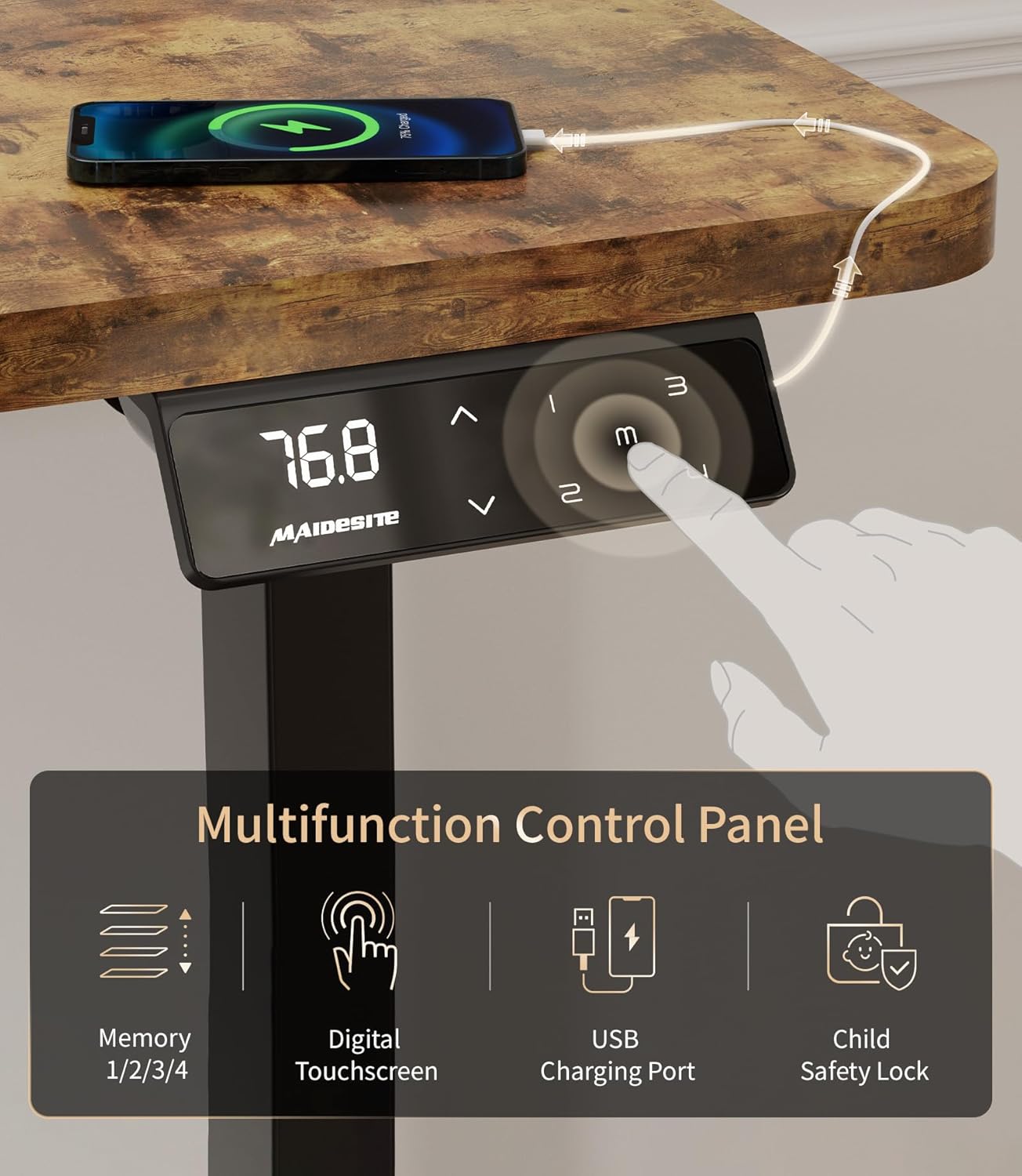
그림 2: The multifunction control panel features an LED display, up/down arrows for adjustment, four memory preset buttons (1, 2, 3, M), a USB charging port, and a child safety lock button.
높이 조정
사용하세요 위쪽(^) 그리고 아래(동사) arrow buttons on the control panel to adjust the desk height. The desk offers a continuous height adjustment range from 72 cm to 120 cm.

그림 3: Visual representation of the desk's height adjustment capabilities, demonstrating comfortable sitting positions at 72cm and standing positions up to 120cm, accommodating various user heights.
메모리 사전 설정
제어판을 사용하면 선호하는 높이 설정을 최대 4개까지 저장하여 빠르게 조정할 수 있습니다.
- 위/아래 화살표를 사용하여 책상 높이를 원하는 대로 조절하세요.
- 를 누르세요 M 버튼을 누르세요. LED 디스플레이에 'S-'가 표시됩니다.
- 3초 이내에 숫자 버튼 중 하나를 누르세요.1, 2, 3, 또는 4) to save the current height to that preset. The display will show 'S-1', 'S-2', etc., indicating successful storage.
- 저장된 높이를 불러오려면 해당 숫자 버튼을 누르기만 하면 됩니다.
아동 안전 잠금 장치
Activate the child safety lock to prevent accidental adjustments.

그림 4: The child safety lock feature, indicated by 'LOC' on the display, prevents unintended height adjustments, ensuring safety in environments with children.
- To activate the lock, press and hold the M button for 5 seconds until 'LOC' appears on the display. All buttons will be disabled.
- 잠금을 해제하려면 를 길게 누릅니다. M button again for 5 seconds until 'LOC' disappears and the current height is displayed.
USB 충전 포트
The control panel includes a built-in USB port for convenient charging of your devices.
충돌 방지 시스템
이 책상은 충돌 방지 시스템을 갖추고 있습니다. 높이 조절 중 책상이 장애물에 부딪히면 자동으로 멈추고 약간 뒤로 움직여 손상이나 부상을 방지합니다.
유지
Proper maintenance ensures the longevity and optimal performance of your MAIDeSITe M1 Pro desk.
- 청소: 데스크탑과 프레임은 부드러운 천으로 닦아주세요.amp cloth. Avoid abrasive cleaners or harsh chemicals that could damage the surface. The desktop surface is waterproof for easy cleaning.
- 케이블 관리 : 제공된 케이블 관리 트레이를 사용하여 케이블을 정기적으로 점검하고 정리하면 꼬임과 손상을 방지할 수 있습니다.
- 점검: 모든 나사와 연결부가 단단히 조여져 있는지 정기적으로 점검하세요. 필요하면 다시 조이세요.
- 모터 케어: The electric motor is maintenance-free. Do not attempt to open or lubricate the motor housing.
문제 해결
책상에 문제가 발생하면 다음의 일반적인 문제와 해결 방법을 참조하세요.
| 문제 | 가능한 원인 | 해결책 |
|---|---|---|
| Desk does not move / 'LOC' displayed | 어린이 안전 잠금 장치가 활성화되었습니다. | 를 누르고 계세요 M button for 5 seconds to deactivate the lock. |
| Desk stops moving / reverses during adjustment | Anti-collision system activated by an obstacle. | Remove the obstacle and resume adjustment. |
| 전원 없음 / 디스플레이 꺼짐 | Power cable disconnected or power outage. | Check power connections and wall outlet. Ensure the power adapter is securely plugged in. |
| 고르지 못한 높이 조정 | Possible calibration issue or obstruction. | Lower the desk to its lowest position and hold the down arrow for 10 seconds to reset. Check for obstructions. |
| 모터 소음이 과도합니다. | 비정상적인 작동입니다. | The motor is designed to be ultra-quiet (<45dB). If noise is excessive, discontinue use and contact customer support. |
명세서
Detailed technical specifications for the MAIDeSITe M1 Pro Electric Height Adjustable Desk.

그림 5: Key performance specifications of the desk, highlighting the powerful motor, smooth 25mm/s rise speed, ultra-quiet operation below 45dB, and a robust 80kg load capacity.
- 모델 번호: MJ-D2D-2-EU
- 데스크탑 크기: 140cm(길이) x 70cm(폭)
- 높이 조정 범위: 72cm ~ 120cm
- 하중 용량: 최대 80kg
- 모터 유형: 전기 같은
- Rise Speed: 25mm/초
- 소음 수준: <45dB (XNUMXdB)
- 재료: Carbon steel frame, Engineered wood desktop
- 특징: 4 Memory Presets, USB Charging Port, Child Safety Lock, Anti-Collision System, Rounded Corners, Waterproof Surface
- 포함된 액세서리: Storage Bag, Drawer, Cable Management Tray, Hooks, Casters
- 제품 무게: 약 27kg
보증 및 지원
MAIDeSITe is committed to providing high-quality products and customer satisfaction.
- 보증: This product comes with a 5-year warranty from the date of purchase, covering manufacturing defects.
- 보고: You may be eligible for free returns within 30 days of purchase, subject to retailer policies.
- 고객 지원: For any questions, technical assistance, or warranty claims, please contact MAIDeSITe customer support through your purchase platform or the official MAIDeSITe website. Please have your model number (MJ-D2D-2-EU) and purchase details ready.


