1. 서론
The FOXWELL NT624 Elite is a professional diagnostic scan tool designed for comprehensive vehicle system analysis and maintenance services. This device provides full OBD2 functions, all-system diagnostics, and various special reset functions for a wide range of vehicle makes.
2. 주요 특징
- 모든 시스템 진단: Reads and clears fault codes, views live data, and retrieves ECU information for all available vehicle systems (Engine, ABS, SRS, Transmission, etc.).
- OBD2의 모든 기능: Supports all 10 OBD2 test modes, including reading/clearing codes, live data, freeze frame, I/M readiness, O2 monitor test, on-board monitor test, component test, vehicle information, and module present.
- 8 Hot Maintenance Services: Includes Oil Light Reset, SAS (Steering Angle Sensor) Calibration, EPB (Electronic Parking Brake) Service, Throttle Body Relearn, ABS Bleeding, Injector Coding, BRT (Battery Replacement) Service, and DPF (Diesel Particulate Filter) Regeneration.
- 광범위한 차량 커버리지: Compatible with over 90 vehicle makes.
- 자동 VIN 스캔: 차량 정보를 자동으로 식별하여 신속한 진단을 지원합니다.
- 라이브 데이터 디스플레이: Shows live sensor data in text and graph formats for easy analysis.
- 평생 무료 업데이트: Ensures the tool stays current with the latest vehicle models and diagnostic functions.
3. 패키지 내용
The FOXWELL NT624 Elite package typically includes the following items:
- FOXWELL NT624 엘리트 메인 유닛
- 진단 케이블(OBDII 커넥터)
- 업데이트용 USB 케이블
- 사용자 설명서
- 보호용 운반 케이스
- SD Card (pre-installed in the device)
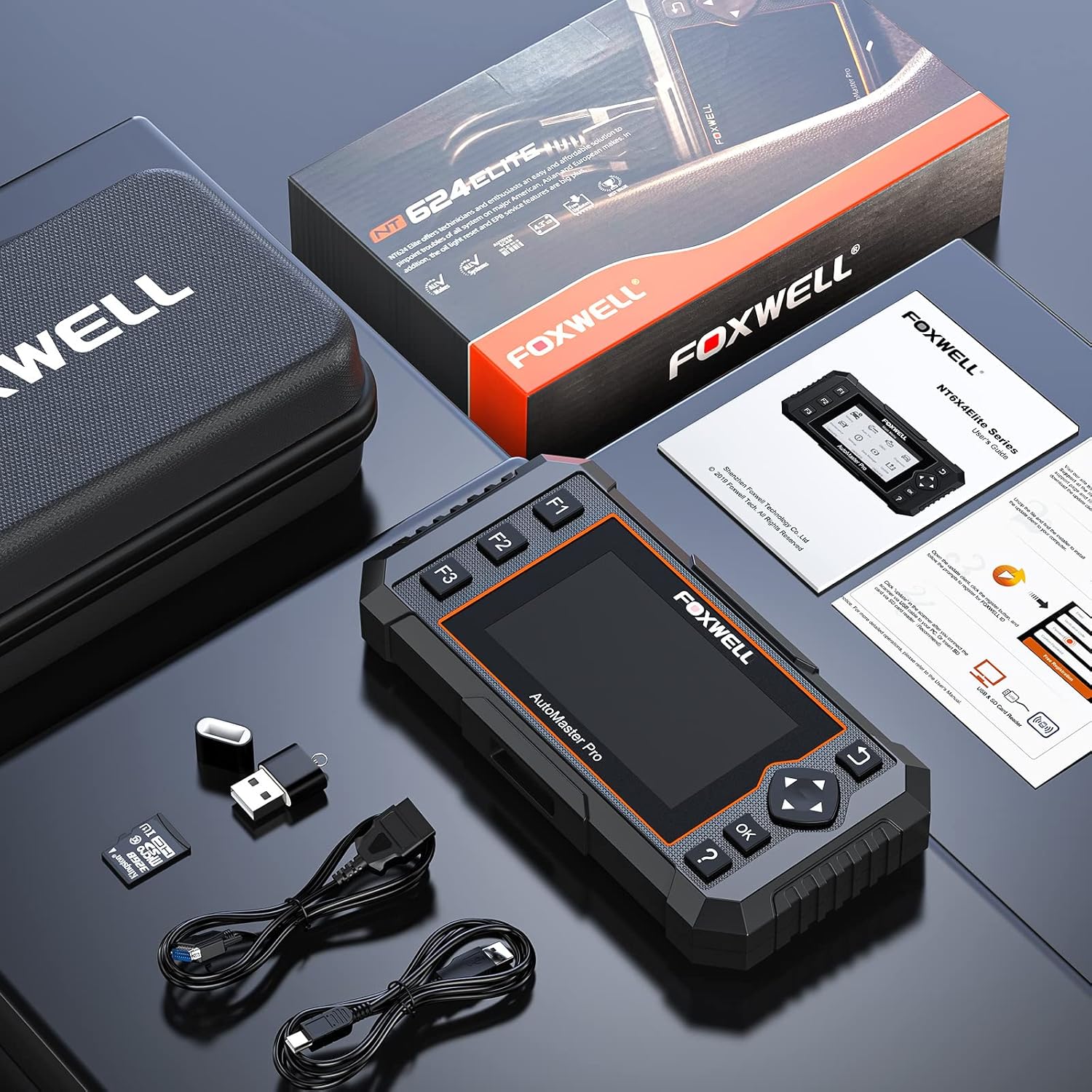
Image: Contents of the FOXWELL NT624 Elite package, showing the diagnostic tool, OBDII cable, USB cable, SD card, and carrying case.
4. 설정 및 첫 사용
- 전원 켜기: Connect the diagnostic cable to the vehicle's OBDII port, usually located under the dashboard on the driver's side. The device will power on automatically.
- 언어 및 단위 설정: Upon first use, navigate to "Settings" from the main menu to select your preferred language and measurement units (e.g., Metric or Imperial).
- 소프트웨어 업데이트: It is recommended to update the software to the latest version before first use. Connect the device to a computer via the USB cable and visit the official FOXWELL web업데이트 지침 및 소프트웨어는 해당 사이트에서 확인할 수 있습니다.

Image: The FOXWELL NT624 Elite diagnostic tool connected to a vehicle's OBDII port, ready for operation.
5. 사용 설명서
5.1. 메인 메뉴 탐색
Use the directional buttons (up, down, left, right) to navigate through the menu options on the 4.3-inch screen. Press the "OK" button to confirm a selection and "Back" to return to the previous screen.

Image: The main menu of the FOXWELL NT624 Elite, showing options like History, Auto VIN, OBDII, Diagnostic, Maintenance, Settings, Data Manager, and Update.
5.2. 모든 시스템 진단
- From the Main Menu, select "Diagnostic".
- Choose the vehicle make, model, and year. The Auto VIN function can often detect this automatically.
- Select "Auto Scan" to scan all available systems or choose a specific system (e.g., Engine, ABS, SRS).
- The tool will display fault codes (DTCs), live data streams, and other system information.
- To clear codes, select the "Clear Codes" option after addressing the underlying issue.

Image: The FOXWELL NT624 Elite displaying diagnostic results for various automotive systems, including ABS, SRS, Engine, and ESP.
5.3. OBD2 Functions
- From the Main Menu, select "OBDII".
- Choose the desired OBD2 function:
- 코드 읽기: 현재, 보류 중 및 영구 진단 문제 코드를 표시합니다.
- 코드 지우기: 차량 컴퓨터에서 진단 오류 코드를 삭제합니다.
- 라이브 데이터 : Shows real-time data from vehicle sensors.
- 정지 화면: 배출 관련 오류가 발생했을 때의 작동 조건을 보여주는 스냅샷입니다.
- I/M 준비: 각종 배출가스 관련 시스템이 정상적으로 작동하는지, 점검 및 유지보수 테스트를 받을 준비가 되었는지 확인합니다.
- 산소 모니터 테스트: O2 센서 모니터 테스트 결과를 검색합니다.
- 온보드 모니터 테스트: Retrieves results for emission-related powertrain components and systems that are continuously monitored.
- 구성 요소 테스트: 차량의 EVAP 시스템에 대한 누출 테스트를 시작할 수 있습니다.
- 차량 정보: 차량식별번호(VIN), 캘리포니아주 차량등록번호(Cal ID), 차량등록번호(CVN) 등을 조회합니다.
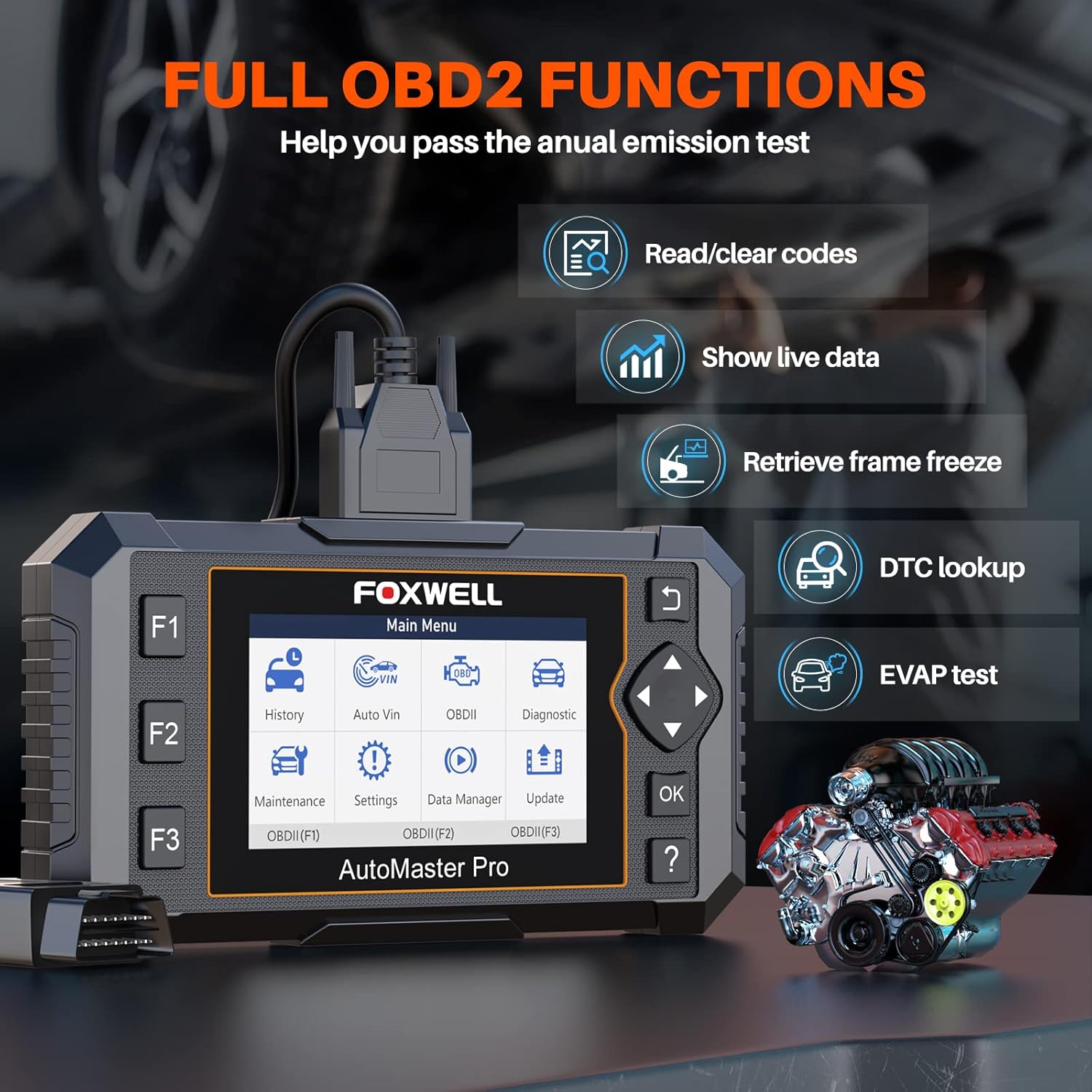
Image: The FOXWELL NT624 Elite screen showing various full OBD2 functions, including Read/Clear codes, Show live data, Retrieve frame freeze, DTC lookup, and EVAP test.
5.4. 유지 보수 서비스
From the Main Menu, select "Maintenance" to access special reset functions. Follow the on-screen prompts for each service.
- 엔진 오일 경고등 리셋: 오일 교환 후 오일 서비스 표시등을 재설정합니다.
- SAS 교정: 조향각 센서를 보정합니다.
- EPB Service: Deactivates and reactivates the Electronic Parking Brake system for brake pad replacement.
- 스로틀 바디 재학습: 청소 또는 교체 후 스로틀 바디 위치를 다시 학습합니다.
- ABS 출혈: ABS 브레이크 공기 빼기 작업을 수행합니다.
- 인젝터 코딩: ECU에 새로운 인젝터 번호를 코드화합니다.
- BRT Service: Performs battery replacement registration.
- DPF 재생: 디젤 미립자 필터(DPF) 재생을 시작합니다.

Image: The FOXWELL NT624 Elite screen highlighting the 8 hot maintenance services available, including Oil Light Reset, ABS Bleeding, Throttle, Injector, SAS, BRT, EPB, and DPF.
6. 데이터 관리 및 분석
The NT624 Elite allows you to view and analyze live data streams, which can be displayed in both text and graphical formats. This helps in understanding vehicle performance and diagnosing intermittent issues.

Image: The FOXWELL NT624 Elite displaying live data in a graphical format on its screen, illustrating sensor readings over time for detailed analysis.
The device also stores diagnostic history, which can be reviewed later. Connect the tool to a computer to print diagnostic reports or manage saved data.
7. 유지 관리 및 업데이트
7.1. 소프트웨어 업데이트
The FOXWELL NT624 Elite offers lifetime free software updates. To update the device:
- FOXWELL 공식 웹사이트를 방문하세요. web사이트 (www.foxwelltech.com).
- Download and install the update client software on your computer.
- Register your device and create an account.
- Connect the NT624 Elite to your computer using the provided USB cable.
- Follow the on-screen instructions in the update client to download and install the latest software versions.
7.2. 기기 관리
- 기기를 깨끗하게 유지하고 먼지와 습기가 없도록 하세요.
- Store the device in its protective carrying case when not in use.
- 기기를 떨어뜨리거나 극한 온도에 노출시키지 마세요.
8. 문제 해결
| 문제 | 가능한 원인 | 해결책 |
|---|---|---|
| 장치의 전원이 켜지지 않습니다. | Loose OBDII connection; vehicle's ignition is off; vehicle battery low. | OBDII 케이블이 제대로 연결되었는지 확인하십시오. 차량의 시동 스위치를 ON 위치로 돌리십시오. 차량 배터리 전압을 확인하십시오.tage. |
| 차량과의 통신 오류. | Incorrect vehicle protocol selected; faulty OBDII port; software issue. | Verify vehicle compatibility. Check the OBDII port for damage. Update the device software. Try on another compatible vehicle. |
| 화면이 멈추거나 기기가 응답하지 않습니다. | 소프트웨어 오류; 저전력. | Restart the device by disconnecting and reconnecting. Ensure stable power supply from the vehicle. Perform a software update. |
| Update fails. | Unstable internet connection; incorrect update client usage; firewall issues. | Ensure a stable internet connection. Follow the update instructions carefully. Temporarily disable firewall/antivirus if necessary. |
9. 사양
- 모델: NT624 엘리트
- 표시하다: 4.3인치 컬러 화면
- 운영 체제: Windows XP (for update client compatibility, device runs proprietary OS)
- 연결성: OBDII, USB
- 치수: 8.8 x 3 x 13.1 인치(대략)
- 무게: 2.07파운드(대략)
- 힘: 8-18V vehicle power via OBDII
- 작동 온도: 0~60°C(32~140°F)
- 보관 온도: -20 ~ 70°C (-4 ~ 158°F)
10. 지원 및 보증
For technical support, product inquiries, or warranty information, please contact FOXWELL customer service through their official web웹사이트 또는 제품 포장에 제공된 연락처 정보를 참조하십시오.
The FOXWELL NT624 Elite comes with a standard manufacturer's warranty. Please refer to the warranty card included in your package for specific terms and conditions.
비디오: 오버view of the FOXWELL NT624 Elite diagnostic tool's features and functions. This video demonstrates the user interface and capabilities of the device.


