1. 서론
This manual provides comprehensive instructions for the setup, operation, and maintenance of your iDPRT 320E Thermal Label Printer. Please read this manual thoroughly before using the device to ensure proper functionality and to prevent damage. The iDPRT 320E is designed for efficient label printing in various environments, supporting multiple operating systems and connectivity options.
2. 상자 안에 무엇이 들어있나요?
포장을 풀 때 모든 구성품이 들어 있는지 확인하세요.
- iDPRT 320E Thermal Label Printer
- 사용 설명서
- USB 데이터 케이블
- 전원 어댑터
- Samp르 라벨
3. 제품 오버view
The iDPRT 320E Thermal Label Printer is a compact device designed for high-speed, high-resolution label printing. It features a simple design with essential ports for connectivity and an intuitive LED indicator for operational status.
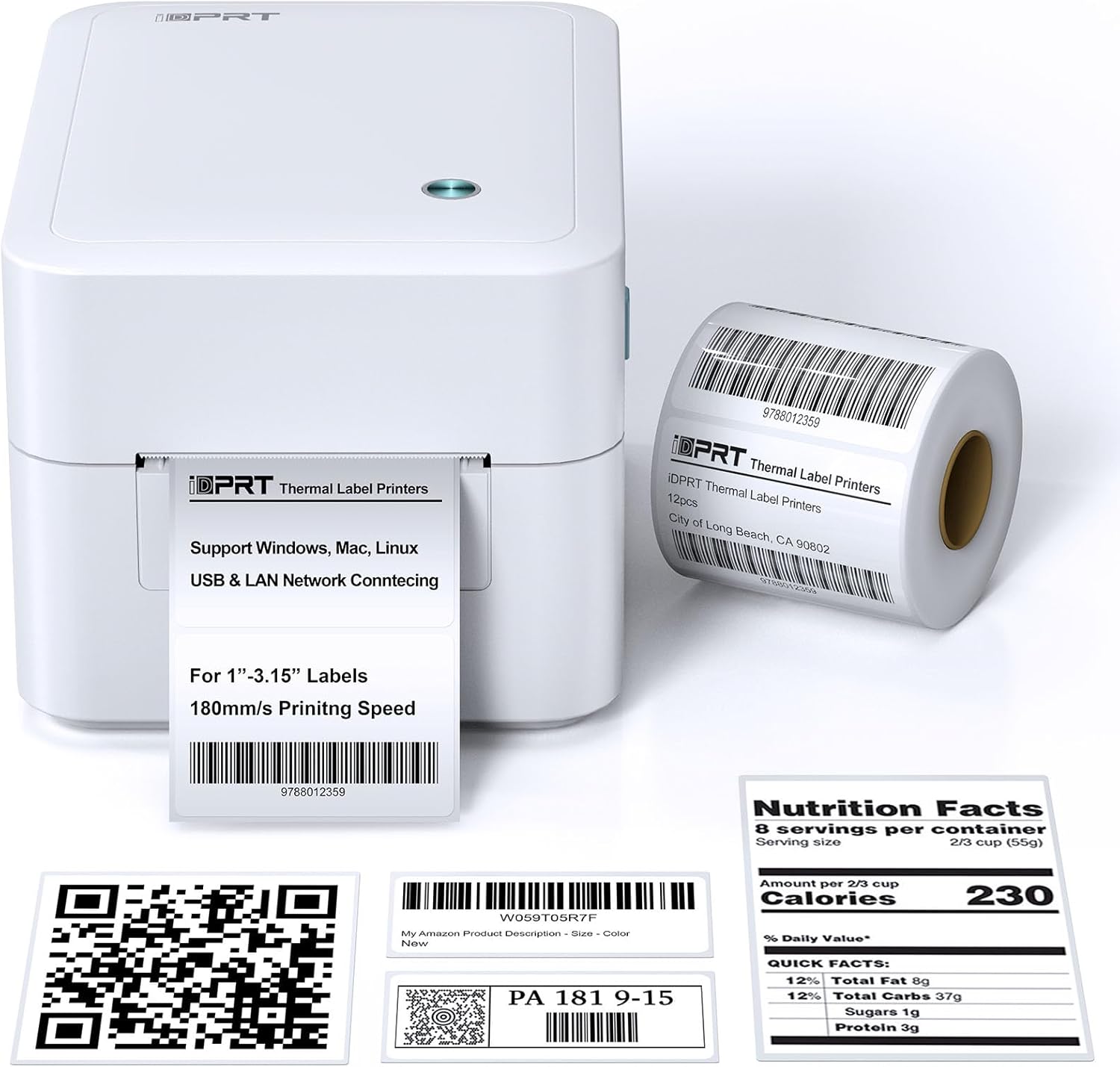
그림 3.1: 전면 view of the iDPRT 320E Thermal Label Printer with samp라벨.
주요 구성 요소:
- Label Exit Slot: 인쇄된 라벨이 등장하는 곳.
- Cover Release Latches: Used to open the printer cover for label loading.
- 전원 포트: 전원 어댑터에 연결합니다.
- USB 포트: 컴퓨터에 직접 연결합니다.
- LAN 포트: 네트워크 연결을 위해.
- LED 표시등: 프린터 상태를 표시합니다.
4. 설정 지침
4.1 전원 연결
- 전원 어댑터를 프린터의 전원 포트에 연결하세요.
- 전원 어댑터를 적합한 전기 콘센트에 연결하십시오.
4.2 라벨 로딩
The printer supports thermal labels with widths between 1 and 3.15 inches.
- Gently press the cover release latches on both sides of the printer to open the top cover.
- Place the roll of thermal labels into the label compartment, ensuring the labels feed from the bottom of the roll and the printable side faces upwards.
- Adjust the label guides to fit the width of your labels snugly, without creasin그들을.
- Pull a few labels past the print head and out through the label exit slot.
- 윗덮개를 딸깍 소리가 나면서 제자리에 고정될 때까지 단단히 닫으세요.

Figure 4.1: Correct method for loading thermal labels into the printer.
4.3 드라이버 및 소프트웨어 설치
To use the printer with your computer, you must install the appropriate drivers and the Label Designer software.
- Visit the official iDPRT website to download the latest drivers for your operating system (Windows, Mac, or Linux).
- Download and install the free Label Designer software from the official website. This software is available for Windows and as an online editor for Mac users.
- Follow the on-screen instructions to complete the installation process for both the drivers and the software.

Figure 4.2: The iDPRT 320E printer supports multiple operating systems.
4.4 연결 옵션
The iDPRT 320E offers flexible connectivity:
- USB 연결: Connect the printer directly to your computer using the provided USB cable.
- LAN Network Connection: Connect the printer to your local area network using an Ethernet cable for shared access.
- 모바일 앱: For direct printing from your smartphone, download the iDPRT mobile application.

Figure 4.3: USB and LAN network connectivity options.
5. 사용 설명서
5.1 Creating Labels with Label Designer Software
The Label Designer software allows you to create and customize various label types.
- Launch the Label Designer software on your computer.
- Select a template or start a new label design.
- Customize your labels with text, barcodes, QR codes, images, and various fonts. The software supports different label sizes and layouts.
- Ensure the label dimensions in the software match the physical labels loaded in the printer.

Figure 5.1: Designing labels using the Label Designer software.
5.2 라벨 인쇄
Once your label design is complete and labels are loaded:
- In the Label Designer software, click the 'Print' button.
- Select the iDPRT 320E printer from the list of available printers.
- Adjust print settings such as quantity and print speed if necessary. The printer supports speeds up to 180mm/s and a resolution of 203 DPI.
- Confirm the settings and initiate printing.

Figure 5.2: The printer delivers high-quality 203 DPI resolution for clear labels.
Figure 5.3: The printer is capable of high-speed printing up to 180mm/s.
5.3 LED Indicator Meanings
The LED indicator on the printer provides visual feedback on its status:
- Green (Solid On): The printer is currently printing.
- Red (Solid On): The printer cover is not properly closed, or there is a paper jam/error.
- Blue (Solid On): 프린터가 작동할 준비가 되었습니다.
6. 유지관리
6.1 프린터 청소
정기적으로 청소하면 인쇄 품질을 유지하고 프린터의 수명을 연장하는 데 도움이 됩니다.
- Ensure the printer is powered off and unplugged before cleaning.
- 부드럽고 보풀이 없는 천을 사용하십시오. dampened with isopropyl alcohol to gently wipe the print head. Avoid touching the print head with bare hands.
- Clean the exterior of the printer with a dry, soft cloth. Do not use abrasive cleaners or solvents.
- Remove any dust or label debris from the label compartment.
7. 문제 해결
If you encounter issues with your iDPRT 320E printer, refer to the following common problems and solutions:
| 문제 | 가능한 원인 | 해결책 |
|---|---|---|
| 프린터 전원이 켜지지 않습니다 | 전원 케이블이 분리되었습니다. 전원 콘센트가 고장났습니다. | 전원 연결을 확인하십시오. 다른 콘센트에 넣어 사용해 보십시오. |
| 라벨이 인쇄되지 않음 | Labels loaded incorrectly; Printer cover open; No drivers installed; Incorrect printer selected | Reload labels correctly; Close cover firmly; Install drivers; Select iDPRT 320E in print dialog. |
| Poor print quality (faded, blurry) | Print head dirty; Low-quality labels; Incorrect print density settings | Clean the print head; Use recommended thermal labels; Adjust print density in software settings. |
| Cannot connect via USB/LAN | Cable faulty; Driver issue; Network configuration problem | Try a different cable; Reinstall drivers; Verify network settings (for LAN). |
| Cannot connect via mobile app | App not installed; Printer not discoverable; Network issue | Ensure app is installed and updated; Check printer's network connection; Restart printer and app. |
| Mac Bluetooth connectivity issues | Direct Bluetooth printing to Mac is not supported; Driver limitations | Connect via USB or LAN for Mac systems. Mobile app connectivity is available for smartphones. |
8. 사양
Detailed technical specifications for the iDPRT 320E Thermal Label Printer:
| 특징 | 사양 |
|---|---|
| 모델명 | 320년대 |
| 인쇄 기술 | 열의 |
| 최대 인쇄 속도 | 180 mm/s (Monochrome) |
| 최대 인쇄 해상도 | 203DPI |
| 최대 미디어 크기 | 1"-3.15" inches width |
| 연결 기술 | USB, 랜 |
| 호환 장치 | PC (Windows, Mac, Linux), Mobile (iOS/Android via App) |
| 제어 방법 | App, Software |
| 제품 치수 | 8.11인치 깊이 x 6.1인치 너비 x 5.28인치 높이 |
| 품목 무게 | 3.78파운드 |
| 특별 기능 | Automatic Label Recognition, LAN Network Connectivity |
9. 보증 및 지원
9.1 보증 정보
The iDPRT 320E Thermal Label Printer comes with a limited warranty. Please refer to the warranty card included in your product packaging or visit the official iDPRT web자세한 이용 약관은 사이트를 참조하세요.
9.2 고객 지원
For technical assistance, troubleshooting, or any inquiries regarding your iDPRT 320E printer, please contact our customer service team. You can reach us via the Amazon messaging system or through the contact information provided on the official iDPRT website. Our team is available to assist you with any pre-sales or after-sales support needs.


