1. 서론
The SONICAKE EQ Equalizer is a professional 10-band graphic equalizer pedal designed with an analog circuit. It features ten carefully selected frequency bands, allowing musicians to precisely and quickly shape their instrument's tone. This pedal is suitable for a variety of instruments and is built with a true bypass circuit to maintain signal integrity.
This manual provides detailed instructions for the setup, operation, and maintenance of your EQ Equalizer pedal to ensure you achieve the best possible sound.
2. 제품 특징
- 100% Analog 10-Band Equalizer: Based on classic EQ effect pedal frequency bands.
- Adjustable Gain Range: ±15dB adjustable gain range for each band, suitable for various instruments.
- Precise Tone Shaping: 11 high-quality sliders for quick and accurate parameter control.
- True Bypass Circuit: Ensures a clean signal path when the effect is disengaged.
- 내구성 있는 구조: Aluminium-alloy casing for lightweight yet robust performance.
3. 컨트롤 및 기능
Familiarize yourself with the controls of your SONICAKE EQ Equalizer pedal:

이미지: 앞면 view of the SONICAKE EQ Equalizer pedal with numbered control labels.
- Input Jack (1/4 inch): Connect your instrument or the output of a preceding effect pedal here.
- DC 9V 전원 입력: Connect a standard 9V DC center-negative power supply (not included).
- Output Jack (1/4 inch): 이것을 당신의 것에 연결하세요 amp앰프 또는 이펙트 페달 체인의 다음 이펙트 페달 입력단자입니다.
- Frequency Band Sliders (31.25Hz to 16kHz): Ten individual sliders to boost or cut specific frequency ranges by ±15dB. Adjust these to shape your tone.
- 레벨 슬라이더: Controls the overall output volume of the pedal. Use this to match the volume when the effect is engaged or disengaged.
- 풋스위치: Engages or disengages the equalizer effect. This pedal features true bypass, ensuring your signal remains unaffected when the pedal is off. The LED indicator above the footswitch illuminates when the effect is active.

이미지: 위에서 아래로 view of the SONICAKE EQ Equalizer pedal, showing all sliders and the footswitch.

Image: A hand demonstrating the adjustment of the frequency sliders on the EQ Equalizer pedal.
4. 설정
Follow these steps to set up your EQ Equalizer pedal:
- 전원 연결: Connect a standard 9V DC center-negative power supply (not included) to the DC 9V input jack (2). Ensure the power supply meets the specified voltage 및 극성 요구 사항.
- 기기 입력: Connect your instrument (e.g., guitar) or the output of a previous effect pedal to the Input Jack (1) on the right side of the pedal.
- 출력 연결: Connect the Output Jack (3) on the left side of the pedal to your amplifier's input or the input of the next effect pedal in your signal chain.
- 전원 켜기: 모든 연결이 안전하게 완료되면 전원을 켜십시오. amp리파이어 및 기타 장비.

이미지: 각도가 있는 view of the EQ Equalizer pedal, highlighting the DC 9V power input and its central negative polarity requirement.
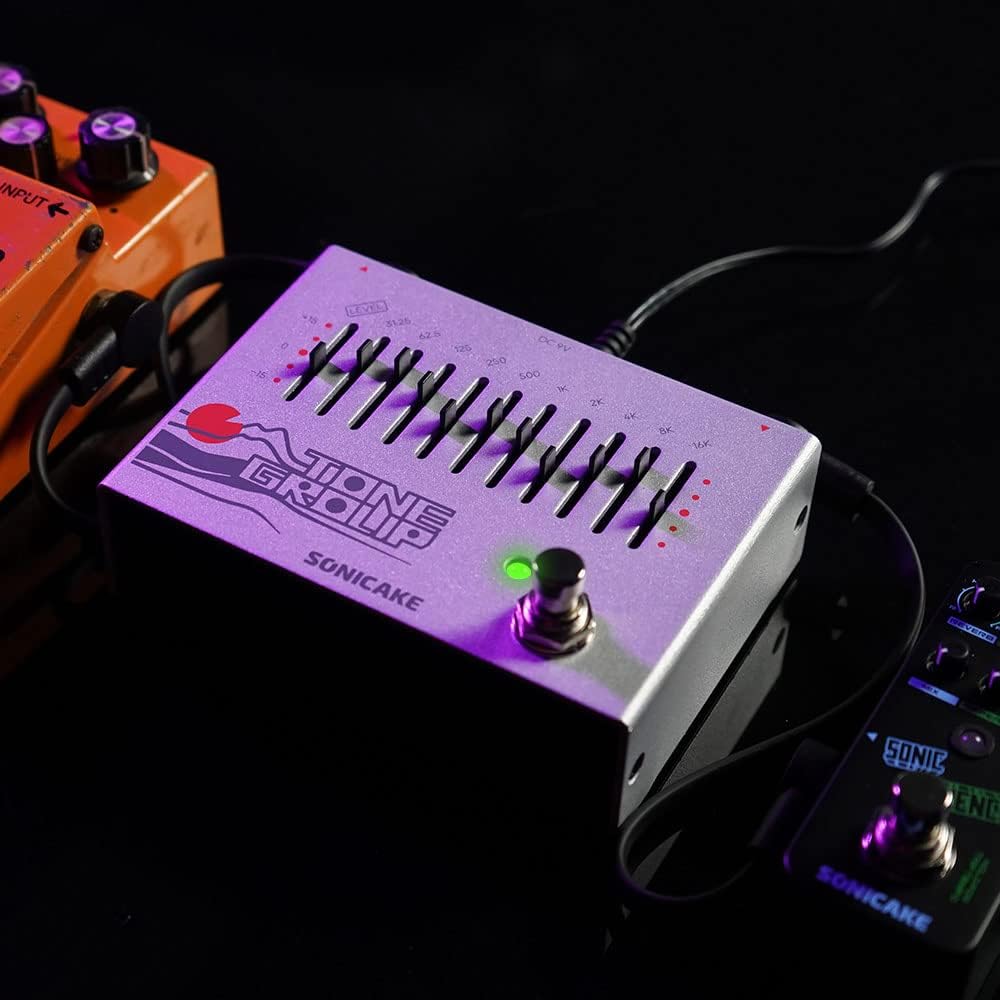
Image: The EQ Equalizer pedal integrated into a pedalboard setup, demonstrating typical connections.
5. 사용 설명서
To operate your SONICAKE EQ Equalizer pedal:
- Engage/Disengage Effect: Press the footswitch (6) to toggle the equalizer effect on or off. The LED indicator will light up when the effect is active.
- Adjusting Frequency Bands: Use the ten frequency band sliders (4) to boost or cut specific frequencies. Moving a slider up boosts that frequency, while moving it down cuts it. Experiment with different settings to find your desired tone.
- Adjusting Overall Level: Use the Level slider (5) to control the overall output volume of the pedal. This is useful for compensating for volume changes introduced by EQ adjustments or for matching the volume with other pedals in your chain.
- 음색 조절 팁:
- Low Frequencies (31.25Hz - 125Hz): Affect bass and sub-bass. Boosting can add warmth and fullness; cutting can reduce muddiness.
- Mid Frequencies (250Hz - 2kHz): Crucial for presence and clarity. Boosting around 500Hz-1kHz can add body; cutting can reduce harshness. Boosting 2kHz can add bite.
- High Frequencies (4kHz - 16kHz): Control treble and brilliance. Boosting can add sparkle and air; cutting can reduce hiss or harshness.

이미지: 클로즈업 view of the footswitch on the EQ Equalizer pedal, illustrating its true bypass functionality.
6. 유지관리
페달의 수명 연장 및 최적의 성능을 보장하려면 다음 사항을 준수하십시오.
- 청소: 페달 외부를 닦을 때는 부드럽고 마른 천을 사용하세요. 연마성 세제나 용제는 사용하지 마세요.
- 저장: 페달은 건조한 환경에 보관하고, 극한의 온도, 습도 및 직사광선을 피하십시오.
- 전원 공급 장치: Always use a regulated 9V DC center-negative power supply. Incorrect power can damage the unit.
- 사이: Periodically check all cable connections for wear and tear.
7. 문제 해결
If you encounter issues with your EQ Equalizer pedal, consider the following:
- 소리 없음:
- 전원 공급 장치가 올바르게 연결되어 있고 정상적으로 작동하는지 확인하십시오.
- 모든 계측기 케이블이 제대로 연결되고 작동하는지 확인하세요.
- 확인해주세요 amp앰프가 켜져 있고 볼륨도 최대로 설정되어 있습니다.
- Ensure the pedal's Level slider is not set to minimum.
- 약하거나 왜곡된 소리:
- Check the power supply; insufficient power can cause distortion.
- Ensure instrument cables are not faulty.
- Adjust the Level slider to prevent signal clipping.
- 원치 않는 소음/윙윙거림:
- 고품질의 규제된 전원 공급 장치를 사용하세요.
- 모든 케이블이 적절하게 차폐되어 연결되어 있는지 확인하십시오.
- Try isolating the pedal from other power sources or noisy equipment.
8. 사양
| 모델 번호 | QDS |
| 품목 무게 | 12.7온스(0.36킬로그램) |
| 제품 치수 | 3.54인치 길이 x 2.16인치 너비 x 4.88인치 높이(9 x 5.5 x 12.4cm) |
| 전원 | DC Power Supply (9V Center Negative, not included) |
| 권tage | 9 볼트 |
| 신호 형식 | 비슷한 물건 |
| 커넥터 유형 | 1/4인치 오디오 잭 |
| 하드웨어 인터페이스 | 1/4인치 오디오 |
9. 보증 및 지원
For warranty information, technical support, or service inquiries regarding your SONICAKE EQ Equalizer pedal, please refer to the documentation included with your purchase or visit the official SONICAKE web사이트. 보증 청구를 위해 구매 증빙 자료를 보관하세요.


