1. 서론
This manual provides detailed instructions for the setup, operation, and maintenance of your Adler AD 1196B Digital Alarm Clock. Please read this manual thoroughly before using the device to ensure proper function and longevity.
2. 제품 오버view
2.1 주요 특징
- Digital time display with 12/24 hour format.
- 손쉬운 백라이트 디스플레이 viewing, automatically turns off after 4 seconds.
- Three independent alarm time settings.
- Three alarm activation settings: 5 days (weekday), 6 days (weekday + Saturday), 7 days (every day).
- Displays current time, date, indoor temperature, and humidity.
- Battery-powered for portability and backup during power outag에스.
2.2 패키지 내용
- Adler AD 1196B Digital Alarm Clock Unit
- 사용자 설명서
Note: 2x AA batteries are required and not included in the package.

그림 1: 전면 view of the Adler AD 1196B Digital Alarm Clock, displaying 12:00, 26°C, 56% humidity, and the current date.
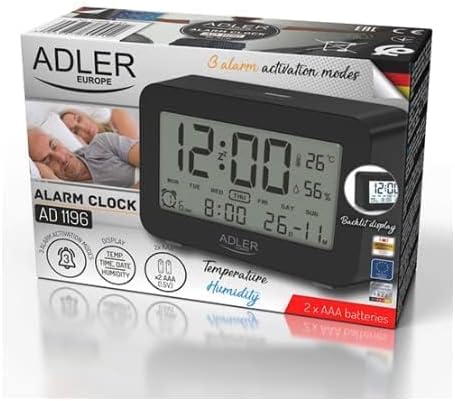
Figure 2: The Adler AD 1196B Digital Alarm Clock shown in its retail packaging, highlighting key features.
3. 설정
3.1 배터리 설치
- 알람 시계 뒷면에서 배터리 덮개를 찾으세요.
- 덮개를 밀거나 들어 올려서 수납 공간을 엽니다.
- 배터리함 안쪽에 표시된 극성(+ 및 -)을 확인하여 AA 배터리 2개를 삽입하십시오.
- 배터리함 덮개를 단단히 다시 닫으십시오.
The clock will power on automatically once batteries are inserted. The display will show default settings or begin flashing.
3.2 초기 전원 켜기
Upon successful battery installation, the display will illuminate. You may need to press a button (e.g., "MODE" or "SET") to activate the display if it remains blank after battery insertion. The backlight will activate briefly and then turn off.
4. 사용 설명서
Familiarize yourself with the control buttons, typically located on the back or top of the device. Common buttons include: MODE, SET, UP/+, DOWN/-, ALARM.
4.1 시간 설정
- 를 누르고 계세요 세트 버튼(또는 방법 button, depending on model) until the hour digits begin to flash.
- 사용하세요 위/+ or 아래에/- 버튼으로 시간을 조정합니다.
- 누르다 세트 (또는 방법) again to move to the minute setting.
- 사용하세요 위/+ or 아래에/- 버튼을 사용하여 분을 조정합니다.
- 계속 누르기 세트 (또는 방법) to cycle through 12/24 hour format, and then to exit time setting mode.
4.2 날짜 설정
- 일반 시간 표시에서 다음을 누릅니다. 방법 button repeatedly until the date display starts flashing or you enter date setting mode.
- The year digits may flash first. Use 위/+ or 아래에/- 연도를 조정합니다.
- 누르다 방법 to move to the month setting, then adjust with 위/+ or 아래에/-.
- 누르다 방법 to move to the day setting, then adjust with 위/+ or 아래에/-.
- 누르다 방법 again to confirm and exit date setting.
4.3 Setting Alarms (Alarm 1, Alarm 2, Alarm 3)
The AD 1196B features three independent alarms. The process is similar for each.
- 를 누르세요 경보 버튼을 한 번 view Alarm 1. Press again for Alarm 2, and a third time for Alarm 3.
- 하는 동안 viewing the desired alarm (e.g., AL1), press and hold the 세트 알람 시간 숫자가 깜빡일 때까지 버튼을 누르세요.
- 사용 위/+ or 아래에/- 알람 시간을 설정합니다.
- 누르다 세트 알람 시간 설정으로 이동합니다.
- 사용 위/+ or 아래에/- 알람 시간을 분 단위로 설정하려면.
- 누르다 세트 알람 시간을 다시 한번 확인하겠습니다.
- 알람을 활성화/비활성화하려면 다음을 누르세요. 경보 button repeatedly until the alarm icon (e.g., bell symbol) appears or disappears next to the corresponding alarm number (AL1, AL2, AL3).
4.4 Alarm Activation Modes (5, 6, 7 Days)
After setting an alarm time, you can choose its activation frequency:
- While in alarm setting mode (after setting minutes for an alarm), press 세트 one more time. The display will show a day indicator (e.g., "5 DAY", "6 DAY", "7 DAY").
- 사용 위/+ or 아래에/- to cycle through the options:
- 5일: 알람은 월요일부터 금요일까지 울립니다.
- 6일: Alarm sounds Monday to Saturday.
- 7일: 알람이 일주일 내내 울린다.
- 누르다 세트 to confirm your selection and exit alarm setting for that specific alarm.
4.5 백라이트 기능
The display features a backlight for improved visibility in low light conditions. The backlight automatically activates when a button is pressed and turns off after approximately 4 seconds to conserve battery power.
4.6 온도 및 습도 표시
The alarm clock continuously displays the current indoor temperature (in Celsius) and relative humidity percentage. No specific action is required to view these readings; they are shown on the main display.
5. 유지관리
5.1 청소
To clean the alarm clock, gently wipe the surface with a soft, dry cloth. Do not use abrasive cleaners, solvents, or chemical sprays, as these may damage the display or casing.
5.2 배터리 교체
When the display becomes dim or the clock functions erratically, it is time to replace the batteries. Follow the battery installation steps in Section 3.1. Always replace both batteries with new AA batteries of the same type. Dispose of old batteries responsibly according to local regulations.
6. 문제 해결
| 문제 | 가능한 원인 | 해결책 |
|---|---|---|
| 디스플레이가 비어 있거나 어둡습니다. | 배터리가 부족하거나 올바르게 설치되지 않았습니다. | 배터리를 새 AA 배터리로 교체하고 극성이 올바른지 확인하세요. |
| 알람이 울리지 않습니다. | 알람이 활성화되지 않았거나 잘못 설정되었습니다. | Ensure the alarm icon is visible on the display. Verify the alarm time and activation mode (5, 6, or 7 days) are set correctly. |
| 시간/날짜가 올바르지 않습니다. | Time/Date was not set or reset after battery change. | Follow instructions in Section 4.1 and 4.2 to set the correct time and date. |
| 온도/습도 측정값이 정확하지 않은 것 같습니다. | 시계를 열원, 환풍구 근처 또는 직사광선이 비치는 곳에 두지 마십시오. | 온도나 습도 변화가 심한 곳을 피하고 안정적인 환경으로 시계를 옮기십시오. 측정값이 안정될 때까지 기다리십시오. |
7. 사양
- 모델: AD 1196B
- 전원: AA 배터리 2개(포함되지 않음)
- 디스플레이 유형: 백라이트가 있는 디지털 LCD
- 기능: Time, Date, Day of Week, Temperature (°C), Humidity (%), 3 Alarms with 3 Activation Modes
- 백라이트 지속 시간: 약 4초
- 재료: 플라스틱
- 치수(폭 x 깊이 x 높이): 11cm x 3.81cm x 5cm
- 무게: 1.6kg
8. 보증 및 지원
보증 정보 또는 기술 지원이 필요하시면 제품에 동봉된 보증 카드를 참조하시거나 제조사에 직접 문의하십시오. 구매 영수증은 구매 증빙 자료로 보관해 주시기 바랍니다.
Manufacturer: Adler


