소개
Thank you for choosing the Viper ProScore Electronic Scoreboard. This device is designed to enhance your dart game experience by providing automatic scoring for up to 8 players across 40 different games and 655 game options. This manual will guide you through the installation, operation, and maintenance of your new scoreboard.
제품 특징
- Compatible with steel-tip dartboards, bringing electronic dart game features to traditional play.
- Large, backlit LCD screen for clear visibility from the throw line.
- Supports up to 8 players with 40 distinct games and 655 game variations, including customizable handicaps.
- Features an automatic shut-off and sleep mode to conserve battery power.
- Soft-touch keypad for intuitive and easy operation.
- Compact dimensions: 12.7 cm (L) x 3.8 cm (W) x 26 cm (H).
- Battery operated: Requires 3 AA batteries (not included).
패키지 내용
설치를 진행하기 전에 모든 항목이 있는지 확인하세요.
- Viper ProScore Electronic Scoreboard
- Mounting hardware (screws and wall anchors or wood screws)
설치 지침
1. 배터리 설치
- Locate the battery compartment on the back of the scoreboard.
- 배터리 덮개를 엽니다.
- AA 배터리 3개(별매)를 올바른 극성(+/-)에 맞춰 삽입합니다.
- 배터리 덮개를 단단히 닫으세요.
2. Mounting the Scoreboard
The Viper ProScore Electronic Scoreboard can be mounted on a wall next to your dartboard for optimal view주고받음.

이미지: 클로즈업 view of the black mounting bracket with three screw holes, designed to secure the scoreboard to a wall.
- 다트판 옆 벽면의 적절한 위치를 편안한 각도로 선택하세요. view잉 높이.
- Use the provided mounting hardware (screws and anchors or wood screws) to securely attach the scoreboard to the wall. Ensure the scoreboard is level.

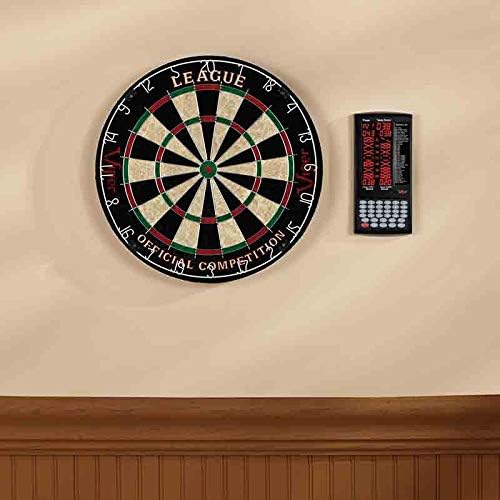
Image: The Viper ProScore Electronic Scoreboard is shown mounted on a wall to the right of a traditional dartboard, illustrating a typical installation setup.
작동 지침

Image: The Viper ProScore Electronic Scoreboard displaying scores for two players and a list of available games. The keypad with number buttons and function keys is visible at the bottom.
1. 전원 켜기/끄기
- To turn on the scoreboard, press the 켜기/끄기 단추.
- To turn off the scoreboard, press and hold the 켜기/끄기 디스플레이가 꺼질 때까지 버튼을 누르세요.
- The scoreboard features an automatic shut-off and sleep mode to conserve battery life when not in use.
2. 게임 선택
- 전원을 켠 후, 다음을 사용하십시오. Up 그리고 아래에 buttons to scroll through the list of 40 available games displayed on the screen.
- Once your desired game is highlighted, press the 입력하다 버튼을 눌러 선택합니다.
3. 플레이어 설정
- The scoreboard supports up to 8 players. Follow the on-screen prompts to select the number of players for your game.
- Some games allow for custom handicaps. Refer to the specific game rules for details.
4. 채점
After each player's turn, manually enter the score using the numeric keypad (buttons 1-20, 25, 50). Special buttons are available for common dart scores:
- X2: Multiplies the last entered score by 2 (Double).
- X3: Multiplies the last entered score by 3 (Triple).
- 25: For scoring a single bullseye.
- 50: For scoring a double bullseye.
- 놓치다: To register a missed throw.
- Next Player: Advances to the next player's turn after scores are entered.
5. Correcting Scores
- 잘못된 점수를 입력했을 경우, 버튼을 누르세요. 옳은 button to adjust the last entry.
6. 볼륨 조절
- 사용하세요 용량 button to adjust the sound level of the scoreboard's voice announcements and effects.
게임 목록
The Viper ProScore Electronic Scoreboard includes the following 40 games:
이미지: 자세한 view of the game list section on the scoreboard's display, showing game codes and names.
- G01 크리켓
- G02 No Score Cricket
- G03 컷 인후 크리켓
- G04 Killer Cricket
- G05 Low Ball Cricket
- G06 Low Pitch Cricket
- G07 English Cricket
- G08 Doubles Only Cricket
- G09 Double only Cricket
- G10 Single only Cricket
- G11 축구
- G12 Bowling
- G13 골프
- G14 Rally
- G15 301
- G16 401
- G17 501
- G18 601
- G19 701
- G20 301 리그
- G21 401 리그
- G22 501 리그
- G23 601 리그
- G24 801 리그
- G25 Round the Clock
- G26 카운트 업
- G27 Shoot-Out
- G28 상하이
- G29 Half-It
- G30 킬러
- G31 Shoot-Out
- G32 9 Lives
- G33 오버
- G34 Unders
- G35 High Score
- G36 Big-6
- G37 Forty-One
- G38 빙고
- G39 더블 다운
- G40 21 Points
유지
- 청소: Wipe the scoreboard surface with a soft, dry cloth. Do not use abrasive cleaners or solvents.
- 배터리 교체: Replace batteries when the display dims or the scoreboard functions erratically. Always replace all batteries at the same time with new ones of the same type.
- 저장: 장기간 보관할 경우 누액을 방지하기 위해 배터리를 제거하십시오.
문제 해결
- Scoreboard does not turn on:
- 배터리가 올바른 극성으로 올바르게 삽입되었는지 확인하세요.
- 오래된 배터리를 새 배터리로 교체하십시오.
- 디스플레이가 어둡거나 깜빡거립니다:
- 배터리가 부족할 수 있습니다. 교체하세요.
- Incorrect scores are registered:
- Ensure you are pressing the correct numeric buttons for the score.
- 사용하세요 옳은 button to rectify recent entries.
- 버튼이 반응하지 않습니다:
- Try turning the scoreboard off and on again.
- Ensure the buttons are clean and free from debris.
명세서
- 모델 번호: 37-0116
- 치수(길이 x 너비 x 높이): 12.07 x 12.07 x 25.4cm(4.75 x 4.75 x 10인치)
- 무게: 318그램(0.7파운드)
- 전원: 3 AA 배터리(포함되지 않음)
- 재료: Sisal (Note: This specification seems to refer to a dartboard material, not the scoreboard itself. The scoreboard is typically plastic/electronic components.)
- 색상: 검은색
- 플레이어 수용 인원: 최대 8명의 플레이어
- 계략: 40 games, 655 options
보증 및 지원
For specific warranty information and customer support, please refer to the documentation included with your product or visit the official Viper web대지. 보증 청구를 위해 구매 영수증을 보관하십시오.


